
1. Introducción
Thank you for choosing the RAZEAK RM-X18 Wired Gaming Mouse. This manual provides detailed instructions for setting up, operating, and maintaining your new gaming mouse. Please read this manual thoroughly before use to ensure optimal performance and longevity of your device.
2. Características del producto
- 8 botones programables: Customize button functions, DPI settings, RGB lighting, and record macros using the dedicated software.
- Modos de uso dual: Switch between gaming and office modes by simultaneously pressing the middle and right buttons.
- 9 modos de retroiluminación RGB: Enhance your gaming environment with 9 distinct backlight modes and 16 million customizable colors.
- 6 niveles de DPI ajustables: Default DPI settings include 500, 1000, 1500, 2000, 3000, and 4000. These values and their indicator colors can be customized via software.
- Diseño ergonómico: Engineered for comfortable grip during extended use.
- Sensor óptico de alta precisión: Equipped with an Avago 3050 sensor for accurate tracking.
3. Contenido del paquete
- RAZEAK RM-X18 Wired Gaming Mouse
- Manual de usuario
4. Guía de configuración
- Conectar el ratón: Plug the USB connector of the RAZEAK RM-X18 mouse into an available USB port on your computer.
- Instalación del controlador: The mouse is plug-and-play for basic functionality. For advanced features such as button programming, DPI customization, and RGB lighting effects, please download and install the official RAZEAK software from the manufacturer's websitio.

Image: The RAZEAK RM-X18 mouse connected to a computer, showcasing its RGB lighting and ergonomic design alongside a keyboard.
5. Instrucciones de funcionamiento
5.1 Disposición y funciones de los botones
The RAZEAK RM-X18 mouse features 8 buttons, all of which can be customized using the dedicated software.
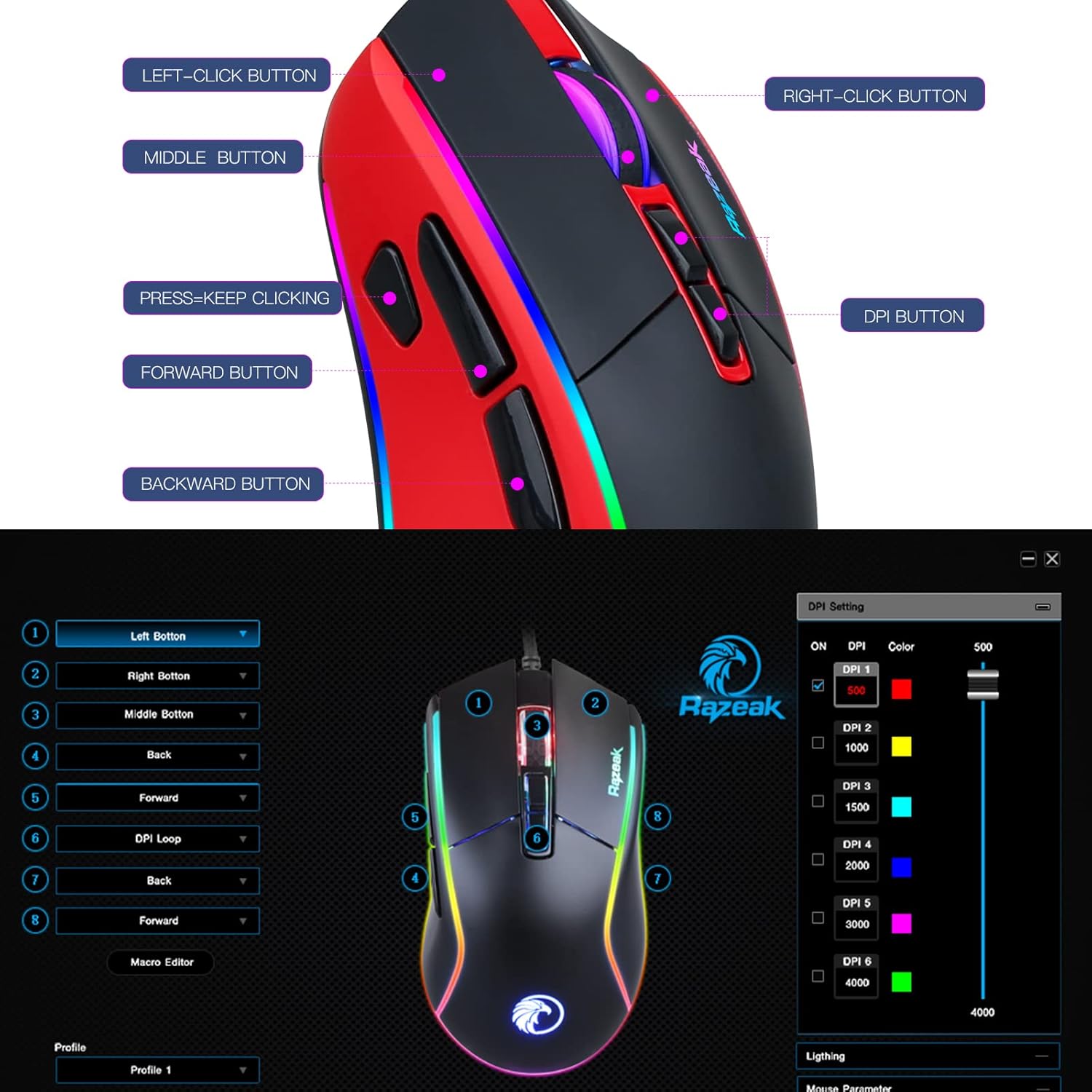
Image: A diagram illustrating the location and labels of the Left-Click, Right-Click, Middle Button, DPI Button, Press=Keep Clicking, Forward, and Backward buttons on the RAZEAK RM-X18 mouse.
- Botón de clic izquierdo: Función de clic principal estándar.
- Botón derecho del ratón: Función de clic secundario estándar.
- Botón central (clic con la rueda de desplazamiento): Standard middle click function.
- Botón PPP: Recorre las configuraciones de DPI.
- Botón de avance: Navega hacia adelante en web navegadores o file exploradores.
- Botón de retroceso: Navega hacia atrás en web navegadores o file exploradores.
- "Press=Keep Clicking" Button: A dedicated button for rapid, continuous clicks, often referred to as a "fire button" in gaming. This button can be programmed to perform multiple left clicks with a single press.
5.2 Ajuste de ppp
The mouse offers 6 adjustable DPI levels to suit various tasks and gaming preferences. Press the Botón DPI (located behind the scroll wheel) to cycle through the preset DPI levels: 500, 1000, 1500, 2000, 3000, and 4000.
For advanced customization, including setting specific numerical values for each DPI level and assigning indicator colors, use the RAZEAK software.

Image: A close-up of the RAZEAK RM-X18 mouse highlighting the DPI button and a graphic representation of the six adjustable DPI levels.
5.3 Button Programming and Macros
All 8 buttons on the RM-X18 mouse are programmable. To customize button functions, record macros, or assign specific actions, you must use the RAZEAK software. The software allows you to create profiles para diferentes aplicaciones o juegos.

Image: Screenshot of the RAZEAK software interface, showing options to program each of the 8 mouse buttons and manage profiles.
5.4 Control de iluminación RGB
The RM-X18 mouse features dynamic RGB lighting with 9 backlight modes and 16 million colors. You can adjust the lighting effects directly on the mouse or through the RAZEAK software.
- On-Mouse Adjustment: Presione el Left-Click Button y el Botón DPI simultaneously to cycle through different lighting effects.
- Personalización del software: Use the RAZEAK software for full control over lighting modes, colors, brightness, and speed.

Image: A close-up of the RAZEAK RM-X18 mouse, indicating the combination of the Left Key and DPI button to adjust lighting effects.

Image: The RAZEAK RM-X18 mouse displaying vibrant RGB lighting effects.
5.5 Switching Between Gaming and Office Modes
The mouse supports two distinct usage modes: Gaming and Office. To switch between these modes, simultaneously press the Botón central (scroll wheel click) and the Botón de clic derecho.
6. Instalación y uso del software
To unlock the full potential of your RAZEAK RM-X18 mouse, including advanced button programming, macro recording, and detailed RGB lighting customization, download the official software from the RAZEAK webSitio. Siga las instrucciones en pantalla para la instalación.
La interfaz del software le permite:
- Assign custom functions to all 8 buttons.
- Crear y administrar múltiples perfiles de usuariofiles.
- Adjust DPI levels and their corresponding indicator colors.
- Configure RGB lighting effects, colors, and speed.
- Grabar y editar macros para secuencias de comandos complejas.
Video: An official RAZEAK video demonstrating the features and customization options of the RM-X18 Wired Gaming Mouse, including RGB lighting, DPI settings, and programmable buttons.
7. Mantenimiento
To ensure the longevity and optimal performance of your RAZEAK RM-X18 mouse, follow these maintenance guidelines:
- Limpieza: Utilice un paño suave y seco para limpiar la superficie del ratón. Para la suciedad difícil, limpie ligeramenteampEnjuague el paño con agua. Evite usar productos químicos agresivos o materiales abrasivos.
- Cuidado del sensor: Mantenga el sensor óptico en la parte inferior del mouse limpio y libre de polvo o residuos para garantizar un seguimiento preciso.
- Sistema de organización de cables: Evite dobleces bruscos o tirones excesivos del cable USB para prevenir daños.
- Almacenamiento: Guarde el ratón en un lugar limpio y seco cuando no lo utilice.
8. Solución de problemas
| Problema | Posible causa | Solución |
|---|---|---|
| El ratón no responde | Conexión USB suelta, puerto USB defectuoso, problema con el controlador. |
|
| Seguimiento inexacto o retraso del cursor | Sensor óptico sucio, superficie de alfombrilla de ratón inadecuada, configuración de DPI incorrecta. |
|
| La iluminación RGB no funciona o es incorrecta | Configuración de software, conflicto de modos. |
|
| Botones no programables | Software not installed or not running, incorrect profile seleccionado. |
|
9. Especificaciones
| Característica | Detalle |
|---|---|
| Marca | RAZEAK |
| Nombre del modelo | RM-X18 |
| Tecnología de conectividad | USB con cable |
| Tecnología de detección de movimiento | Optical (Avago 3050 Sensor) |
| Niveles de DPI | 500/1000/1500/2000/3000/4000 (Adjustable) |
| Número de botones | 8 (Programable) |
| Retroiluminación RGB | 9 modos, 16.8 millones de colores |
| Orientación de la mano | Bien |
| Dispositivos compatibles | Ordenador personal |
| Plataforma de hardware | PC |
| Peso del artículo | 137 gramos |
10. Garantía y soporte
RAZEAK offers a garantía del fabricante de un año for the RM-X18 Wired Gaming Mouse. For any product inquiries, technical support, or warranty claims, please contact RAZEAK customer service. We aim to respond to messages within 24 hours.
Conserve su comprobante de compra para validar la garantía.