
1. Introducción
The OWON SDS1102 is a 2-channel digital storage oscilloscope designed for a wide range of electronic measurement and analysis tasks. It features a 100 MHz bandwidth, a 1 GSa/s real-time sampling rate, and a clear 7-inch TFT-LCD display. This manual provides essential information for setting up, operating, maintaining, and troubleshooting your device, ensuring optimal performance and longevity.

Figure 1: OWON SDS1102 Digital Oscilloscope
2. Información de seguridad
Lea y comprenda todas las instrucciones de seguridad antes de utilizar el dispositivo. El incumplimiento de estas instrucciones podría provocar una descarga eléctrica, un incendio o daños al producto.
- Use only the power cord supplied with the device.
- Asegúrese de que el dispositivo esté correctamente conectado a tierra para evitar descargas eléctricas.
- No opere el dispositivo en mojado o damp condiciones.
- Evite exponer el dispositivo a la luz solar directa o a altas temperaturas.
- No abra el dispositivo casing; delegue cualquier servicio a personal calificado.
- Verify probe attenuation settings match the oscilloscope's input settings.
3. Contenido del paquete
Verifique que todos los artículos enumerados a continuación estén incluidos en su paquete:
- OWON SDS1102 Digital Oscilloscope
- Cable de alimentación
- CD-ROM (contiene software y documentación)
- Cable USB
- Sondas de osciloscopio (2 unidades)
- Herramienta de ajuste de la sonda (destornillador)
- Manual de usuario (este documento)
4. Producto terminadoview
The SDS1102 is designed for efficiency and accuracy in various applications, from electronic circuit debugging to automotive maintenance.
Características principales:
- Pantalla LCD de alta definición: A 7-inch color TFT-LCD with 65535 colors and 800 x 480 pixel resolution provides clear and concise waveform readings. It supports four automatic cursor modes for precise voltagMediciones de diferencia de tiempo y e.
- Alta SampTasa de ling: Equipped with a 1 GSa/s sampling rate, the device allows for detailed waveform capture and analysis. It includes single waveform recording and playback, and supports plug-and-play USB storage devices.
- Powerful System: Features an auto-range function and supports horizontal, vertical, single/multi-waveform tracking. Probe attenuation settings include 1x, 10x, 100x, and 1000x. It offers 30 types of automatic measurement functions and supports LABVIEW communication for secondary development.
- Portabilidad: With ultra-thin body design (301 x 152 x 70 mm) and a weight of 1.1 kg, the oscilloscope is highly portable, saving desktop space and operating quietly.

Figure 2: Key features of the SDS1102 Oscilloscope

Figure 3: Compact design and dimensions for portability

Figure 4: Diverse applications of the SDS1102 Oscilloscope
5. Configuración
5.1 Encendido inicial
- Connect the power cord to the oscilloscope and a suitable power outlet.
- Presione el botón de encendido para encender el dispositivo.
- The 7-inch TFT-LCD display will illuminate, showing the OWON logo and then the main waveform interface.
5.2 Calibración de la sonda
Before taking measurements, it is crucial to calibrate the oscilloscope probes for accurate readings. This process compensates for any slight variations in the probes as supplied.
- Connect a probe to one of the BNC input connectors (e.g., CH1).
- Ensure the probe's attenuation switch (usually on the probe body) is set to 10x.
- Connect the probe tip to the test point, which is a small metal loop located on the bottom right of the oscilloscope's front panel.
- Attach the black grounding alligator clip of the probe to the lower metal loop, which serves as the ground test point.
- Presione el Ajuste automático button on the oscilloscope. The device will automatically adjust settings to display the test signal. The test point outputs a 1 kHz, 5V square wave.
- Observe the waveform on the screen. If it does not appear as a perfect square wave (e.g., rounded corners or overshoot), use the supplied probe adjustment tool (small screwdriver).
- Carefully insert the screwdriver into the compensation screw on the BNC connector of the probe and adjust it until the displayed square wave is clean and flat on top and bottom, with sharp corners. A slight turn (approximately 1/8th) may be sufficient.
- Repeat this process for all probes you intend to use.
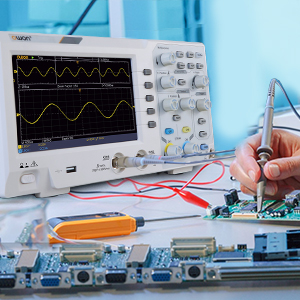
Figure 5: Oscilloscope probe connected to a circuit for testing
6. Instrucciones de funcionamiento
6.1 Visualización básica de forma de onda
- Conecte la sonda al circuito bajo prueba.
- Ajustar el Vertical Scale (VOLTS/DIV) y Horizontal Scale (SEC/DIV) knobs to get a stable and viewable waveform on the screen.
- Utilice el Posición perillas para mover la forma de onda vertical u horizontalmente.
- Presione el Ajuste automático Botón para optimización automática de la forma de onda.

Figure 6: Auto-range function in action
6.2 Cursor Measurements
The SDS1102 supports four automatic cursor modes for precise measurements.
- Presione el Cursor botón.
- Select the desired cursor type (e.g., Voltage, Time) using the menu options.
- Adjust the cursor positions using the multipurpose knob to measure specific points on the waveform.
- The measured values (e.g., ◊V, ◊T) will be displayed on the screen.

Figure 7: Performing cursor measurements
6.3 Mediciones automáticas
The oscilloscope offers 30 types of automatic measurements for quick analysis.
- Presione el Medida botón.
- Navigate through the menu to select the desired automatic measurements (e.g., Frequency, Peak-to-Peak Voltagy, RMS).
- The selected measurements will be displayed on the screen, updating in real-time.

Figure 8: Automatic measurement display
6.4 Waveform Recording and Playback
The device allows for recording and replaying single waveforms.
- Presione el Guardar / recuperar button (or similar function).
- Select the option to record a waveform.
- To replay, select the playback option and choose the desired stored waveform.
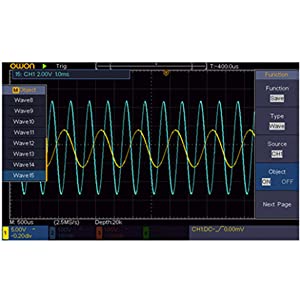
Figure 9: Waveform save and recall menu
6.5 USB Connectivity and PC Control
The SDS1102 supports plug-and-play USB storage devices for saving data and configurations. It also allows for remote communication and control via a computer using the USB interface, with support for LABVIEW and SCPI commands.

Figure 10: USB connection for PC communication and data transfer
7. Mantenimiento
The OWON SDS1102 is designed for continuous, maintenance-free use under normal operating conditions. However, proper care ensures its longevity and performance.
- Limpieza: Utilice un paño suave y seco para limpiar el exterior del osciloscopio. Para la suciedad persistente, utilice un paño ligeramente seco.amp Se puede usar un paño con detergente suave, asegurándose de que no entre líquido en el dispositivo. No utilice limpiadores abrasivos ni disolventes.
- Almacenamiento: When not in use, store the oscilloscope in a clean, dry environment, away from extreme temperatures and humidity.
- Cuidado de la sonda: Manipule las sondas con cuidado. Evite doblar o forzar los cables. Mantenga limpias las puntas de las sondas.
- Mantenimiento interno: The device does not require user-performed internal maintenance. Do not attempt to open the casing, ya que esto puede anular la garantía y exponerlo a peligros eléctricos.
8. Solución de problemas
If you encounter issues with your OWON SDS1102, refer to the following common troubleshooting steps:
| Problema | Posible causa | Solución |
|---|---|---|
| El dispositivo no se enciende. | Power cord not connected; power outlet faulty; device fault. | Check power cord connection. Test power outlet with another device. If problem persists, contact support. |
| No se muestra ninguna forma de onda. | Probe not connected; probe faulty; input signal too small/large; incorrect vertical/horizontal settings. | Ensure probes are securely connected. Check probe functionality. Adjust VOLTS/DIV and SEC/DIV. Use Autoset. |
| Waveform is distorted or noisy. | Uncalibrated probe; poor grounding; external interference. | Perform probe calibration (Section 5.2). Ensure proper grounding. Minimize external electromagnetic interference. |
| USB storage not recognized. | USB device format incompatible; faulty USB device/port. | Ensure USB device is formatted correctly (e.g., FAT32). Try a different USB device or port. |
For issues not covered here, please refer to the full manual on the provided CD-ROM or contact OWON customer support.
9. Especificaciones
| Característica | Especificación |
|---|---|
| Fabricante | OWON |
| Número de modelo | OWON-SDS1102 |
| Dimensiones (L x An x Al) | 30.1 x 15.2 x 7 cm |
| Peso | 1.67 kilogramos |
| Mostrar | 7-inch Color TFT-LCD, 800 x 480 pixels |
| Canales | 2 |
| Ancho de banda | 100 MHz |
| Samptasa | 1 GSa/s |
| Duración del registro | 10K puntos |
| Hora de levantarse | ≤1.7 ns |
| Atenuación de la sonda | 1 veces, 10 veces, 100 veces, 1000 veces |
| Mediciones automáticas | 30 tipos |
| Conectividad | USB (for storage, PC communication) |
| Soporte de software | LABORATORIOVIEW, SCPI |
| Pilas incluidas | No |
| Fecha de primera disponibilidad | 23 de junio de 2022 |

Figure 11: Summary of key technical specifications
10. Garantía y soporte
OWON products are designed for reliability and performance. For warranty information, please refer to the documentation included on the CD-ROM or visit the official OWON website. Information regarding the availability of spare parts is currently unavailable.
For technical support, product inquiries, or service requests, please contact OWON customer service through their official channels. Keep your purchase receipt and product model number (OWON-SDS1102) handy when contacting support.