
1. Introducción
This instruction manual provides essential information for the safe and effective use of your Vineyuan BP-264 NI-MH Battery Charger BC-192. Please read this manual thoroughly before operating the charger to ensure proper functionality and to prevent damage to the product or connected devices. This charger is designed for specific ICOM two-way radio models and their compatible BP-264 NI-MH batteries.
2. Información de seguridad
Tenga en cuenta las siguientes precauciones de seguridad para evitar lesiones o daños:
- Do not open the battery pack or charger base.
- No caliente la batería a más de 60 °C (140 °F).
- No provoque cortocircuito en los terminales de la batería.
- Use this charger only with specified radios and BP-264 NI-MH batteries.
- Mantenga el cargador alejado del agua y la humedad.
- Unplug the charger from the power outlet when not in use or during cleaning.
Desecho: Do not dispose of batteries in household waste. Follow local regulations for proper disposal of NI-MH batteries.
3. Contenido del paquete
Verifique que todos los artículos enumerados a continuación estén incluidos en su paquete:
- 1 x BC-192 Charger Base
- Adaptador de corriente 1 x AC
- 1 x BP-264 NI-MH Battery
- 1 x Clip para cinturón
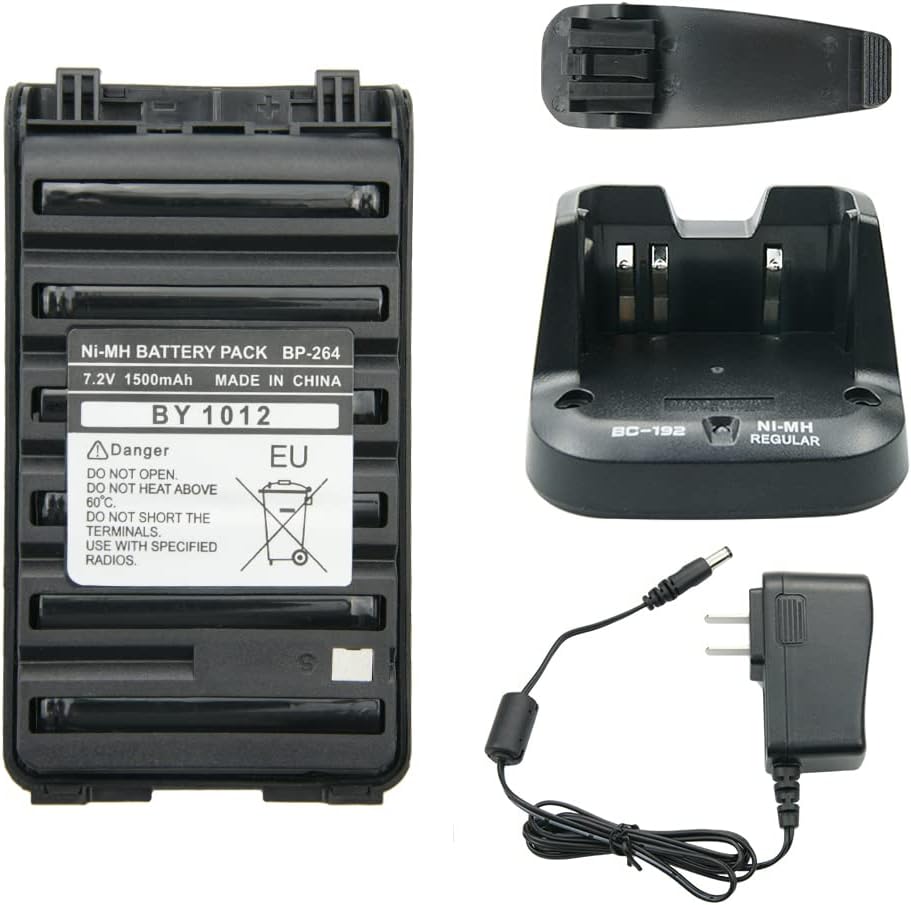
Figura 3.1: Sobreview of the BP-264 NI-MH Battery Charger BC-192 package contents, including the battery, charger base, AC adapter, and belt clip.
4. Configuración
Siga estos pasos para configurar su cargador:
- Connect the AC power adapter cable to the DC input port on the back of the BC-192 charger base.
- Conecte el adaptador de corriente CA a un tomacorriente de pared estándar de 110-240 V.
- El cargador ahora está listo para usarse.

Figure 4.1: The BC-192 charger base connected to its AC power adapter, ready for power connection.
5. Instrucciones de funcionamiento
To charge the BP-264 NI-MH battery:
- Ensure the charger base is powered on (refer to Section 4: Setup).
- Carefully insert the BP-264 NI-MH battery into the charging slot of the BC-192 charger base. Ensure it is seated correctly.
- The charging indicator light on the charger base will illuminate rojo, indicando que la batería se está cargando.
- Una vez que la batería esté completamente cargada, la luz indicadora se encenderá. verde.
- Remove the fully charged battery from the charger base.
Nota importante: All new batteries are not fully charged from the factory. It is recommended to fully charge the battery before its first use.

Figure 5.1: The BP-264 battery correctly placed in the BC-192 charger base for charging.
6. Mantenimiento
To ensure the longevity and optimal performance of your charger and battery:
- Keep the charger base and battery contacts clean and free from dust or debris. Use a dry, soft cloth for cleaning.
- Guarde el cargador y la batería en un lugar fresco y seco cuando no los use.
- Avoid exposing the charger or battery to extreme temperatures, direct sunlight, or high humidity.
7. Solución de problemas
Consulte la siguiente tabla para conocer los problemas más comunes y sus soluciones:
| Asunto | Posible causa / solución |
|---|---|
| Charger indicator flashes red/green without battery. | This is normal behavior. The charger is in standby mode, awaiting a battery. |
| Battery does not charge (no red light). |
|
| Battery charges slowly or not fully. |
|
8. Especificaciones
BP-264 NI-MH Battery
- Química: NI-MH
- Volumentage: 7.2 V
- Capacidad: 1500 mAh
- Peso: Aproximadamente 200 g (7 oz)
- Dimensiones: Aproximadamente 10.3 cm (4.05 pulgadas) x 5.7 cm (2.24 pulgadas)

Figure 8.1: Detailed dimensions of the BP-264 NI-MH battery.
BC-192 Charger Base
- Aporte: 110-240V AC, 50/60Hz, 500mA
- Producción: 12 V CC, 1000 mA
- Peso: Aproximadamente 170 g (5.99 oz)
- Dimensiones del producto: Aproximadamente 4.7 x 2.9 x 1.6 pulgadas
9. Compatible Radios and Batteries
Compatible ICOM Two-Way Radios
- ICOM IC-V80, IC-V80E, IC-G80
- ICOM IC-T70A, IC-T70E
- ICOM IC-F27SR
- ICOM IC-F3001, IC-F4001
- ICOM IC-F3002, IC-F4002
- ICOM IC-F3003, IC-F4003
- ICOM IC-F3011, IC-F4011
- ICOM IC-F3101D, IC-F4101D
- ICOM IC-F3102D, IC-F4102D
- ICOM IC-F3103D, IC-F4103D
Modelo de batería compatible
- BP-264 NI-MH Battery

Figure 9.1: An ICOM IC-F3011 radio demonstrating compatibility with the BC-192 charger.
10. Garantía y soporte
For warranty information or technical support, please refer to the documentation provided with your purchase or contact the seller directly. Keep your purchase receipt as proof of purchase for any warranty claims.