
Introducción
This manual provides instructions for the proper use and maintenance of your Alecto AK-20 Alarm Clock with Thermometer. Please read these instructions carefully before operating the device and retain them for future reference. The AK-20 is designed to display time, date, day, and indoor temperature, featuring multiple alarms, a snooze function, and radio-controlled time synchronization.
Información de seguridad
- No exponga el dispositivo a temperaturas extremas, luz solar directa o humedad alta.
- Evite dejar caer el dispositivo o someterlo a fuertes impactos.
- No intente desmontar ni reparar la unidad usted mismo. Encargue cualquier servicio técnico a personal cualificado.
- Deseche las baterías usadas de manera responsable de acuerdo con las regulaciones locales.
Contenido del paquete
Asegúrese de que todos los artículos estén presentes y en buenas condiciones al desembalarlos:
- Alecto AK-20 Alarm Clock
- User Manual (NL/EN/DE/FR)
Producto terminadoview
The Alecto AK-20 features a clear digital display and intuitive controls for easy operation.

Figura 1: Frente view of the Alecto AK-20 Alarm Clock, showing the large digital display with time, date, day, and temperature, along with control buttons at the bottom.

Figura 2: Angulado view of the Alecto AK-20, highlighting the main display and the alarm ON/OFF switches on the right side.
Controls and Display Elements:
- Pantalla digital grande: Shows time (AM/PM indicator), date, day of the week, and indoor temperature.
- Botón de CONFIGURACIÓN DE HORA: Se utiliza para ingresar al modo de configuración de la hora.
- Botones - / +: Used to adjust values (decrease/increase).
- Botón CONFIGURACIÓN DE ALARMA: Se utiliza para ingresar al modo de configuración de alarma.
- ALARM 1-4 ON/OFF Switches: Located on the side for individual alarm activation.
- Botón DORMIR/LUZ: Ubicado en la parte superior, activa la luz de fondo y la función de repetición.
- AUTO LIGHT Switch: Located on the back, controls automatic backlight.
- Botón de reinicio: Located on the back, for factory reset.

Figura 3: Lado derecho view of the alarm clock, showing the physical ON/OFF switches for Alarm 3 and Alarm 4.

Figura 4: Atrás view of the alarm clock, showing the battery compartment, RESET button, and AUTO LIGHT switch.
Configuración
1. Instalación de la batería
- Localice el compartimiento de la batería en la parte posterior del reloj despertador (consulte la Figura 4).
- Abra la tapa del compartimiento de la batería.
- Inserte dos pilas AA, asegurándose de la polaridad correcta (+ y -).
- Cierre bien la tapa del compartimento de la batería.
The display will light up, and the clock will begin searching for the DCF radio signal for automatic time synchronization.
2. Initial Time and Date Synchronization (DCF)
The AK-20 is a radio-controlled clock. Upon battery installation, it will automatically attempt to synchronize with the DCF signal. This process may take several minutes. A signal icon on the display indicates successful reception.
- Place the clock near a window for better signal reception.
- Evite colocarlo cerca de dispositivos electrónicos que puedan causar interferencias.
3. Manual Time and Date Setting (Optional)
If DCF synchronization is not desired or unsuccessful, you can set the time and date manually:
- Mantenga pulsado el TIEMPO ESTABLECIDO Botón hasta que los dígitos de la hora comiencen a parpadear.
- Utilice el - or + Botones para ajustar la hora.
- Prensa TIEMPO ESTABLECIDO nuevamente para confirmar la hora y pasar a los minutos.
- Repita el proceso para los minutos, el año, el mes y el día.
- Prensa TIEMPO ESTABLECIDO una última vez para salir del modo de configuración.
4. Selección de idioma
The device supports multiple languages for day display. To change the language:
- Mientras esté en el modo de visualización de hora normal, presione el botón - botón repetidamente.
- The day of the week will cycle through available languages (Dutch, French, German, English, Spanish, Italian, Danish, Russian).
- Stop when your desired language is displayed.
Instrucciones de funcionamiento
1. Configuración de alarmas
The AK-20 allows setting up to four independent alarms.
- Mantenga pulsado el SET DE ALARMAS button until the alarm time (e.g., ALARM-1) starts flashing.
- Utilice el - or + buttons to adjust the desired alarm hour.
- Prensa SET DE ALARMAS nuevamente para confirmar la hora y pasar a los minutos.
- Utilice el - or + Botones para ajustar los minutos de alarma deseados.
- Prensa SET DE ALARMAS to confirm and move to the next alarm (ALARM-2, ALARM-3, ALARM-4).
- Repeat steps 2-4 for each alarm you wish to set.
- After setting all desired alarms, press SET DE ALARMAS para salir del modo de configuración de alarma.
2. Activación/desactivación de alarmas
Each alarm has a dedicated ON/OFF switch on the side of the unit (refer to Figure 3).
- Slide the corresponding switch to ON to activate an alarm. An alarm icon will appear on the display.
- Desliza el interruptor a APAGADO to deactivate an alarm. The alarm icon will disappear.
3. Función de repetición
Cuando suene una alarma, presione el DORMITORIO / LUZ button on top of the clock. The alarm will temporarily stop and sound again after a few minutes (typically 5-10 minutes, depending on the model's default setting).
4. Función de retroiluminación
La pantalla cuenta con luz de fondo para mayor visibilidad en condiciones de poca luz.
- Retroiluminación manual: Presione brevemente el DORMITORIO / LUZ Botón para activar la luz de fondo durante unos segundos.
- Retroiluminación automática: On the back of the unit, slide the LUZ AUTOMÁTICA cambiar a ON. The backlight will automatically illuminate in dark environments. Slide to APAGADO para desactivar esta función.
5. Pantalla de temperatura
The integrated thermometer displays the indoor temperature.
- Para cambiar entre Celsius (°C) y Fahrenheit (°F), presione el botón + Botón mientras está en el modo de visualización de hora normal.
Mantenimiento
- Limpie el dispositivo con un paño suave y seco. No utilice limpiadores abrasivos ni disolventes.
- Si el dispositivo no se utilizará durante un período prolongado, retire las baterías para evitar fugas.
Solución de problemas
| Problema | Posible causa | Solución |
|---|---|---|
| La pantalla está en blanco o tenue. | Las baterías están bajas o insertadas incorrectamente. | Reemplace las baterías con baterías AA nuevas, asegurándose de la polaridad correcta. |
| La hora es incorrecta | Señal DCF no recibida o tiempo manual no configurado. | Ensure the clock is in an area with good signal reception. Manually set the time if necessary. |
| La alarma no suena. | La alarma no está activada o está configurada incorrectamente. | Check the alarm ON/OFF switch on the side. Verify alarm time settings. |
| La luz de fondo no funciona. | AUTO LIGHT switch is OFF or batteries are low. | Check the AUTO LIGHT switch on the back. Replace batteries if needed. |
Si el problema persiste después de intentar estas soluciones, comuníquese con el servicio de atención al cliente.
Presupuesto
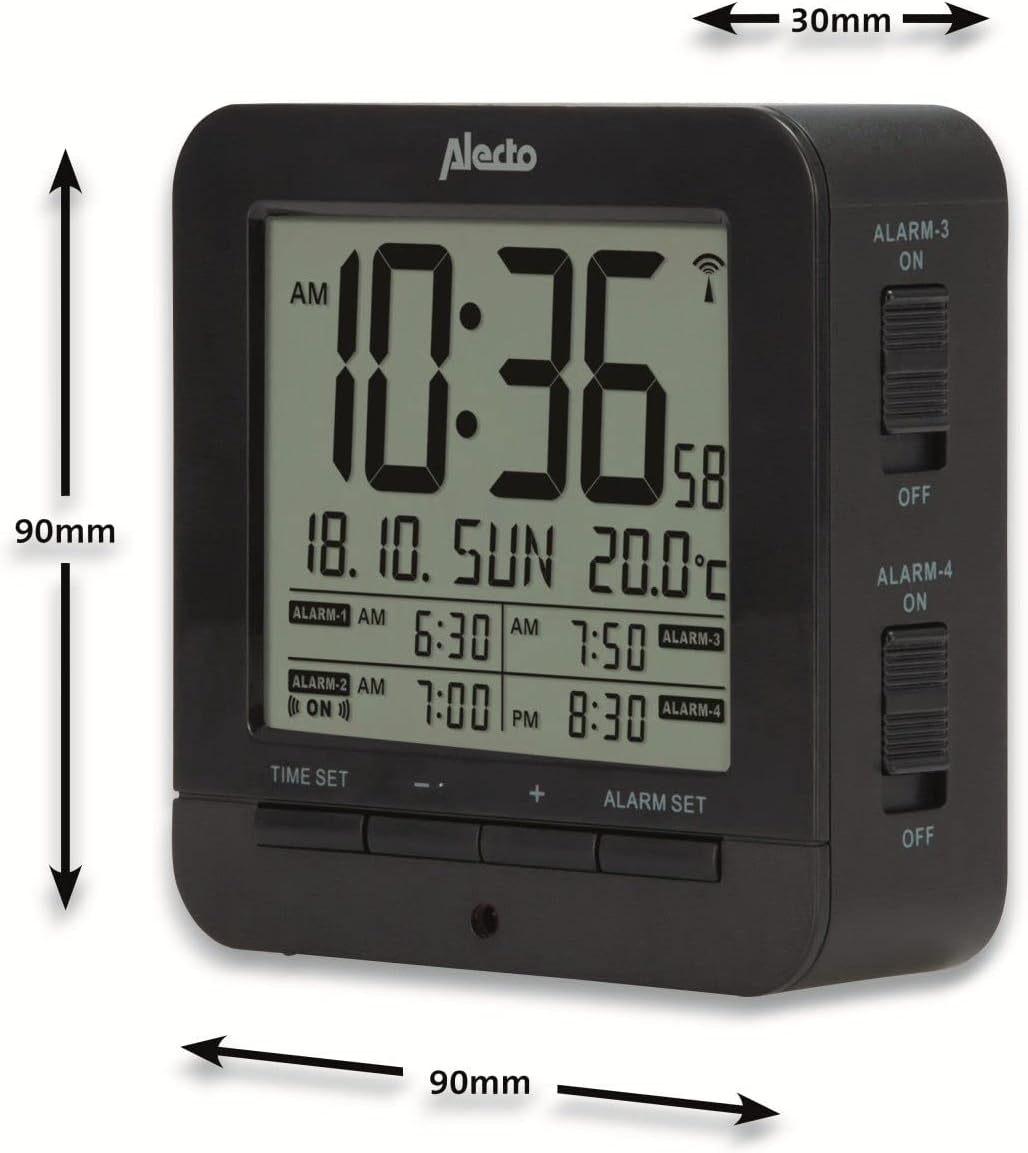
Figure 5: Alecto AK-20 Alarm Clock showing its approximate dimensions: 90mm height, 90mm width, and 30mm depth.
| Característica | Detalle |
|---|---|
| Número de modelo | AK-20 (A003319) |
| Marca | Alecto |
| Color | Negro |
| Material | Acrilonitrilo butadieno estireno (ABS) |
| Dimensiones (alto x ancho x profundidad) | 9 x 9 x 3 cm (aprox. 3.54 x 3.54 x 1.18 pulgadas) |
| Dimensiones de la pantalla | 6.4 x 5.4 cm (aprox. 2.52 x 2.13 pulgadas) |
| Peso | 231 g (aprox. 0.51 libras) |
| Fuente de poder | 2 pilas AA (no incluidas) |
| Tipo de pantalla | Digital |
| Características especiales | Temperature Display, 4 Alarms, Snooze Function, Backlight, DCF Radio Control |
| Unidades de temperatura | °C / °F seleccionable |
| Idiomas compatibles | Dutch, French, German, English, Spanish, Italian, Danish, Russian |
Garantía y soporte
Alecto products are manufactured to high quality standards. For information regarding warranty terms and conditions, please refer to the documentation provided with your purchase or visit the official Alecto website. For technical support or service inquiries, please contact your retailer or the Alecto customer service department.