
1. Introducción
Gracias por la compraasing the Lenco SCD-341 Portable CD-Radio. This device combines a CD player, DAB+ and FM radio, and Bluetooth connectivity in a compact design. This manual provides essential information for safe and efficient use of your new audio system. Please read it thoroughly before operation and retain it for future reference.
2. Información de seguridad
- No exponga la unidad a la lluvia ni a la humedad para evitar incendios o descargas eléctricas.
- Asegúrese de que haya una ventilación adecuada. No bloquee las aberturas de ventilación.
- Utilice únicamente el adaptador de corriente suministrado con la unidad.
- No abra la casing. Deje todo servicio a personal cualificado.
- Evite colocar la unidad cerca de fuentes de calor o bajo la luz solar directa.
- Mantenga la unidad alejada de campos magnéticos fuertes.
3. Contenido del paquete
Por favor, compruebe que todos los artículos estén presentes y en buen estado:
- Lenco SCD-341 Portable CD-Radio Unit
- Adaptador de corriente
- Manual de usuario (este documento)
- Guía de inicio rápido
4. Producto terminadoview
The Lenco SCD-341 features a user-friendly interface with clearly labeled buttons and an LCD display.

Figura 1: Frente view of the Lenco SCD-341, showing the main controls, LCD display, and stereo speakers.

Figure 2: Lenco SCD-341 with its integrated handle and telescopic antenna extended for radio reception.
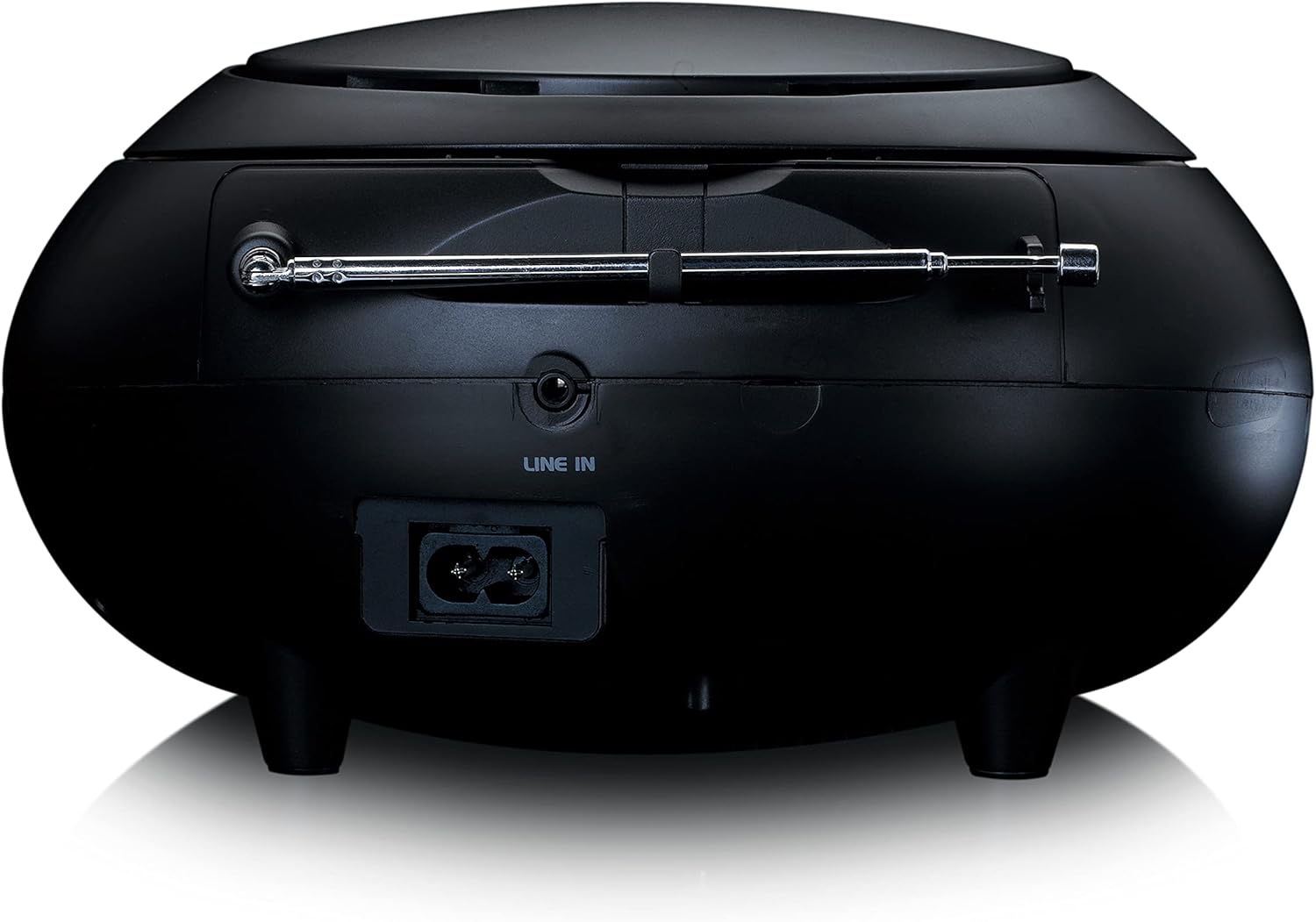
Figura 3: Posterior view of the Lenco SCD-341, highlighting the power input and LINE IN audio port.
5. Configuración
5.1 Conexión de alimentación
The Lenco SCD-341 can be powered by the included AC adapter or by batteries.
- Alimentación CA: Connect the supplied power adapter to the AC IN socket on the rear of the unit (refer to Figure 3) and plug the other end into a standard wall outlet.
- Energía de la batería: Open the battery compartment on the bottom of the unit. Insert the required number of C-type batteries (not included), ensuring correct polarity. Close the compartment securely.
5.2 Configuración de la antena
For optimal DAB+ and FM radio reception, fully extend the telescopic antenna located on the rear of the unit. Adjust its position for the best signal.
6. Instrucciones de funcionamiento
6.1 Encendido y apagado
Presione el FUERZA para encender o apagar la unidad.
6.2 Reproducción de CD
- Presione el FUENTE button repeatedly until "CD" is displayed on the LCD screen.
- Abra la tapa del compartimiento del CD levantándola con cuidado.
- Coloque un CD con la etiqueta hacia arriba sobre el eje.
- Close the CD compartment lid. The unit will begin reading the CD.
- Utilice el REPRODUCIR/PAUSA, DETENER, SALTAR HACIA ADELANTE, y SALTAR HACIA ATRÁS Botones para controlar la reproducción.

Figura 4: Arriba view of the Lenco SCD-341 with the CD compartment open, showing a CD being inserted.
6.3 Funcionamiento de la radio DAB+
- Presione el FUENTE button repeatedly until "DAB" is displayed.
- The unit will automatically scan for available DAB+ stations. This may take a few moments.
- Una vez que se complete el escaneo, use el SINTONIZACIÓN +/- Botones para navegar por las estaciones disponibles.
- Para guardar una estación como preestablecida, mantenga presionada la tecla PROGRAMAR botón, luego use SINTONIZACIÓN +/- para seleccionar un número preestablecido y presione PROGRAMAR De nuevo para confirmar.
6.4 Funcionamiento de la radio FM
- Presione el FUENTE Presione el botón repetidamente hasta que aparezca "FM".
- Mantenga pulsado el SINTONIZACIÓN +/- buttons to automatically scan for the next available station. Briefly press to manually tune.
- Para guardar una estación como preestablecida, mantenga presionada la tecla PROGRAMAR botón, luego use SINTONIZACIÓN +/- para seleccionar un número preestablecido y presione PROGRAMAR De nuevo para confirmar.
6.5 Emparejamiento Bluetooth
- Presione el FUENTE button repeatedly until "Bluetooth" is displayed. The unit will enter pairing mode, indicated by a flashing Bluetooth icon on the display.
- En su dispositivo externo (teléfono inteligente, tableta), habilite Bluetooth y busque los dispositivos disponibles.
- Select "Lenco SCD-341" from the list of found devices.
- Once paired, the Bluetooth icon on the unit's display will stop flashing and remain solid. You can now play audio from your device through the Lenco SCD-341.
6.6 Control de volumen
Utilice el VOLUMEN +/- Botones para ajustar el nivel de salida de audio.
7. Mantenimiento
- Limpieza: Utilice un paño suave y seco para limpiar el exterior de la unidad. No utilice limpiadores abrasivos ni disolventes.
- Cuidado de la lente del CD: Si ocurren problemas con la reproducción de CD, utilice un disco limpiador de lentes de CD disponible en el mercado.
- Almacenamiento: When not in use for extended periods, disconnect the power adapter and remove batteries. Store the unit in a cool, dry place.
8. Solución de problemas
| Problema | Posible causa | Solución |
|---|---|---|
| Sin poder | Adaptador de corriente no conectado; baterías agotadas o insertadas incorrectamente. | Verifique la conexión del adaptador de corriente; reemplace las baterías o asegúrese de que la polaridad sea correcta. |
| Sin sonido | Volumen demasiado bajo; fuente incorrecta seleccionada; auriculares conectados. | Increase volume; select correct source (CD, DAB, FM, Bluetooth); disconnect headphones. |
| El CD no se reproduce | CD inserted incorrectly; CD dirty or scratched; CD format not supported. | Reinsert CD correctly; clean or replace CD; ensure CD is a standard audio CD. |
| Mala recepción de radio | Antena no extendida o mal posicionada; fuerte interferencia. | Fully extend and adjust antenna; move unit away from other electronic devices. |
| El emparejamiento de Bluetooth falló | Bluetooth not enabled on external device; device too far; unit not in pairing mode. | Ensure Bluetooth is on and discoverable; move device closer; select Bluetooth source on unit. |
9. Especificaciones
| Número de modelo | SCD-341 |
| Marca | Lenco |
| Dimensiones (L x An x Al) | 21.5 x 21 x 11.5 cm |
| Peso | 1.09 kilogramos |
| Fuente de poder | AC (adapter included) / Battery-Powered |
| Tecnología de sintonizador | DAB+, FM |
| Conectividad | Bluetooth |
| Modo de salida de audio | Estéreo |
| Tipo de pantalla | Pantalla LCD |
| Potencia de salida | 3 vatios RMS |

Figure 5: Dimensions of the Lenco SCD-341 unit.
10. Garantía y soporte
For warranty information and technical support, please refer to the warranty card included in your package or visit the official Lenco websitio.
Fabricante: Lenco GmbH
País natal: Hong Kong
11. Vídeos oficiales del producto
Watch this official video for a visual guide to the Lenco SCD-341.
Video 1: A 360-degree product view of the Lenco SCD-341, showcasing su diseño y características desde todos los ángulos.