
1. Introducción
This manual provides detailed instructions for the safe and efficient use of your MECHEN HIFI MP3 Player M30. Please read this manual thoroughly before operating the device and retain it for future reference.
The MECHEN M30 is a dedicated HIFI lossless audio player designed for high-fidelity sound reproduction. It features advanced DSD decoding technology and supports a wide range of audio formats. Please note that this device does not support Bluetooth, FM radio, recording, video playback, e-books, photos, or alarm functions.

Figure 1: MECHEN M30 HIFI MP3 Player Overview
2. Características del producto
- Audio de alta fidelidad: Equipped with a high-quality DSP chip and advanced DSD decoding technology for immersive, low-distortion sound.
- Almacenamiento expandible: Comes with a 64GB microSD card and supports expansion up to 256GB, allowing for extensive music libraries.
- Durable Design & Intuitive Controls: Constructed from a high-quality zinc alloy for durability. Features a unique scroll control wheel and simple physical buttons for easy navigation and operation.
- Conectividad versátil: Includes a 3.5mm headphone jack and a line-out port, enabling connection to wired headphones, AUX speakers, and car audio systems.
- Batería de larga duración: Built-in 1500mAh battery provides approximately 30 hours of music playback on a 2.5-hour full charge.
- Compatibilidad con formatos amplios: Compatible with numerous audio formats including MP3, WMA, WAV/PCM, APE, FLAC, AAC, OGG, DSF, AIFF, ALAC, IMA/MS-ADPCM, DFF, and DSD 128. (Note: AAC files play in mono.)

Figure 2: High-Quality DSD and DAC Chips
3. Configuración
3.1. Contenido del paquete
Verifique que todos los artículos estén presentes en el paquete:
- MECHEN HIFI MP3 Player M30
- 64GB MicroSD Memory Card
- Cable USB
- Manual de usuario (este documento)

Figura 3: Componentes incluidos
3.2. Carga del dispositivo
- Connect the provided USB cable to the player's charging port.
- Conecte el otro extremo del cable USB a un adaptador de corriente USB (no incluido) o al puerto USB de una computadora.
- El indicador de batería en pantalla mostrará el estado de carga. Una carga completa tarda aproximadamente 2.5 horas.
3.3. Inserción de la tarjeta MicroSD
- Localice la ranura para tarjeta microSD en el lateral del reproductor.
- Gently insert the provided 64GB microSD card (or another compatible card up to 256GB) into the slot until it clicks into place.
- To remove, push the card inward until it clicks, then release, and it will eject.
3.4. Transferencia de música Files
- Conecte el reproductor a su computadora usando el cable USB.
- The player will appear as a removable disk (or prompt you to select 'Mass Storage' mode).
- Arrastre y suelte el audio deseado files into the appropriate folders on the microSD card. Organizing files into folders (e.g., by Artist, Album) is recommended for easier navigation.
- Safely eject the player from your computer before disconnecting the USB cable.
4. Instrucciones de funcionamiento
4.1. Encendido y apagado
- Encendido: Mantenga presionado el botón de encendido hasta que la pantalla se ilumine.
- Apagado: Mantenga presionado el botón de encendido hasta que el dispositivo se apague.
4.2. Navegación y Menú
- Rueda de desplazamiento: Rotate the scroll wheel to navigate through menus and lists.
- Botón MENÚ: Press to enter the main menu or confirm a selection.
- Botón de retroceso: Press to return to the previous screen or cancel an action.
- Botones de control de reproducción: Use the dedicated buttons for Play/Pause, Next Track, Previous Track.
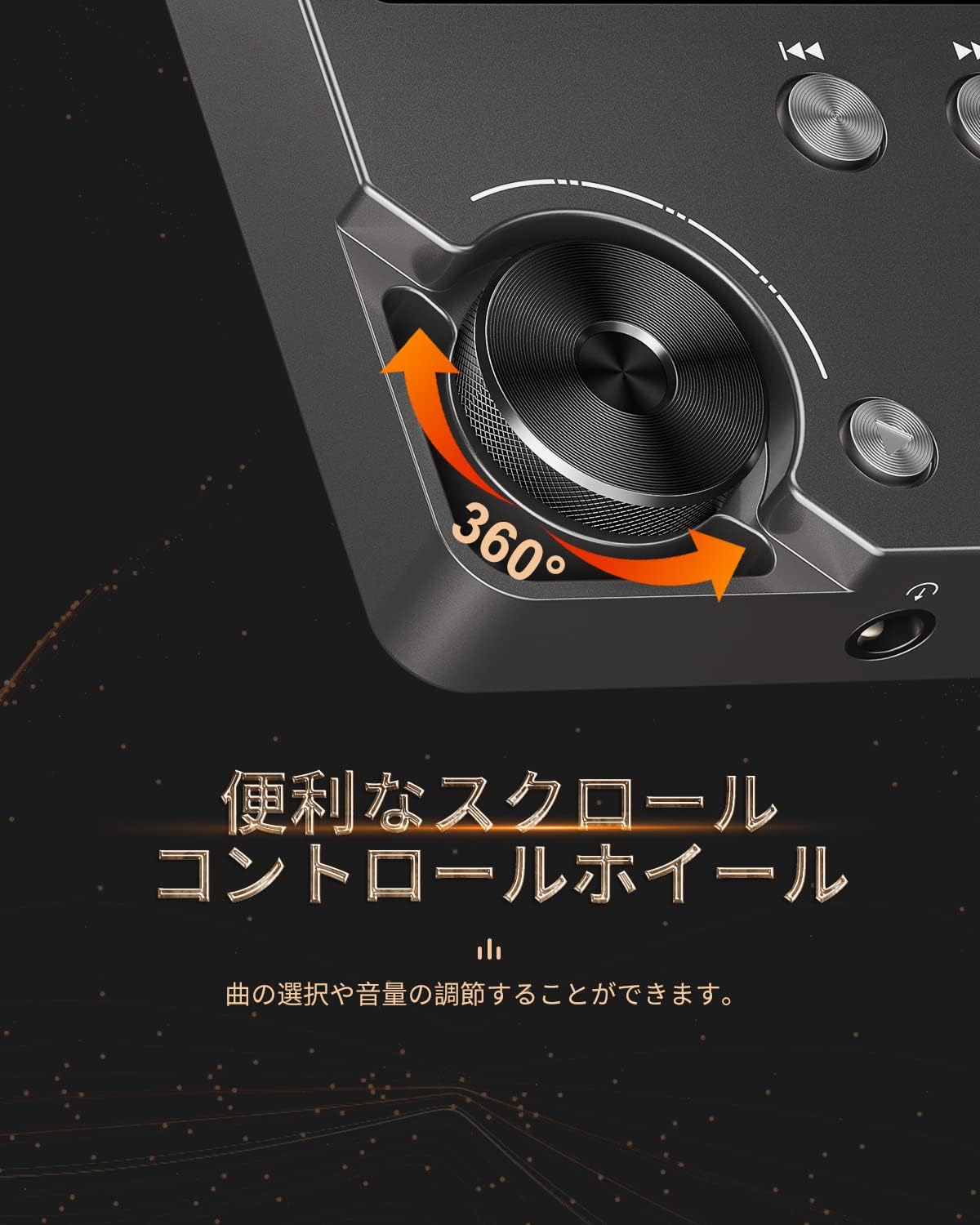
Figure 4: Scroll Control Wheel
4.3. Reproducción de música
- Navega a la sección 'Música' desde el menú principal.
- Browse your music by folder, artist, album, or all songs.
- Select a track and press the MENU button to start playback.
- Utilice el botón Reproducir/Pausa para controlar la reproducción.
- Press Next Track or Previous Track buttons to skip songs. Hold these buttons for fast forward or rewind.
4.4. Control de volumen
Rotate the scroll wheel during music playback to adjust the volume level. It is recommended to set the initial maximum volume to a low level to prevent sudden loud sounds.
4.5. Configuración del ecualizador
The player features an equalizer with various presets (e.g., Rock, Pop, Jazz, Classical, Soft, Techno) and a custom setting. Access the equalizer settings from the playback screen or system settings to adjust the sound profile según su preferencia.

Figure 5: Equalizer Function
4.6. Repeat and Shuffle Modes
During playback, access the options menu to select repeat modes (e.g., repeat one, repeat all) or enable shuffle playback for a randomized song order.
4.7. Conexión a dispositivos externos
The MECHEN M30 can connect to various audio output devices:
- Auriculares con cable: Plug your 3.5mm headphones into the headphone jack.
- External Speakers/Car Audio: Use an AUX cable (not included) to connect the player's line-out port to your speakers or car's AUX input.

Figure 6: Connecting to Various Devices
5. Mantenimiento
5.1. Limpieza
Wipe the device with a soft, dry cloth. Do not use liquid cleaners or abrasive materials, as they may damage the finish or internal components.
5.2. Cuidado de la batería
Para prolongar la vida útil de la batería, evite descargarla por completo con frecuencia. Cargue el dispositivo regularmente, incluso si no lo usa durante períodos prolongados. Guarde el dispositivo en un lugar fresco y seco.

Figura 7: Información de la batería
5.3. Almacenamiento
When storing the player for a long time, ensure it is fully charged and then power it off completely. Recharge it every few months to prevent deep discharge.
6. Solución de problemas
- El dispositivo no se enciende: Ensure the battery is charged. Connect the player to a power source using the USB cable and try again. If the issue persists, perform a reset by pressing the reset button (if available) or holding the power button for an extended period.
- Sin sonido: Check the volume level. Ensure headphones or external speakers are properly connected. Test with different headphones or speakers if possible.
- Música files no reconocido: Verifica que la música files are in a supported format (refer to Specifications). Ensure the microSD card is properly inserted and the files are not corrupted. Re-transfer the files si es necesario.
- Screen is unresponsive or erratic: Try restarting the device. If the problem continues, ensure the device is not exposed to extreme temperatures or moisture.
- Album art or metadata not displayed: Ensure that the metadata (ID3 tags) for your music files are correctly embedded. While the player supports folder-based navigation, correct tags enhance the browsing experience.
- Playback stops unexpectedly: Ensure the battery is sufficiently charged. If connected to a car audio system via USB, playback might pause when the engine is turned off or on due to changes in the USB host communication.
7. Especificaciones
| Característica | Descripción |
|---|---|
| Nombre del modelo | M30 |
| Marca | MECHÉN |
| Mostrar | LCD de 2 pulgadas |
| Almacenamiento de memoria | 64GB MicroSD card included (expandable up to 256GB) |
| Conectividad | AUX (3.5mm headphone jack, Line Out) |
| Capacidad de la batería | 1500 mAh |
| Duración de la batería | Aprox. 30 horas de reproducción |
| Tiempo de carga | Aproximadamente 2.5 horas |
| Dimensiones del producto (Pr. x An. x Al.) | 1.6 x 5.6 x 8.8 cm |
| Peso del producto | 176 gramos |
| Formatos de audio compatibles | MP3 (8-48KHz, 16bits), WMA (8-192KHz, 16/24bits), WAV/PCM (8-192KHz, 8/16/24/32bits), APE (8-192KHz, 16/24bits), FLAC (8-192KHz, 16/24bits), AAC (8-96KHz, 16bits - mono playback), OGG (8-48KHz, 10-500bits), DSF (2822.4KHz, 1bit), AIFF (8-192KHz, 8/16/24/32bits), ALAC (8-192KHz, 16/24bits), IMA/MS-ADPCM (8-48KHz, 8/16bits), DFF (3072KHz, 1bit), DSD 128 (5.6MHz) |
| Características especiales | Equalizer, Shuffle Play, Hi-Res Audio, Repeat Play, Auto Power-Off |
| País natal | Porcelana |
| Código Postal | 607469642453 |

Figura 8: Formatos de audio compatibles
8. Garantía y soporte
8.1. Garantía del fabricante
The MECHEN HIFI MP3 Player M30 comes with a one-year manufacturer's warranty from the date of purchase. This warranty covers defects in materials and workmanship under normal use. It does not cover damage caused by misuse, accidents, unauthorized modifications, or normal wear and tear.
8.2. Atención al cliente
For technical assistance, warranty claims, or any questions regarding your MECHEN M30 player, please contact your retailer or the MECHEN customer support team. Refer to the contact information provided with your purchase documentation or visit the official MECHEN websitio para detalles de soporte.