
1. Introducción y másview
The BONTEC Monitor Stand is a versatile and ergonomic solution designed to enhance your workspace. This height-adjustable metal riser provides optimal viewing angles for monitors, laptops, and other devices, promoting better posture and reducing strain. Its robust construction and thoughtful features ensure a tidy and efficient desk environment.
Características principales:
- Ergonomic Height Adjustable Design: Features 3 adjustable height levels (3.9, 4.7, 5.5 inches) to position your screen at eye level, reducing neck, back, and eye strain.
- Funcionalidad multipropósito: Supports monitors, laptops, printers, and more. Includes a built-in pen holder and cable management system.
- Construcción de metal resistente: Made from durable white steel, capable of holding up to 44 lbs (20 kg). Equipped with non-slip rubber feet for stability.
- Diseño que ahorra espacio: The 14.5” x 9.1” platform offers ample under-stand storage for keyboards, phones, notebooks, and office supplies.
- Fácil montaje sin herramientas: Simple setup requires no tools; just screw in the legs and adjust the height.

Figure 1: The BONTEC Monitor Stand, highlighting its clean aesthetic and perforated design.
2. Instrucciones de configuración
Follow these simple steps to assemble and set up your BONTEC Monitor Stand.
2.1. Montaje
- Unpack all components: You should find the metal platform and four adjustable legs.
- Turn the metal platform upside down.
- Screw each of the four adjustable legs into the designated threaded holes on the underside of the platform. Tighten them securely by hand until snug. No tools are required.
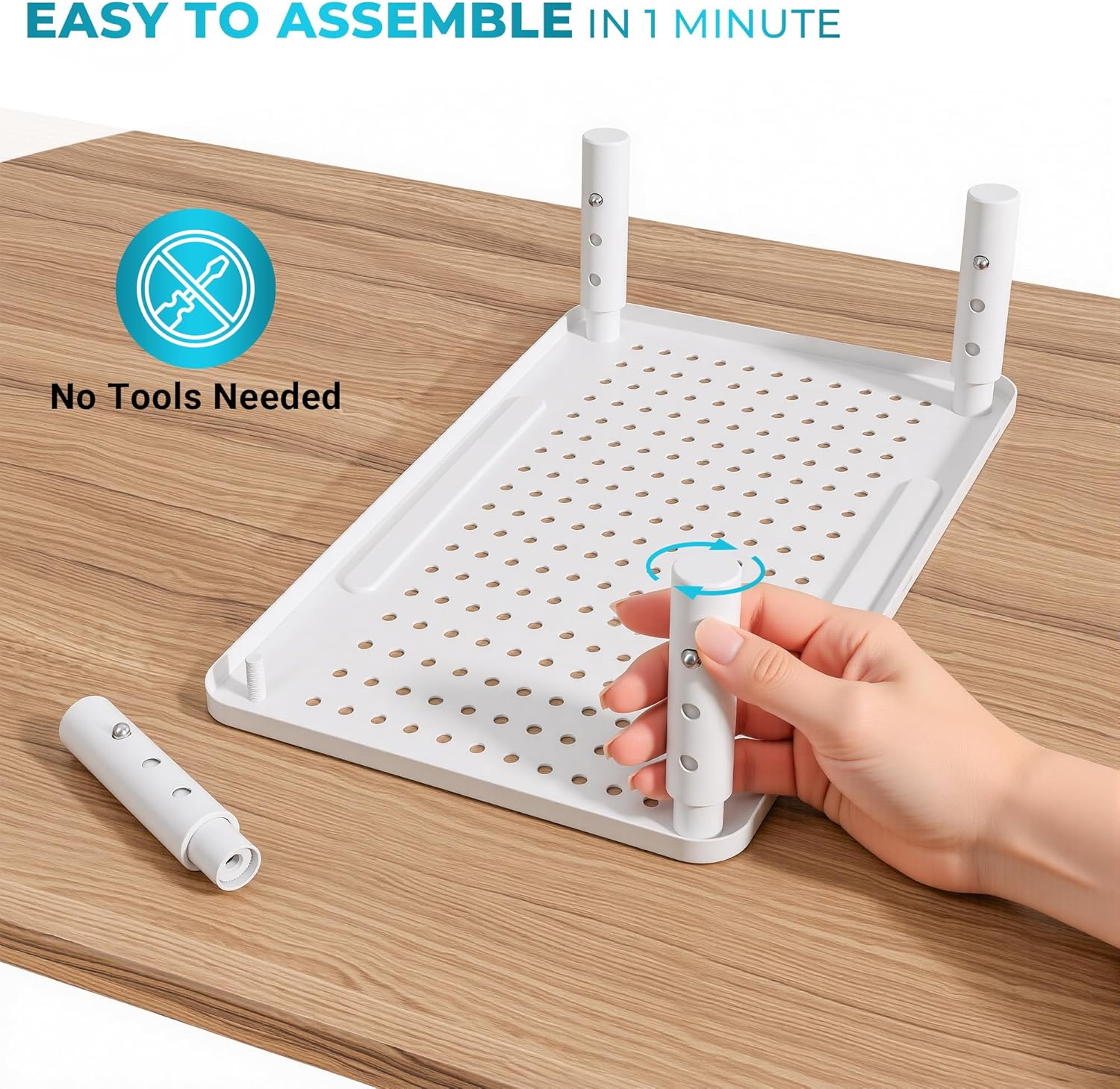
Figure 2: Tool-free assembly of the monitor stand legs.
2.2. Ajuste de altura
The stand offers three height levels for optimal ergonomic positioning:
- Lowest: 3.9 inches (10 cm)
- Middle: 4.7 inches (12 cm)
- Highest: 5.5 inches (14 cm)
Para ajustar la altura:
- Locate the small button on each leg.
- Press the button and slide the inner part of the leg up or down to your desired height.
- Ensure the button clicks into place in one of the three adjustment holes for secure positioning. Repeat for all four legs to maintain a level surface.

Figure 3: Adjusting the height of the monitor stand.
2.3. Colocación inicial
Place the assembled stand on a stable, flat surface. Ensure all four feet are firmly on the desk. You can now place your monitor, laptop, or other device on the stand's platform.
Video 1: A user demonstrates the simple assembly and height adjustment of the BONTEC Monitor Stand, highlighting its sturdy build and ease of use.
3. Instrucciones de funcionamiento
Maximize the functionality of your BONTEC Monitor Stand with these tips.
3.1. Uso ergonómico
Position your monitor or laptop so that the top of the screen is at or slightly below eye level. This helps maintain a neutral neck and spine posture, reducing discomfort during prolonged use.

Figure 4: Visual guide to ergonomic posture with a monitor stand.
3.2. Gestión de cables
Utilize the integrated cable management system to keep your workspace tidy. Thread cables through the provided slots or use the included Velcro cable ties to secure them neatly along the back of the stand.

Figure 5: Effective cable management using the stand's features.
3.3. Pen Holder and Storage
The stand features a built-in pen holder slot on the front edge of the platform. The space underneath the stand can be used to store your keyboard, mouse, notebooks, or other office essentials, freeing up valuable desk space.

Figure 6: Utilizing the integrated pen holder.
3.4. Disipación de calor
The perforated mesh platform design allows for superior airflow, helping to dissipate heat from laptops and other devices placed on the stand. This can contribute to the longevity and performance of your electronics.

Figure 7: Breathable mesh platform for enhanced heat dissipation.
Vídeo 2: Una revisión detalladaview demonstrating the sturdiness and adjustable features of the monitor stand, including its ability to support various devices.
4. Mantenimiento
Para garantizar la longevidad y el rendimiento óptimo de su soporte de monitor BONTEC, siga estas sencillas pautas de mantenimiento:
- Limpieza: Limpie el soporte periódicamente con un paño suave.amp cloth to remove dust and smudges. Avoid using abrasive cleaners or harsh chemicals that could damage the powder-coated finish.
- Comprobación de estabilidad: Periodically check that the legs are securely screwed into the platform and that the height adjustment buttons are fully engaged.
- Límite de peso: Do not exceed the maximum load capacity of 44 lbs (20 kg) to prevent damage to the stand or your devices.
5. Solución de problemas
Si encuentra algún problema con el soporte de su monitor, consulte las siguientes soluciones comunes:
- Tambaleándose: Ensure all four legs are adjusted to the same height and are securely locked into place. Check that the stand is placed on a flat, stable surface.
- Dificultad para ajustar la altura: Make sure the adjustment button on each leg is fully depressed before attempting to slide the leg. If it's stiff, try rotating the leg slightly while pressing the button.
- Arañazos en el escritorio: The stand is equipped with non-slip rubber feet. Ensure these are properly attached and intact to protect your desk surface.
6. Especificaciones
| Característica | Detalle |
|---|---|
| Marca | BONTEC |
| Modelo | B0B8YPJJRW |
| Material | Metal |
| Color | Blanco |
| Dimensiones del producto (L x An x Al) | 14.5 x 9.1 x 3.94 pulgadas (aprox. 36.8 x 23.1 x 10 cm) |
| Niveles de altura ajustables | 3.9 in (10 cm), 4.7 in (12 cm), 5.5 in (14 cm) |
| Capacidad de carga | 44 libras (20 kg) |
| Peso del artículo | 1.85 libras (0.84 kg) |
| Tipo de acabado | Recubierto de polvo |
| Característica especial | Lightweight, Pen Holder, Cable Management, Non-slip Rubber Feet |

Figura 8: Dimensiones del producto y capacidad de peso.
7. Garantía y soporte
For warranty information or technical support, please refer to the product packaging or contact BONTEC customer service directly. Keep your purchase receipt for any warranty claims.