
1. Producto terminadoview
The Hikity 9 Inch Quad Split Screen Backup Camera Monitor is designed to provide enhanced visibility for various vehicles, including cars, SUVs, vans, trucks, and pickups. This monitor features a 9-inch TFT LCD display with 4-channel video input, allowing for multiple viewing modes. It supports a wide power input range of 9-36V, making it versatile for different vehicle types. The monitor can display up to four camera feeds simultaneously, aiding in driving and parking maneuvers.

Image 1.1: The Hikity 9 Inch Quad Split Screen Backup Camera Monitor.
Vídeo 1.1: Un finalview of the Hikity 9-inch 4-channel backup camera monitor, highlighting its features and capabilities.
2. Contenido del paquete
Verifique que todos los artículos enumerados a continuación estén incluidos en su paquete. Si falta algún artículo o está dañado, comuníquese con atención al cliente.
- 1 x 9-inch Quad Split Monitor
- 1 x Headrest Shell
- 1 x soporte de montaje
- Mando a distancia 1 x IR
- 1 x Video & Power Cable

Image 2.1: All components included in the Hikity 9 Inch Backup Camera Monitor package.
Video 2.1: A detailed unboxing and display of the Hikity 9 Inch Backup Camera Monitor package contents.
3. Especificaciones
| Tamaño de pantalla | 9 pulgadas |
| Resolución | HD (800x480 native) |
| Relación de aspecto | 16:9 |
| Tipo de pantalla | Pantalla LCD TFT |
| Viewángulo de ing | 170 grados |
| Volumentage Entrada | 9-36 Voltios |
| Conectividad | RCA (4 Channels) |
| Características adicionales | Anti-Glare Screen, Quad Split Screen Display |
| Dispositivos compatibles | CCTV Camera, Car Camera, DVD/VCD, TV BOX |
4. Configuración e instalación
The monitor offers two primary installation methods: stereoscopic (dashboard mount) and embedded (headrest shell). Choose the method that best suits your vehicle and preferences.
4.1 Métodos de instalación

Image 4.1: Visual representation of stereoscopic (dashboard) and embedded (headrest) installation options.
4.2 Diagrama de cableado
Connect the power and video cables as shown in the diagram. Ensure correct polarity for power connections (+12-24V and GND). The camera control lines (Brown, Blue, Green, Gray) should be connected to the positive of the reverse gear or other trigger sources for automatic switching.
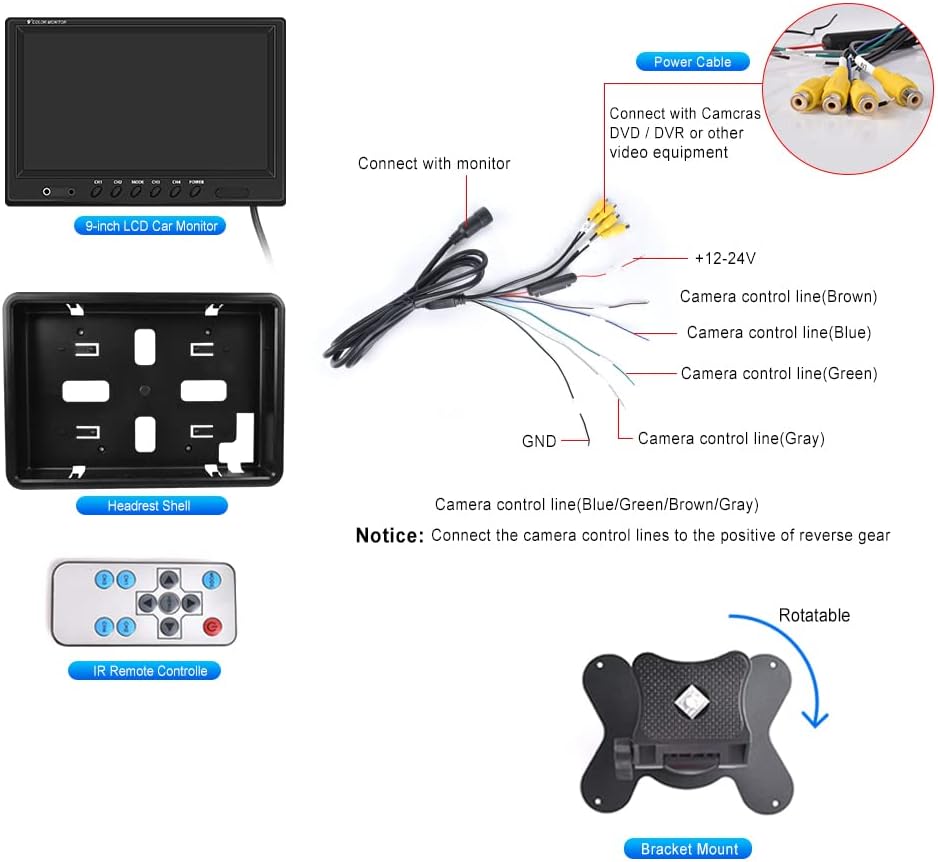
Image 4.2: Detailed wiring connections for the monitor, including power and four RCA video inputs.
Vídeo 4.1: Una breve presentaciónview demonstrating an installation method for the monitor, focusing on placement and initial setup.
5. Instrucciones de funcionamiento
The Hikity monitor offers various viewing modes and adjustable settings for optimal use.
5.1 Viewmodos de ing
The monitor supports 6 selectable viewing modes: Single Full View, Split Dual Video View, Split Tri Video View, and Quad Four View. These modes allow you to customize how camera feeds are displayed on the screen.

Image 5.1: Illustration of the quad split screen functionality, showing four camera feeds simultaneously.
5.2 Ajustes
Use the included IR remote controller or the buttons on the monitor to adjust settings such as brightness, contrast, and color. The monitor also supports rotating or mirroring the screen display for each channel.
5.3 Asistencia a la conducción
Each of the four video input channels (CH1/CH2/CH3/CH4) has a dedicated signal wire for backup or turning triggers. Connecting these wires allows the monitor to automatically switch to the corresponding camera view when a trigger is activated (e.g., shifting into reverse).

Image 5.2: The 9-inch monitor displaying a quad-split view, showing multiple perspectives for driving assistance.
6. Mantenimiento
Para garantizar la longevidad y el rendimiento óptimo de su monitor Hikity, siga estas pautas de mantenimiento:
- Limpieza: Utilice un paño suave y seco para limpiar la pantalla del monitor yasing. Para manchas difíciles, aplique ligeramenteampEnjuague el paño con agua o un limpiador de pantallas. Evite materiales abrasivos o productos químicos agresivos.
- Condiciones ambientales: Avoid exposing the monitor to extreme temperatures, direct sunlight for prolonged periods, or excessive moisture.
- Sistema de organización de cables: Ensure all cables are securely connected and not pinched or strained, which can lead to damage or intermittent signal loss.
- Almacenamiento: Si va a guardar el monitor durante un período prolongado, desconéctelo de la alimentación y guárdelo en un lugar fresco y seco.
7. Solución de problemas
If you encounter issues with your Hikity monitor, refer to the following common problems and solutions:
- Sin energía:
- Compruebe todas las conexiones eléctricas para asegurarse de que sean seguras.
- Verify that the power source (9-36V) is functioning correctly.
- Inspeccione el cable de alimentación para detectar cualquier daño visible.
- Sin señal de vídeo:
- Ensure all RCA video cables are firmly connected to both the cameras and the monitor.
- Confirm that the cameras are powered on and functioning.
- Check the selected input channel on the monitor matches the connected camera.
- If using trigger wires, ensure they are correctly connected and receiving a signal.
- Mala calidad de imagen:
- Adjust the brightness, contrast, and color settings using the remote control or monitor buttons.
- Ensure camera lenses are clean and free from obstructions.
- Verify that the video cables are not damaged or experiencing interference.
- El control remoto no funciona:
- Verifique y reemplace la batería del control remoto.
- Asegúrese de que no haya obstrucciones entre el control remoto y el receptor de infrarrojos del monitor.
Si estos pasos no resuelven el problema, comuníquese con el servicio de atención al cliente de Hikity para obtener más ayuda.
8. Garantía y soporte
Hikity ofrece soporte integral para sus productos:
- Garantía de devolución de dinero: Política de devolución de dinero de 30 días.
- Garantía de reemplazo: Garantía de reemplazo de 2 años.
- Apoyo técnico: Soporte técnico de por vida disponible.
For installation or usage issues, please contact Hikity Flagship Store via the product page on Amazon. Support inquiries are typically responded to within 24 hours.