Producto terminadoview
The SWISSTEN Elegant Bluetooth Headphones are designed for versatile audio playback, offering high-quality sound and multiple connectivity options. These headphones feature Bluetooth wireless connectivity, an integrated FM radio tuner, a microSD card slot for direct music playback, a 3.5mm AUX audio input, and a built-in hands-free microphone. The earcups are pivotable for enhanced comfort during use.

Figura 1: Frente view of the SWISSTEN Elegant Bluetooth Headphones, showcasing the sleek black design and earcups.
Contenido del paquete
Al abrir el paquete, asegúrese de que estén presentes todos los componentes:
- SWISSTEN Elegant Bluetooth Headphones
- Cable de carga USB
- Cable de audio de 3.5 mm (AUX)
- Manual de usuario
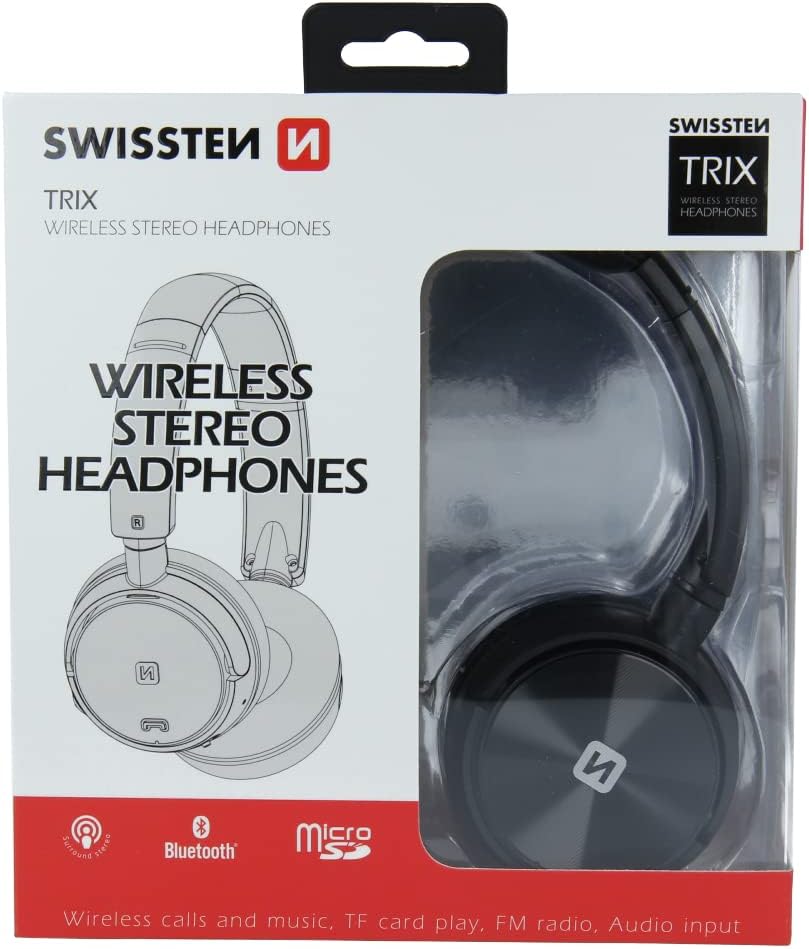
Figura 2: Retail packaging of the SWISSTEN Elegant Bluetooth Headphones, showing the product and key features.
Configuración
Carga de los auriculares
Before first use, fully charge the headphones. Connect the supplied USB charging cable to the micro USB port on the headphones and the other end to a USB power source (e.g., computer USB port, USB wall adapter). The charging indicator light will illuminate during charging and turn off when fully charged. A full charge takes approximately 2 hours.
Encendido/apagado
- Para encender: Mantenga presionado el botón de encendido hasta que la luz indicadora parpadee.
- Para apagar: Mantenga presionado el botón de encendido hasta que la luz indicadora se apague.

Figura 3: De cerca view of the headphone earcup, highlighting the control buttons, charging port, and 3.5mm audio jack.
Instrucciones de funcionamiento
Emparejamiento Bluetooth
- Asegúrese de que los auriculares estén apagados.
- Press and hold the Power button for approximately 5-7 seconds until the indicator light flashes blue and red alternately, indicating pairing mode.
- En su dispositivo (teléfono inteligente, tableta, computadora), habilite Bluetooth y busque los dispositivos disponibles.
- Select "SWISSTEN SW1010" (or similar name) from the list of found devices.
- Una vez emparejado, la luz indicadora parpadeará lentamente en azul.
El alcance del Bluetooth es de aproximadamente 10 metros (33 pies).
Music Playback (Bluetooth/MicroSD/AUX)
- Modo Bluetooth: After successful pairing, play music from your connected device. Use the headphone controls for Play/Pause, Next/Previous Track, and Volume adjustment.
- Modo de tarjeta MicroSD: Insert a microSD card (up to 32GB) with MP3, WMA, or WAV audio files into the designated slot. The headphones will automatically switch to microSD mode and begin playback.
- Modo AUX: Connect one end of the 3.5mm audio cable to the headphone's AUX port and the other end to your audio source. The headphones will automatically switch to AUX mode. Note: In AUX mode, controls on the headphones may be limited; control playback from your audio source.
Funcionamiento de la radio FM
- Encienda los auriculares.
- Press the Mode button (often labeled 'M' or similar) to switch to FM Radio mode.
- Presione el botón Reproducir/Pausa una vez para buscar y guardar automáticamente las estaciones de FM disponibles.
- Utilice los botones Pista siguiente/Pista anterior para navegar entre las estaciones guardadas.
The FM frequency range is 87.5-108 MHz.
Llamadas manos libres
- Responder llamada: Presione el botón Reproducir/Pausa una vez.
- Finalizar llamada: Presione el botón Reproducir/Pausa una vez durante una llamada.
- Rechazar llamada: Mantenga presionado el botón Reproducir/Pausar durante 2 segundos.
- Volver a marcar el último número: Presione dos veces el botón Reproducir/Pausa.

Figura 4: A person wearing the SWISSTEN Elegant Bluetooth Headphones, demonstrating their comfortable fit.
Mantenimiento
- Limpieza: Utilice un paño suave y seco para limpiar los auriculares. No utilice limpiadores abrasivos ni disolventes.
- Almacenamiento: Guarde los auriculares en un lugar fresco y seco, alejado de la luz solar directa y de temperaturas extremas.
- Cuidado de la batería: Para prolongar la vida útil de la batería, evite descargarla por completo con frecuencia. Cargue los auriculares regularmente, incluso si no los usa durante períodos prolongados.
- Exposición al agua: Estos auriculares no son resistentes al agua. Evite la exposición al agua o a la humedad excesiva.
Solución de problemas
| Problema | Posible causa | Solución |
|---|---|---|
| Los auriculares no se encienden. | Batería baja. | Cargue completamente los auriculares. |
| No se puede emparejar a través de Bluetooth. | Los auriculares no están en modo de emparejamiento; el Bluetooth del dispositivo está desactivado; demasiado lejos del dispositivo. | Asegúrate de que los auriculares estén en modo de emparejamiento (parpadeando en azul/rojo). Activa el Bluetooth en tu dispositivo. Acerca los auriculares al dispositivo (a menos de 10 m). |
| No hay sonido. | Volumen demasiado bajo; modo incorrecto seleccionado; cable AUX no completamente insertado. | Increase volume on headphones and connected device. Ensure correct mode (Bluetooth, MicroSD, AUX, FM) is selected. Re-insert AUX cable firmly. |
| Mala recepción de radio FM. | Señal débil; interferencia. | Move to an area with better signal. Re-scan stations. |
Presupuesto
| Característica | Detalle |
|---|---|
| Número de modelo | SW1010 |
| Versión de Bluetooth | V4.2 |
| Bluetooth Pro compatiblefiles | A2DP, AVRCP |
| Supported Audio Formats (MicroSD) | MP3 (8-320 Kbps), WMA (5-320 Kbps), WAV (16-1536 Kbps) |
| Rango de frecuencia de radio FM | 87.5-108 MHz |
| Diámetro del altavoz | 40 milímetros |
| Impedancia | 32 ohm |
| Sensibilidad | 108 +/- 3dB |
| Respuesta de frecuencia | 20 – 20,000 Hz |
| Rango de operación | 10 metros |
| Tiempo de carga | 2 horas |
| Tiempo de funcionamiento | 6 – 8 horas |
| Conectividad | Wireless Bluetooth, 3.5mm Jack |
| Características especiales | Microphone included, FM Radio, MicroSD slot |
| Factor de forma | Over-Ear (Supra-Auriculaire) |
| Material | Faux Leather (Simili cuir) |
Garantía y soporte
For warranty information and technical support, please refer to the official SWISSTEN webSitio web o contacte a su vendedor. Conserve su comprobante de compra para reclamaciones de garantía.
Fabricante: SUIZA
ASIN: B0BC9F9LWM