
Verde VX-TW-KT-W
Manual del usuario del termostato de gestión de energía con cable Verdant serie VX
Modelo: VX-TW-KT-W
Introducción
This manual provides comprehensive instructions for the installation, operation, and maintenance of your Verdant VX Series Wired Energy Management Thermostat. Designed for robust performance and energy efficiency, this thermostat is ideal for various commercial and hospitality environments.
Producto terminadoview
The Verdant VX thermostat is a field-proven solution for energy management, offering reliability and significant value. It incorporates advanced features for guestroom energy management, trusted by numerous hotels across North America.
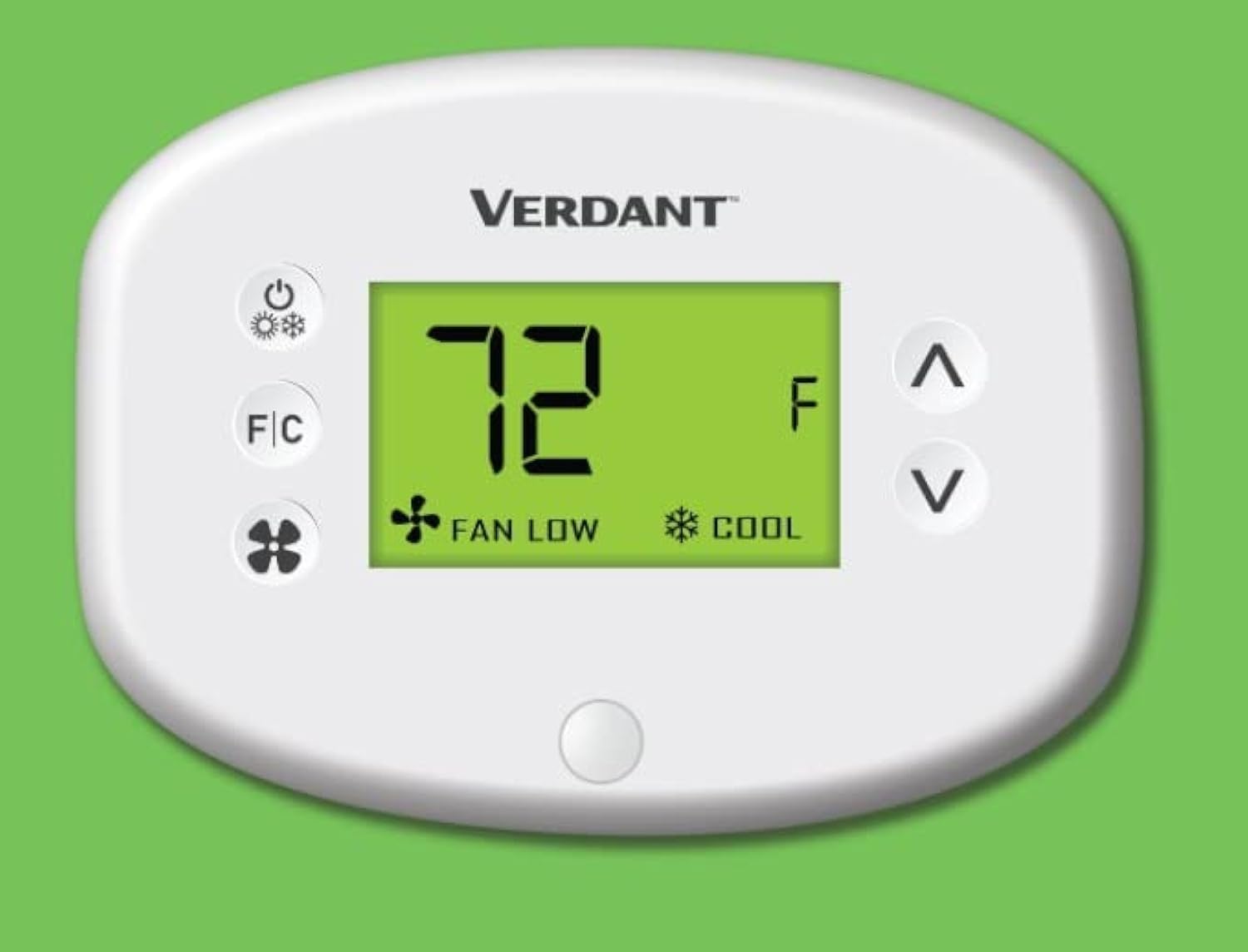
Figura 1: Frente view of the Verdant VX Series Wired Energy Management Thermostat, displaying temperature and mode settings.
Características principales
- High-Quality Hotel thermostat can control PTAC, VTAC, Hot Water Heat pump units.
- 10 Minute Install Time.
- Compatible with VX-TW-RM, VX-TW-SA, VX-TW-KT, VX-TW-XMF systems.
- Reduces heating & cooling costs by up to 40%.
- Control type: Button Control.
- Item shape: Round.
- Mounting type: Wall Mount.
- Built-in Occupancy Sensor for intelligent energy management.
- LCD Display for clear temperature and setting visibility.

Figure 2: Visual representation of the VX Thermostat's features, highlighting its user-friendliness and energy-saving capabilities.
Presupuesto
| Atributo | Detalle |
|---|---|
| Marca | Verde |
| Nombre del modelo | VX Series Wired |
| Tipo de controlador | Botón pulsador |
| Característica especial | Motion Detector (Occupancy Sensor) |
| Color | Blanco |
| Usos específicos del producto | Heat Pump, PTAC, VTAC, Hot Water Heat Pump Units |
| Tipo de control de temperatura | Calefacción, refrigeración |
| Tecnología de conectividad | Cableado |
| Componentes incluidos | Mounting Plate (Thermostat Base), Faceplate, Mounting Hardware |
| Volumentage | 230 voltios |
| Material | Plástico |
| Forma | Redondo |
| Tipo de pantalla | Pantalla LCD |
| Método de control | Button Control, App, Touch (Note: App/Touch control may require additional accessories/setup not detailed here) |
| Tipo de montaje | Montaje en pared |
| Iluminar desde el fondo | Sí |
| Dimensiones del producto | 1 x 5.5 x 2 pulgadas |
| Peso del artículo | 8.1 onzas |
| País natal | Canadá |
Configuración e instalación
The Verdant VX thermostat is designed for quick and easy installation, typically within 10 minutes per room by an on-site facilities team. It is a wall-mount unit and comes with the necessary mounting plate, faceplate, and hardware.
Pasos de instalación:
- Preparación: Ensure power to the HVAC unit is turned off at the circuit breaker before beginning installation.
- Placa de montaje: Secure the mounting plate (thermostat base) to the wall using the provided mounting hardware. Ensure it is level and securely fastened.
- Alambrado: Connect the thermostat wires according to the wiring diagram provided with your specific HVAC system and the thermostat's instructions. This is a wired connectivity device.
- Fijación de la placa frontal: Once wiring is complete and secure, attach the faceplate to the mounting plate, ensuring it snaps firmly into place.
- Encendido: Restore power to the HVAC unit. The thermostat display should illuminate.
Note: For detailed wiring diagrams and specific installation requirements, please refer to the full installation guide included with your product packaging or consult a qualified HVAC technician.
Instrucciones de funcionamiento
The Verdant VX thermostat features an intuitive LCD display and button controls for easy operation. The built-in occupancy sensor helps manage energy consumption efficiently.
Operación básica:
- Encendido/apagado: Presione el Botón de encendido (usually indicated by a circle with a vertical line) to turn the thermostat on or off. When off, the display will show "OFF".
- Temperatura de ajuste: Utilice el Up (^) and Down (v) arrow buttons to increase or decrease the desired temperature setting. The display will show "SET" indicating the target temperature.
- Cambio de unidades de temperatura (Fahrenheit/Celsius): Presione el Botón F / C to toggle between Fahrenheit (°F) and Celsius (°C) temperature displays.
- Selecting Mode (Heat/Cool): The thermostat automatically adjusts between heating and cooling based on the set temperature and ambient room temperature, leveraging its occupancy sensor. If the room temperature is higher than the set temperature, it will cool. If lower, it will heat. The display will indicate "HEAT" or "COOL" accordingly.
- Ajuste de la velocidad del ventilador: Presione el Botón del ventilador (indicated by a fan icon) to cycle through available fan speeds, typically "LOW" and "HIGH". This controls how quickly the desired temperature is reached.

Figura 3: detallada view of the thermostat's interface, showing the power, F/C, fan, and temperature adjustment buttons.
The integrated motion detector (occupancy sensor) automatically adjusts settings to save energy when a room is unoccupied, and returns to comfort settings when occupancy is detected. This feature significantly reduces heating and cooling costs.
Mantenimiento
To ensure optimal performance and longevity of your Verdant VX thermostat, follow these simple maintenance guidelines:
- Limpieza: Limpie suavemente la superficie del termostato con un paño suave.amp paño. Evite usar limpiadores abrasivos, solventes o productos químicos fuertes, ya que pueden dañar la pantalla oasing.
- Reemplazo de batería: The thermostat requires AA batteries (not included) for operation. If the display dims or the thermostat becomes unresponsive, it may be time to replace the batteries. To access the battery compartment, locate the small groove at the bottom of the unit and gently pull the faceplate forward. Ensure correct polarity when inserting new batteries.
- Espacio libre del sensor: Ensure the occupancy sensor (small button at the bottom of the display) is not obstructed by furniture, curtains, or other objects, as this can affect its ability to detect occupancy accurately.
- Controles periódicos: Periodically check the thermostat for any loose connections or signs of damage. If any issues are observed, contact technical support.
Solución de problemas
If you encounter issues with your Verdant VX thermostat, try the following troubleshooting steps:
- Sin pantalla/No responde:
- Check if the thermostat is powered on. Press the Power button.
- Verifique que las baterías estén correctamente instaladas y tengan suficiente carga. Reemplácelas si es necesario.
- Ensure the main power to the HVAC unit is on at the circuit breaker.
- Lectura de temperatura incorrecta:
- Ensure the F/C button is set to your preferred unit (Fahrenheit or Celsius).
- Check for drafts or direct sunlight hitting the thermostat, which can affect readings.
- Calefacción/refrigeración no activada:
- Confirm the set temperature is appropriately higher (for heat) or lower (for cool) than the current room temperature.
- Check if the occupancy sensor is obstructed.
- Ensure the HVAC system itself is functioning correctly.
- El ventilador no funciona:
- Press the Fan button to cycle through fan speeds (LOW/HIGH).
- Ensure the thermostat is not in "OFF" mode.
If these steps do not resolve the issue, please contact Verdant technical support for further assistance.
Garantía y soporte
Verdant stands by the quality and reliability of its products. The Verdant VX thermostat comes with free lifetime technical support, ensuring assistance is always available for property owners.
For technical assistance, troubleshooting, or any product-related inquiries, please contact Verdant customer service. Refer to your product packaging or the official Verdant webSitio para obtener la información de contacto más actualizada.

Figura 4: Sobreview of the Verdant Energy Management System's advantages, emphasizing its efficiency and ease of integration.
Ask a question about this manual
Ask about setup, troubleshooting, compatibility, parts, safety, or missing instructions. Manuals+ will review the question and use this page’s manual context to help answer it.