
1. Producto terminadoview
The Point Wired Mini Keyboard Pt-350 is a compact and versatile keyboard designed for both gaming and general typing. It features a high-quality build and a modern design, adhering to industry standards for reliable performance. This keyboard is an ideal choice for users seeking a durable and efficient input device.
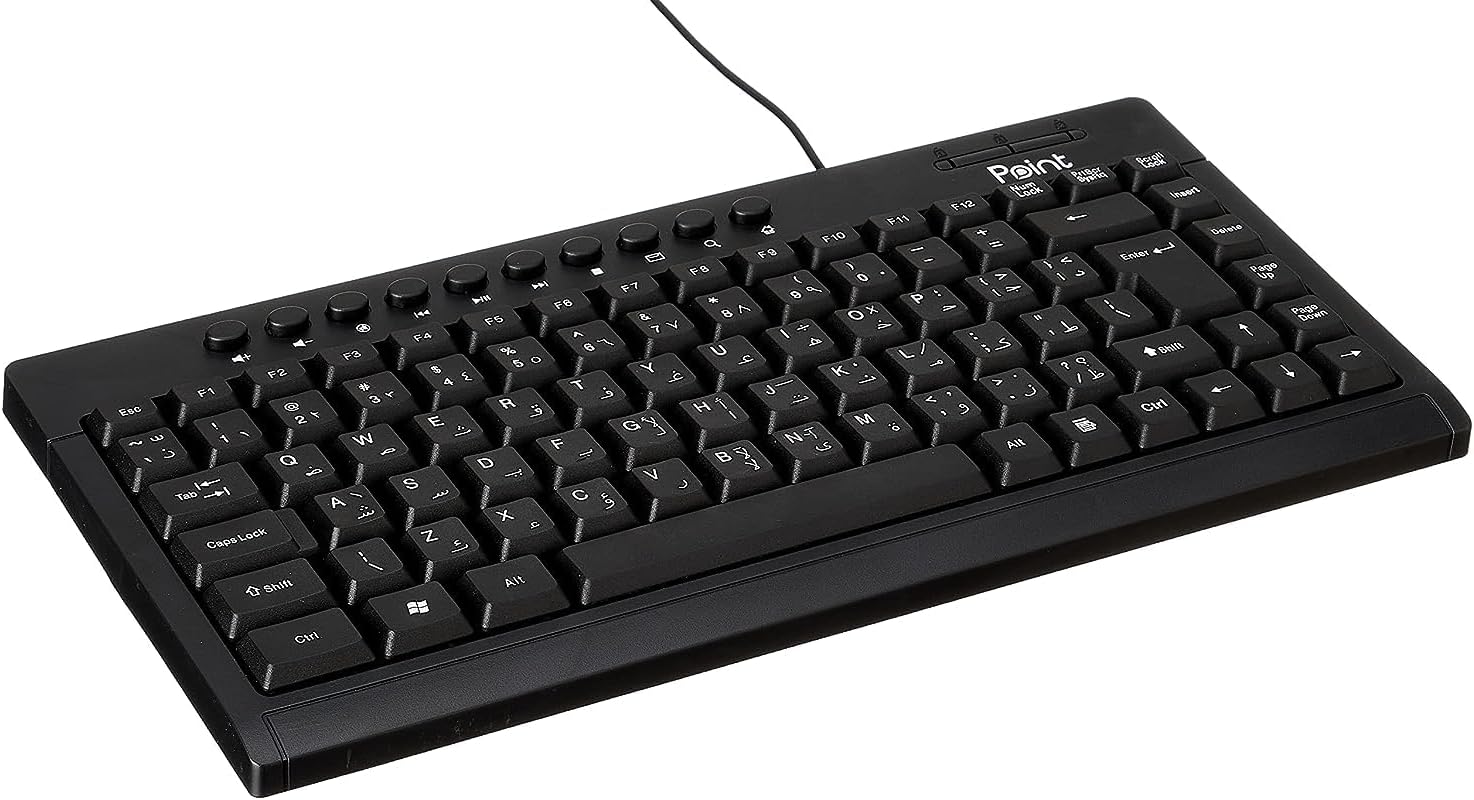
Figura 1.1: Angulado view of the Point Wired Mini Keyboard Pt-350, showcasing su diseño compacto y disposición de teclas.
Características principales:
- Wired connectivity for stable performance.
- Compact design suitable for various setups.
- Durable construction from high-quality plastic materials.
- Designed for both gaming and typing applications.
2. Contenido del paquete
Revise el paquete cuidadosamente para asegurarse de que todos los artículos estén presentes:
- Point Wired Mini Keyboard Pt-350
- Manual de usuario (este documento)
3. Configuración
Follow these steps to set up your Point Wired Mini Keyboard Pt-350:
- Desembalaje del teclado: Retire con cuidado el teclado de su embalaje.
- Identify the USB Connector: The keyboard comes with an integrated USB cable.
- Conéctese a su computadora: Locate an available USB port on your computer (desktop PC, laptop, etc.). Insert the keyboard's USB connector firmly into the USB port.
- Instalación del controlador (Plug & Play): The keyboard is plug-and-play compatible. Your operating system (Windows, macOS, Linux) should automatically detect and install the necessary drivers. This process usually takes a few seconds.
- Verificar funcionalidad: Once connected, open a text editor or any application that accepts text input and test the keys to ensure proper operation.

Figura 3.1: De arriba hacia abajo view of the keyboard, illustrating the key layout and integrated cable for connection.
4. Instrucciones de funcionamiento
The Point Wired Mini Keyboard Pt-350 operates like a standard computer keyboard. Below are general instructions and tips for use:
Mecanografía básica:
- Simply press the desired keys to input characters, numbers, and symbols into your active application.
- Utilice el Cambio key for uppercase letters and alternative symbols on keys.
- El Bloq Mayús key toggles permanent uppercase typing.
- El Retroceso key deletes characters to the left of the cursor.
- El Ingresar key confirms input or moves to the next line.
Teclas de función (F1-F12):
The function keys (F1 through F12) perform various tasks depending on the active program or operating system. Some common uses include:
- F1: Often opens help for the active program.
- F2: Renames a selected item.
- F5: Refresca un web page or document.
- F11: Toggles full-screen mode in many browsers.
Teclas multimedia:
The keyboard may include dedicated multimedia keys or secondary functions on the F-keys (accessed via the Fn key, if present). These typically control:
- Volume control (Mute, Volume Up, Volume Down)
- Media playback (Play/Pause, Stop, Previous Track, Next Track)
5. Mantenimiento
Un mantenimiento adecuado garantiza la longevidad y el rendimiento óptimo de su teclado:
- Limpieza: Limpie el teclado con regularidad para evitar la acumulación de polvo y residuos. Utilice un paño suave y sin pelusa ligeramente húmedo.ampLimpie con agua o una solución limpiadora suave. Evite productos químicos agresivos o materiales abrasivos.
- Eliminación de polvo: Use compressed air to blow out dust and crumbs from between the keys.
- Evite derrames: Mantenga el teclado alejado de líquidos para evitar daños a los componentes internos. En caso de derrame, desconecte el teclado inmediatamente y deje que se seque por completo antes de volver a conectarlo.
- Almacenamiento: Cuando no esté en uso, guarde el teclado en un entorno limpio y seco, alejado de temperaturas extremas.
6. Solución de problemas
If you encounter issues with your Point Wired Mini Keyboard Pt-350, refer to the following common problems and solutions:
El teclado no responde:
- Comprobar la conexión USB: Asegúrate de que el cable USB esté conectado correctamente a un puerto USB que funcione en tu computadora. Prueba con otro puerto USB.
- Reiniciar la computadora: Un simple reinicio a menudo puede resolver los problemas de conectividad.
- Prueba en otra computadora: Connect the keyboard to another computer to determine if the issue is with the keyboard or your computer's setup.
- Comprobar el Administrador de dispositivos (Windows): In Windows, go to Device Manager and check if the keyboard is listed under 'Keyboards' and if there are any error symbols. You might need to update or reinstall the driver.
Keys Not Working or Sticky:
- Teclas limpias: Dust, crumbs, or liquid residue can cause keys to stick or malfunction. Refer to the Maintenance section for cleaning instructions.
- Daño físico: Inspect the keys for any visible physical damage.
Salida de carácter incorrecto:
- Comprobar la configuración del idioma: Ensure your operating system's keyboard language settings match the physical layout of your keyboard.
- Problema con el controlador: Reinstalling the keyboard driver might resolve this.
Si el problema persiste después de intentar estos pasos, comuníquese con el servicio de atención al cliente.
7. Especificaciones
Technical specifications for the Point Wired Mini Keyboard Pt-350:

Figura 7.1: Lado view of the keyboard, highlighting its profile and compact form factor.
| Característica | Detalle |
|---|---|
| Nombre de marca | Punto |
| Modelo | Pt-350 |
| Tecnología de conectividad | Cableado |
| Dispositivos compatibles | Computadora |
| Descripción del teclado | Multifuncional |
| Usos recomendados | Juegos de PC |
| Características especiales | Juego de azar |
| Color | Negro |
| Estilo | Moderno |
| Material | Plástico |
| Dimensiones de envío | 34.5 x 26.4 x 3 cm |
| Peso | 800 gramos |
| Primera fecha disponible | 4 de septiembre de 2022 |
| ASIN | B0BD2DM9ZJ |
8. Garantía y soporte
This product is covered by a standard manufacturer's warranty. Please refer to the warranty card included with your purchase for specific terms and conditions, including the warranty period and coverage details.
For technical support, troubleshooting assistance, or warranty claims, please contact Point customer service through the contact information provided on the product packaging or the official Point website. When contacting support, please have your product model (Pt-350) and purchase details ready.