
Introducción
This manual provides detailed instructions for the installation, operation, and maintenance of your Tiandy TC-C38XS 8MP IR Turret Camera. Please read this manual thoroughly before using the product to ensure correct usage and to prevent damage.
Información de seguridad
- Ensure the power supply meets the camera's requirements (DC 12V or PoE).
- No exponga la cámara a temperaturas extremas, humedad o ambientes corrosivos.
- Evite apuntar la cámara directamente a fuentes de luz fuertes durante períodos prolongados.
- Manipule la cámara con cuidado para evitar daños físicos.
- La instalación debe ser realizada por personal calificado de acuerdo con los códigos eléctricos locales.
Contenido del paquete
Verifique que todos los componentes estén presentes en el paquete:
- Tiandy TC-C38XS IR Turret Camera
- Tornillos de montaje y tacos de pared
- Conector impermeable para cable Ethernet
- Guía de inicio rápido (si corresponde)
- Plantilla de perforación (si corresponde)
Producto terminadoview
The Tiandy TC-C38XS is an 8MP IR Turret Camera designed for outdoor surveillance, featuring a full metal housing and advanced imaging capabilities.
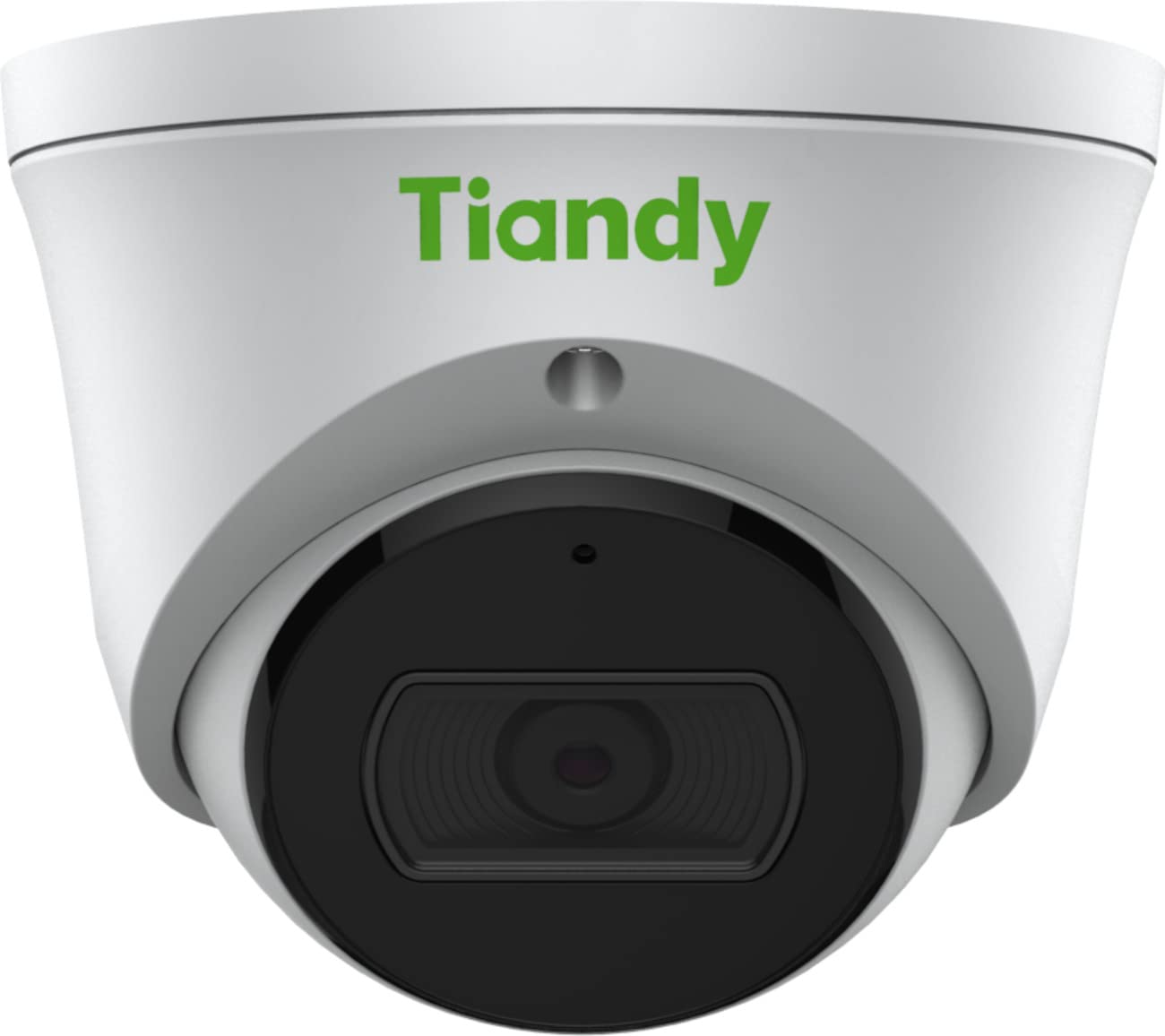
Figura 1: Frente view of the Tiandy TC-C38XS IR Turret Camera, showing the lens and IR illuminators.

Figura 2: Angular view of the Tiandy TC-C38XS IR Turret Camera, highlighting its compact turret design.

Figura 3: Technical drawing showing the dimensions of the Tiandy TC-C38XS IR Turret Camera (approx. 116.6mm diameter, 96mm height).
Características principales:
- Resolución de 8 megapíxeles: Captures video at up to 3840x2160 at 20fps.
- Sensor CMOS de 1/2.8": Provides clear images even in low-light conditions.
- IR inteligente: Infrared illumination up to 30 meters (98.42 feet) for night vision.
- 120dB WDR: Wide Dynamic Range for balanced images in high-contrast scenes.
- Micrófono incorporado: Para monitorización de audio.
- Almacenamiento a bordo: Admite tarjetas MicroSD de hasta 512 GB.
- Carcasa totalmente metálica: Construcción duradera para uso en exteriores.
Configuración
1. Montaje de la cámara
The TC-C38XS is designed for wall mounting. Choose a suitable location that provides the desired field of view and is within reach of network and power cables.
- Use the provided drill template (if included) to mark the screw holes on the mounting surface.
- Perfore agujeros piloto e inserte tacos de pared si lo va a montar sobre mampostería o panel de yeso.
- Fije la base de la cámara a la superficie de montaje utilizando los tornillos provistos.
- Adjust the camera's angle: The camera supports pan 0 to 340°, tilt 0 to 75°, and rotate 0 to 360° for optimal positioning. Loosen the adjustment screws, position the camera, and then tighten the screws to secure it.
2. Cableado y conexión eléctrica
The camera supports Power over Ethernet (PoE) or a DC 12V power supply.
- Conexión PoE: Connect a standard Ethernet cable from a PoE-enabled switch or NVR to the camera's RJ45 port. This provides both power and data connectivity. Ensure the waterproof connector is properly installed to protect the Ethernet port from moisture.
- Conexión DC 12 V: If PoE is not used, connect a DC 12V power adapter (not included) to the camera's power input port. Then, connect a standard Ethernet cable from your network to the camera's RJ45 port for data.
After connecting, the camera will power on and begin its startup sequence.
Operante
1. Configuración inicial de la red
Para acceder a la cámara web interface for configuration, you will need to find its IP address on your network. This can typically be done using a manufacturer-provided IP search tool or by checking your router's connected devices list.
- Conecte su computadora a la misma red que la cámara.
- Abrir una web navegador e ingrese la dirección IP de la cámara.
- Log in using the default username and password (refer to the Quick Start Guide or manufacturer's documentation for default credentials). It is highly recommended to change the default password immediately for security.
2. Funciones básicas
- Vivir View: Acceda a la transmisión de video en vivo a través del web interface or compatible NVR/VMS software.
- Grabación: Configure recording schedules and methods (continuous, motion-triggered) to the on-board MicroSD card (up to 512 GB) or a connected NVR.
- Detección de movimiento: Set up motion detection zones and sensitivity. The camera can trigger alarms (e.g., email notifications) upon detection.
- IR inteligente: The camera automatically adjusts IR intensity to prevent overexposure in night vision, ensuring clear images up to 30 meters.
- Configuración de imagen: Adjust saturation, brightness, contrast, and sharpness via the client software or web browser to optimize image quality.
- Audio: Utilize the built-in microphone for audio monitoring.
Mantenimiento
1. Limpieza
La limpieza regular ayuda a mantener una calidad de imagen óptima.
- Gently wipe the camera lens with a soft, clean cloth. If necessary, use a mild lens cleaning solution.
- Do not use harsh chemicals or abrasive materials, as they can damage the lens coating or housing.
- Periodically clean the camera housing to remove dust and debris.
2. Actualizaciones de firmware
Revise periódicamente las instrucciones del fabricante. webSitio para actualizaciones de firmware. Las actualizaciones de firmware pueden mejorar el rendimiento, añadir nuevas funciones y mejorar la seguridad. Siga atentamente las instrucciones incluidas en el paquete de actualización de firmware.
3. Gestión de tarjetas MicroSD
If using on-board storage, regularly check the status of the MicroSD card. Format the card periodically to maintain performance and prevent data corruption. Back up important recordings before formatting.
Solución de problemas
| Problema | Posible causa | Solución |
|---|---|---|
| Sin imagen/Sin energía | Incorrect power supply; Loose cable connection; PoE issue. | Check power adapter (DC 12V) or PoE switch. Ensure all cables are securely connected. |
| No se puede acceder a la cámara a través de la red | Incorrect IP address; Network configuration error; Firewall blocking. | Verify IP address. Check network cable. Disable temporary firewall for testing. Ensure camera and computer are on the same subnet. |
| Mala calidad de imagen | Dirty lens; Insufficient lighting; Incorrect image settings. | Clean the lens. Adjust image settings (brightness, contrast, WDR). Ensure IR is functioning correctly at night. |
| La detección de movimiento no funciona | Incorrect sensitivity settings; Detection zone not configured; Obstructions. | Review motion detection settings in the web interface. Adjust sensitivity and redraw detection zones. Clear any obstructions in the camera's view. |
| La tarjeta microSD no graba | Card full; Card not formatted; Card faulty; Recording schedule not set. | Check card capacity. Format the MicroSD card via the camera's interface. Replace card if faulty. Verify recording schedule. |
Presupuesto
| Característica | Detalle |
|---|---|
| Modelo | TC-C38XS |
| Sensor de imagen | CMOS de 1/2.8" |
| Resolución máxima | 3840x2160 (8MP) |
| Velocidad de cuadros | Up to 20fps (3840x2160), 30fps (1080p) |
| Iluminación mínima | Color: 0.003 Lux a (F1.6, AGC activado), B/N: 0 Lux con IR |
| Lente | Fijo 2.8mm |
| Campo de View (Campo de visión) | Horizontal: 100.1° |
| Rango IR | Hasta 30 m (98.42 pies) con Smart IR |
| Amplio Rango Dinámico (WDR) | 120 dB |
| Compresión de vídeo | S+265/H.265/H.264/M-JPEG |
| Audio | Micrófono incorporado |
| Almacenamiento a bordo | Tarjeta microSD hasta 512 GB |
| Interfaz de red | 1 puerto Ethernet autoadaptable RJ45 10M / 100M |
| Fuente de alimentación | 12 V CC, PoE (802.3af) |
| Material | Carcasa de metal completa. |
| Dimensiones | Approx. 4.59 x 4.59 x 3.77 inches (116.6mm diameter, 96mm height) |
| Peso | Aprox. 0.88 libras (0.4 kg) |
| Condiciones de funcionamiento | Uso al aire libre |
| Protocolos | TCP/IP, HTTP, HTTPS, DHCP, DNS, RTP, RTSP, etc. |
| Disparador de alarma | Motion Detection, Mask Alarm, Disk Full, etc. |
| Análisis de vídeo | Tripwire, Perimeter |
Información de garantía
Tiandy products typically come with a limited manufacturer's warranty. For specific warranty terms and conditions, please refer to the warranty card included with your product or visit the official Tiandy webSitio. Conserve su recibo de compra como comprobante para reclamaciones de garantía.
Apoyo
If you encounter any issues or have questions regarding your Tiandy TC-C38XS camera that are not covered in this manual, please contact your authorized Tiandy reseller or visit the official Tiandy support website for further assistance. You may also find FAQs and additional resources online.
- Fabricante: Tiandi
- Número de modelo: TC-C38XS
- Código postal: 785249841675