
1. Introducción
This manual provides detailed instructions for the proper use and maintenance of your Obbug Bluetooth Headset, Model YYK-530. Please read this manual thoroughly before using the product to ensure optimal performance and longevity.
2. Contenido del paquete
Verifique que todos los artículos estén presentes en su paquete:
- 1 x Obbug Bluetooth Headset
- 1 x Estuche de carga
- Cable de carga 1 x USB tipo C
- 1 x Ear Hat (replacement ear tip)
- 1 x Manual de usuario
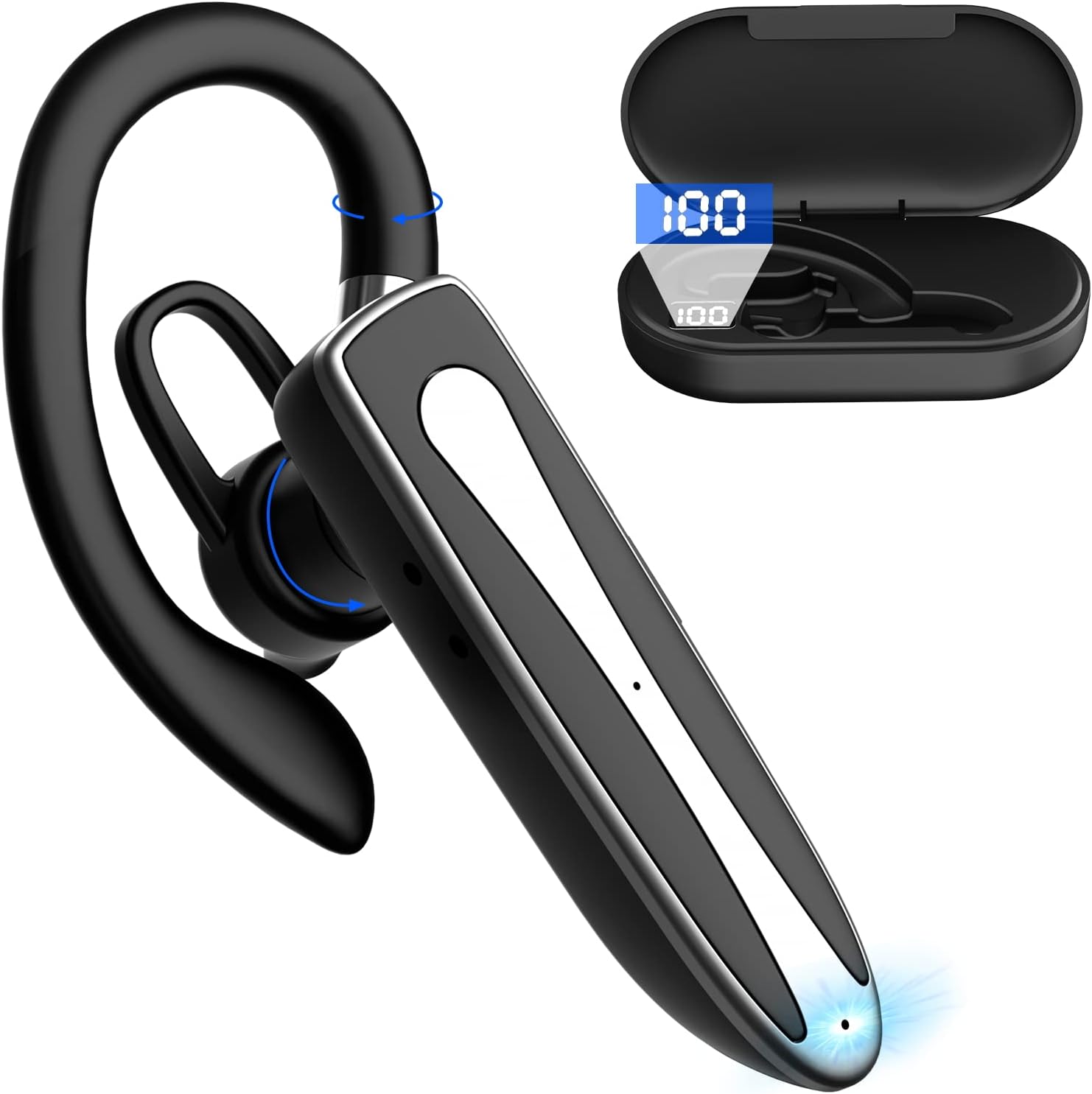
Image 2.1: Obbug Bluetooth Headset YYK-530 and its charging case.
3. Características del producto
- Tecnología Bluetooth 5.1: Provides stable connection and clear audio.
- Mayor duración de la batería: Hasta 80 horas de uso continuo con el estuche de carga.
- Diseño cómodo y ajustable: Flexible earhook and rotatable boom mic for left or right ear wear.
- CVC8.0 Noise Reduction: Mejora la claridad de las llamadas al reducir el ruido de fondo.
- Amplia compatibilidad: Connects with most Bluetooth-enabled devices including smartphones, tablets, and computers.
- Llamadas manos libres: Integrated microphone for convenient communication.

Image 3.1: Illustration of CVC8.0 Noise Reduction for clear audio.
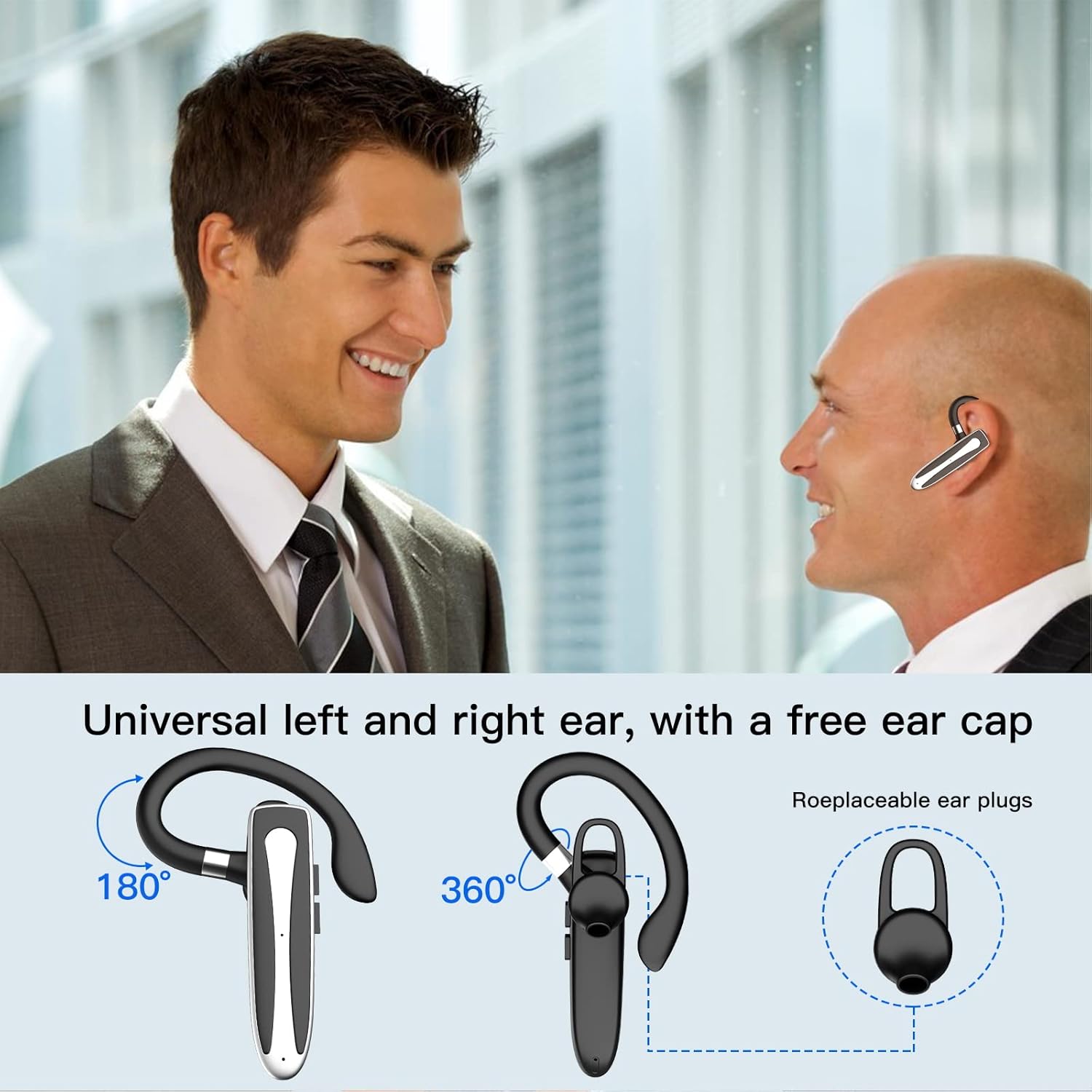
Image 3.2: Diagram illustrating the dual microphone noise reduction processing.
4. Configuración
4.1 Carga de los auriculares y el estuche
Before first use, fully charge the headset and its charging case.
- Place the headset into the charging case.
- Connect the USB Type-C cable to the charging port on the case and to a power source (e.g., USB wall adapter, computer USB port).
- The charging indicator on the case will show charging status. A full charge typically takes 1.5 hours.

Image 4.1: The Type-C charging port on the charging case.

Image 4.2: Battery life and charging time information for the headset and case.
4.2 Emparejamiento con un dispositivo
Los auriculares utilizan Bluetooth 5.1 para la conexión inalámbrica.
- Encendido: Take the headset out of the charging case, or press and hold the Multi-function Button until the indicator light flashes blue and red, indicating pairing mode.
- Activar Bluetooth: En su dispositivo (teléfono inteligente, tableta, etc.), vaya a la configuración de Bluetooth y active Bluetooth.
- Seleccione el dispositivo: In the list of available devices, select "YYK-530".
- Confirmar conexión: Once connected, the headset indicator light will flash blue slowly, and your device will show "Connected".

Image 4.3: Illustration of optimal Bluetooth connection distance (within 10 meters).
4.3 Conexión a dos dispositivos simultáneamente
The headset supports connecting to two Bluetooth devices at the same time.
- Connect the headset to the first device (e.g., Phone A) as described in Section 4.2.
- Turn off Bluetooth on the first device. The headset will re-enter pairing mode.
- Connect the headset to the second device (e.g., Phone B) as described in Section 4.2.
- Activa el Bluetooth en el primer dispositivo. Los auriculares deberían reconectarse automáticamente a ambos dispositivos.
You can now answer calls or play music from either connected device.

Image 4.4: Step-by-step guide for connecting the headset to two devices.
4.4 Cómo usar los auriculares
The headset is designed for comfortable wear on either the left or right ear.
- The earhook can rotate 360° vertically and 360° horizontally to fit your preferred angle.
- The retractable earhook can be adjusted to fit the shape of your ear.

Image 4.5: The headset's adjustable design for left or right ear wearing.
5. Instrucciones de funcionamiento
5.1 Encendido y apagado
- Encendido: Take the headset out of the charging case, or press and hold the Multi-function Button for approximately 3 seconds until the indicator light flashes blue.
- Apagado: Place the headset back into the charging case, or press and hold the Multi-function Button for approximately 5 seconds until the indicator light flashes red and then turns off.
5.2 Gestión de llamadas
- Responder/Finalizar llamada: Presione el botón multifunción una vez.
- Rechazar llamada: Mantenga presionado el botón multifunción durante aproximadamente 2 segundos.
- Volver a marcar el último número: Presione dos veces el botón multifunción.
5.3 Reproducción de música
- Reproducir/Pausa: Presione el botón multifunción una vez.
- Pista siguiente: Mantenga presionado el botón para subir el volumen.
- Pista anterior: Mantenga presionado el botón para bajar el volumen.
5.4 Control de volumen
- Aumenta el volumen: Presione el botón para subir el volumen.
- Disminuir volumen: Presione el botón para bajar el volumen.
5.5 Activación del asistente de voz
Activate your device's voice assistant (Siri, Google Assistant) directly from the headset.
- Activar asistente de voz: Presione tres veces el botón multifunción.

Image 5.1: The headset supports activation of Siri and Google Assistant.
6. Mantenimiento
- Clean the headset and charging case regularly with a soft, dry cloth.
- Evite exponer el dispositivo a temperaturas extremas, humedad o sustancias corrosivas.
- Guarde los auriculares en su estuche de carga cuando no los utilice para protegerlos y mantenerlos cargados.
- No intente desmontar ni reparar el dispositivo usted mismo. Póngase en contacto con el servicio de atención al cliente para obtener ayuda.
7. Solución de problemas
Los auriculares 7.1 no se encienden
- Asegúrese de que los auriculares estén completamente cargados. Colóquelos en el estuche de carga y conéctelos a una fuente de alimentación.
- Press and hold the Multi-function Button for 3-5 seconds to power on.
7.2 No se puede emparejar con el dispositivo
- Ensure the headset is in pairing mode (indicator flashes blue and red).
- Desactive el Bluetooth en su dispositivo y vuelva a activarlo.
- Ensure the headset is within 10 meters of your device and there are no significant obstacles.
- Borre la lista de emparejamiento de Bluetooth en su dispositivo e intente emparejarlo nuevamente.
7.3 No hay sonido o la calidad del sonido es mala
- Ajuste el volumen tanto en los auriculares como en el dispositivo conectado.
- Asegúrese de que los auriculares estén conectados correctamente a su dispositivo.
- Acérquese a su dispositivo para asegurarse de estar dentro del alcance de Bluetooth.
- Compruebe si hay interferencias de otros dispositivos inalámbricos.
8. Especificaciones
| Característica | Especificación |
|---|---|
| Nombre del modelo | YYK-530 |
| Marca | obbug |
| Tecnología de conectividad | Inalámbrico (Bluetooth) |
| Versión de Bluetooth | 5.1 |
| Alcance de Bluetooth | Hasta 33 pies (10 metros) |
| Control de ruido | Sound Isolation (CVC8.0 Noise Reduction) |
| Forma del auricular | Gancho para la oreja |
| Duración de la batería (auriculares) | 5 horas (aprox.) |
| Duración de la batería (con estuche de carga) | Up to 80 Hours (approx.) |
| Tiempo de carga | 1.5 horas |
| Puerto de carga | USB tipo C |
| Nivel de resistencia al agua | Impermeable |
| Peso del artículo | 4.9 onzas (0.14 kilogramos) |
| Rango de frecuencia | 20Hz - 20,000Hz |
| Dispositivos compatibles | Cellphones, Desktops, Laptops, Telephones |

Image 8.1: The headset is compatible with a wide range of Bluetooth-enabled devices.
9. Garantía y atención al cliente
The Obbug Bluetooth Headset comes with a 1-month replacement warranty.
For any questions, issues, or support needs, please contact our customer service. We offer 24-hour customer service to assist you.
Consulte la documentación de compra para obtener detalles de contacto específicos.