
PCsensor 3 Key Mini Keypad
Manual del usuario del mini teclado de 3 teclas PCsensor
Model: 3 Key Mini Keypad
Marca: PCsensor
Introducción
This manual provides detailed instructions for the setup, operation, and maintenance of your PCsensor 3-Key Mini Keypad. This wireless mechanical gaming keyboard is designed for customized hotkey programming, offering flexibility and enhanced control for various applications.

Image: The PCsensor 3-Key Mini Keypad in white, showcasing its three mechanical keys with red RGB backlighting. The compact design highlights its portability and functionality.
¿Qué hay en la caja?
Verifique que todos los artículos estén presentes en el paquete:
- PCsensor 3-Key Mini Keypad (White-Bluetooth model)
- USB Type-C to USB-A Charging Cable
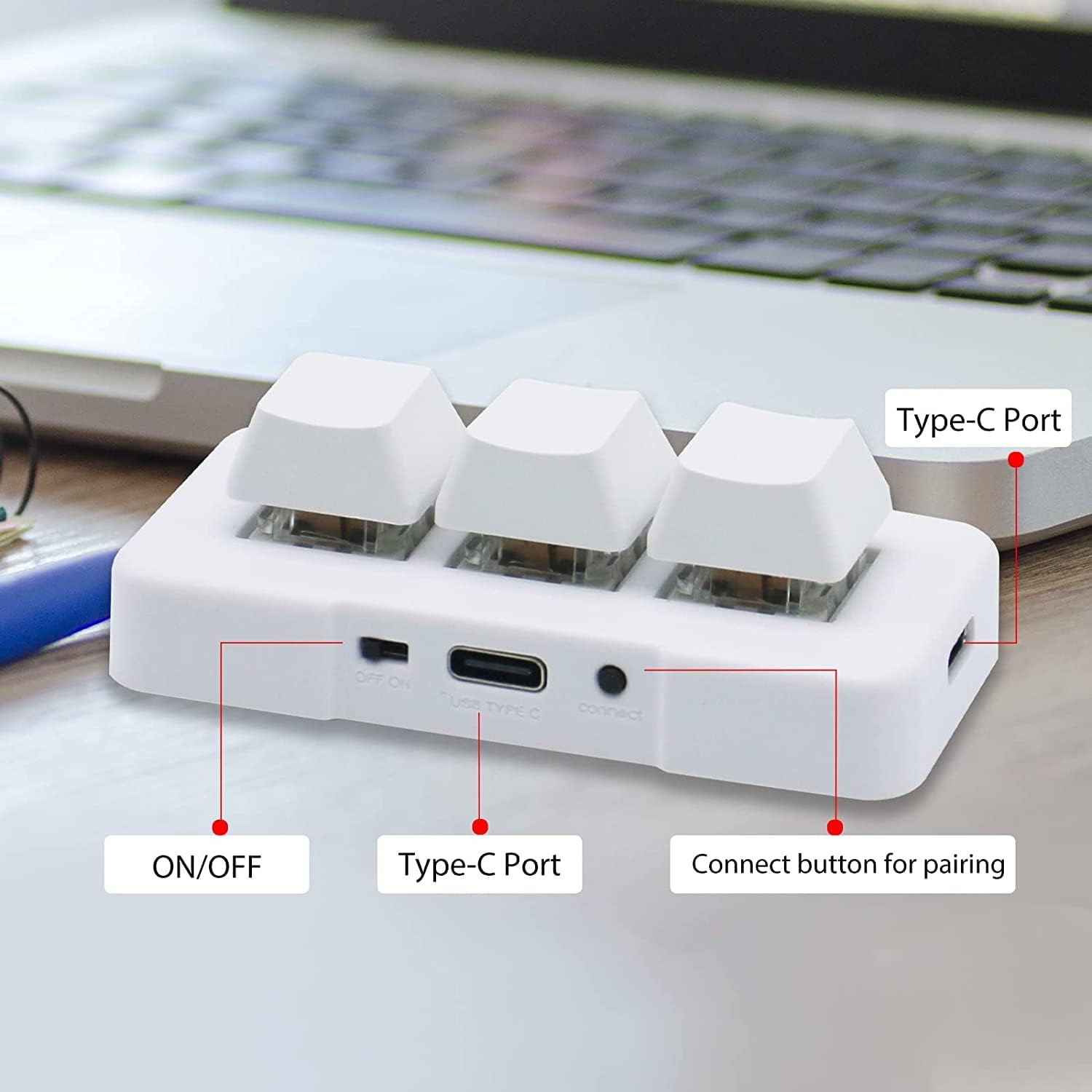
Image: A diagram illustrating the dimensions of the 3-Key Mini Keypad (approximately 3 inches long) and the included 59-inch (1500mm) USB Type-C charging cable.
Producto terminadoview
Familiarize yourself with the components of your mini keypad:
- Teclas mecánicas: Three programmable keys with durable mechanical switches.
- Interruptor encendido / apagado: Ubicado en el lateral para control de potencia.
- Puerto USB tipo C: Para conexión por cable y carga.
- Botón de conexión: Se utiliza para emparejamiento Bluetooth.
- Retroiluminación LED RGB: Customizable lighting under each key.

Imagen: Un primer plano view of the white 3-Key Mini Keypad, clearly labeling the ON/OFF switch, USB Type-C port, and the small connect button for pairing.
Configuración
Carga del teclado
- Connect the provided USB Type-C cable to the keypad's Type-C port.
- Conecte el otro extremo del cable a una fuente de alimentación USB (por ejemplo, puerto USB de computadora, adaptador de pared).
- The keypad's LED light will indicate charging status. A full charge typically takes 2 hours and can provide up to 3 months of use. The LED will flash every 3 seconds when the battery is low.
Opciones de conectividad
The keypad supports both wired (USB) and wireless (Bluetooth) connections.
Wired Connection (USB Mode)
- Ensure the keypad is turned APAGADO utilizando el interruptor ON/OFF.
- Connect the USB Type-C cable from the keypad to your computer's USB port.
- The keypad will automatically be recognized as a standard keyboard. In USB mode, the key backlighting will typically display a blue light.
Wireless Connection (Bluetooth Mode)
- Turn the keypad ON utilizando el interruptor ON/OFF.
- Long press the "connect" button on the side of the keypad until the LED light starts flashing rapidly, indicating pairing mode.
- On your device (computer, smartphone, tablet), navigate to Bluetooth settings and search for new devices.
- Select "3 Key Mini Keypad" or a similar name from the list of available devices to pair.
- Once successfully paired, the LED light will stop flashing and remain solid, typically displaying a red light in wireless mode.

Image: The 3-Key Mini Keypad illustrating the different LED colors for connectivity modes: blue light indicates USB mode, and red light indicates wireless (Bluetooth) mode.
Nota: For initial setup and programming, it is recommended to connect the keypad to a Windows system first. Once programmed, it can be freely used with Windows, Linux, Mac OS, Android, and iOS systems.
Instrucciones de funcionamiento
Programación clave
The 3-Key Mini Keypad is fully programmable, allowing you to assign custom hotkeys, shortcuts, or macros to each of its three keys. Programming is done via dedicated software.
- Download the official programming software from the PCsensor website. (Refer to the product packaging or manufacturer's website for the download link).
- Instale el software en su computadora Windows.
- Connect the keypad to your computer via USB. Ensure the software recognizes the device.
- Dentro de la interfaz del software, seleccione la tecla que desea programar.
- Assign the desired function (e.g., single key press, key combination, multimedia control, macro).
- Save the configuration to the keypad's onboard memory. The programmed functions will work across all compatible operating systems without needing the software running.

Image: A screenshot of the PCsensor programming software interface, showing options for customizing key functions and device settings. This software is essential for assigning specific commands to each key.

Image: A person interacting with the PCsensor programming software on a desktop computer, demonstrating the user interface for customizing the keypad's functions.
Control de LED RGB
The keypad features RGB LED backlighting. The lighting can often be controlled through the programming software, allowing you to adjust colors, effects, or turn them off to conserve battery life.
Mantenimiento
Para garantizar la longevidad y el rendimiento óptimo de su teclado, siga estas pautas de mantenimiento:
- Limpieza: Utilice un paño suave y seco para limpiar la superficie del teclado. Para la suciedad difícil, utilice un paño ligeramente seco.amp Se puede utilizar un paño con jabón suave, asegurándose de que no entre líquido en el dispositivo.
- Almacenamiento: Guarde el teclado en un lugar fresco y seco, alejado de la luz solar directa y de temperaturas extremas.
- Cuidado de la batería: Avoid fully discharging the battery frequently. Charge the keypad regularly to maintain battery health.
- Evite los líquidos: No exponga el teclado al agua ni a otros líquidos.
- Tratar con cuidado: Avoid dropping or subjecting the keypad to strong impacts.
Solución de problemas
If you encounter issues with your PCsensor 3-Key Mini Keypad, refer to the following common problems and solutions:
| Problema | Solución |
|---|---|
| Keypad not responding (Wired) |
|
| Keypad not connecting (Bluetooth) |
|
| Keys not performing programmed functions |
|
| La batería se agota rápidamente |
|
Presupuesto
| Característica | Detalle |
|---|---|
| Número de modelo | 3 Key Mini Keypad |
| Conectividad | Bluetooth, USB-C (con cable) |
| Número de llaves | 3 |
| Tipo de clave | Mecánico |
| Contraluz | LED RGB |
| Distancia inalámbrica | Hasta 33 pies (10 metros) |
| Tipo de batería | 1 ion de litio (incluido) |
| Duración de la batería | Up to 3 months on a 2-hour charge (usage dependent) |
| Compatibilidad | Windows, Linux, Mac OS, Android, iOS |
| Dimensiones | 3.11 x 2.2 x 1.54 pulgadas |
| Peso del artículo | 2.82 onzas |
| Fabricante | Sensor de PC |
Garantía y soporte
PCsensor products are designed for durability and performance. For specific warranty information, please refer to the product packaging or the official PCsensor websitio.
For technical support, troubleshooting assistance, or inquiries regarding your 3-Key Mini Keypad, please visit the PCsensor Store on Amazon or contact PCsensor customer service directly.
También está disponible para descargar una versión PDF del manual del usuario: Manual de usuario (PDF)
Ask a question about this manual
Ask about setup, troubleshooting, compatibility, parts, safety, or missing instructions. Manuals+ will review the question and use this page’s manual context to help answer it.