
1. Producto terminadoview
The SAKO Hybrid Solar Inverter is a high-performance device designed for home solar power systems. It integrates advanced MPPT solar charging technology, a pure sine wave inverter, and a UPS function in a compact unit. This inverter ensures efficient power conversion and reliable operation for various household applications.

This diagram illustrates the main features of the inverter, including 100A MPPT, photovoltaic input range, compatibility with LiFePO4 batteries, USB/RS232/RS485 communication, WiFi, large LCD display, and support for operation without a battery.
Características principales:
- Tecnología avanzada: Utilizes advanced MPPT technology for charging with up to 99.9% efficiency and DC to AC SPWM technology for pure sine wave power output.
- High-Level Configuration: Features an LCD screen and 3 LED indicators for dynamic display of system data and operating status. Equipped with an intelligent variable-speed fan for efficient heat dissipation.
- Modos múltiples: Offers various charging modes (solar only, utility priority, solar energy priority, hybrid utility charging) and output modes (inverter and utility).
- Funciones de protección integral: Includes protection against short circuits, overvoltage, bajo volumentage, sobrecarga y polaridad inversa.
- Monitoreo remoto: Supports WiFi remote monitoring for convenient use and improved work efficiency.
2. Instalación y configuración
Proper installation is crucial for the safe and efficient operation of your SAKO Hybrid Solar Inverter. Please follow these guidelines carefully.
2.1 Contenido del paquete:
- 1 x Hybrid Solar Inverter
- 1 x cable de conexión
- 1 x Manual de instrucciones
2.2 Conexión terminadaview:
The inverter features clearly labeled ports for AC input/output, battery connection, and solar input. Ensure all connections are secure and correctly polarized.

This composite image shows the front and side panels of the inverter, labeling key components such as the LCD display, status indicator, charging indicator, fault indicator, operation keys, AC input/output, battery input, solar input, overcurrent protection, USB communication interface, RS232 communication interface, and the main power switch.
2.3 System Diagram:
Refer to the system diagram below for a typical setup connecting solar panels, battery, and household loads to the inverter.

A schematic diagram illustrating a complete solar power system. It shows 300W/30V solar panels connected to a lithium battery power bank, which then connects to the hybrid solar inverter. The inverter powers various household appliances like a 200L refrigerator, 25W LED light, 50in LED TV, and a fan.
2.4 Encendido inicial:
- Ensure all connections (solar, battery, AC input/output) are correctly made and secure.
- Turn on the battery breaker first, then the solar array breaker (if applicable).
- Finally, turn on the AC input breaker (if applicable) and the inverter's main power switch.
- Observe la pantalla LCD y los indicadores LED para verificar el funcionamiento normal.
3. Instrucciones de funcionamiento
The SAKO Hybrid Solar Inverter offers flexible operating modes to suit various energy needs. Use the control panel and LCD display to configure settings.
3.1 Control Panel and Display:
The inverter features an intuitive control panel with an LCD screen and three LED indicators (AC/INV, CHG, FAULT) to provide real-time system status and data.
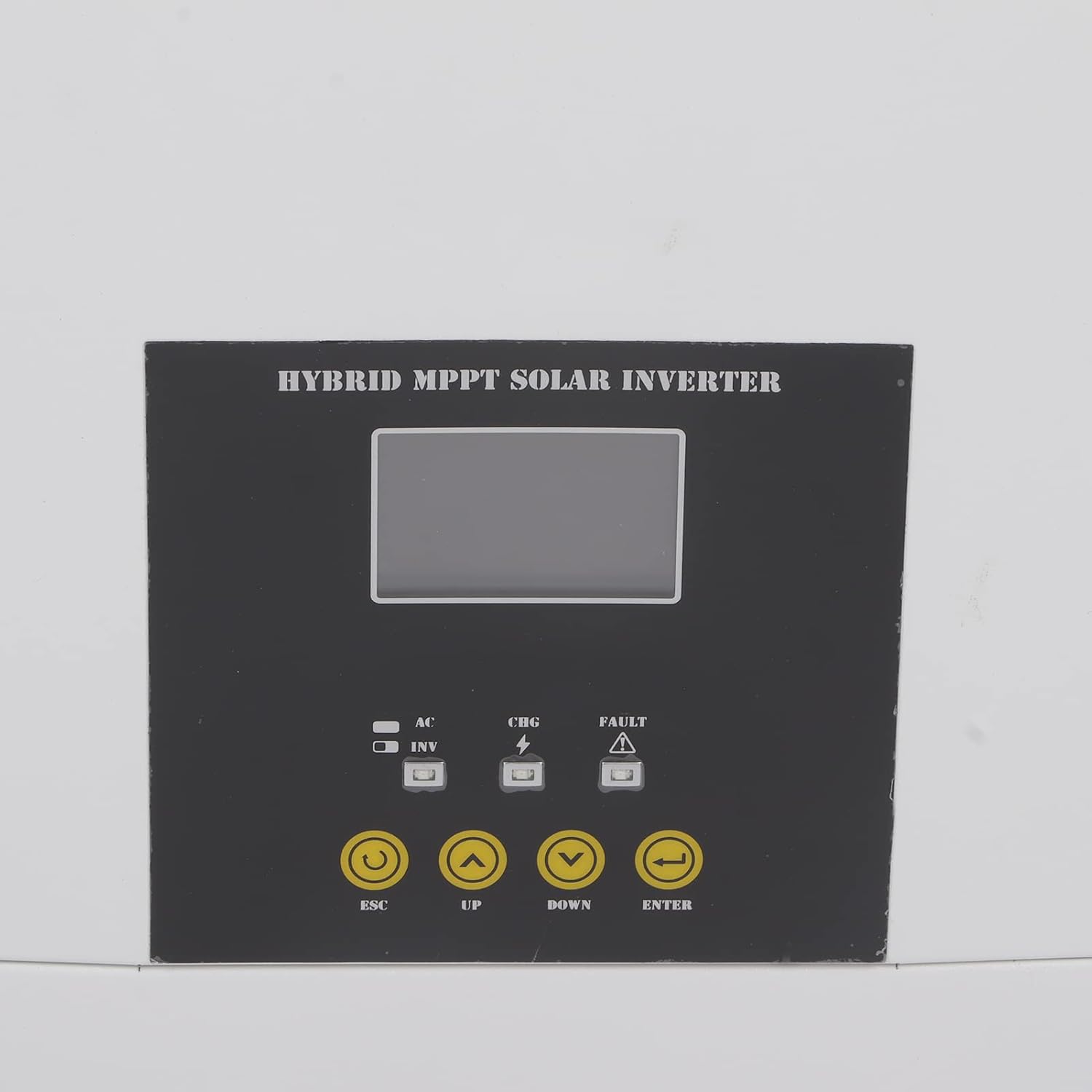
Un primer plano view of the inverter's control panel, featuring the LCD screen, LED indicators (AC/INV, CHG, FAULT), and operation buttons (ESC, UP, DOWN, ENTER) for system management.
3.2 modos de funcionamiento:
You can select from various charging and output modes to optimize energy usage:
- Modos de carga:
- Solo solares
- Prioridad de utilidad
- Solar Energy Priority
- Hybrid Utility Charging
- Modos de salida:
- Inverter (Battery/Solar)
- Utility (Bypass)
3.3 Remote Monitoring (WiFi):
The inverter supports WiFi remote monitoring, allowing you to view system data and adjust settings from a distance. Refer to the dedicated WiFi module instruction manual for setup and application details.

A detailed shot of the communication ports on the inverter, specifically showing the Ethernet (COMM PORT) and USB ports for data transfer and remote monitoring.
4. Mantenimiento
Regular maintenance ensures the longevity and optimal performance of your hybrid solar inverter.
- Limpieza: Limpie periódicamente el exterior del inversor con un paño suave y seco. Asegúrese de que las aberturas de ventilación estén libres de polvo y residuos para evitar el sobrecalentamiento.
- Verificación de conexión: Annually inspect all electrical connections for tightness and signs of corrosion. Loose connections can lead to power loss or overheating.
- Condiciones ambientales: Ensure the inverter is operating within its specified temperature range (-10-50℃) and in a well-ventilated area, free from excessive humidity or direct sunlight.
- Actualizaciones de firmware: Verifique el fabricante websitio para obtener actualizaciones de firmware disponibles para garantizar que su inversor tenga las últimas funciones y correcciones de errores.
5. Solución de problemas
Esta sección ofrece orientación sobre problemas comunes que podrían surgir. Para problemas complejos, contacte con el soporte técnico.
5.1 Problemas comunes y soluciones:
- Sin salida de potencia:
- Check if the inverter is powered on and all breakers are engaged.
- Verifique el volumen de la bateríatage está dentro del rango operativo.
- Check for any fault indicators on the LCD or LED display.
- Protección contra sobrecarga activada:
- Reduce the connected load. The inverter has overload protection to prevent damage.
- Restart the inverter after reducing the load.
- Indicador de falla encendido:
- Refer to the specific error code displayed on the LCD (if any) in the detailed instruction manual for diagnosis.
- Common faults include overvoltage, bajo volumentage, short circuit, or reverse polarity.
- WiFi Remote Monitoring Issues:
- Ensure the WiFi module is correctly installed and connected.
- Verifique su conexión de red y la configuración del enrutador.
- Verify the monitoring application is up to date.
6. Especificaciones técnicas
Detailed specifications for the SAKO Hybrid Solar Inverter.
| Especificación | Valor |
|---|---|
| Tipo de artículo | Inversor solar híbrido |
| Material | Hierro, ABS |
| Capacidad | 5.5 KVA, 5500 W |
| Color | Blanco y negro |
| Factor de potencia | 1.0 |
| Rango de temperatura de funcionamiento | -10-50 ℃ |
| Inverter Mode DC Input | 48 V CC, 127 A |
| Inverter Mode AC Output | 230 VCA, 50/60 Hz, 23.9 A |
| Solar Charger Mode MPPT Rated Current | 100 A |
| Solar Charger Mode Rated Power | 6000 W |
| Solar Charger Mode Maximum Solar Input Current | 18 A |
| Solar Charger Mode Rated Operating Voltage | 240 V CC |
| Solar Charger Mode Maximum Solar Voltage (VoC) | 500 V CC |
| Solar Charger Mode MPPT Voltage Rango | 120-450 V DC |
| Fecha de primera disponibilidad en Amazon.com.be | 2 de noviembre de 2022 |
| Fabricante | tefola |
| Referencia del fabricante | Tefolai9goq3mhkp |
| Disponibilidad de repuestos | Información no disponible sobre repuestos |
| Usos recomendados para el producto | Hogar |
| Fuente de poder | Energía solar |
| Número total de tomas de corriente | 1 |
| Vol de entradatage | 48 voltios |
| Potencia de salida | 500 vatios |
| Eficiencia | 99.9% |
| Vol de salidatage | 240 voltios |
7. Garantía y soporte
For warranty information, technical support, or service inquiries, please contact the manufacturer, Tefola, or your authorized dealer. Keep your purchase receipt as proof of purchase.
The included instruction manual provides more detailed information on specific error codes and advanced settings.