
RAZEAK X44-BKWT-RS
Manual de usuario del teclado mecánico portátil RAZEAK 60%
Model: X44-BKWT-RS
Producto terminadoview
The RAZEAK Portable 60% Mechanical Keyboard (Model: X44-BKWT-RS) is a compact, 61-key mini mechanical keyboard designed for PC and Mac users, including gamers. It features switchable colorful backlighting and Red switches for a responsive typing experience.
- Diseño compacto del 60 %: Space-saving 61-key design with full functionality via key combinations.
- Cambio de tecla N: Independent mechanical Red switches ensure long-lasting and stable operation with anti-ghosting for all 61 keys.
- Dual Colour Translucent Keycaps: Injection-moulded keycaps provide durability and enhanced light transmission for visibility in low-light conditions.
- Colorful Backlighting: Multi-colored LED backlighting with 19 distinct modes to customize your experience.
- Humanistic Design: Features flat and 2-angle height adjustment for ergonomic comfort and a detachable USB-C cable for universal compatibility and portability.

Image: The RAZEAK Portable 60% Mechanical Keyboard, showcasing its compact design and colorful backlighting.
Guía de configuración
Follow these steps to set up your RAZEAK Portable 60% Mechanical Keyboard:
- Desembalaje del teclado: Retire con cuidado el teclado y el cable USB-C incluido de su embalaje.
- Conecte el cable USB-C: Insert the smaller USB-C end of the cable into the USB-C port located on the back of the keyboard.
- Conectar a la computadora: Plug the standard USB-A end of the cable into an available USB port on your Windows PC or Mac.
- Instalación del controlador (automática): El teclado es plug-and-play. El sistema operativo debería detectar e instalar automáticamente los controladores necesarios. Normalmente no se requiere la instalación manual de controladores.
- Ajustar altura: Flip out the two adjustable feet on the underside of the keyboard to set your preferred typing angle.

Image: The RAZEAK keyboard connected to a computer via its USB-C cable, ready for use.

Imagen: Primer plano view of the detachable USB-C port on the RAZEAK keyboard, highlighting its connectivity.
Instrucciones de funcionamiento
The RAZEAK 60% keyboard utilizes a compact layout, requiring the use of the Function (Fn) key for accessing secondary functions and multimedia controls.
Funciones y combinaciones de teclas
Many keys have dual functions, accessible by pressing the Fn key in combination with another key. Refer to the diagram below for common combinations.

Image: Diagram illustrating the compound function key switches and combinations on the RAZEAK keyboard.
- Fn + F1-F12: Access various multimedia and system functions (e.g., volume control, media playback, brightness).
- Shift + Sub-Function: Some keys have a third function accessible with Shift. For example, Shift + ! for '!' symbol.
- Fn + Teclas de flecha: To unlock or cancel arrow keys, press Fn + the desired arrow key. This allows the standard WASD keys to function as arrow keys when needed.
Control de retroiluminación
The keyboard features multi-colored LED backlighting with 19 different modes. Use the following combinations to control the lighting:
- Fn + \ |: Cycle through the 19 different backlighting modes.
- Fn + [{ or ]}: Ajusta el brillo de la retroiluminación.
- Fn + ;: or '": Adjust backlight speed/direction (depending on mode).

Image: Multiple RAZEAK keyboards displaying different colorful backlighting effects.
N-Key Rollover and Switches
The keyboard supports N-Key Rollover, meaning all 61 keys can be pressed simultaneously and registered correctly without ghosting. It is equipped with durable Red mechanical switches, known for their linear feel and quiet operation.
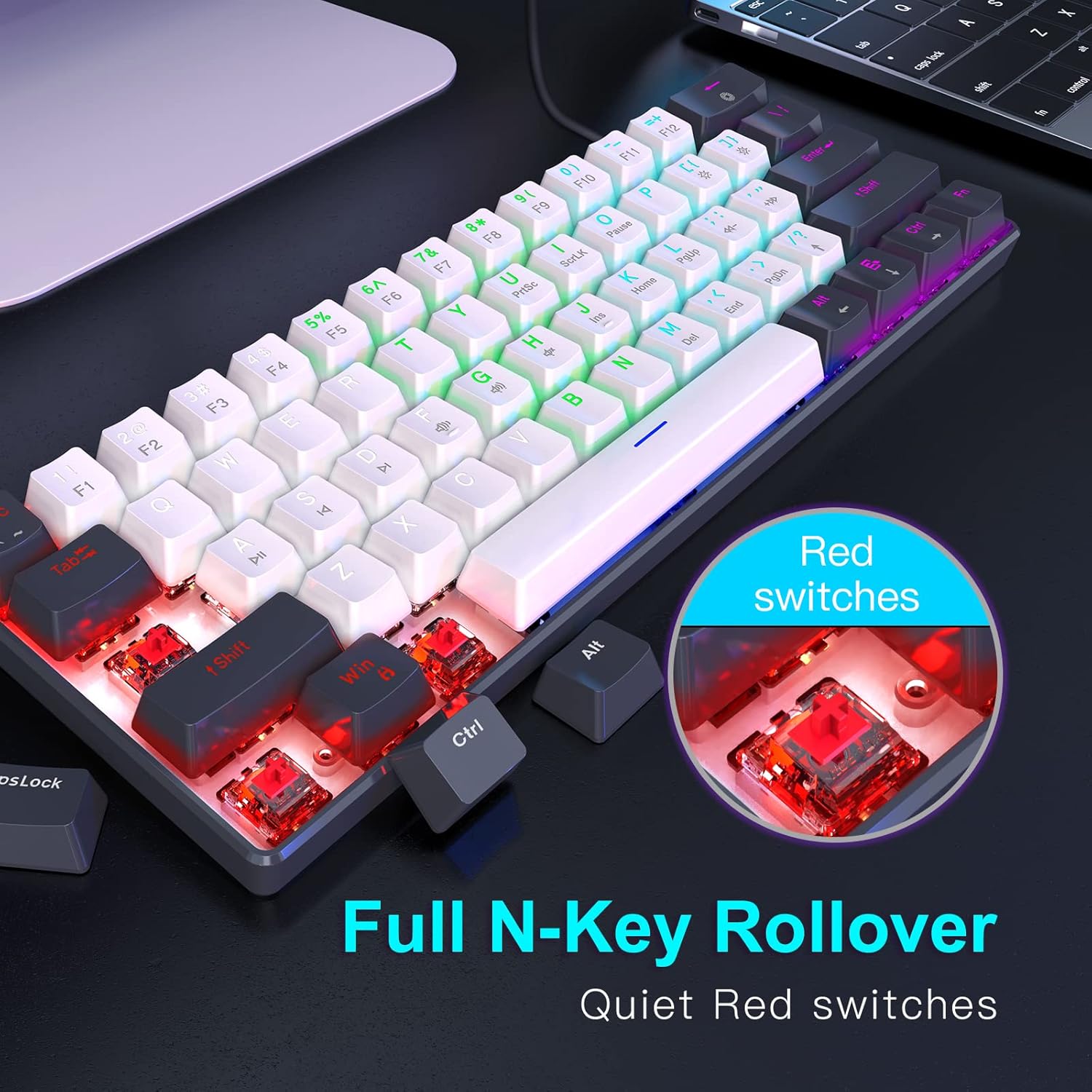
Imagen: Primer plano view of the Red mechanical switches and an illustration of the N-Key Rollover feature.
Mantenimiento
Un mantenimiento adecuado garantiza la longevidad y el rendimiento óptimo de su teclado.
- Limpieza de teclas: Utilice un paño suave y seco.amp cloth with a mild cleaning solution to wipe down the keycaps. Avoid excessive moisture.
- Limpieza entre teclas: Use compressed air to remove dust, crumbs, and debris from between the keycaps. A small brush can also be used.
- Limpieza general: Wipe the keyboard's body with a dry or slightly damp cloth. Do not submerge the keyboard in water or use harsh chemicals.
- Cuidado de cables: Evite curvas o torceduras pronunciadas en el cable USB-C para evitar daños.
Solución de problemas
If you encounter issues with your RAZEAK keyboard, refer to the following common troubleshooting steps:
| Problema | Posible causa | Solución |
|---|---|---|
| Keyboard not responding / Keys not registering | Loose cable connection, USB port issue, temporary software glitch. |
|
| La retroiluminación no funciona o está bloqueada | Backlight turned off, mode selected has no animation, software conflict. |
|
| Teclas específicas que no funcionan | Escombros debajo de la tecla, mal funcionamiento del interruptor. |
|
Presupuesto
Detailed specifications for the RAZEAK Portable 60% Mechanical Keyboard:
- Número de modelo: X44-BKWT-RS
- Diseño del teclado: 60% (61 teclas)
- Tipo de interruptor: Interruptores mecánicos rojos
- Conectividad: USB-C con cable (cable desmontable)
- Dispositivos compatibles: Windows PCs, Mac
- Contraluz: Multi-colored LED with 19 modes
- Tipo de tecla: Dual Colour Injection Moulded Translucent Keycaps
- Cambio de tecla N: Supported (61 keys anti-ghosting)
- Dimensiones del producto: 11.5 x 4.02 x 1.57 pulgadas (29.21 x 10.21 x 3.99 cm)
- Peso del artículo: 1.34 libras (0.61 kg)
- Fabricante: WINSTAR TECHNOLOGY INDUSTRIAL LIMITED
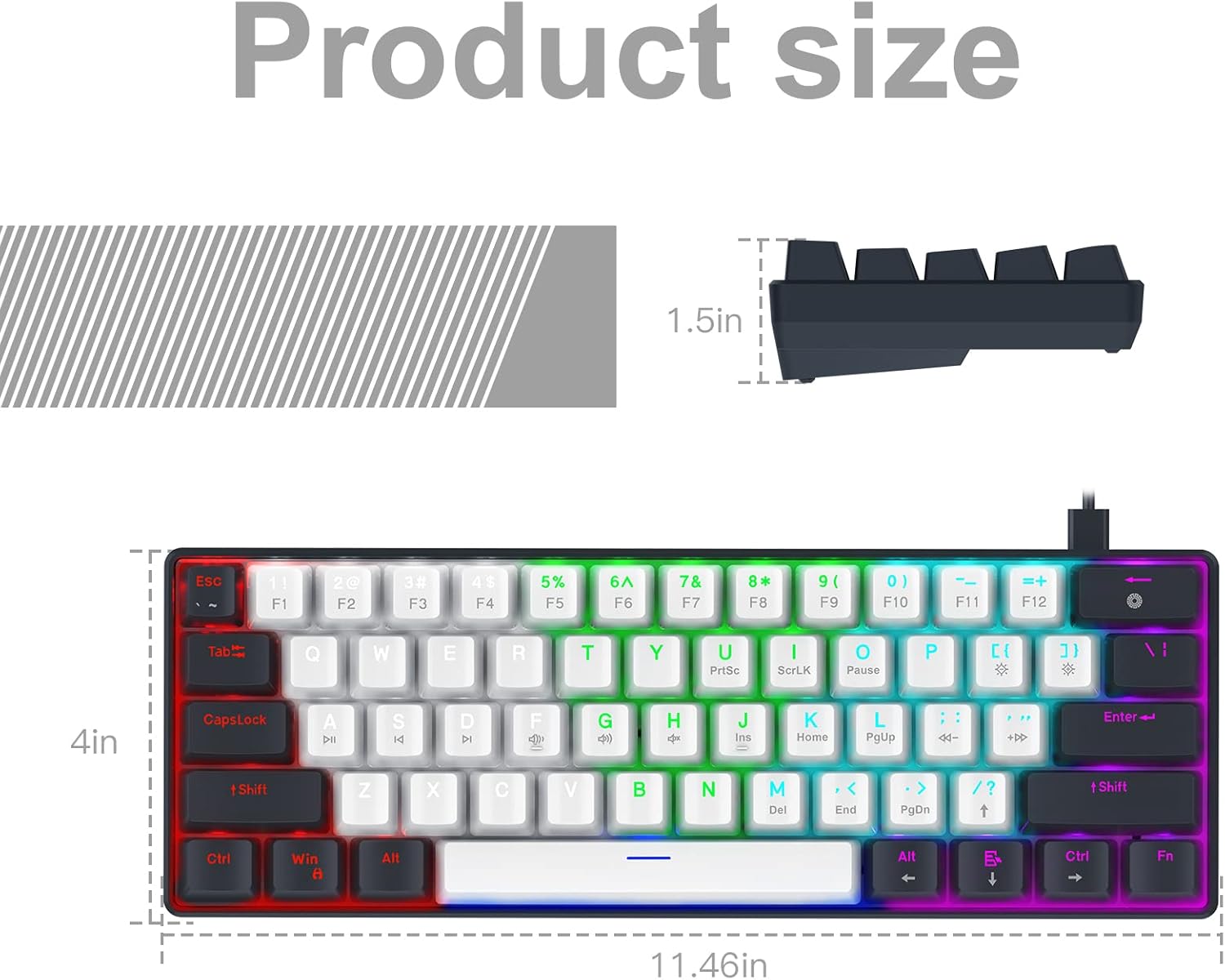
Image: Diagram illustrating the precise dimensions of the RAZEAK Portable 60% Mechanical Keyboard.
Garantía y soporte
For warranty information and customer support, please refer to the documentation included with your product or contact the seller directly. While specific warranty terms are not detailed in this manual, the product typically includes a return/replacement policy for a period of 30 days from purchase.
You can also visit the official RAZEAK store on Amazon for more information and support resources: RAZEAK Store
For direct inquiries, please contact the seller, Razeak-US, through the Amazon platform.
Ask a question about this manual
Ask about setup, troubleshooting, compatibility, parts, safety, or missing instructions. Manuals+ will review the question and use this page’s manual context to help answer it.