Introducción
This manual provides comprehensive instructions for the Thomson ROC4301 4-in-1 Web-Programmable Universal Remote Control. This device allows you to control up to four different infrared-controlled electronic devices, such as TVs, DVD players, Blu-ray players, Set-Top Boxes (STB), VCRs, and audio equipment, using a single remote.
The ROC4301 features web-based programming for easy setup and a continuously updated code database to ensure compatibility with a wide range of brands and models.
Características principales
- Controls up to 4 devices via one infrared remote control.
- Fast and easy programming via a web-based database accessible on PC, laptop, or tablet.
- Data transfer to the remote control is facilitated by a 3.5 mm jack cable (30 cm).
- Up to 4 devices can be programmed simultaneously.
- Compatible with TV, DVD, Blu-ray player, STB, VCR, and audio equipment.
- Continuously updated code database available online.
Configuración y Programación
The Thomson ROC4301 remote control is programmed using an online database, ensuring access to the latest device codes. This method requires a computer (PC, laptop, or tablet) with internet access and the included 3.5 mm jack cable.
Pasos para Web-Based Programming:
- Prepare el control remoto: Ensure fresh AAA batteries are installed in the remote control. (See "Maintenance" section for battery installation).
- Access the Programming Websitio: Abrir una web browser on your PC, laptop, or tablet and navigate to the official Thomson remote control programming website. (Refer to the product packaging or manufacturer's websitio para la información exacta URL).
- Conectar el control remoto: Plug one end of the supplied 3.5 mm jack cable into the designated port on the remote control and the other end into the headphone jack of your computer.
- Seleccionar dispositivos: On the programming website, follow the on-screen instructions to select the types of devices (e.g., TV, DVD, STB) and their respective brands and models you wish to control. The database will provide the necessary codes.
- Transfer Codes: Once you have selected your devices, initiate the data transfer process on the website. The codes will be transmitted through the audio jack to your remote control. Ensure your computer's volume is set to a suitable level as instructed by the websitio.
- Pruebe el control remoto: After the transfer is complete, disconnect the remote control from your computer. Test the remote with each programmed device to ensure all functions work correctly. If a device does not respond or functions are incorrect, repeat the programming process, trying alternative codes if available on the websitio.
El web database is continuously updated, providing access to codes for new devices. You can program up to four devices simultaneously.
Operación del control remoto
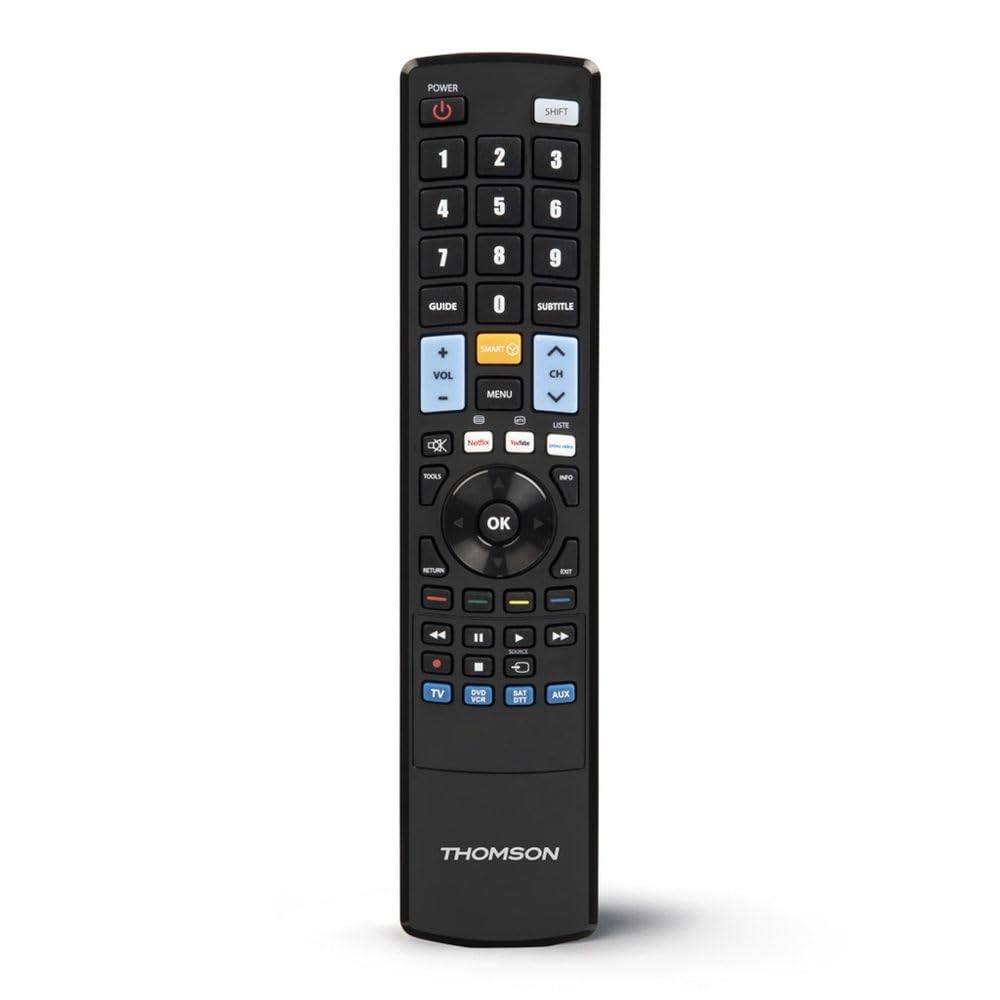
Once programmed, the Thomson ROC4301 functions like a standard remote control for your selected devices. It features 48 buttons designed for intuitive control.
Operación general:
- Selección de dispositivo: Use the dedicated device buttons (e.g., TV, DVD, STB, AUDIO) at the top of the remote to switch between controlling different devices. The remote will typically indicate which device is currently selected (e.g., via an LED indicator).
- Encendido/apagado: Presione el FUERZA Botón para encender o apagar el dispositivo seleccionado.
- Canal/Volumen: Utilice el CANAL +/- y VOLUMEN +/- buttons to adjust channels and volume respectively.
- Navegación: El pad direccional (arriba, abajo, izquierda, derecha) y OK button are used for menu navigation on most devices.
- Teclado numérico: Utilice los botones numéricos (0-9) para ingresar directamente números de canal u otras entradas numéricas.
- Botones de función: Other buttons such as Play, Pause, Stop, Fast Forward, Rewind, Menu, Exit, and colored function buttons will perform their corresponding actions on the selected device.
Ensure there is a clear line of sight between the remote control and the infrared receiver of the device you are operating. The maximum effective range is approximately 10 meters.
Mantenimiento
Instalación y reemplazo de la batería:
The Thomson ROC4301 remote control requires two AAA batteries (included). When the remote's performance degrades or it stops responding, it's time to replace the batteries.
- Ubique la tapa del compartimiento de la batería en la parte posterior del control remoto.
- Deslice la cubierta hacia abajo o presione el pestillo y levante para abrir el compartimiento.
- Remove the old batteries, if any.
- Insert two new AAA batteries, ensuring the positive (+) and negative (-) terminals match the markings inside the compartment.
- Vuelva a colocar la tapa del compartimiento de la batería hasta que encaje firmemente en su lugar.
Importante: Always dispose of used batteries responsibly according to local regulations. Do not mix old and new batteries, or different types of batteries.
Limpieza:
Para limpiar el control remoto, utilice un paño suave y seco. Para la suciedad difícil, frote ligeramente.ampEnjuague el paño con agua. No utilice limpiadores abrasivos, disolventes ni alcohol, ya que pueden dañar la superficie o los componentes internos del control remoto.
Solución de problemas
If you encounter issues with your Thomson ROC4301 universal remote control, try the following troubleshooting steps:
- El control remoto no responde:
- Check the batteries. Ensure they are correctly inserted and have sufficient charge. Replace them if necessary.
- Asegúrese de que haya una línea de visión despejada entre el emisor de infrarrojos del control remoto y el receptor de infrarrojos del dispositivo. Las obstrucciones pueden bloquear la señal.
- Make sure you have selected the correct device mode (e.g., TV, DVD) on the remote.
- El dispositivo no responde después de la programación:
- Re-program the remote for that specific device. The web database often provides multiple codes for a single brand/model. Try the next available code if the first one doesn't work.
- Ensure the 3.5 mm jack cable connection was secure and the computer's volume was adequate during programming.
- Verify that the device you are trying to control is indeed an infrared-controlled device.
- Algunas funciones no funcionan:
- Even with the correct code, some advanced functions might not be fully supported by a universal remote.
- Try alternative codes for your device, as some codes might offer better functionality mapping.
- Programming Issues (e.g., data transfer failure):
- Comprueba tu conexión a Internet.
- Asegúrese de que los controladores de audio de su computadora estén actualizados.
- Temporarily disable any sound enhancements or equalizers on your computer that might interfere with the audio signal.
- Try using a different computer or web browser if problems persist.
If these steps do not resolve the issue, please refer to the "Support" section for further assistance.
Presupuesto
| Marca | Thomson |
| Nombre del modelo | ROC4301 Web-Programmable Universal Remote Control 4-in-1 |
| Número de modelo del artículo | 00132679 |
| Tecnología de conectividad | Infrarrojos (IR) |
| Número máximo de dispositivos compatibles | 4 |
| Dispositivos compatibles | TV, DVD, Blu-ray player, STB, VCR, Audio equipment |
| Tipo de controlador | Control de botones |
| Número de botones | 48 |
| Alcance máximo | 10 metros |
| Color | Negro |
| Baterías | 2 pilas AAA (incluidas) |
| Dimensiones del producto | 22.9 x 5.2 x 2.5 cm |
| Peso del artículo | 149.32 gramos |
| Fabricante | Thomson |
| País natal | Porcelana |
Información de garantía
The Thomson ROC4301 Universal Remote Control comes with a Garantía del fabricante de 2 años. Please retain your proof of purchase for warranty claims. For specific terms and conditions, refer to the warranty documentation included with your product or visit the official Thomson websitio.
Apoyo
For further assistance, updated device codes, or to access the web-based programming tool, please visit the official Thomson support webSitio. También puede encontrar preguntas frecuentes y recursos adicionales allí.
If you require technical support, please contact Thomson customer service through the channels provided on their official websitio.
Producto terminadoview