
Introducción
Gracias por la compraasing the Andoer D2 Handheld RGB LED Video Light Wand. This manual provides detailed instructions for the safe and effective use of your new light wand. Please read this manual thoroughly before operation and retain it for future reference.
Información de seguridad
- No exponga el dispositivo al agua ni a mucha humedad.
- Evite la exposición directa de los ojos a la fuente de luz.
- No desmonte ni modifique el dispositivo. Las reparaciones solo deben ser realizadas por personal autorizado.
- Mantener fuera del alcance de los niños.
- Utilice únicamente el cable de carga proporcionado o certificado.
- No operar en entornos con gases o líquidos inflamables.
Contenido del paquete
Por favor, revise el contenido del paquete al abrirlo. Si falta algún artículo o está dañado, contacte con su vendedor.
- Andoer D2 Handheld RGB LED Video Light Wand
- Cable de carga USB-C
- Manual de usuario (este documento)
Producto terminadoview
Familiarize yourself with the components and controls of the Andoer D2 light wand.
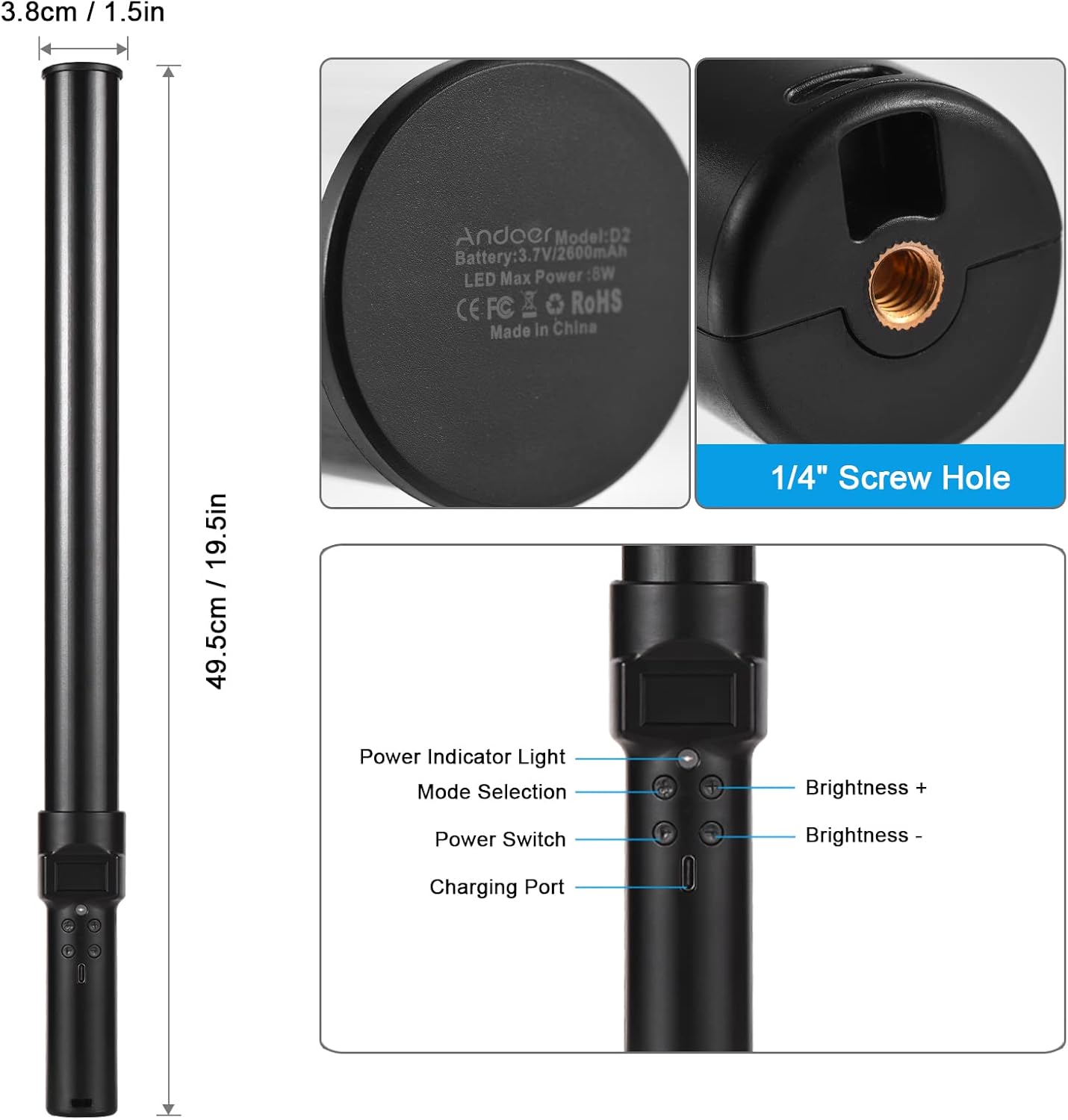
Imagen: Encimaview of the Andoer D2 light wand, showing its dimensions (approximately 49.5cm / 19.5in long and 3.8cm / 1.5in diameter) and control panel. The control panel includes a Power Indicator Light, Mode Selection button, Power Switch, Brightness + button, Brightness - button, and a Charging Port.
Funciones del panel de control:
- Interruptor de alimentación: Turns the light wand on or off.
- Selección de modo: Cycles through different lighting modes (e.g., CCT mode, RGB color effects).
- Brillo +: Increases the light brightness.
- Brillo -: Decreases the light brightness.
- Luz indicadora de poder: Shows the power status and charging status.
- Puerto de carga (Tipo C): Se utiliza para cargar la batería interna.
Configuración
Carga inicial:
Before first use, fully charge the light wand. Connect the provided USB Type-C cable to the charging port on the device and the other end to a USB power adapter (not included) or a computer USB port. The power indicator light will show charging status.

Imagen: Un primer plano view of the Type-C charging port, indicating where to connect the charging cable.

Imagen: The Andoer D2 light wand shown alongside its USB Type-C charging cable, illustrating the charging setup.
Opciones de montaje:
The Andoer D2 light wand can be used handheld for flexible lighting or mounted for stable positioning. It features a standard 1/4-inch screw hole at the bottom.

Imagen: Un detallado view of the 1/4-inch screw hole located at the base of the light wand, demonstrating how it can be attached to a light stand or tripod for stable use. Note that the light stand/tripod is sold separately.
- Uso portátil: Simply hold the light wand to direct light as needed.
- Tripod/Light Stand Mounting: Screw the 1/4-inch thread at the bottom of the light wand onto a compatible tripod or light stand. Ensure it is securely fastened before use.
Instrucciones de funcionamiento
Encendido/apagado:
Mantenga pulsado el Interruptor de encendido Botón para encender o apagar la varilla de luz.
Ajuste del brillo:
The light wand offers 12 levels of adjustable brightness. Use the Brillo + Botón para aumentar el brillo y el Brillo - para disminuirlo.

Imagen: Illustration of the 12 levels of adjustable brightness, demonstrating the range from dim to bright light output.
Ajuste de la temperatura del color (modo CCT):
In CCT mode, you can adjust the color temperature between 2500K (warm light), 5500K (neutral/daylight), and 8500K (cold light). Press the Selección de modo button to cycle to CCT mode, then use the Brillo + y Brillo - buttons to adjust the color temperature.

Imagen: Visual representation of the adjustable color temperatures, ranging from warm (2500K) to neutral (5500K) to cool (8500K) light.
Activating Colorful Light Effects (RGB Mode):
The light wand features 7 colorful light effects: red, green, blue, orange, purple, light blue, and red & blue flash. Press the Selección de modo button to cycle through these RGB effects. Brightness can still be adjusted in these modes using the Brillo + y Brillo - botones.
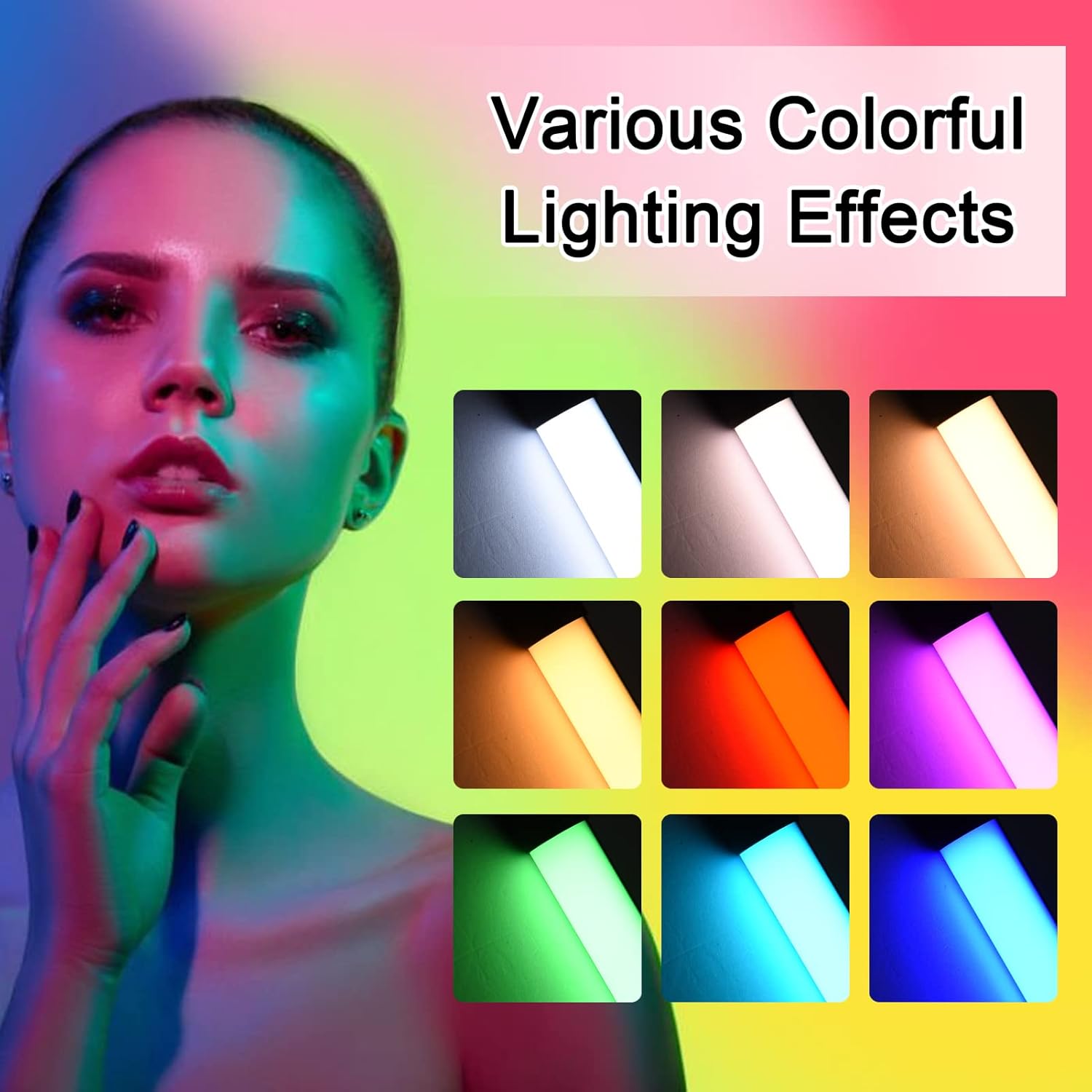
Imagen: A visual guide to the 7 colorful light effects available, showcasing the vibrant range of colors the light wand can produce.
Cargando
The Andoer D2 light wand has a built-in 2600mAh rechargeable lithium battery. When the battery is low, the power indicator light will signal. To charge:
- Connect the small end of the USB Type-C charging cable to the charging port on the light wand.
- Connect the standard USB end of the cable to a USB power source (e.g., wall adapter, power bank, computer USB port).
- The power indicator light will illuminate or change color to indicate charging. It will change again or turn off when fully charged.
A full charge provides approximately 2.5 hours of continuous use at maximum brightness.
Mantenimiento
- Clean the light wand with a soft, dry cloth. Do not use abrasive cleaners or solvents.
- Guarde el dispositivo en un lugar fresco y seco, alejado de la luz solar directa y de temperaturas extremas.
- If not used for extended periods, charge the battery every 3 months to maintain battery health.
Solución de problemas
| Problema | Posible causa | Solución |
|---|---|---|
| La luz no se enciende. | La batería está agotada. | Charge the light wand using the provided USB Type-C cable. |
| La luz es tenue o parpadea. | Batería baja. | Recarga el dispositivo. |
| Cannot change color or mode. | Pulsación incorrecta del botón o falla temporal del software. | Ensure you are pressing the Mode Selection button. Try turning the device off and on again. |
| El dispositivo no se carga. | Cable, adaptador de corriente o puerto de carga defectuosos. | Pruebe con otro cable USB tipo C o adaptador de corriente. Asegúrese de que el cable esté completamente insertado. |
Presupuesto
| Característica | Detalle |
|---|---|
| Modelo | D2 (SJI3033515989406YA) |
| Marca | Andoer |
| Temperatura de color | 2500K / 5500K / 8500K (Ajustable) |
| Niveles de brillo | 12 niveles |
| Efectos de luz de colores | 7 effects (Red, Green, Blue, Orange, Purple, Light Blue, Red & Blue Flash) |
| Capacidad de la batería | Batería de litio de 2600 mAh |
| Puerto de carga | USB tipo C |
| Duración de la batería (brillo máximo) | Aproximadamente 2.5 horas |
| Montaje | Orificio para tornillo de 1/4 de pulgada |
| Dimensiones | Approx. 49.5cm (19.5in) length, 3.8cm (1.5in) diameter |
Garantía y soporte
Andoer products are designed and manufactured to the highest quality standards. For warranty information or technical support, please refer to the warranty card included with your purchase or visit the official Andoer webSitio web. Conserve su comprobante de compra para reclamaciones de garantía.
Andoer Official Websitio: Tienda Andoer en Amazon