
Cecotec Conga 11090 Spin Revolution Hogar y lavado
Manual de usuario del robot aspirador Cecotec Conga 11090 Spin Revolution Home&Wash
Modelo: 08105
1. Introducción
Thank you for choosing the Cecotec Conga 11090 Spin Revolution Home&Wash Robot Vacuum Cleaner. This advanced robot is designed to provide comprehensive cleaning for your home, combining powerful vacuuming with effective mopping capabilities and an automatic self-emptying and mop-washing station. Please read this manual carefully before using the product to ensure proper operation, maintenance, and safety.
2. Instrucciones de seguridad importantes
Siga siempre las precauciones básicas de seguridad al utilizar aparatos eléctricos para reducir el riesgo de incendio, descarga eléctrica o lesiones.
- Lea todas las instrucciones antes de utilizar el aparato.
- No permita que los niños operen el robot. Supervise a los niños y a las mascotas cuando el robot esté en funcionamiento.
- Asegúrese de que la potencia voltage coincide con el voltage indicado en la etiqueta de clasificación.
- No utilice el robot sobre superficies mojadas o en zonas con agua estancada.
- Mantenga el cabello, la ropa suelta, los dedos y todas las partes del cuerpo lejos de las aberturas y las partes móviles.
- No recoja objetos grandes, objetos afilados o líquidos con el robot.
- Apague el robot y desenchufe la estación de carga antes de realizar cualquier mantenimiento o limpieza.
- Utilice únicamente accesorios y accesorios recomendados por el fabricante.
- Store the robot and charging station indoors in a cool, dry place.
- No utilice el robot si se ha caído, dañado, dejado al aire libre o ha caído al agua.
3. Contenido del paquete
Verifique que todos los componentes estén presentes en el paquete:
- 1 x Robot Aspirador
- 1 x cepillo lateral
- 2 x trapeadores giratorios
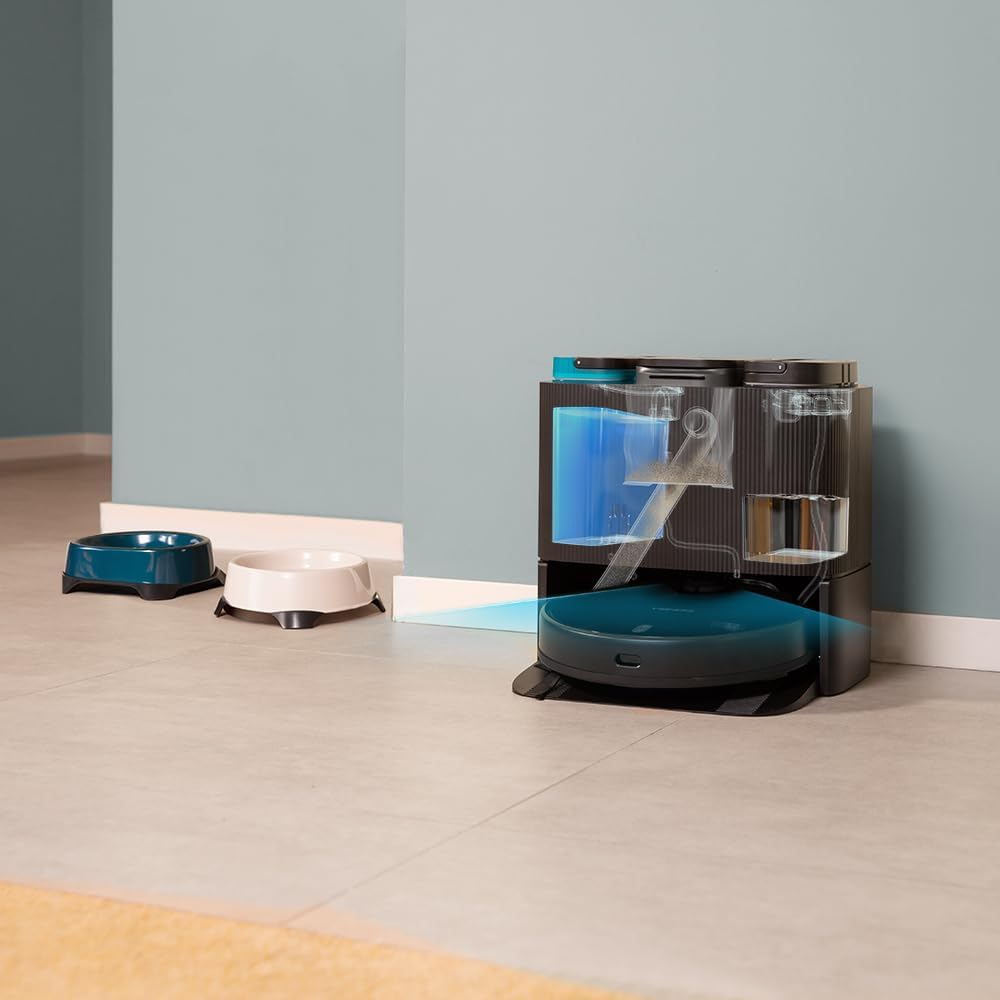
- 1 x Self-emptying Base with 2 Tanks (1 x Clean Water Tank, 1 x Dirty Water Tank)
- 1 x bolsa para el polvo
- 1 x cable de alimentación
- 1 x Cepillo autolimpiante
- 1 x Cepillo multifunción
- 1 x Manual de instrucciones

4. Producto terminadoview
The Conga 11090 Spin Revolution Home&Wash is an intelligent cleaning solution featuring advanced navigation and comprehensive cleaning capabilities.
Aspiradora Robot 4.1
- Navegación inteligente: Equipped with iTech Laser Eye technology for precise mapping and obstacle avoidance.
- Potente succión: Delivers up to 5000 Pa suction power for effective dirt and debris removal.
- Spin Revolution Mopping: Features two rotating mops for deep scrubbing and floor cleaning.
- Batería de larga duración: Provides up to 140 minutes of cleaning autonomy.


4.2 Self-Emptying and Mop-Washing Station
- Recolección automática de polvo: The robot automatically empties its dustbin into a 2L dust bag in the station.
- Lavado automático de trapeadores: The station cleans the robot's mopping pads with clean water from its 2.8L tank and collects dirty water in a 2.4L tank.
- Diseño conveniente: Reduces manual intervention for a truly hands-free cleaning experience.


5. Configuración
5.1 Desembalaje y colocación
- Retire con cuidado todos los componentes del embalaje.
- Choose a suitable location for the self-emptying station. Ensure there is at least 1.5 meters of clear space in front of the station and 0.5 meters on either side.
- Plug the power cable into the station and connect it to a power outlet.
5.2 Carga inicial
Place the robot onto the charging contacts of the self-emptying station. Ensure the robot is properly aligned. The robot will begin charging automatically. For first use, it is recommended to fully charge the robot before operation.
5.3 Instalación y conexión de la aplicación
Download the "CECOTEC" app from your smartphone's app store (iOS or Android). Follow the in-app instructions to connect your robot to your home Wi-Fi network (2.4 GHz) and Bluetooth. The app provides enhanced control and mapping features.

6. Operar el robot
6.1 Inicio de un ciclo de limpieza
- A través del botón Robot: Press the power button on the robot to start a general cleaning cycle.
- A través de la aplicación: Open the CECOTEC app. You can select various cleaning modes such as "Clean All", "Spot Clean", "Zone Clean", or schedule cleanings.

6.2 Cartografía y navegación
The robot uses its iTech Laser Eye to create a detailed map of your home during its first cleaning cycle. This map can be viewed and customized in the app. You can set virtual walls, restricted zones, and specific cleaning areas.

6.3 Automatic Self-Maintenance
During and after cleaning cycles, the robot will automatically return to its station to empty its dustbin and wash its mopping pads. The frequency of these actions can be configured in the app.
7. Mantenimiento
El mantenimiento regular garantiza un rendimiento óptimo y prolonga la vida útil de su robot aspirador.
7.1 Limpieza del robot
- Cepillo principal: Remove the main brush and clean it regularly using the provided self-cleaning brush to remove tangled hair and debris.
- Cepillo lateral: Check and clean the side brush for any tangled hair or debris. Replace if worn.
- Almohadillas para fregar: Although the station washes them, it is recommended to manually remove and rinse the mopping pads periodically.
- Sensores: Wipe all sensors (cliff sensors, laser sensor) with a clean, dry cloth to ensure proper navigation.

7.2 Maintaining the Self-Emptying Station
- Bolsa para polvo: Replace the dust bag in the station when it is full. The app will notify you.
- Tanques de agua: Regularly empty the dirty water tank and refill the clean water tank. Clean both tanks to prevent mold or odor buildup.
- Washing Tray: Clean the washing tray where the mops are cleaned to remove any residue.

8. Solución de problemas
Si tiene problemas con su robot, consulte los siguientes problemas y soluciones comunes:
| Problema | Posible causa | Solución |
|---|---|---|
| El robot no enciende. | Low battery; power cable not connected. | Place robot on charging station; ensure power cable is securely connected. |
| El robot no puede encontrar la estación de carga. | Station is blocked; robot is too far. | Ensure clear space around station; manually place robot closer to station. |
| Bajo rendimiento de limpieza. | Brushes tangled; dustbin full; mops dirty. | Clean main/side brushes; empty dustbin/replace bag; clean mopping pads. |
| El robot se atasca con frecuencia. | Obstacles; dark surfaces; dirty sensors. | Clear obstacles; use virtual walls in app; clean sensors. |
| Problemas de conexión de la aplicación. | Incorrect Wi-Fi password; 5GHz network; Bluetooth off. | Verify Wi-Fi password; ensure 2.4GHz network; enable Bluetooth; restart robot and router. |
9. Especificaciones
| Característica | Detalle |
|---|---|
| Marca | Cecotec |
| Nombre del modelo | Conga 11090 Spin Revolution Hogar y Lavado |
| Número de modelo | 08105 |
| Color | Negro |
| Dimensiones del producto (robot) | 34.3 x 34.5 x 10.8 cm |
| Peso del producto | 11.25 kilogramos |
| Volumentage | 120 voltios |
| Nivel de ruido | 75 dB |
| Tiempo de funcionamiento | Hasta 2 horas y 20 minutos (140 minutos) |
| Capacidad de la bolsa de polvo (estación) | 2 litros |
| Clean Water Tank Capacity (Station) | 2.8 litros |
| Dirty Water Tank Capacity (Station) | 2.4 litros |
| Características especiales | Wireless, Automatic Shut-off, iTech Laser Eye Navigation |
| Dispositivos compatibles | Smartphones (via CECOTEC App) |
10. Garantía y soporte
Cecotec products are manufactured to high-quality standards. For warranty information, please refer to the warranty card included in your product packaging or visit the official Cecotec website. For technical support, troubleshooting assistance, or spare parts, please contact Cecotec customer service or the retailer from whom you purchased the product.
Soporte en línea: Visita el Tienda de la marca Cecotec en Amazon para obtener información adicional sobre el producto y recursos de soporte.
Ask a question about this manual
Ask about setup, troubleshooting, compatibility, parts, safety, or missing instructions. Manuals+ will review the question and use this page’s manual context to help answer it.