
1. Introducción
Thank you for choosing the Vetroo 1000W Black Power Supply. This power supply unit (PSU) is designed to provide stable and efficient power to your personal computer, especially for high-performance gaming and workstation builds. It features 80 Plus Gold certification for energy efficiency, full modular cabling for easy management, and is compliant with the latest ATX 3.1 and PCIe 5.1 standards. This manual provides essential information for safe installation, operation, and maintenance of your PSU.
2. Información de seguridad
Please read and understand all safety warnings before installing or operating this product. Failure to follow these instructions may result in electric shock, fire, or serious injury.
- Alto voltage: La fuente de alimentación contiene alto volumentagComponentes electrónicos. No abra la fuente de alimentación.asing. No hay piezas que el usuario pueda reparar en el interior.
- Instalación profesional: Installation should be performed by qualified personnel. Incorrect installation can damage your system or the PSU.
- Desconexión de energía: Always disconnect the AC power cord from the wall outlet before installing, removing, or cleaning the PSU or any other components in your computer.
- Toma de tierra: Ensure the PSU is properly grounded. Use only the provided power cord.
- Ambiente: Operate the PSU in a dry, well-ventilated environment. Avoid exposure to moisture, extreme temperatures, or direct sunlight.
- Ventilación: Do not block the ventilation openings of the PSU. Ensure adequate airflow around the unit.
- Sistema de organización de cables: Ensure all cables are securely connected and routed to prevent interference with cooling fans or other components.
3. Contenido del paquete
Verifique que todos los artículos estén presentes en su paquete:
- Vetroo 1000W Black Power Supply Unit
- Modular Cable Set (including 24-pin ATX, 8-pin CPU, PCIe 5.1 12+4-pin, PCIe 6+2-pin, SATA, Molex, FDD cables)
- Cable de alimentación de CA
- Tornillos de montaje
- Bridas para cables/Correas de velcro
- Manual de usuario (este documento)


4. Características del producto
- Certificación 80 Plus Gold: Ensures high energy efficiency, reducing power consumption and heat generation.
- Fully Compliant with ATX 3.1 Specifications: Designed to meet the latest power delivery standards for modern PC components.
- Compatible con PCIe Gen 5.1: Equipped with dedicated 12+4-pin connectors for the latest PCIe 5.1 graphics cards, offering up to 600W power delivery. Also backwards compatible with PCIe 4.0 and 3.0.
- Premium 105° C Capacitors: Utilizes high-quality Japanese capacitors for enhanced stability, reliability, and extended lifespan.
- Full Modular Design: Allows users to connect only the necessary cables, improving airflow and simplifying cable management within the PC case.
- Eco Mode with 120mm FDB Fan: Features a fluid dynamic bearing (FDB) fan that operates silently under low loads, with an Eco Mode switch to stop the fan entirely when power consumption is below 50%.
- Tamaño compacto: Designed to fit comfortably in various PC chassis types.
- Protección integral: Incluye Over Voltage Protection (OVP), Over Current Protection (OCP), Over Power Protection (OPP), Short Circuit Protection (SCP), Under Voltage Protection (UVP), and Over Temperature Protection (OTP).
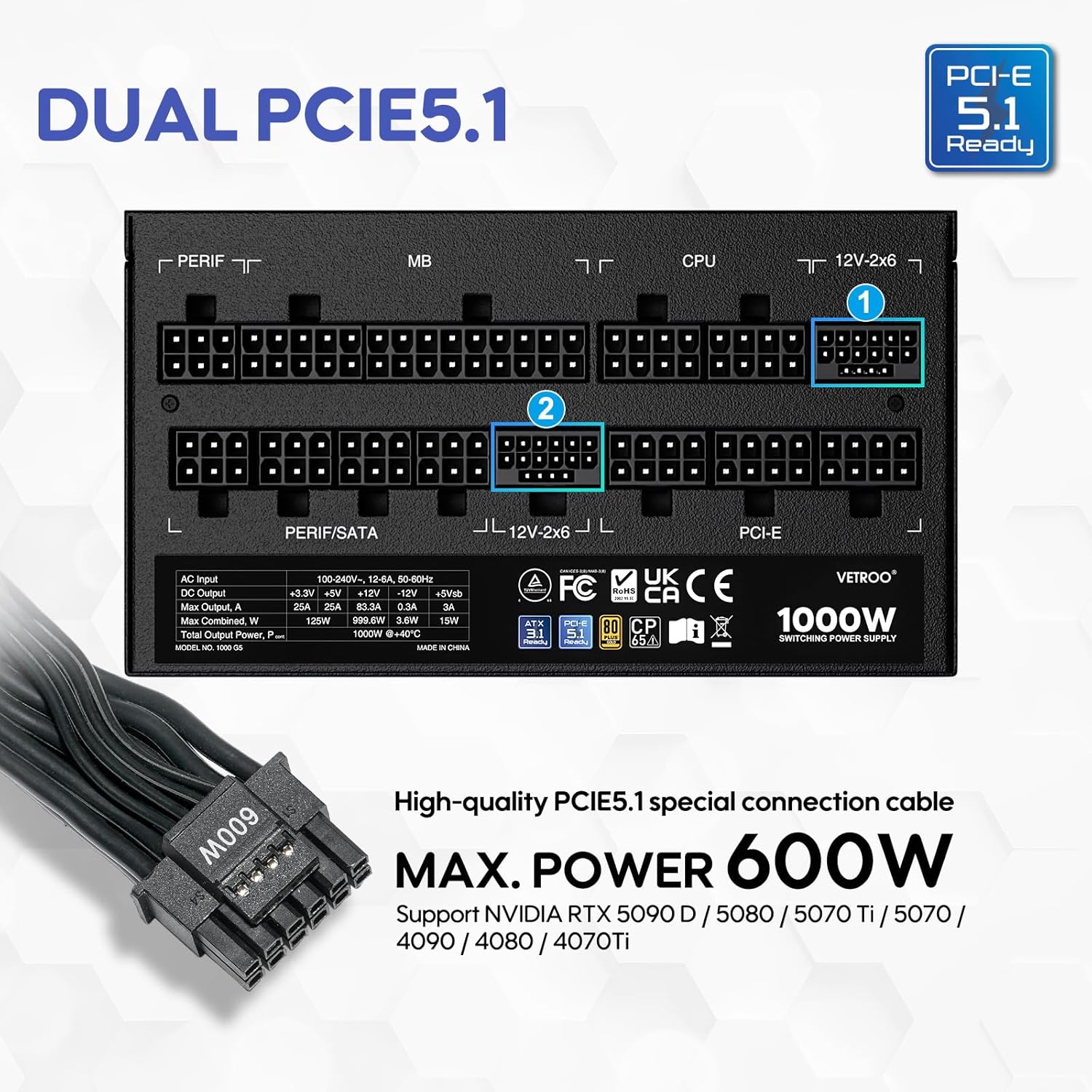

5. Especificaciones
| Característica | Detalle |
|---|---|
| Nombre del modelo | 1000G5 |
| Salida Wattage | 1000 vatios |
| Factor de forma | ATX |
| Diseño de fuente de alimentación | Modular completo |
| Certificación de Eficiencia | 80 Plus Oro |
| Estándar ATX | Listo para ATX 3.1 |
| Estándar PCIe | PCIe 5.1 Ready (Dual) |
| Método de enfriamiento | Aire (ventilador FDB de 120 mm) |
| Dimensiones del producto (L x An x Al) | 5.9 x 5.5 x 3.4 pulgadas |
| Peso del artículo | 5.83 libras |
| Dispositivos compatibles | Ordenador personal |
| Tipo de conector | ATX & PCIE |

6. Configuración e instalación
Follow these steps to install your Vetroo 1000W Power Supply:
- Prepare su sistema: Asegúrese de que su computadora esté completamente apagada y desenchufada del tomacorriente. Abra la caja de su PC para acceder al área de montaje de la fuente de alimentación.
- Retire la fuente de alimentación antigua (si corresponde): Desconecte todos los cables de su fuente de alimentación anterior y retírela del chasis.
- Monte la nueva fuente de alimentación: Carefully slide the Vetroo 1000W PSU into the designated power supply bay in your PC case. Secure it with the provided mounting screws.
- Conectar cables modulares: Identify the necessary cables for your motherboard, CPU, graphics card(s), and storage devices. Connect these cables to the corresponding ports on the PSU first, then route them to your components.
- Placa madre: Conecte el cable ATX de 24 pines a su placa base.
- UPC: Connect the 8-pin (or 4+4-pin) CPU power cable(s) to your motherboard.
- Tarjeta(s) gráfica(s): For modern GPUs, use the PCIe 5.1 12+4-pin cable. For older or additional GPUs, use the PCIe 6+2-pin cables.
- Storage/Peripherals: Conecte cables de alimentación SATA a SSD/HDD y cables Molex a otros periféricos según sea necesario.
- Sistema de organización de cables: Use the included cable ties or Velcro straps to organize cables, ensuring optimal airflow and a tidy build.
- Conexiones finales: Close your PC case. Connect the AC power cord to the PSU and then to a wall outlet or surge protector.

7. Instrucciones de funcionamiento
- Encendido/apagado: After all connections are secure, flip the main power switch on the back of the PSU to the 'ON' position. Your computer can now be powered on via its front panel button. To power off, shut down your computer normally, then flip the PSU switch to 'OFF' for complete power disconnection.
- Modo ecologico: The Vetroo 1000W PSU features an Eco Mode switch on the rear panel.
- Eco Mode ON: When the Eco Mode switch is in the 'ON' position, the PSU fan will remain off under low to moderate loads (typically below 50% load) for silent operation. The fan will automatically activate when the load increases or internal temperature rises.
- Eco Mode OFF: When the Eco Mode switch is in the 'OFF' position, the PSU fan will spin continuously regardless of the load, providing constant cooling.

8. Mantenimiento
Un mantenimiento adecuado garantiza la longevidad y el rendimiento óptimo de su fuente de alimentación:
- Limpieza de polvo: Periodically clean the PSU fan and ventilation grilles to prevent dust buildup, which can hinder cooling performance. Use compressed air to gently blow dust away. Always disconnect power before cleaning.
- Inspección de cables: Revise periódicamente todas las conexiones de cables modulares para asegurarse de que estén seguras y libres de daños.
- Condiciones ambientales: Maintain a clean, dry, and well-ventilated environment for your PC to prevent excessive heat and moisture exposure to the PSU.
9. Solución de problemas
If you encounter issues with your Vetroo 1000W Power Supply, try the following steps:
- Sin energía:
- Asegúrese de que el cable de alimentación de CA esté enchufado de forma segura tanto a la fuente de alimentación como al tomacorriente de pared.
- Verifique que el interruptor de encendido principal de la fuente de alimentación esté en la posición "ENCENDIDO".
- Check all modular cable connections, especially the 24-pin ATX and 8-pin CPU cables, to ensure they are fully seated.
- Pruebe el tomacorriente de pared con otro dispositivo para confirmar que tenga energía.
- Inestabilidad del sistema/apagados aleatorios:
- Asegúrese de que su fuente de alimentación funcionetage is sufficient for all your components, especially high-power GPUs.
- Verifique que haya una ventilación adecuada dentro de la carcasa de su PC para evitar el sobrecalentamiento.
- Verify that all PCIe power cables to your graphics card(s) are correctly connected.
- If Eco Mode is enabled, try disabling it to see if continuous fan operation resolves the issue.
- Ruidos inusuales:
- If you hear a fan noise, ensure the PSU fan is not obstructed by cables or dust.
- If a 'coil whine' noise is present, it is often harmless but can sometimes indicate a component under stress. Ensure your system is not drawing excessive power.
If problems persist after performing these checks, please contact Vetroo customer support for further assistance.
10. Garantía y soporte
The Vetroo 1000W Black Power Supply comes with a Garantía de 10 años a partir de la fecha de compra. Esta garantía cubre defectos de materiales y mano de obra en condiciones normales de uso.
La garantía no cubre:
- Daños causados por accidente, abuso, mal uso, inundación, incendio, terremoto u otras causas externas.
- Damage caused by operating the product outside the permitted or intended uses described by Vetroo.
- Damage caused by service (including upgrades and expansions) performed by anyone who is not a representative of Vetroo.
- Products or parts that have been modified to alter functionality or capability without the written permission of Vetroo.
For warranty claims or technical support, please visit the official Vetroo website or contact their customer service department with your product model and proof of purchase.