
Producto terminadoview
The UMLIFE Ultra-mini USB Type C Lithium Battery Charger Board is designed for charging 3.7V lithium batteries. It features a compact design, a Type-C USB input for power supply, and integrated protection circuits to ensure safe charging. This module is compatible with most PD fast charging heads and provides a 1A linear charging current.
Las características principales incluyen:
- Ultra-small form factor for integration into various projects.
- USB Type-C input for convenient power connection.
- 1A high current linear charging for 3.7V lithium batteries.
- Integrated protection circuit for over-voltage, protección contra sobredescarga y sobrecorriente.
- LED indicators for charge status.
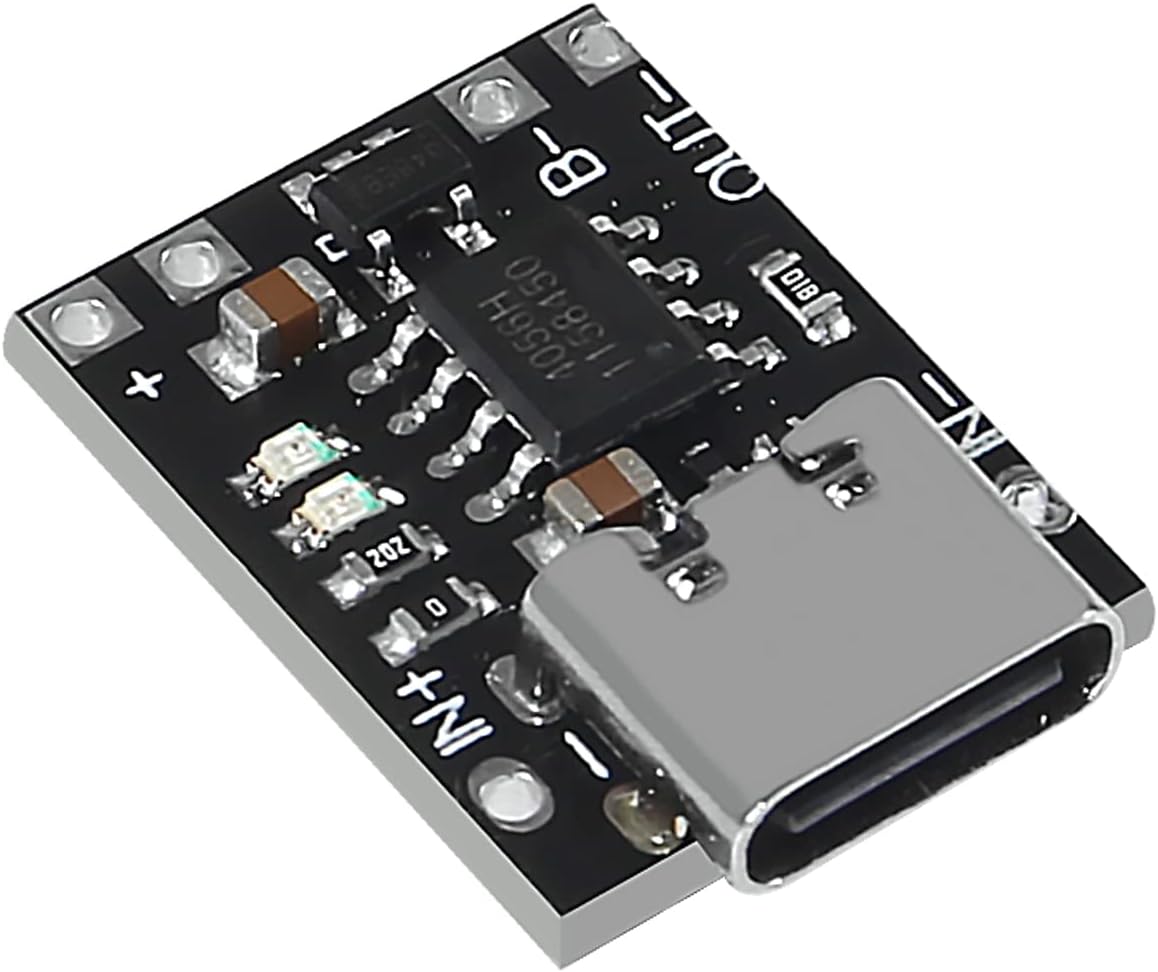
Imagen: En ángulo view of the UMLIFE Ultra-mini USB Type C Lithium Battery Charger Board. This image highlights the compact size and the Type-C USB input port, along with the various electronic components on the board.
Instrucciones de instalación
Follow these steps to set up your UMLIFE charger board:
- Identificar puntos de conexión: Locate the IN+, IN-, B+, B-, OUT+, and OUT- pads on the charger board.

Imagen: de arriba hacia abajo view of the charger board. This image clearly shows the input (IN+, IN-), battery (B+, B-), and output (OUT+, OUT-) connection points, which are crucial for proper wiring.
- Conecte la batería: Connect your 3.7V lithium battery to the B+ and B- pads. Ensure correct polarity: B+ to the positive terminal of the battery, and B- to the negative terminal.
- Conectar carga (opcional): If you intend to power a device directly from the charger board while charging, connect your load to the OUT+ and OUT- pads. Note that the "Battery+" and "Output+" terminals are electrically bonded together. The "Output-" and "Battery-" terminals are electrically isolated.
- Conecte la fuente de alimentación: Insert a USB Type-C cable into the board's Type-C port. Connect the other end of the cable to a 5V to 6V USB power source, such as a mobile phone charger or a compatible PD fast charging head.
- Activate Protection Board: For the first use, it is necessary to connect the power supply to activate the integrated protection board.
Instrucciones de funcionamiento
Once connected, the charger board will begin charging the lithium battery. Observe the LED indicators for charge status:
- Indicador de carga: A red LED typically indicates that the battery is currently charging.
- Charged Indicator: A green or blue LED typically indicates that the battery is fully charged.
Charging Cycle Behavior:
- The charging cycle automatically terminates when the charging current drops to 100mA after reaching the final float voltage (4.2 V).
- Si el volumen de la bateríatage drops below 4.05V (approximately 80% to 90% of capacity), the charging cycle will automatically restart.
- For batteries with voltage below 2.9V, the board initiates a pre-charge phase with a current of 100mA.
Características de protección:
The board includes an integrated protection circuit to safeguard the battery and the module:
- exceso de volumentagy Protección: Evita que la batería se cargue más allá de su volumen seguro.tage limite.
- Protección contra sobredescarga: Prevents the battery from discharging below 2.4V, extending battery life.
- Protección contra sobrecorriente: Limits the output current to 4A to prevent damage from excessive load.
Mantenimiento
To ensure the longevity and proper functioning of your charger board:
- Mantenga el tablero limpio y libre de polvo y residuos.
- Evite exponer el tablero a la humedad o temperaturas extremas.
- Asegúrese de que todas las conexiones estén seguras y adecuadamente aisladas para evitar cortocircuitos.
- No exceda el volumen de entrada especificado.tage range (5V-6V) or output current (1A charging, 4A protection limit).
Solución de problemas
| Problema | Posible causa | Solución |
|---|---|---|
| La batería no se carga / No hay indicación LED |
|
|
| Board gets excessively hot |
|
|
| Battery not reaching full charge |
|
|
Especificaciones técnicas
| Característica | Especificación |
|---|---|
| Vol de entradatage Rango | 5 V a 6 V |
| Vol de salidatage (Cargando) | 4.2 V |
| Corriente de carga | 1A (linear) |
| Over-discharge Protection Value | 2.4 V |
| Valor de protección contra sobrecorriente | 4A |
| Board Dimensions (L x W x H) | 18mm x 14mm x 5mm (Type-C port protrudes ~1.5mm) |
| Peso | Approximately 0.528 ounces (per 10-pack) |
| Interfaz | USB tipo C |
| Certificaciones | UL, FCC, CE |
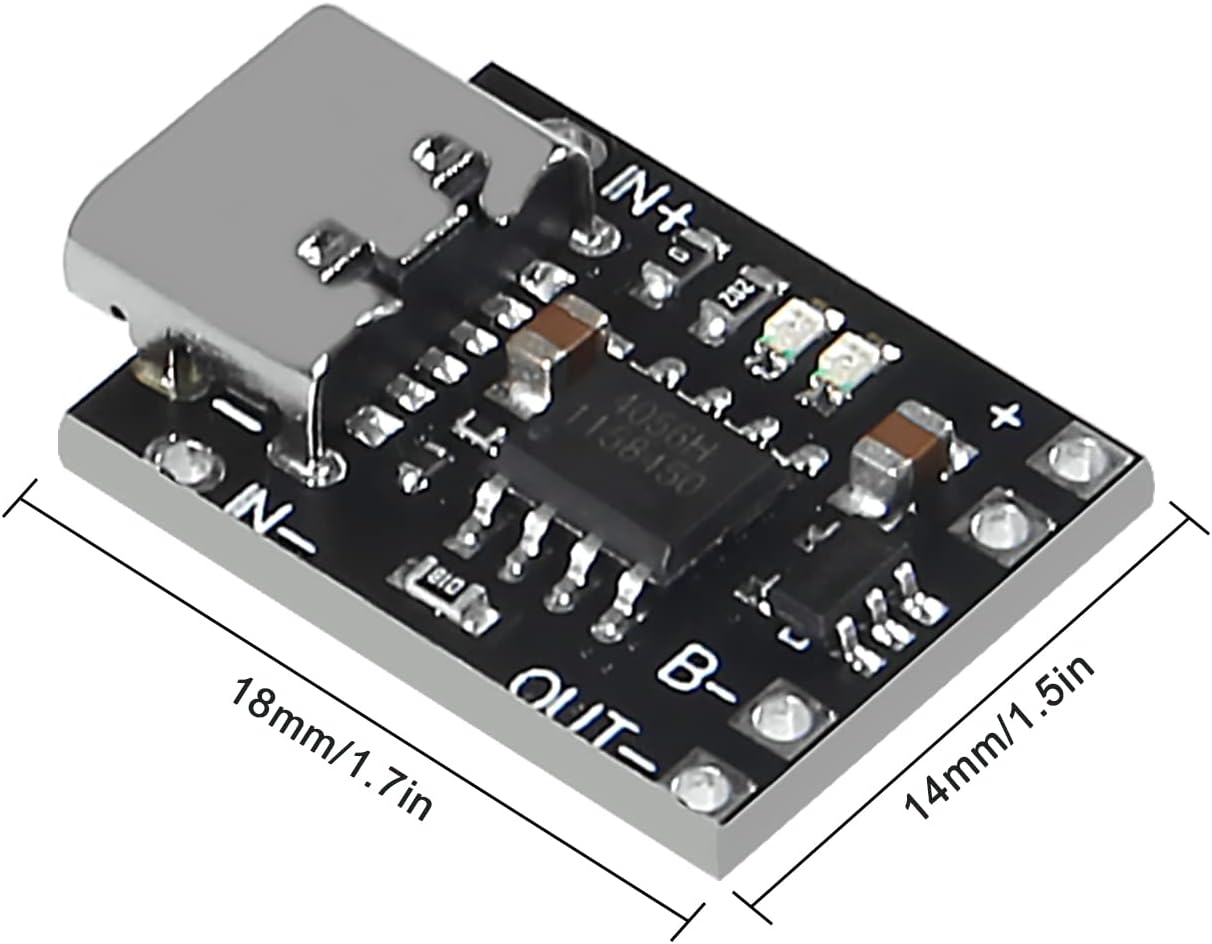
Image: Dimensions of the charger board. This image provides a visual reference for the physical size of the module, indicating its length and width.

Imagen: Abajo view of the charger board. This view confirms the key electrical specifications printed on the board itself, specifically the 4.2V output voltage and 1A charging current.
Información de garantía
UMLIFE products are manufactured to high-quality standards. For specific warranty details, please refer to the purchase documentation or contact the seller directly. General return policies typically allow for returns or replacements within 30 days of purchase for defective items.
Atención al cliente
For technical assistance, questions, or support regarding your UMLIFE Ultra-mini USB Type C Lithium Battery Charger Board, please contact the manufacturer or seller through the platform where the product was purchased.
You can also visit the official UMLIFE Store for more information: UMLIFE Store on Amazon