
Casio AP-270 CELVIANO
Manual de usuario del piano digital Casio AP-270 CELVIANO
Model: AP-270 CELVIANO
Introducción
This manual provides essential information for the setup, operation, and maintenance of your Casio AP-270 CELVIANO Digital Piano. Designed to offer a natural playing feel and rich, authentic tones, this instrument combines advanced technology with elegant design. Please read this manual thoroughly to ensure proper use and to maximize your musical experience.
Qué incluye
Your Casio AP-270 CELVIANO Digital Piano package includes the following components:
- Casio AP-270 CELVIANO Digital Piano (Brown)
- Furniture Bench
- Auriculares
- Adaptador de CA
- DVD instructivo de Austin Bazaar
- Paño de pulido
- Manual de usuario (este documento)

Image: The complete Casio AP-270 CELVIANO Digital Piano bundle, showcasing the brown digital piano, matching bench, headphones, and various instructional materials.
Características principales
- Multi-dimensional Morphing AiR Sound Source: This advanced sound source meticulously reproduces the rich, resonating tones inherent to a grand piano, with expanded memory for longer sampling duration and enhanced waveform data quality.
- Tri-sensor Scaled Hammer Action Keyboard II: Experience a natural playing feel that closely mimics a grand piano. The three-sensor system accurately detects key touches, replicating the unique sounding timing of an acoustic instrument.
- Simulated Ebony and Ivory Keys: The keys provide a luxurious feel and texture, along with a smooth touch. The detailed crimp surface finish helps prevent finger slippage during extended play.
- Two Legendary Grand Piano Sounds: Select between two distinct world-renowned grand piano sounds to suit various musical genres and performance environments. One offers powerful, richly reverberating performances, ideal for classical pieces, while the other provides crisp, straightforward sound, suitable for jazz and pop.
- Damper Resonance: A stereo resonance simulator on all 88 keys naturally reproduces the deep, beautiful resonance created by using a damper pedal, including the resonance from the lifting of the dampres.
- Concert Play: Features high-quality audio data recordings of 10 live orchestra performances, allowing pianists to play along and experience a magnificent performance.
- Conectividad: Class-compliant USB connects to the Casio Music Space iOS/Android app for lessons, score viewing, and more. Includes headphone outputs for quiet practice.
Configuración
Siga estos pasos para configurar su piano digital:
- Desembalaje: Retire con cuidado todos los componentes del embalaje. Asegúrese de que estén presentes todos los artículos indicados en la sección "Incluye".
- Asamblea: Assemble the digital piano cabinet and attach the keyboard unit according to the separate assembly guide provided in the box. Ensure all screws are tightened securely.
- Montaje del banco: Assemble the furniture bench as per its instructions.
- Conexión de energía: Conecte el adaptador de CA suministrado al terminal DC IN del piano y luego conéctelo a un tomacorriente de pared estándar.
- Auriculares: For private practice, plug your headphones into one of the 3.5mm headphone jacks located on the front of the piano.
- Conexión USB (opcional): To connect to a computer or smart device for use with the Casio Music Space app, use a standard USB cable (not included) to connect the piano's USB port to your device.
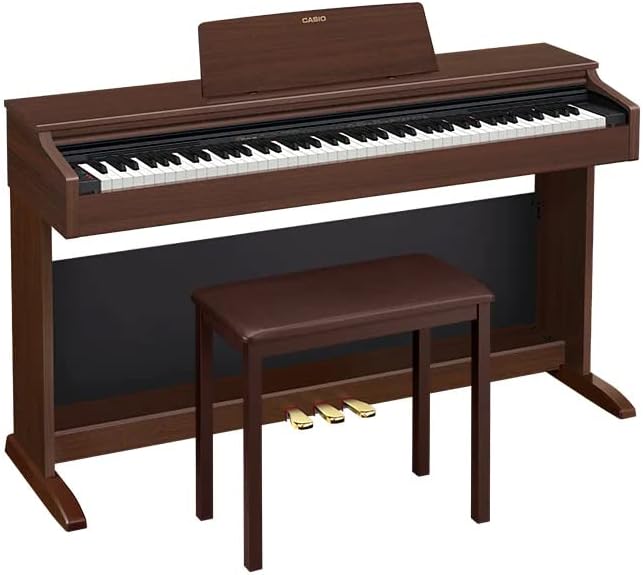
Image: A side perspective of the Casio AP-270 CELVIANO Digital Piano, highlighting its cabinet design and the accompanying bench.
Instrucciones de funcionamiento
Encendido/apagado
- Para encender: Presione el FUERZA botón.
- Para apagar: Mantenga presionado el FUERZA hasta que la pantalla se apague.
Ajuste del volumen
Utilice el VOLUMEN knob located on the front panel to adjust the overall sound output level.
Seleccionar tonos
Your piano features a variety of tones, including two distinct grand piano sounds. Refer to the detailed tone list in the full user manual for specific tone selection procedures. Generally, tones are selected using dedicated buttons or a combination of function and key presses.
Using Pedals
The Casio AP-270 includes three pedals: Damper (Sustain), Soft, and Sostenuto. These function similarly to an acoustic grand piano, allowing for expressive control over your sound.
- Damper Pedal (Derecho): Sustains notes. The piano features advanced Damper Resonance for realistic sound.
- Pedal suave (izquierdo): Suaviza el sonido.
- Pedal de sostenimiento (medio): Sostiene únicamente las notas que se mantienen presionadas en el momento en que se presiona el pedal.
Concierto
Engage the Concert Play feature to play along with pre-recorded orchestral performances. Detailed instructions for selecting and playing along with Concert Play tracks are available in the comprehensive manual.
Casio Music Space App
Enhance your learning and playing experience by connecting your piano to the Casio Music Space app via USB. The app offers interactive lessons, score viewing, and additional features. Download the app from your device's app store and follow the in-app instructions for connection.
Mantenimiento
- Limpieza: Use the provided polishing cloth or a soft, dry cloth to wipe the piano's surface. For stubborn dirt, slightly dampen the cloth with water and wipe gently, then dry immediately. Avoid abrasive cleaners, waxes, or solvents.
- Cuidado de las llaves: Wipe the keys with a soft, dry cloth. Do not use chemical cleaners on the keys as they may damage the simulated ebony and ivory finish.
- Almacenamiento: When not in use for extended periods, cover the piano to protect it from dust. Store in a stable environment, away from direct sunlight, extreme temperatures, and high humidity.
- Apagado: Always turn off the piano and unplug the AC adapter when not in use or during electrical storms.
Solución de problemas
| Problema | Posible causa | Solución |
|---|---|---|
| No hay sonido en los altavoces/auriculares. | Volume too low; AC adapter not connected; headphones not fully inserted. | Aumentar VOLUMEN knob; ensure AC adapter is securely connected; re-insert headphones firmly. |
| Las teclas no responden o se sienten pegajosas. | Dust or debris under keys; environmental factors (humidity). | Gently clean around keys with a soft brush; ensure piano is in a stable environment. If problem persists, contact support. |
| El piano no se enciende. | Adaptador de CA no conectado o defectuoso; problema con la toma de corriente. | Check AC adapter connection to piano and wall outlet; try a different power outlet. |
| El sonido está distorsionado o ruidoso. | Volume too high; external interference; faulty cable. | Lower volume; move piano away from other electronic devices; check headphone/audio cables. |
For issues not listed here, please refer to the comprehensive troubleshooting section in the full user manual or contact Casio customer support.
Presupuesto
- Nombre del modelo: Celviano
- Número de modelo del artículo: CAS-AP270BN-COMBO-PRO
- Número de llaves: 88
- Tipo de teclado: Tri-sensor Scaled Hammer Action Keyboard II
- Fuente de sonido: Multi-dimensional Morphing AiR Sound Source
- Color: Marrón
- Dimensiones del producto: 60 x 17 x 23 pulgadas
- Fuente de energía: Adaptador de CA
- Toma de auriculares: Conector de 3.5 mm
- Tecnología de conectividad: Auxiliar, USB
- Software compatible: Espacio musical de Casio
- Nivel de dificultad: Principiante
- Rango de edad: Adulto
Garantía y soporte
Para obtener información detallada sobre la garantía, consulte la tarjeta de garantía incluida con su producto o visite el sitio web oficial de Casio. website. Casio provides comprehensive support for its products.
- Online Lessons: Register on the Casio website to unlock one free month of access to Playground Sessions, offering step-by-step lessons for learning your favorite songs.
- Aplicación Casio Music Space: Utilize the Casio Music Space app for additional learning resources and interactive features.
- Servicio al cliente: For technical assistance or service inquiries, please contact Casio customer support through their official websitio o la información de contacto proporcionada en la documentación de su producto.
Always ensure you are using official Casio resources for support and information.
Ask a question about this manual
Ask about setup, troubleshooting, compatibility, parts, safety, or missing instructions. Manuals+ will review the question and use this page’s manual context to help answer it.