
Dieffematic AT7070
Dieffematic AT 7070 UNIKO 24VCC Control Unit Instruction Manual
Model: AT7070 | Brand: Dieffematic
1. Introducción
This manual provides detailed instructions for the installation, operation, and maintenance of the Dieffematic AT 7070 UNIKO 24VCC Control Unit. This unit is designed for the automation of selective and overhead doors, offering reliable control and advanced features. Please read this manual thoroughly before proceeding with installation or operation to ensure safe and correct usage.
2. Producto terminadoview y características
The Dieffematic AT 7070 UNIKO is a 24VCC control unit (SKU: G030) specifically designed for UNIKO Dieffematic systems. It is an original Dieffematic spare part, ensuring compatibility and performance. Key features include:
- 24VCC Control Unit: Optimized for low voltagy aplicaciones.
- Compatibilidad: Designed for UNIKO Dieffematic selective and overhead door automation systems.
- Self-Learning Receiver: Integrated receiver for easy remote control pairing.
- Rolling Code Management: Enhanced security with dynamic code changes.
- Iluminación LED: Includes support for courtesy light functionality.
- Monophase Control: Suitable for 1 or 2 motors (230 Vac).
- Control avanzado: Features 4 limit switches, 4 operating modes, automatic time learning, and independent slowdown programming.
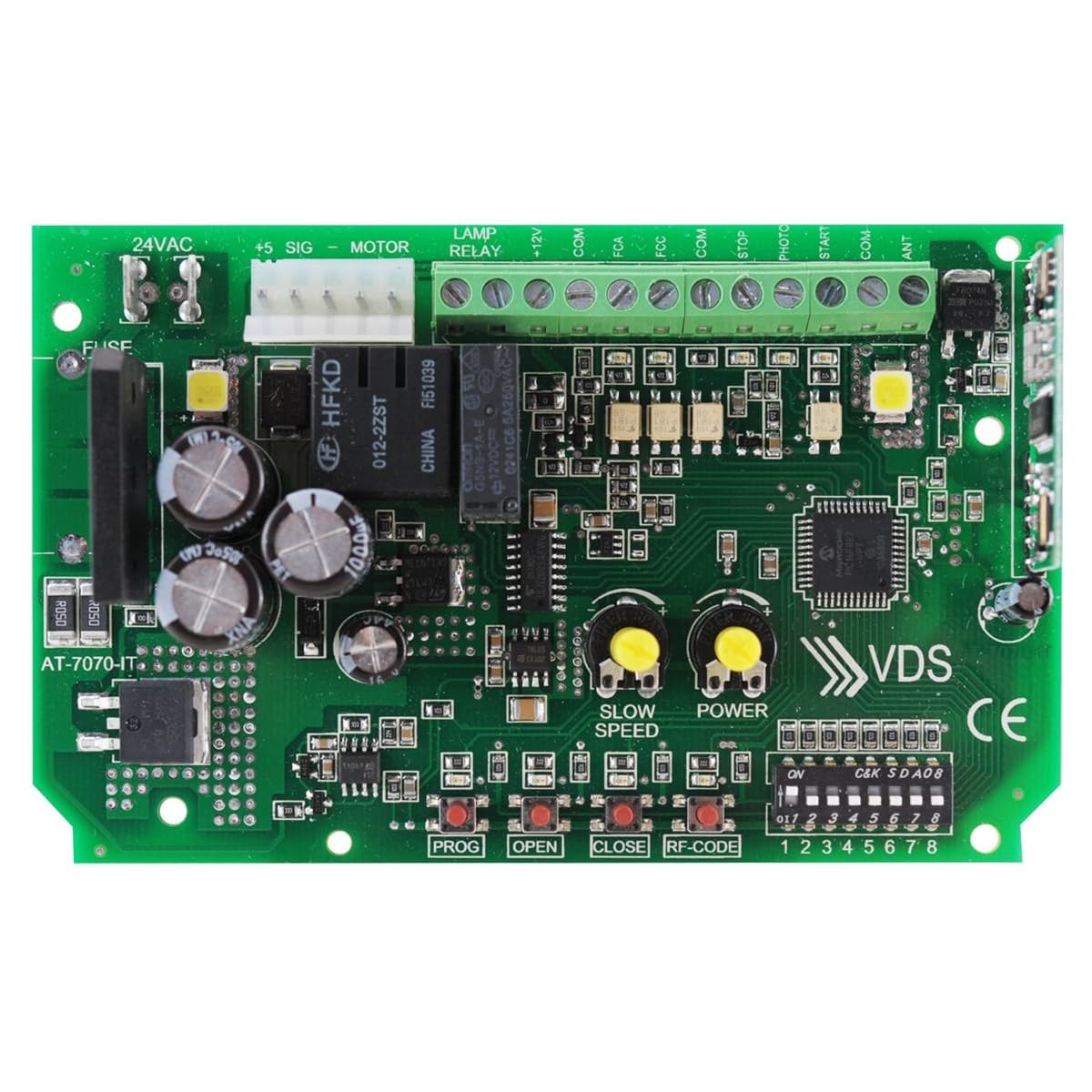
Figure 1: Dieffematic AT 7070 UNIKO 24VCC Control Unit. This image shows the green circuit board with a brown transformer, multiple relays, and terminal blocks for connections. A red 4-button remote control is also visible.
3. Configuración e instalación
Proper installation is crucial for the safe and efficient operation of your control unit. It is recommended that installation be performed by qualified personnel.
3.1 Cableado y Conexiones
Ensure all power is disconnected before making any electrical connections. Connect the 24VCC power supply to the designated terminals. Connect the motor(s), limit switches, and any safety devices (e.g., photocells) to their respective terminals as indicated on the circuit board.
Video 1: Programming the Start S4XL and associating IDOR 100 remote controls. This video demonstrates the process of programming the control unit and pairing a remote control, showing the lights on the board indicating successful operations.
3.2 Emparejamiento de control remoto
The control unit features a self-learning receiver for easy pairing with compatible remote controls. Follow the specific instructions provided with your remote control for pairing. Generally, this involves pressing a programming button on the control unit and then a button on the remote.
3.3 Programación inicial
The AT 7070 UNIKO offers automatic time learning and independent slowdown programming. Refer to the detailed programming section in the full manual for specific steps on setting up opening/closing times and slowdown points. This ensures smooth and safe gate operation.
Video 2: Universal Control Unit for Automatic Swing Gates with 1/2 Doors (START-S4XL Came BFT Nice etc.). This video illustrates the functionality of a universal control unit, demonstrating how it controls the opening and closing of a gate, with lights indicating the status.
Video 3: IDOR-100 video tutorial. This tutorial provides a visual guide on the operation of the control unit, including how to trigger opening and closing actions using a remote and external contacts.
4. Instrucciones de funcionamiento
Once installed and programmed, operating the Dieffematic AT 7070 UNIKO control unit is straightforward:
- Mando a distancia: Press the programmed button on your remote control to initiate the gate's opening or closing cycle.
- External Commands: The unit can also be operated via external command devices such as key switches or push buttons connected to the appropriate terminals.
- Características de seguridad: The system is designed with safety in mind. Ensure all safety devices (e.g., photocells) are correctly installed and functioning to prevent accidental closures or impacts.
5. Mantenimiento
Regular maintenance helps ensure the longevity and optimal performance of your Dieffematic AT 7070 UNIKO control unit and automated gate system.
- Inspección visual: Periodically inspect all wiring and connections for signs of wear, corrosion, or damage.
- Limpieza: Keep the control unit free from dust, dirt, and moisture. Use a soft, dry cloth for cleaning.
- Verificación de funcionalidad: Regularly test the gate's opening and closing cycles, including safety features like photocells and limit switches, to ensure they are working correctly.
- Servicio Profesional: Para problemas complejos o controles anuales es recomendable contactar con un técnico cualificado.
6. Solución de problemas
If you encounter issues with your control unit, consider the following basic troubleshooting steps:
- Sin energía: Check the main power supply and the unit's fuses.
- El control remoto no funciona: Verify the remote's battery and ensure it is correctly paired with the control unit.
- La puerta no se mueve: Check motor connections, limit switch functionality, and ensure no obstructions are blocking the gate's path.
- Operación intermitente: Inspect wiring for loose connections or damage. Check for interference with the remote signal.
If problems persist after basic troubleshooting, consult a professional technician or refer to the comprehensive troubleshooting guide in the full product manual.
7. Especificaciones
| Característica | Detalle |
|---|---|
| Modelo | AT 7070 UNIKO |
| Código SKU | G030 |
| Fuente de alimentación | 24VCC |
| Compatibilidad del motor | 1 or 2 monophase motors (230 Vac) |
| Receptor | Integrated self-learning, Rolling Code |
| Funciones de control | 4 limit switches, 4 operating modes, automatic time learning, independent slowdown programming |
| Luz de cortesía | LED lighting support |
| ASIN | B0BVFZPFDH |
| Primera fecha disponible | 21 de diciembre de 2022 |
8. Garantía y soporte
For warranty information, please refer to the documentation included with your purchase or contact Dieffematic customer support directly. For technical assistance, troubleshooting beyond the scope of this manual, or spare parts, please reach out to your authorized Dieffematic dealer or visit the official Dieffematic websitio.
Documentos relacionados - AT7070
 |
UNIKO Pro Chlorinator User Manual and Installation Guide Comprehensive user manual and installation guide for the UNIKO Pro Chlorinator, detailing operating conditions, technical features, installation, operation, maintenance, and troubleshooting for pool water treatment. |
 |
Manual de usuario y guía de instalación del clorador UNIKO PH Este manual proporciona instrucciones completas para el clorador UNIKO PH, que cubren las condiciones de funcionamiento, características técnicas, instalación, operación, mantenimiento y solución de problemas para el tratamiento del agua de la piscina. |
 |
CT ACTION 09 - Guida per l'installazione This document provides installation instructions for the ALLMATIC CT ACTION 09 control unit for sectional doors, detailing electrical connections, configuration, and advanced functions. |
 |
Manual del usuario del abridor de puerta corrediza premium SL600ACL Este manual del usuario proporciona instrucciones completas para el abridor de puerta corrediza premium SL600ACL, que abarca información de seguridad, especificaciones, contenido del paquete, pasos de instalación, ajustes, resolución de problemas, mantenimiento y pautas de eliminación. |
 |
Guía de instalación simplificada de King Gates Dynamos 400 Guía concisa para instalar y configurar el sistema de automatización de puertas King Gates Dynamos 400, que cubre el cableado, la configuración, los ajustes básicos y la información de contacto. |
 |
Manual de instalación y uso de la unidad de control de puertas correderas PROTECO Q80S 230 V CA This manual provides detailed installation and usage instructions for the PROTECO Q80S 230V ac sliding gate control unit. It covers product features, technical specifications, electrical connections, programming menus, safety guidelines, and troubleshooting for gate automation systems. |
Ask a question about this manual
Ask about setup, troubleshooting, compatibility, parts, safety, or missing instructions. Manuals+ will review the question and use this page’s manual context to help answer it.