
1. Introducción
This manual provides detailed instructions for the assembly, installation, operation, and maintenance of your AMANSON H07 ATX Mid Tower PC Case. Please read this manual thoroughly before beginning installation to ensure proper setup and safe operation. Keep this manual for future reference.

Figure 1.1: AMANSON H07 ATX Mid Tower PC Case with illuminated internal components.
2. Información de seguridad
- Desconecte siempre la fuente de alimentación de la toma de pared antes de realizar cualquier instalación o mantenimiento dentro del gabinete del PC.
- Manipule todos los componentes con cuidado para evitar daños.
- Use una pulsera antiestática para evitar daños por descarga electrostática (ESD) en componentes electrónicos sensibles.
- Mantenga las piezas pequeñas y los materiales de embalaje fuera del alcance de los niños.
- Asegúrese de que haya una ventilación adecuada alrededor de la carcasa de la PC para evitar el sobrecalentamiento.
3. Contenido del paquete
Verifique que todos los artículos estén presentes en el paquete:
- AMANSON H07 ATX Mid Tower PC Case
- Caja de accesorios (tornillos, separadores, bridas, etc.)
- Manual de usuario (este documento)
4. Componente terminadoview
The AMANSON H07 PC case features a panoramic design with tempered glass panels for full visibility of your internal components. It supports various motherboard sizes and extensive cooling configurations.

Figure 4.1: Top I/O Panel with power button, USB 3.0, USB 2.0, and audio ports.
The top I/O panel includes:
- Botón de encendido
- Botón de reinicio
- 2 puertos USB 2.0
- 1 puertos USB 3.0
- Conectores de entrada y salida de audio
5. Configuración e instalación
5.1. Preparación del caso
The AMANSON H07 features tool-less hinged tempered glass side panels for easy access. Gently open the side panel by pulling it from the rear edge. The panels can also be removed by lifting them off their hinges for full access during installation.

Figure 5.1: Hinged tempered glass side panel for easy access.
5.2. Instalación de la placa base
The H07 supports E-ATX, ATX, Micro-ATX, and ITX motherboards. Install the necessary standoffs for your motherboard form factor. Carefully align your motherboard with the standoffs and I/O shield, then secure it with screws.
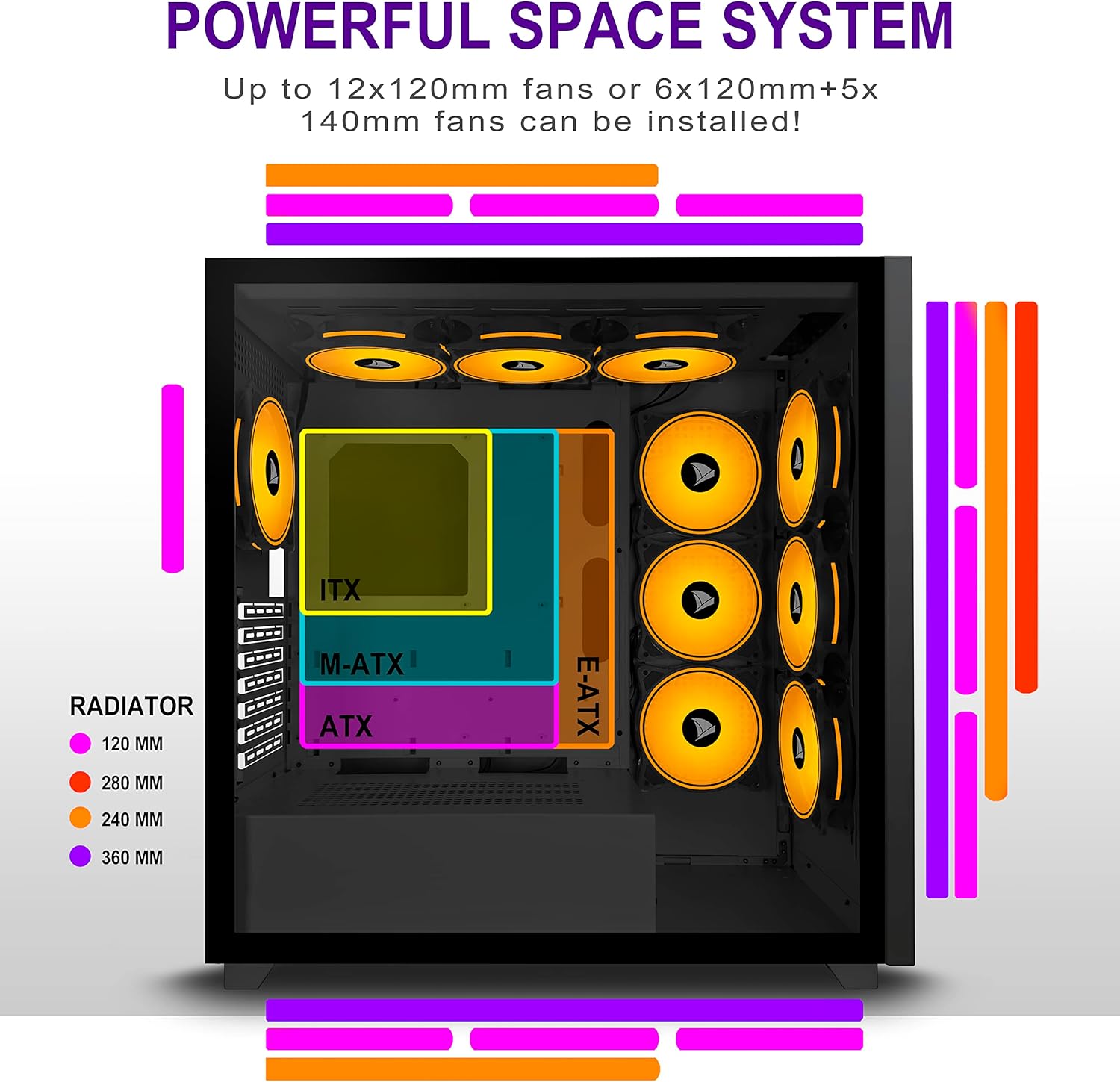
Figure 5.2: Motherboard and cooling component placement options.
5.3. Instalación de la fuente de alimentación
Install your power supply unit (PSU) into the dedicated compartment at the bottom rear of the case. Secure it with screws from the rear of the case.
5.4. Instalación del dispositivo de almacenamiento
The case provides multiple mounting points for storage devices. Install your 3.5" HDDs and 2.5" SSDs into the designated trays and mounting locations. Refer to the case diagram for specific locations.

Figure 5.3: Storage drive mounting options for HDDs and SSDs.
5.5. Instalación de la tarjeta de expansión (GPU)
Remove the necessary PCI-E slot covers from the rear of the case. Insert your graphics card or other expansion cards into the motherboard's PCI-E slots and secure them with screws.
5.6. Gestión de cables
Utilice los recortes para el cableado y los puntos de sujeción detrás de la bandeja de la placa base para organizarlos. Esto mejora el flujo de aire y mantiene una estética limpia.
6. Instrucciones de funcionamiento
6.1. Encendido / apagado
Press the power button located on the top I/O panel to turn on your PC. To shut down, use the operating system's shutdown function or press and hold the power button for several seconds.
6.2. Using Front I/O Ports
Connect USB devices to the USB 2.0 or USB 3.0 ports. Use the audio jacks for headphones, microphones, or speakers.
7. Mantenimiento
7.1. Limpieza
Limpie periódicamente el exterior de la caja con un paño suave y húmedo.amp cloth. For internal cleaning, use compressed air to remove dust from fans and components. Ensure the PC is powered off and unplugged before cleaning.
7.2. Filtros de polvo
The AMANSON H07 may include removable dust filters. Clean these filters periodically to maintain optimal airflow and cooling performance.
8. Solución de problemas
- PC does not power on: Check all power connections, including the PSU to the wall, the PSU to the motherboard, and the front panel power switch cable to the motherboard.
- Overheating issues: Ensure all fans are properly installed and functioning. Verify that dust filters are clean and not obstructing airflow. Check thermal paste application on CPU cooler.
- Los puertos USB no funcionan: Confirm that the front panel USB cables are correctly connected to the motherboard headers.
- Los conectores de audio no funcionan: Verify that the front panel audio cable is correctly connected to the motherboard's audio header.
9. Especificaciones
Below are the technical specifications for the AMANSON H07 PC Case:
| Característica | Detalle |
|---|---|
| Modelo | H07 |
| Tipo de caso | Torre Media |
| Compatibilidad de la placa base | E-ATX, ATX, Micro ATX, ITX |
| Material | Vidrio templado |
| Dimensiones del producto (LxAnxAl) | 19.69 x 13.78 x 19.69 pulgadas (500 x 350 x 500 mm) |
| Peso del artículo | 24.2 libras |
| Número de puertos USB 2.0 | 2 |
| Número de puertos USB 3.0 | 1 |
| Número de ranuras de expansión | 8 |
| Método de enfriamiento | Aire |
| Tipo de montaje de la fuente de alimentación | Montaje inferior |

Figure 9.1: AMANSON H07 PC Case dimensions (520mm height, 510mm length, 250mm width).
10. Información de garantía
Please refer to the product packaging or the official AMANSON webConsulte el sitio web para conocer los términos y condiciones específicos de la garantía. Conserve su comprobante de compra para reclamaciones de garantía.
11. Soporte
For technical assistance or customer support, please visit the official AMANSON websitio o contacte con su departamento de atención al cliente. Los datos de contacto suelen encontrarse en el empaque del producto o en la etiqueta de la marca. websitio.