
1. Producto terminadoview
The Onforu 5-Head 70W Motion Sensor Outdoor Flood Light (Model BDBS70G-5) is a hardwired LED security light designed for outdoor use. It features five adjustable light heads, a built-in motion sensor, and provides 7000 lumens of daylight white illumination. The robust IP65 waterproof design ensures durability in various weather conditions, making it suitable for driveways, garages, gardens, and other outdoor areas.
2. Información de seguridad
- Seguridad eléctrica: Installation must be performed by a qualified electrician or a person with sufficient electrical knowledge. Ensure power is turned off at the circuit breaker before installation, wiring, or maintenance.
- Toma de tierra: Este artefacto debe estar conectado a tierra adecuadamente para evitar posibles descargas eléctricas.
- Volumentage: Asegúrese de que la fuente de alimentación voltage coincide con los requisitos del dispositivo (120 voltios).
- Uso en exteriores: Designed for outdoor use. Ensure all connections are sealed and waterproofed according to local electrical codes.
- Calor: Las luces LED pueden generar calor. No toque los cabezales inmediatamente después de usarlas.
- Protección ocular: Evite mirar directamente a la fuente de luz LED cuando esté iluminada, ya que puede provocar fatiga visual o daños.
3. Contenido del paquete
Verifique que todos los componentes estén presentes antes de comenzar la instalación:
- Onforu 5-Head Motion Sensor Flood Light (x1)
- Soporte de montaje (x1)
- Tornillos de montaje y anclajes de pared
- Tuercas de alambre (x3)
- Manual de usuario (x1)
- LED Lens (Included as part of the fixture)
4. Configuración e instalación
This flood light is designed for hardwired installation. Follow these steps carefully:
- Apagar la energía: Antes de comenzar, asegúrese de que la energía del área de instalación esté apagada en el disyuntor principal.
- Preparar el cableado: Identify the Live (Black), Neutral (White), and Ground (Green/Bare Copper) wires from your electrical box.
- Soporte de montaje: Secure the mounting bracket to the desired surface (wall, soffit, or pillar) using the provided screws and anchors. Ensure it is firmly attached.
- Conexiones de cable: Connect the fixture's wires to your household wiring using the provided wire nuts:
- Black (Fixture) to Black (Household - Live)
- White (Fixture) to White (Household - Neutral)
- Green (Fixture) to Green/Bare Copper (Household - Ground)
- Accesorio seguro: Carefully tuck the wires into the junction box and attach the light fixture to the mounting bracket. Ensure a tight seal to prevent water ingress.
- Ajuste de los cabezales de luz: Once mounted, adjust the five individual light heads to cover the desired area. Each head can be rotated to direct light as needed.
- Restaurar energía: Vuelva a encender la energía en el disyuntor.
Altura de instalación recomendada: 6.5 - 13.1 feet (2 - 4 meters) above the ground for optimal motion detection and lighting coverage.

Figure 4.1: Hardwired Installation Diagram. This image illustrates the wiring connections (Live, Neutral, Ground) and how the fixture attaches to the mounting bracket on a wall.

Figure 4.2: Various Mounting Options. The image displays the flood light installed in three common configurations: under a soffit, on a wall, and on a pillar, demonstrating its versatility.
5. Instrucciones de funcionamiento
The Onforu flood light is designed for automatic operation based on motion detection and ambient light levels.
- Activación de movimiento: The built-in PIR motion sensor detects movement within its sensing range. When motion is detected, the light will automatically turn on for the set duration.
- Cabezales de luz ajustables: The five light heads can be independently adjusted to direct light precisely where needed, providing broad and customizable illumination.

Figure 5.1: Wide Area Illumination. This image demonstrates the extensive coverage area (up to 1230 sq.ft.) provided by the adjustable 5-head design, illuminating a large backyard at night.

Figure 5.2: Motion Activated Lighting. The image illustrates the motion sensor's functionality, showing a person triggering the light within its 180-degree sensing angle and up to 72.17ft detection distance.
6. Configuración del sensor de movimiento
The motion sensor features adjustable controls for customization:
- Rango de detección: Adjustable from approximately 19 feet to 72 feet (6 meters to 22 meters).
- Modos de trabajo:
- "+" Mode: Light will be triggered both day and night when motion is detected.
- "-" Mode: Light will only be triggered at night when motion is detected.
- Minutero: Adjustable duration for how long the light stays on after motion detection, typically from 1 to 10 minutes.

Figure 6.1: Motion Sensor Controls. This image shows the three adjustment knobs on the motion sensor for setting detection range, operating mode (day/night), and illumination duration (timer).

Figure 6.2: Flexible Light Panels and Adjustable Motion Sensor. This image highlights the design features, including the ability to adjust the angle of the five light panels and the motion sensor for optimal coverage.
7. Mantenimiento
El mantenimiento regular garantiza un rendimiento óptimo y la longevidad de su reflector.
- Limpieza: Limpie periódicamente los cabezales de luz y la lente del sensor de movimiento con un paño suave.amp Paño para eliminar la suciedad, el polvo o los residuos que puedan obstruir la salida de luz o el funcionamiento del sensor. No utilice limpiadores abrasivos.
- Inspección: Annually inspect the wiring and mounting for any signs of wear, damage, or loosening. Ensure all seals remain intact to maintain IP65 waterproof rating.
- No hay piezas que el usuario pueda reparar: The LED components are integrated and not user-replaceable. Do not attempt to disassemble the light heads.

Figure 7.1: IP65 Waterproof Design. This image visually confirms the light's resistance to water, snow, heat, and dust, highlighting its suitability for outdoor environments.
8. Solución de problemas
If you encounter issues with your Onforu flood light, refer to the following common troubleshooting steps:
- La luz no se enciende:
- Check if the power supply is active at the circuit breaker.
- Verifique que todas las conexiones del cableado sean seguras y correctas.
- Ensure the motion sensor is set to the correct working mode (e.g., "+" for day/night, "-" for night only).
- Adjust the ambient light sensor sensitivity if the light is not activating in low light conditions.
- La luz permanece encendida continuamente:
- Check if the motion sensor is detecting constant movement (e.g., tree branches, pets). Adjust the sensor angle or sensitivity.
- Ensure the timer setting is not set to its maximum duration or a continuous mode if available.
- Light Flashes or Cycles On/Off:
- This could indicate an unstable power supply or a faulty connection. Recheck wiring.
- Ensure the motion sensor lens is clean and unobstructed.
- El sensor de movimiento no detecta:
- Increase the detection range setting on the sensor.
- Ensure the sensor is not obstructed and is facing the desired detection area.
- Verify the installation height is within the recommended range for optimal detection.
If these steps do not resolve the issue, please contact Onforu customer support for further assistance.
9. Especificaciones
| Característica | Especificación |
|---|---|
| Marca | Onforú |
| Nombre del modelo | BDBS70G-5 |
| Fuente de poder | Eléctrico con cable |
| Quétage | 70 vatios |
| Brillo | 7000 lúmenes |
| Temperatura de color | 6500 Kelvin (luz blanca diurna) |
| Material | Metal, Plástico |
| Nivel de resistencia al agua | IP65 resistente al agua |
| Características especiales | 5 Heads Adjustable, Anti-Rust, Energy Efficient, Motion Sensor, Waterproof |
| Dimensiones del producto | 16.4" de largo x 4.7" de ancho x 5.7" de alto |
| Peso del artículo | 4.51 libras |
| Volumentage | 120 voltios |
| Tipo de montaje | Wall Mount, Soffit Mount, Pillar Mount |
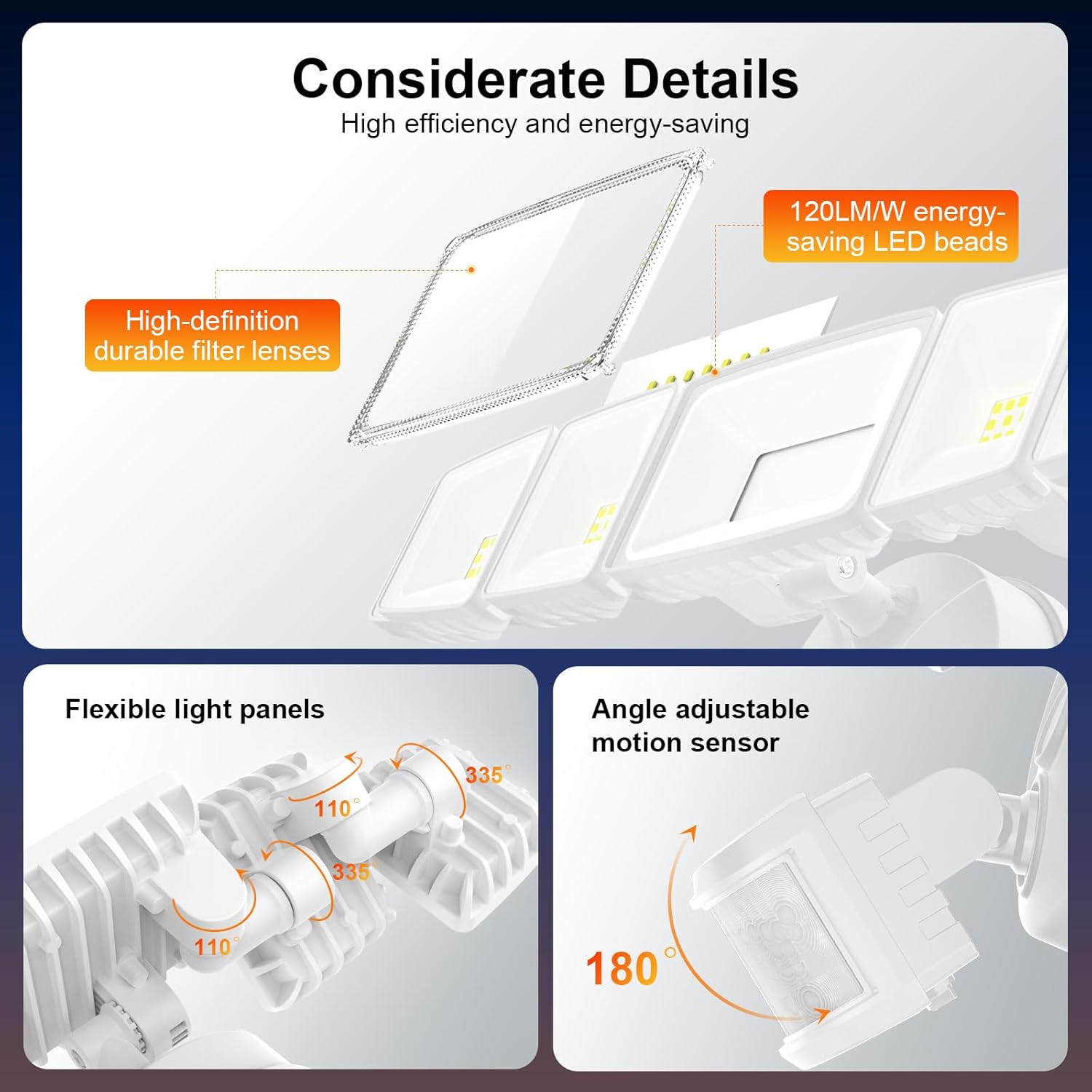
Figura 9.1: Dimensiones del producto. Esta imagen proporciona una vista detallada. view of the flood light with its key measurements in both millimeters and inches.
10. Garantía y soporte
This Onforu product comes with a limited warranty. For specific warranty details, please refer to the documentation included with your purchase or visit the official Onforu websitio.
For technical support, troubleshooting assistance, or any questions regarding your product, please contact Onforu customer service. Contact information can typically be found on the product packaging or the official Onforu websitio.