Introducción
This document provides instructions for the Generic Replacement Remote Control. This remote is designed as a dedicated replacement for various Pioneer Car Stereo models, including XR-A3800, XR-A4800, XR-A6800, and XR-A9800, and is also compatible with certain TV, Audio, and Projector systems. It operates using Infrared (IR) communication.
Please note that this is a replacement remote control and not an original manufacturer's product. Consequently, some advanced or specific functions present on the original remote may not be fully supported or may operate differently. This is a characteristic of replacement units and not an indication of a defective product.
Configuración
Instalación de la batería
El control remoto requiere dos (2) pilas AAA para su funcionamiento. Las pilas no están incluidas.
- Ubique el compartimiento de la batería en la parte posterior del control remoto.
- Presione la pestaña y deslice la tapa de la batería hacia abajo para abrirla.
- Inserte dos pilas AAA, asegurándose de que los terminales positivo (+) y negativo (-) estén alineados correctamente con las marcas dentro del compartimiento.
- Deslice la tapa de la batería nuevamente en su lugar hasta que haga clic de forma segura.
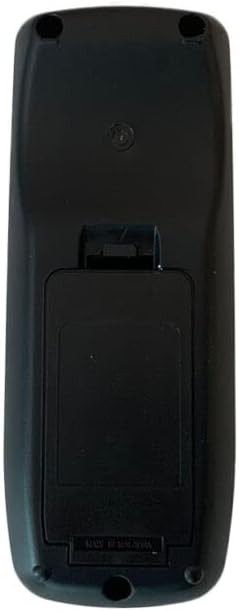
Imagen: Trasera view of the remote control with the battery compartment cover. The cover is located on the lower half of the remote's back, designed to slide open for battery insertion.
Uso inicial
No programming or complex setup is required for this replacement remote control. Once batteries are correctly installed, the remote is ready for use with compatible devices.
Instrucciones de funcionamiento
To operate your device using this remote control:
- Asegúrese de que el control remoto tenga baterías nuevas instaladas.
- Point the front of the remote control directly towards the infrared receiver on your Pioneer Car Stereo or other compatible device.
- Press the desired function button (e.g., Power, Volume Up/Down, Channel, Play, Pause).
- Maintain a clear line of sight between the remote and the device. Obstructions can block the infrared signal.
The remote is designed for a stable performance and a farther transmitting distance, offering sensitive and easy operation due to its compact size.
Mantenimiento
Cuidado de la batería
- Remove batteries from the remote control if it will not be used for an extended period (e.g., several weeks or months) to prevent battery leakage and potential damage to the remote.
- No mezcle pilas viejas y nuevas.
- No mezcle diferentes tipos de pilas (por ejemplo, alcalinas con recargables).
- Reemplace siempre todas las baterías al mismo tiempo con otras nuevas del mismo tipo.
Limpieza
Para limpiar el control remoto, límpielo suavemente con un paño suave y seco. No utilice limpiadores líquidos, estropajos abrasivos ni disolventes químicos, ya que pueden dañar la superficie o los componentes internos del control remoto.
Solución de problemas
- El control remoto no responde: Ensure batteries are correctly installed and have sufficient charge. Replace with new batteries if necessary. Check for any obstructions between the remote and the device's IR receiver. Ensure you are within the effective operating range.
- Algunas funciones no funcionan: As a replacement remote, certain functions may not be fully compatible with all features of your original device. This is expected behavior for a non-original replacement and does not indicate a defect.
- Operación intermitente: This could be due to low battery power or interference. Try replacing batteries and ensuring a clear line of sight.
For optimal compatibility, if you encounter persistent issues, providing your original remote's part number or your unit's specific model number to the seller may help in identifying potential solutions or alternative replacement options.
Presupuesto
| Tipo de producto | Reemplazo de control remoto |
| Tecnología de conectividad | Infrarrojos (IR) |
| Fuente de poder | Pilas 2 x AAA (no incluidas) |
| Material | ABS/Plástico |
| Dispositivos compatibles | Pioneer XR-A3800, XR-A4800, XR-A6800, XR-A9800 Car Stereo, DVD/Blu-ray Player, Home Theater, Set Top Box, Stereo System, Television |
| Número máximo de dispositivos compatibles | 1 |
| Color | Black or White (color may vary as per availability) |
Información de garantía
Specific warranty details for this Generic Replacement Remote Control are not provided in the product information. For any warranty-related inquiries or claims, please contact the seller directly through your purchase platform.
Apoyo
Should you require further assistance, have questions about compatibility, or experience issues not covered in this manual, please reach out to the seller from whom you purchased this product. They will be able to provide specific support related to your purchase.


