
ZOUKAI BT-X
ZOUKAI BT-X Earhooks Sports Headphones User Manual
Model: BT-X | Brand: ZOUKAI
1. Introducción
Thank you for choosing the ZOUKAI BT-X Earhooks Sports Headphones. These open-ear Bluetooth headphones are designed for comfort, stability, and high-quality audio, making them ideal for sports and daily use. Featuring Bluetooth 5.3 for stable connectivity, a long-lasting battery, and a unique night running mode, the BT-X provides an immersive listening experience while keeping you aware of your surroundings. Please read this manual carefully to ensure proper use and maintenance of your new headphones.
2. ¿Qué hay en la caja?
Your ZOUKAI BT-X Earhooks Sports Headphones package includes the following items:
- Cable de carga USB-C
- Manual de usuario (este documento)
- Estuche de carga inalámbrica
3. Producto terminadoview
The ZOUKAI BT-X headphones combine innovative design with advanced technology to deliver a superior audio experience. Key features include:
- Cómodo diseño de oído abierto: Soft ear pads and an ear-hanging wearing method ensure a painless fit, allowing you to enjoy music without discomfort while maintaining situational awareness.
- Night Running Mode: Unique transparent earhooks with bright lights enhance your visibility and safety during nighttime outdoor activities.
- Mayor duración de la batería: Enjoy up to 15 hours of continuous music playback on a single charge. The charging case provides multiple additional charges, extending total usage time significantly.
- Conectividad Bluetooth 5.3: Advanced Bluetooth 5.3 chip ensures smooth transmission and a stable connection within a 10-meter range, compatible with a wide range of Bluetooth-enabled smartphones and devices.
- Sports-Ready Durability: The ear-hook style provides a stable fit, preventing accidental falls during intense workouts. IPX5 sweat-proof and waterproof functionality protects the earphones from sweat damage.
- Clear Calls and Immersive Sound: Built-in 4 noise-cancelling microphones ensure crisp, clear calls. The 28mm dynamic speakers deliver HiFi sound quality with powerful bass for an immersive audio experience.

Figure 3.1: ZOUKAI BT-X Earhooks Sports Headphones and Charging Case. The image shows the white charging case open, revealing one earhook headphone placed inside and the other removed, showcasing su diseño.
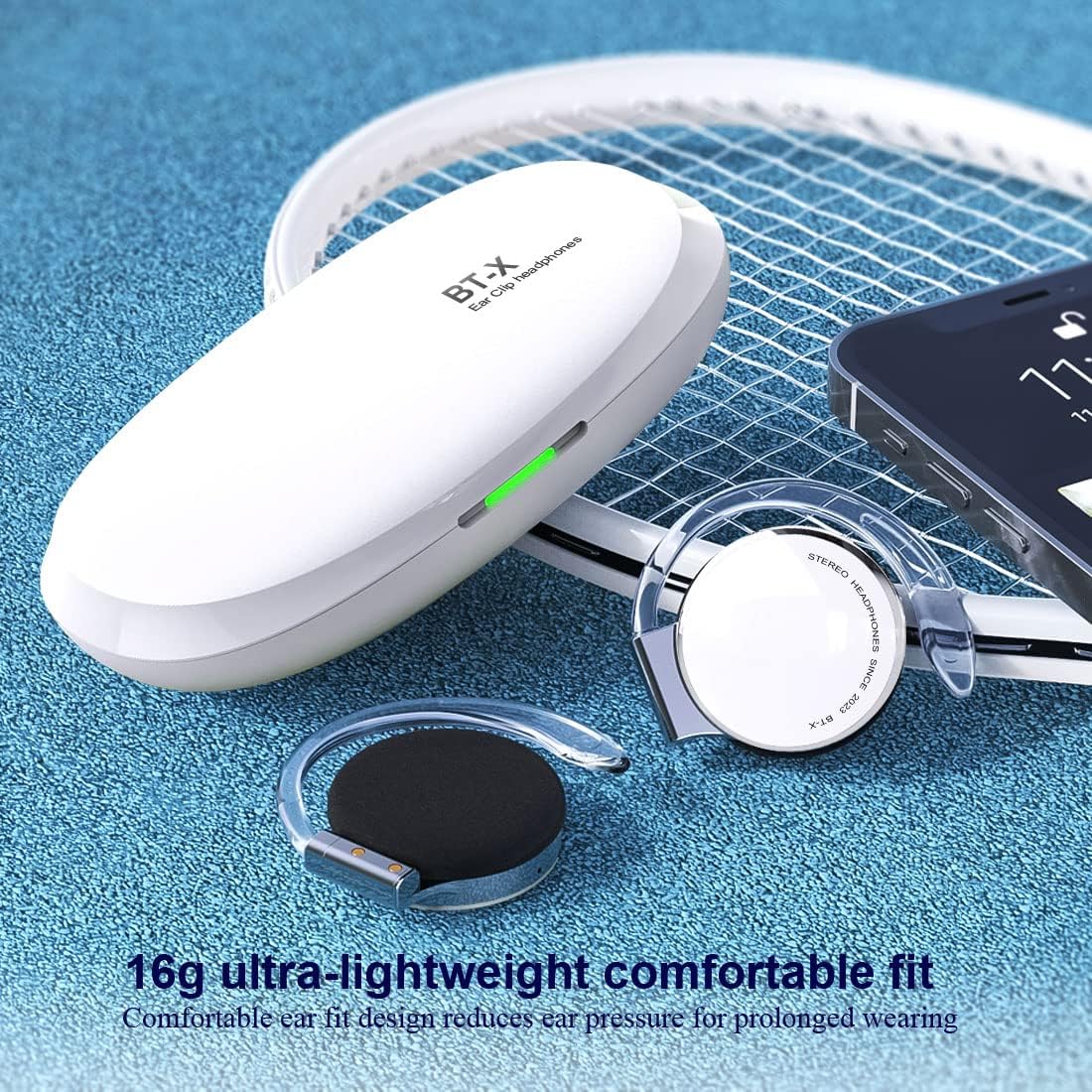
Figure 3.2: ZOUKAI BT-X Earhooks Sports Headphones with charging case and phone, highlighting lightweight fit. The image emphasizes the 16g ultra-lightweight design for comfortable prolonged wearing.

Figure 3.3: ZOUKAI BT-X Earhooks Sports Headphones in charging case next to a laptop and smartphone, illustrating broad compatibility. This image highlights the Bluetooth 5.3 for instant connection with various devices.

Figure 3.4: Person wearing ZOUKAI BT-X Earhooks Sports Headphones with glowing earhooks for night running mode. The image demonstrates the LED sports warning light for enhanced safety during nighttime exercise.

Figure 3.5: ZOUKAI BT-X Earhooks Sports Headphones on a surface, emphasizing 4 noise-cancelling microphones and HD calling. This image highlights the features for business, office, sports, and music use.

Figure 3.6: Person wearing ZOUKAI BT-X Earhooks Sports Headphones, with a graphic illustrating ENC + CVC noise reduction technology. The image shows the effect of noise reduction on sound waves, indicating clearer audio.

Figure 3.7: ZOUKAI BT-X Earhooks Sports Headphones and charging case on a laptop keyboard, highlighting USB-C charging and 28mm speakers. This image emphasizes the audio quality and charging convenience.

Figure 3.8: Person wearing ZOUKAI BT-X Earhooks Sports Headphones during a workout, demonstrating secure fit and clear calls. The image highlights the durability and stable fit even during intense physical activity.
4. Configuración
4.1 Carga inicial
- Coloque ambos auriculares en el estuche de carga.
- Conecte el cable de carga USB-C al puerto de carga del estuche y a una fuente de alimentación.
- Las luces indicadoras del estuche mostrarán el estado de carga. Una carga completa tarda aproximadamente 2 horas.
4.2 Emparejamiento con su dispositivo
- Asegúrese de que los auriculares estén cargados.
- Abra el estuche de carga. Los auriculares entrarán automáticamente en modo de emparejamiento, lo cual se indicará mediante una luz intermitente.
- En su dispositivo (teléfono inteligente, tableta, computadora portátil), vaya a la configuración de Bluetooth y active Bluetooth.
- Buscar available devices and select "BT-X" from the list.
- Once connected, the headphone indicator light will stop flashing. You are now ready to use your headphones.
4.3 Attaching/Detaching Earhooks
The earhooks are designed to be detachable for convenience. Refer to the video below for a visual guide on how to properly attach and detach the earhooks from your ZOUKAI BT-X headphones.
Video 4.1: Demonstration of attaching and detaching the earhooks from the ZOUKAI BT-X headphones. This video provides a clear visual instruction for assembling and disassembling the earhook components.
5. Instrucciones de funcionamiento
5.1 Encendido y apagado
- Encendido: Abra el estuche de carga y los auriculares se encenderán automáticamente.
- Apagado: Vuelve a colocar los auriculares en el estuche de carga y cierra la tapa. Se apagarán automáticamente y comenzarán a cargarse.
5.2 Reproducción de música
- Reproducir/Pausa: Toque el área de control táctil en cualquiera de los auriculares una vez.
- Pista siguiente: Toque dos veces el auricular derecho.
- Pista anterior: Toque dos veces el auricular izquierdo.
- Sube el volumen: Triple-tap the right headphone.
- Bajar volumen: Triple-tap the left headphone.
5.3 Gestión de llamadas
- Responder/Finalizar llamada: Toque el área de control táctil en cualquiera de los auriculares una vez.
- Rechazar llamada: Mantenga presionada la zona de control táctil de cualquiera de los auriculares durante 2 segundos.
- Activar asistente de voz: Press and hold the touch control area on either headphone for 3 seconds (when not on a call).
5.4 Modo de funcionamiento nocturno
- To activate the LED lights on the earhooks for night running, refer to the specific instructions in the quick start guide included with your product, as activation methods may vary.
6. Mantenimiento
To ensure the longevity and optimal performance of your ZOUKAI BT-X headphones, follow these maintenance guidelines:
- Limpieza: Utilice un paño suave, seco y sin pelusa para limpiar los auriculares y el estuche de carga. No utilice limpiadores abrasivos, alcohol ni disolventes químicos.
- Resistencia al agua: The headphones are IPX5 sweat-proof and waterproof. While they can withstand sweat and light splashes, do not submerge them in water or expose them to heavy rain. Dry them thoroughly after exposure to moisture.
- Almacenamiento: Cuando no los uses, guarda los auriculares en su estuche de carga para protegerlos del polvo y daños. Guárdalos en un lugar fresco y seco, alejados de temperaturas extremas.
- Cuidado de la batería: Para prolongar la vida útil de la batería, cargue los auriculares regularmente, incluso si no los usa con frecuencia. Evite descargar la batería por completo durante periodos prolongados.
7. Solución de problemas
If you encounter any issues with your ZOUKAI BT-X headphones, please refer to the following common solutions:
| Problema | Posible solución |
|---|---|
| Los auriculares no se encienden | Ensure the headphones are fully charged. Place them in the charging case and connect the case to a power source. |
| No se puede emparejar con el dispositivo | Make sure Bluetooth is enabled on your device. Ensure headphones are in pairing mode (flashing light). Try forgetting the device in your Bluetooth settings and re-pairing. Ensure headphones are within 10 meters of the device. |
| Sin sonido o volumen bajo | Check the volume level on both the headphones and your connected device. Ensure headphones are properly connected. Try playing different audio sources. |
| Call quality issues (muffled sound, cannot be heard) | Ensure the microphones are not obstructed. Check network signal strength on your phone. Try disconnecting and reconnecting the headphones. |
| Headphones frequently disconnect | Ensure no obstacles are between the headphones and your device. Move closer to your device. Check for interference from other wireless devices. |
Si el problema persiste después de probar estas soluciones, comuníquese con el servicio de atención al cliente.
8. Especificaciones
| Característica | Detalle |
|---|---|
| Nombre del modelo | BT-X |
| Tecnología de conectividad | Inalámbrico (Bluetooth) |
| Versión de Bluetooth | 5.3 |
| Alcance de Bluetooth | 10 Meters (without obstacles) |
| Duración de la batería | Up to 15 Hours (continuous playback) |
| Tiempo de carga | Aproximadamente 2 horas |
| Forma del auricular | Gancho para la oreja |
| Colocación de orejas | Oído abierto |
| Nivel de resistencia al agua | IPX5 (Sweat-proof, Waterproof) |
| Micrófonos | 4 Noise-Cancelling Microphones |
| Tamaño del altavoz | Ø28mm Dynamic Speaker |
| Tipo de control | Toque, control de volumen |
| Peso del artículo | 0.56 onzas (aprox. 16 g) |
| Material | Plástico |
| Código Postal | 768399354974 |
9. Garantía y soporte
ZOUKAI products are designed and manufactured to the highest quality standards. This product is covered by a limited warranty from the date of purchase. For detailed warranty information, including terms and conditions, please refer to the warranty card included in your product packaging or visit the official ZOUKAI websitio.
If you require technical support, have questions about product functionality, or need assistance with troubleshooting, please contact ZOUKAI customer service through the contact information provided on our website or in your product documentation. Please have your model number (BT-X) and proof of purchase ready when contacting support.
Ask a question about this manual
Ask about setup, troubleshooting, compatibility, parts, safety, or missing instructions. Manuals+ will review the question and use this page’s manual context to help answer it.