
1. Producto terminadoview
The GiiKER Smart Four is an AI-powered 3D strategy board game designed to offer a fresh twist on the classic 4-in-a-row game. It features an integrated referee system and a progressively challenging AI opponent, making it suitable for both solo play and head-to-head matches. This innovative game enhances cognitive skills, spatial thinking, pattern recognition, and strategic planning while minimizing screen time.

Figure 1: GiiKER Smart Four Game Board
2. ¿Qué hay en la caja?
Verifique que todos los componentes estén presentes antes de comenzar a jugar:
- GiiKER Smart Four Game Board
- Black Gaming Pieces
- White Gaming Pieces
- Manual de usuario (este documento)

Figure 2: Game Components
3. Configuración
3.1 Instalación de la batería
The GiiKER Smart Four requires 2 AA batteries (not included). To install the batteries:
- Locate the battery compartment on the underside of the game board.
- Abra la tapa del compartimiento de la batería.
- Inserte 2 pilas AA, asegurándose de la polaridad correcta (+/-) como se indica dentro del compartimento.
- Cierre bien la tapa del compartimento de la batería.
3.2 Encendido inicial
After installing batteries, press the power button (usually red) located on the side or front of the game board. The indicator lights will illuminate, signaling that the device is ready for use.
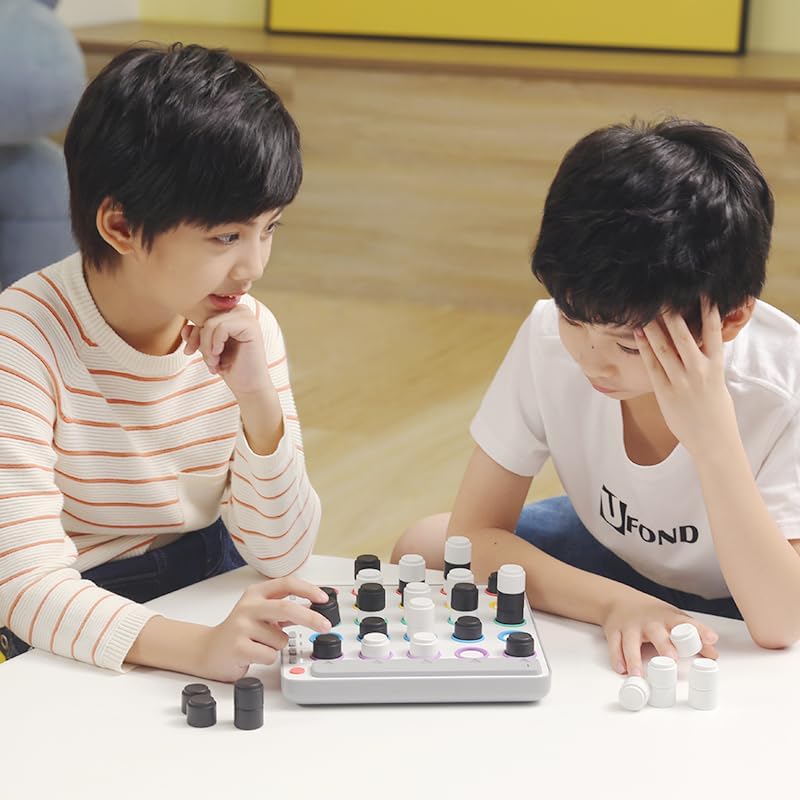
Figure 3: Game Board Powered On
4. Cómo jugar
The objective of GiiKER Smart Four is to connect four of your pieces in a row in any direction: horizontal, vertical, diagonal, or ascendant (stacking upwards).
Modos de juego 4.1
The game offers versatile entertainment with multiple modes:
- AI Opponent (Robot Mode): Sharpen your skills against the integrated AI. It offers three progressive difficulty levels (Easy, Medium, Master) to keep you engaged. The AI acts as a challenging opponent, and the board will indicate its suggested moves.
- Head-to-Head Mode: Challenge friends and family. The integrated referee system keeps track of all moves, provides prompts, and automatically indicates the winner.
4.2 Making a Move
To make a move, choose your piece color (black or white) and select an empty slot on the game board. Gently press the piece down into the slot until you hear a click or feel it register. The board's lights will then indicate the next player's turn or the AI's move.

Figure 4: Connect Four in Any Direction

Figure 5: AI Powered & Smart Features
Video 1: GiiKER Smart Four 4 in a row board game demonstration. This video showcases the game's features, including AI play and the integrated referee system, demonstrating how pieces are placed and how the board indicates turns and wins.
5. Modos de funcionamiento
The GiiKER Smart Four offers intuitive controls for selecting game modes and managing play:
- Botón de encendido: Located on the side/front, used to turn the device on/off.
- Difficulty Selection Buttons: Three buttons (I, II, III) allow you to choose between Easy, Medium, and Master AI difficulty levels.
- Head-to-Head Button: A dedicated button to switch to two-player mode, where the board acts as a referee.
- Player Indicator Lights: Lights on the side of the board indicate whose turn it is (Player 1, Player 2, or AI).
- Triangle Indicator Lights: These lights guide AI moves or highlight winning lines.
6. Mantenimiento
To ensure the longevity and optimal performance of your GiiKER Smart Four, follow these maintenance guidelines:
- Limpieza: Use a soft, dry cloth to wipe down the game board and pieces. Avoid abrasive cleaners or excessive moisture, which can damage the electronic components.
- Almacenamiento: Store the game in its original packaging or a protective case when not in use to prevent dust accumulation and physical damage. Keep it in a cool, dry place away from direct sunlight and extreme temperatures.
- Cuidado de la batería: Remove batteries if the game will not be used for an extended period to prevent battery leakage, which can damage the device.
7. Solución de problemas
If you encounter any issues with your GiiKER Smart Four, refer to the following common troubleshooting steps:
| Problema | Posible causa | Solución |
|---|---|---|
| Game does not power on. | Baterías bajas o instaladas incorrectamente. | Compruebe la polaridad de las pilas. Reemplácelas con pilas AA nuevas. |
| Pieces not registering/winning not detected. | Piece not pressed down firmly enough; sensor issue. | Ensure pieces are pressed firmly until a click is felt. Clean the sensor areas if visible debris. |
| AI behavior seems incorrect or repetitive. | Game mode selection error; temporary software glitch. | Verify the selected AI difficulty. Try turning the game off and on again to reset. |
If the problem persists after trying these steps, please contact GiiKER customer support for further assistance.
8. Especificaciones
| Característica | Detalle |
|---|---|
| Dimensiones del producto | 9.45 x 8.66 x 0.04 pulgadas |
| Peso del artículo | 2.14 libras |
| Número de modelo del artículo | JKSZQ002 |
| Edad recomendada por el fabricante | 6 años y más |
| Pilas necesarias | 2 pilas AA |
| País natal | Porcelana |
9. Garantía y soporte
For warranty information, technical support, or any inquiries regarding your GiiKER Smart Four, please refer to the contact details provided in the product packaging or visit the official GiiKER webSitio. Conserve su recibo de compra como comprobante para reclamaciones de garantía.