
1. Introducción
The Focal Theva N°3-D is a high-fidelity 3-way floorstanding loudspeaker designed for home cinema systems. It features Dolby Atmos® compatibility, achieved through a dedicated speaker driver positioned on the top of the cabinet. This driver reflects sound waves off the ceiling to create immersive 3D audio effects. This manual provides essential information for the proper setup, operation, and maintenance of your Theva N°3-D loudspeaker.
2. Instrucciones de seguridad
Please read these safety instructions carefully before using your loudspeaker. Keep this manual for future reference.
- Colocación: Ensure the loudspeaker is placed on a stable, level surface to prevent tipping. Avoid placing it in direct sunlight, near heat sources, or in areas with high humidity.
- Ventilación: Do not block any ventilation openings. Allow adequate space around the loudspeaker for proper airflow.
- Fuerza: Conecte el altavoz a un amplifier with appropriate power ratings. Exceeding recommended power can damage the speaker.
- Limpieza: Disconnect the loudspeaker from the amplifier before cleaning. Use a soft, dry cloth. Do not use liquid cleaners or aerosols.
- Servicio: No intente reparar el altavoz usted mismo. Deje todas las reparaciones a personal técnico cualificado.
- Niños: Mantenga los materiales de embalaje y las piezas pequeñas fuera del alcance de los niños para evitar peligro de asfixia.
3. Contenido del paquete
Verifique que todos los componentes estén presentes en el embalaje:
- Focal Theva N°3-D Floorstanding Loudspeaker (Model: FTHEVAN3LW-D)
- Rejilla (preinstalada o separada)
- Manual de usuario (este documento)
Si falta algún artículo o está dañado, comuníquese con su distribuidor.
4. Producto terminadoview
The Theva N°3-D loudspeaker incorporates advanced technologies for superior audio performance and immersive sound.
Características principales:
- 3-way floorstanding design, Dolby Atmos® compatible.
- Full-range speaker driver with directional baffle for precise Dolby Atmos® effects.
- Slatefiber technology for immersive and dynamic home cinema sound.
- TNF Tweeter for mellow treble reproduction.
- Time Alignment design for a focused sound image.
Componentes:
- Dolby Atmos® Driver: Located on the top, designed to reflect sound off the ceiling.
- TNF Tweeter: Aluminum/Magnesium inverted dome tweeter for high frequencies.
- Controlador de rango medio: 6.5-inch (16.5cm) Slatefiber cone for balanced and precise mid-range.
- Woofers: Two 6.5-inch (16.5cm) Slatefiber cone woofers for powerful bass.
- Tilted Stand: Integrated stand for optimal Time Alignment.

Figure 1: Focal Theva N°3-D Product Sheet illustrating key components and features. This diagram shows the internal structure, driver types (TNF Tweeter, Slatefiber midrange, Slatefiber woofers), and the top-mounted Dolby Atmos driver with its directional baffle.

Figura 2: Primer plano view of the top-mounted Dolby Atmos driver on the Focal Theva N°3-D loudspeaker. This driver is designed to project sound upwards for ceiling reflection, creating immersive 3D audio effects.

Figura 3: detallada view of the Slatefiber cone material used in the midrange and woofer drivers of the Focal Theva N°3-D. This material contributes to dynamic and immersive sound reproduction.

Figure 4: Close-up of the TNF Tweeter, an Aluminum/Magnesium inverted dome, responsible for clear and mellow high-frequency reproduction in the Focal Theva N°3-D loudspeaker.
5. Configuración
5.1 Colocación
Optimal placement is crucial for achieving the best sound performance from your Theva N°3-D loudspeakers, especially for Dolby Atmos effects.
- Configuración estéreo: For a traditional stereo setup, place the loudspeakers equidistant from your primary listening position, forming an equilateral triangle.
- Home Cinema Setup: In a home cinema configuration, the Theva N°3-D speakers should be positioned as your front left and right channels. Ensure they are placed symmetrically relative to your screen and listening area.
- Dolby Atmos: The integrated upward-firing driver requires a reflective ceiling. Position the speakers so that the sound from the top driver can reflect off the ceiling and reach your listening position. Avoid placing them under sound-absorbing materials or very high ceilings that might diminish the effect.
- Distancia de las paredes: Experiment with the distance from the rear and side walls. Placing speakers too close to walls can overemphasize bass, while too far can reduce bass impact. A good starting point is 1-2 feet (30-60 cm) from the rear wall.

Figura 5: Example of a Focal Theva home cinema setup, demonstrating typical speaker placement for optimal sound dispersion and Dolby Atmos effects. Note the symmetrical positioning relative to the viewÁrea de ing.
5.2 Conexiones
The Theva N°3-D loudspeakers connect to your ampLifier utilizando cables de altavoz estándar.
- Selección de cables: Use high-quality speaker cables of appropriate gauge for the length required.
- Polaridad: Ensure correct polarity (+ to + and - to -) when connecting the speaker terminals to your amplifier. Incorrect polarity will result in poor sound quality and imaging.
- Tipo de terminal: The Theva N°3-D features binding posts that accept bare wire, spade connectors, or banana plugs.
- AmpCanales amplificadores: Connect the main speaker terminals to the front left and right channels of your amplifier. For the Dolby Atmos effect, ensure your amplifier or AV receiver has dedicated height channels and connect the top-mounted driver terminals to these outputs. Consult your amplifier's manual for specific height channel connections.

Figura 6: Posterior view of the Focal Theva N°3-D loudspeaker, showing the speaker terminals for connection to an amplifier. Note the separate terminals for the main drivers and the top-mounted Dolby Atmos driver.
6. Instrucciones de funcionamiento
Once properly set up and connected, operating your Theva N°3-D loudspeakers is straightforward.
- Encendido: Asegúrese de que su ampEl amplificador está encendido y configurado en la fuente de entrada correcta.
- Control de volumen: Ajuste el nivel de volumen en su amplifier. Start at a low volume and gradually increase it to a comfortable listening level.
- Material de origen: For optimal Dolby Atmos experience, use content encoded with Dolby Atmos audio tracks.
- Período de rodaje: Loudspeakers typically require a break-in period of several hours of use to achieve their full sonic potential. During this time, the drivers will loosen up and perform optimally.
7. Mantenimiento
Proper care will ensure the longevity and performance of your loudspeakers.
- Limpieza del gabinete: Use a soft, dry, lint-free cloth to wipe the cabinet surfaces. For stubborn marks, a slightly damp Se puede usar un paño limpio y luego un paño seco. Evite limpiadores abrasivos o disolventes.
- Limpieza de la rejilla: The fabric grille can be gently vacuumed with a soft brush attachment to remove dust.
- Cuidado del conductor: Evite tocar directamente los conos de los altavoces o los tweeters, ya que esto puede causar daños.
- Condiciones ambientales: Proteja los altavoces de temperaturas extremas, humedad y luz solar directa.
8. Solución de problemas
If you encounter issues with your Theva N°3-D loudspeakers, refer to the following common problems and solutions:
| Problema | Posible causa | Solución |
|---|---|---|
| No hay sonido del altavoz | Loose cable connection, incorrect input selection on amplevantador, amplifier off, speaker damaged. | Check all cable connections (speaker to amplifier, source to amplifier). Ensure ampEl amplificador está encendido y se ha seleccionado la entrada correcta. Pruebe con otro altavoz si es posible. |
| Sonido distorsionado | sobrecargado amplifier, damaged speaker driver, incorrect cable connection (polarity). | Reducir amplifier volume. Check speaker cable polarity. Inspect speaker drivers for visible damage. |
| Bajos débiles o nulos | Incorrect speaker placement, phase issue, ampConfiguración del elevador. | Adjust speaker placement relative to walls. Check amplifier's bass/tone controls or room correction settings. Ensure correct polarity. |
| Poor Dolby Atmos effect | Incorrecto amplifier setup, unsuitable room acoustics, speaker placement. | Verify height channel connections on your amplifier. Ensure your AV receiver is configured for Dolby Atmos. Check ceiling height and material for proper reflection. Adjust speaker angle if possible. |
If the problem persists after attempting these solutions, please contact Focal customer support or your authorized dealer.
9. Especificaciones
Detailed technical specifications for the Focal Theva N°3-D Floorstanding Loudspeaker.
| Característica | Especificación |
|---|---|
| Nombre del modelo | FTHEVAN3LW-D |
| Tipo de altavoz | 3-way Floorstanding, Dolby Atmos Compatible |
| Material | Madera |
| Color | Madera clara |
| Dimensiones del producto (Pr. x An. x Al.) | 34"D x 116"W x 26.5"H (Note: Dimensions seem unusually large, please verify with manufacturer if critical) |
| Peso del artículo | 48 libras |
| Speaker Size (Woofer/Subwoofer) | 6.5 pulgadas |
| Potencia máxima de salida del altavoz | 250 vatios |
| Relación señal a ruido | 91 dB |
| Modo de salida de audio | Stereo, Dolby Atmos |
| Tipo de montaje | Piso de pie |
| Tecnología de conectividad | Power Cord (Note: This typically refers to active speakers, but Theva N°3-D is passive. This might be a data entry error in the source.) |
| Usos recomendados | For DVD Players, For Gaming Consoles, For Surround Sound Systems, For Televisions, Home Cinema |
| Dispositivos compatibles | Laptop, Smartphone, Tablet, Television (via ampmás vivo) |
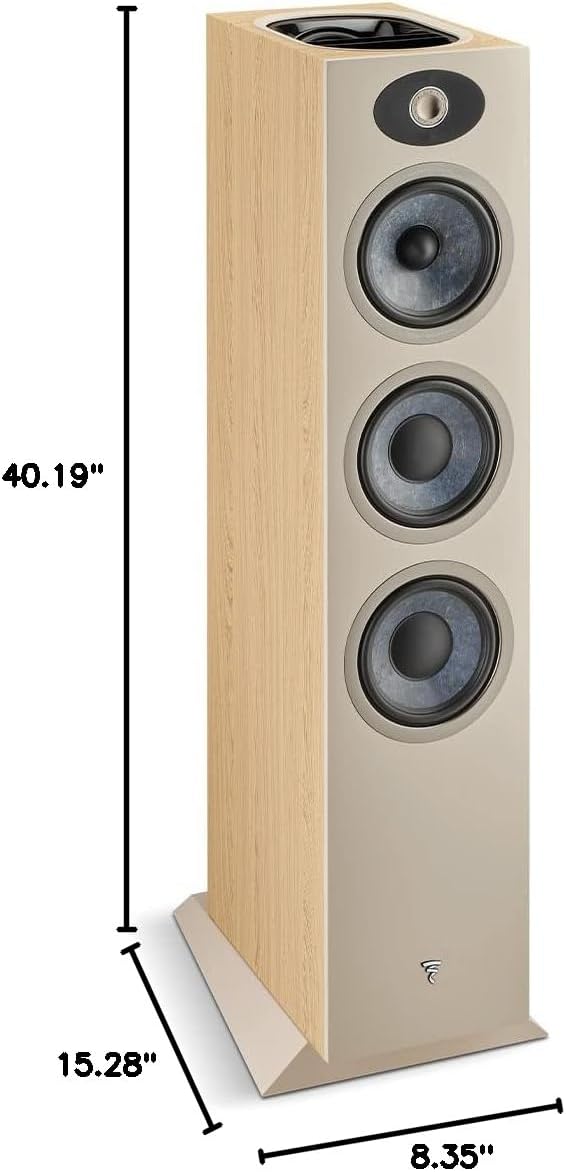
Figure 7: Dimensions diagram for the Focal Theva N°3-D loudspeaker, showing height (40.19"), depth (15.28"), and width (8.35").
10. Garantía y soporte
10.1 Información de garantía
The Focal Theva N°3-D loudspeaker comes with a limited warranty. Please refer to the warranty card included with your product or visit the official Focal websitio para conocer los términos y condiciones detallados sobre cobertura, duración y procedimientos de reclamaciones.
10.2 Atención al cliente
For technical assistance, troubleshooting beyond this manual, or warranty inquiries, please contact your authorized Focal dealer or visit the official Focal support websitio:
- Focal Websitio: www.focal.es
- Información del distribuidor: Refer to your purchase receipt or the Focal website to locate an authorized dealer near you.