
Introducción
Gracias por la compraasing the Hikity 2 Din Bluetooth Car Stereo. This manual provides detailed instructions for installation, operation, and maintenance to ensure optimal performance and longevity of your device. Please read this manual thoroughly before use and keep it for future reference.
¿Qué hay en la caja?
Carefully unpack the box and ensure all items are present. If any items are missing or damaged, please contact your retailer.
- Hikity 2 Din Car Stereo
- Trasero View Cámara
- Micrófono externo
- Cable de alimentación
- Cable de bocina
- Mando a distancia
- Marco
- Manual de usuario (este documento)
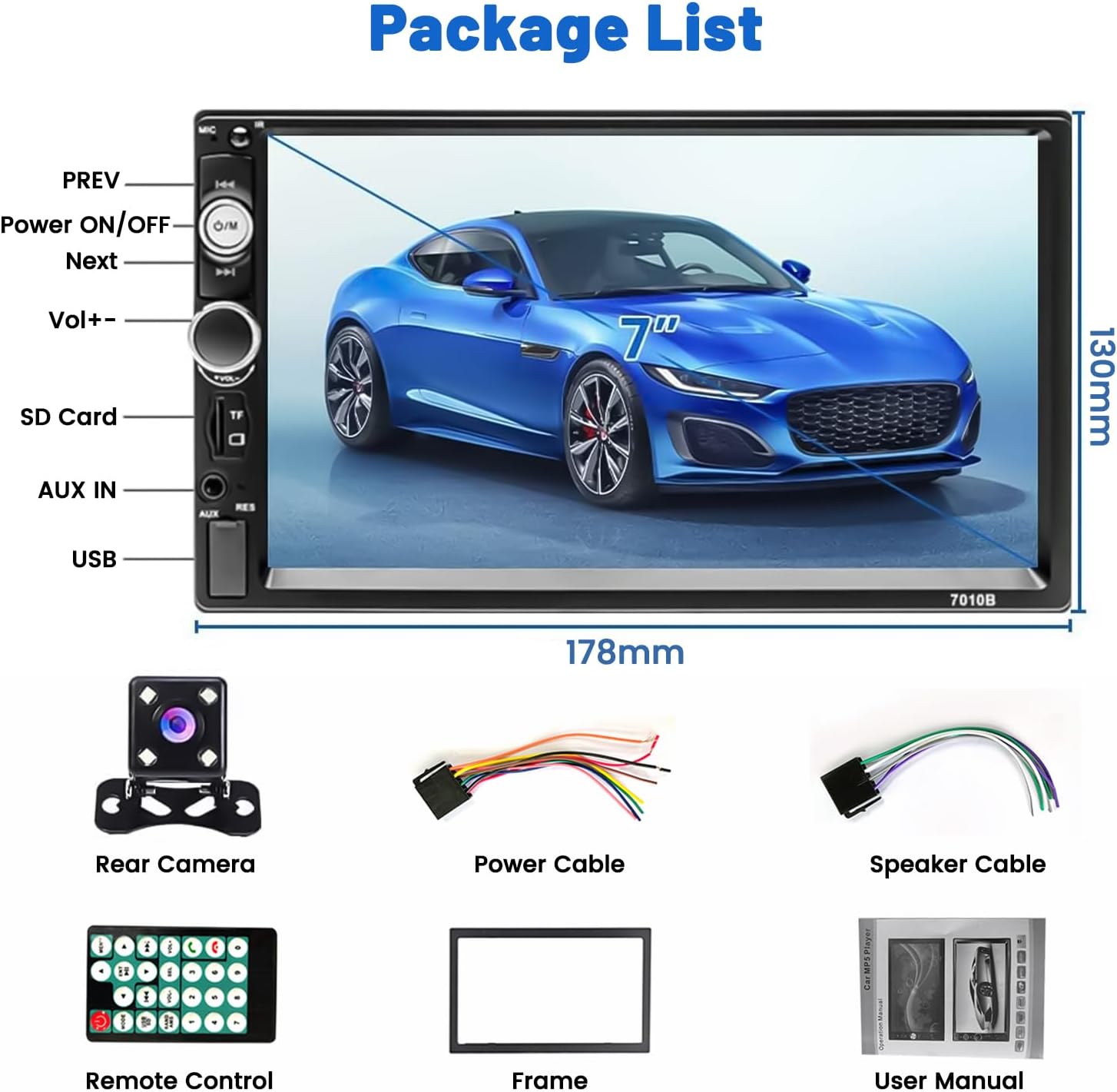
Image: Package contents and dimensions of the Hikity 2 Din Car Stereo.
Producto terminadoview
Características principales
- Pantalla táctil capacitiva de 7 pulgadas
- Bluetooth incorporado para llamadas manos libres y transmisión de música
- FM Radio Receiver with 18 preset stations
- Función Mirror Link para teléfonos iOS y Android
- Rear Camera Input with automatic display
- USB, AUX, and SD Card slots for multimedia playback
- Soporte de control del volante (SWC)
- 7-color LED backlight options
- EQ customization and audio output

Imagen: Frente view of the Hikity 2 Din Car Stereo.
Controles y puertos del panel frontal

Imagen: Detallada view of the front panel, including the 7-inch touchscreen, physical buttons, and input slots.
- ANTERIOR / SIGUIENTE: Track skip/station tuning
- Power ON/OFF/M: Power button, also functions as Mode selector
- Volumen+/-: Botón de control de volumen
- Ranura para tarjeta SD: For TF/SD memory cards
- ENTRADA AUX: Entrada auxiliar de 3.5 mm
- Puerto USB: For USB drives and phone charging
- RES: Reset button (small pinhole)
Configuración e instalación
Proper installation is crucial for the performance and safety of your car stereo. It is recommended to have this unit installed by a professional.
Diagrama de cableado
Consulte el siguiente diagrama para ver las conexiones correctas del cableado. Un cableado incorrecto puede dañar la unidad o el sistema eléctrico de su vehículo.

Image: Comprehensive wiring diagram for the car stereo, including power, speaker, and video connections.
- Cable de alimentación (A): Connect ACC (Red), GND (Black), B+ (Yellow), ANT (Blue), ILL (Orange).
- Cable de altavoz (B): Connect Front Left (White/White-Black), Front Right (Gray/Gray-Black), Rear Left (Green/Green-Black), Rear Right (Purple/Purple-Black).
- Entrada de cámara de marcha atrás: Connect the red wire from the camera power to the reversing lamp positive, and the black wire to ground. Connect the video output cable to the unit's 'REVERSE CAMERA INPUT' (usually a yellow RCA jack).
- Control del volante (TECLA1/TECLA2): Connect to your vehicle's SWC wires.
Pasos generales de instalación
- Desconecte el terminal negativo de la batería del vehículo.
- Remove the existing car stereo or dashboard panel.
- Connect the wiring harness from the new stereo to the vehicle's wiring, following the diagram.
- If installing a rear camera, route the camera cable and connect it as per the diagram.
- Monte el nuevo estéreo de forma segura en el tablero.
- Vuelva a conectar el terminal negativo de la batería del vehículo y pruebe la unidad.
Instrucciones de funcionamiento
Operación de pantalla táctil
The unit features a responsive 7-inch capacitive touchscreen. Navigate through menus and control functions by tapping, swiping, and dragging on the screen.

Imagen: Examples of touchscreen gestures for operating the unit.
Conexión Bluetooth
Pair your mobile phone with the car stereo for hands-free calling and wireless audio streaming.
- Encienda el Bluetooth en su teléfono móvil.
- En el estéreo del automóvil, vaya al menú Bluetooth.
- Buscar available devices on your phone. The stereo's name will typically appear as "Hikity" or similar.
- Select the stereo from your phone's list and confirm pairing.
- Una vez emparejado, podrá realizar/recibir llamadas y reproducir música de forma inalámbrica.

Image: Bluetooth connection interface and FM radio display.
Funcionamiento de la radio FM
Access and tune into your favorite FM radio stations.
- Select the FM Radio mode from the main menu.
- Use the on-screen controls to scan for stations (AS/PS for auto scan/preset scan) or manually tune using the frequency display.
- You can save up to 18 stations as presets for quick access.
Función de enlace de espejo
Visualiza la pantalla de tu smartphone directamente en la pantalla del estéreo del coche.
- Connect your smartphone to the car stereo's USB port using an original USB cable.
- Select the "Mirror Link" or "PhoneLink" option on the car stereo.
- Siga las instrucciones en pantalla tanto en su teléfono como en el estéreo para establecer la conexión.
- Una vez conectado, la pantalla de su teléfono se reflejará, lo que le permitirá view navigation, videos, and other apps.

Image: Phone screen mirroring for both iOS and Android devices.
Pantalla de la cámara trasera
The unit automatically displays the rear camera feed when the vehicle is put into reverse gear.
- Ensure the rear camera is correctly installed and wired to the reverse light power source.
- When shifting into reverse, the stereo will automatically switch to the camera view.
- La cámara ofrece un gran angular de 170 grados. view con capacidades de visión nocturna para mayor seguridad.

Imagen: Trasera view camera display and parking assistance features.
Reproductor Multimedia
Reproducir audio y vídeo files de varias fuentes.
- USB: Inserte una unidad USB en el puerto USB.
- Tarjeta SD: Insert a TF/SD card into the SD card slot.
- Auxiliar: Conecte un dispositivo de audio externo a través de la entrada AUX de 3.5 mm.
- Navegar por tu files utilizando la interfaz de pantalla táctil.

Image: Multimedia playback options including SD card, AUX, and USB inputs.
Control del volante (SWC)
Controle las funciones básicas del estéreo utilizando los botones del volante de su vehículo.
- Ensure the SWC wires (KEY1/KEY2) are correctly connected during installation.
- Acceda al menú de configuración SWC en el estéreo del automóvil.
- Follow the on-screen instructions to program the steering wheel buttons to the desired functions (e.g., volume up/down, track skip, mode).
Image: Steering Wheel Control (SWC) setup interface.
Mantenimiento
- Limpieza: Utilice un paño suave y seco para limpiar la pantalla y la unidad. No utilice limpiadores abrasivos ni disolventes.
- Temperatura: Evite exponer la unidad a temperaturas extremas o a la luz solar directa durante períodos prolongados.
- Humedad: Mantenga la unidad seca. No la exponga al agua ni a otros líquidos.
- Actualizaciones de software: Consulta el sitio oficial de Hikity webVisite el sitio periódicamente para ver si hay actualizaciones de firmware disponibles.
Solución de problemas
Si encuentra problemas, consulte los siguientes problemas y soluciones comunes:
| Problema | Posible causa | Solución |
|---|---|---|
| Sin poder | Cableado incorrecto; fusible quemado | Check power cable connections (ACC, B+, GND). Verify vehicle's fuse and the unit's fuse. |
| Sin sonido | Cableado incorrecto de los altavoces; Volumen demasiado bajo; Silencio activado | Check speaker connections. Increase volume. Ensure mute is off. |
| El Bluetooth no se conecta | Bluetooth off on phone/stereo; Device not discoverable | Asegúrate de que el Bluetooth esté activado en ambos dispositivos. Asegúrate de que el estéreo esté en modo de emparejamiento. Intenta reiniciar ambos dispositivos. |
| Mirror Link no funciona | Incorrect USB cable; App not installed/updated | Use an original USB cable. Ensure the required app (if any) is installed and updated on your phone. Check phone settings for USB debugging/file modo de transferencia. |
| La cámara trasera no se muestra | Incorrect camera wiring; Reverse trigger not connected | Verify camera power and video signal connections. Ensure the reverse trigger wire (REVERSE) is connected to the vehicle's reverse light positive. |
| La unidad se congela o no responde | Fallo temporal del software | Press the RESET button (small pinhole on the front panel) with a thin object. |
Presupuesto
| Característica | Detalle |
|---|---|
| Marca | Caminata |
| Número de modelo | 544e7620-8aa7-4010-8628-b58fa734ad5e |
| Tamaño de pantalla | 7 pulgadas |
| Tipo de pantalla | Pantalla tactil capacitiva |
| Tecnología de conectividad | AUX, Bluetooth, USB, Wi-Fi |
| Características especiales | Built-in Bluetooth, Touchscreen, Rear Camera Input, SD Card Input, AUX Input, Mirror Link |
| Dispositivos compatibles | Amplificador, Smartphone |
| Modo de salida de audio | Mononucleosis infecciosa |
| Configuración de canales de sonido envolvente | 5.1 |
| Codificación de vídeo | AVI/MP4/FLV/RM/RMVB/MP1/MP |
| Color | Negro |
| Dimensiones del producto (Pr x An x Al) | 6.3 x 17.8 x 10.3 cm |
| Potencia de salida | 60 vatios |
| Número de canales | 4 |
| Internet Applications | YouTube, Browser, Netflix |
| Método de control | Aplicación, control remoto, tacto, voz |
| Tipo de salida de audio | AUX, Speakers, Bluetooth |
| Formatos compatibles | AVI, WAV, WMA |
| Peso del artículo | 700 gramos |
Garantía y soporte
Garantía del producto
This Hikity product comes with a 2 año de garantía Desde la fecha de compra. Esta garantía cubre defectos de fabricación y mal funcionamiento en condiciones normales de uso. No cubre daños causados por instalación incorrecta, mal uso, accidentes ni modificaciones no autorizadas.
Atención al cliente
For technical assistance, troubleshooting, or warranty claims, please contact Hikity customer support through the retailer where you purchased the product or visit the official Hikity store page:
Visita la tienda Hikity en Amazon
Please have your model number (544e7620-8aa7-4010-8628-b58fa734ad5e) and proof of purchase ready when contacting support.


