
1. Introducción
The SUNOL F06 Smart Glasses are designed to provide an integrated audio and visual experience. Featuring an open-ear listening design, these sunglasses allow you to enjoy audio while remaining aware of your surroundings. Equipped with TWS 5.3 Bluetooth technology, they offer a stable and high-fidelity sound connection for music, calls, and navigation. The glasses include touch-sensitive controls for easy operation and come with interchangeable UV-filtered lenses for eye protection. Their waterproof design ensures durability in various environments.

Image: The SUNOL F06 Smart Glasses, showcasing su diseño moderno.
Vídeo: Un overview of the SUNOL F06 Smart Glasses, highlighting their open-ear audio capabilities and design.
2. ¿Qué hay en la caja?
Upon opening your SUNOL F06 Smart Glasses package, you should find the following items:
- Smart Glasses (main unit)
- Glasses Case (for storage and protection)
- Two Pairs of Lenses (one pre-installed, one alternative)
- Cable de carga
- Manual de usuario (este documento)

Image: All components included in the SUNOL F06 Smart Glasses package.
3. Producto terminadoview
The F06 Smart Glasses integrate audio technology into a stylish eyewear design. Key features include:
- Open Ear Listening: Allows you to hear audio while remaining aware of your surroundings.
- Bluetooth 5.3: Provides a fast and stable wireless connection for high-fidelity sound.
- Controles táctiles: Intuitive controls on the temple for managing music playback and calls.
- Lentes intercambiables: Comes with brown and black UV-filtered lenses to protect your eyes.
- Diseño a prueba de agua: Built to withstand rain and splashes, suitable for outdoor activities.

Image: Visual representation of the smart glasses' key features.

Image: Demonstrating the open-ear audio and wireless capabilities.

Image: Close-up of the touch control area on the glasses' temple.

Image: Illustrating the UV400 protection provided by the lenses.
4. Configuración
4.1 Carga de las gafas
Before first use, fully charge your SUNOL F06 Smart Glasses. Connect the provided charging cable to the charging port on the glasses and plug the other end into a compatible USB power source (e.g., computer USB port, wall adapter). The indicator light will show charging status.
4.2 Encendido/apagado y emparejamiento Bluetooth
To power on the glasses, press and hold the touch button area on the right temple for 3 seconds. You will hear a voice prompt "Power on". The glasses will then enter pairing mode.
On your mobile device, enable Bluetooth and search for available devices. Select 'TWS-F' from the list to connect. Once connected, you will hear a confirmation sound.
To power off the glasses, press and hold the right mirror leg touch area for 5 seconds. You will hear a voice prompt "Power off". Alternatively, plugging the glasses into the charger will automatically shut them down.
5. Instrucciones de funcionamiento
The SUNOL F06 Smart Glasses feature intuitive touch controls located on the temples. Refer to the diagram below for specific functions:
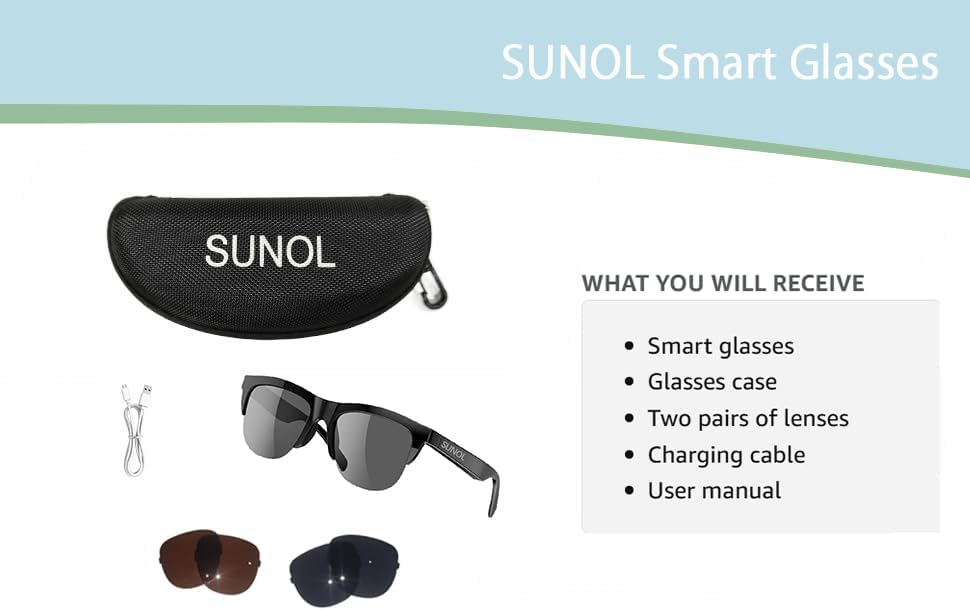
Imagen: Diagrama detallado de las funciones de control táctil.
5.1 Controles de reproducción de música
- Reproducir/Pausa: In standby state or during playback, double-click the multi-function touch area to play or pause the audio.
- Next Song/Content: Triple-click the multi-function touch area.
- Previous Song/Content: Long press the multi-function touch area for 1.5 seconds.
5.2 Gestión de llamadas
- Responder/colgar llamada: When an incoming call is received, double-click the multi-function touch area to answer. Double-click again to hang up.
- Rechazar llamada: Long press the multi-function touch area for 1.5 seconds to reject an incoming call.
6. Reemplazo de lentes
The SUNOL F06 Smart Glasses come with interchangeable lenses, allowing you to switch between different colors or types as needed. Follow the instructions in the video below to safely replace the lenses.
Video: Demonstrating the process of replacing the lenses on the SUNOL F06 Smart Glasses.
Nota: Handle lenses carefully to avoid scratches. Ensure they are securely seated in the frame after replacement.
7. Mantenimiento
Proper maintenance will extend the lifespan of your smart glasses:
- Limpieza de lentes: Use the provided lens cloth or a soft, clean microfiber cloth to wipe the lenses. Avoid using abrasive materials or harsh chemicals.
- Marco de limpieza: Limpie el marco con un paño suave.amp cloth. Do not submerge the glasses in water, despite their waterproof rating, to prevent damage to electronic components.
- Almacenamiento: When not in use, store the glasses in the provided storage case to protect them from dust, scratches, and impacts.
- Cuidado de la batería: Avoid extreme temperatures. If storing for a long period, charge the battery to about 50% to maintain battery health.
8. Solución de problemas
If you encounter issues with your SUNOL F06 Smart Glasses, refer to the following common solutions:
| Problema | Posible causa | Solución |
|---|---|---|
| Las gafas no se encienden. | Batería baja; botón de encendido no presionado correctamente. | Charge the glasses fully. Press and hold the touch area for 3 seconds until "Power on" is heard. |
| No se puede emparejar con el dispositivo. | Bluetooth not enabled; glasses not in pairing mode; interference. | Ensure Bluetooth is enabled on your device. Power off and on the glasses to re-enter pairing mode. Move closer to your device. Forget previous pairings on your device. |
| No hay sonido o volumen bajo. | Volumen demasiado bajo; no conectado; problema con la fuente de audio. | Increase volume on both glasses and connected device. Ensure glasses are properly paired. Check audio source on your device. |
| La calidad de la llamada es mala. | Señal Bluetooth débil; ruido ambiental. | Acérquese a su dispositivo conectado. Reduzca el ruido de fondo si es posible. |
| Los controles táctiles no responden. | Fallo temporal del software; área táctil sucia. | Reinicie las gafas. Limpie el área de control táctil con un paño suave y seco. |
9. Especificaciones
| Característica | Detalle |
|---|---|
| Número de modelo | F06 |
| Marca | Sol |
| Versión de Bluetooth | 5.3 |
| Tipo de batería | Polímero de litio (1 requerido, incluido) |
| Clasificación de impermeabilidad | XP4 Life Waterproof |
| Tipo de lente | UV Filtered, Interchangeable (Brown and Black) |
| Método de control | Control táctil |
| Salida de audio | Open Ear HIFI Audio, Dual Speaker Design |
| Dimensiones | 7.4 x 2.91 x 2.56 pulgadas (Dimensiones del paquete) |
| Peso | 1.06 onzas (peso del paquete) |
| Fabricante | Sol |
| País natal | Porcelana |

Image: Physical dimensions of the smart glasses.
10. Garantía y soporte
Para obtener información sobre la garantía y atención al cliente, consulte la documentación incluida con su compra o póngase en contacto directamente con el fabricante. Conserve el comprobante de compra para cualquier reclamación de garantía.
Manufacturer: SUNOL
For further assistance, please visit the official SUNOL websitio o comuníquese con su departamento de servicio al cliente.