
1. Producto terminadoview
The GMBACK Wireless Switch 2 Pro Controller is a versatile gaming controller designed for a wide range of platforms, including Nintendo Switch 2/Switch/Lite/OLED, Apple devices (iPhone, iPad, Mac, TV, Apple Arcade MFi Games), Android devices (phone, tablet, Android TV, TV boxes), PC/Laptop (Windows 7/8/9/10/11), and Steam. It features advanced functionalities such as programmable buttons, 6-axis gyro motion control, adjustable vibration, turbo modes, and customizable RGB lighting to enhance your gaming experience.

Imagen: Frente view of the GMBACK Wireless Switch 2 Pro Controller, showcasing su diseño ergonómico y joysticks iluminados.
2. Contenido del paquete
Verifique el contenido del paquete al desembalarlo para asegurarse de que todos los elementos estén presentes:
- GMBACK Wireless Switch 2 Pro Controller
- Cable de carga USB
- Manual de usuario (este documento)
3. Configuración y conexión
3.1 Amplia compatibilidad
The controller supports a broad range of devices. Ensure your device's Bluetooth is enabled before attempting to pair.
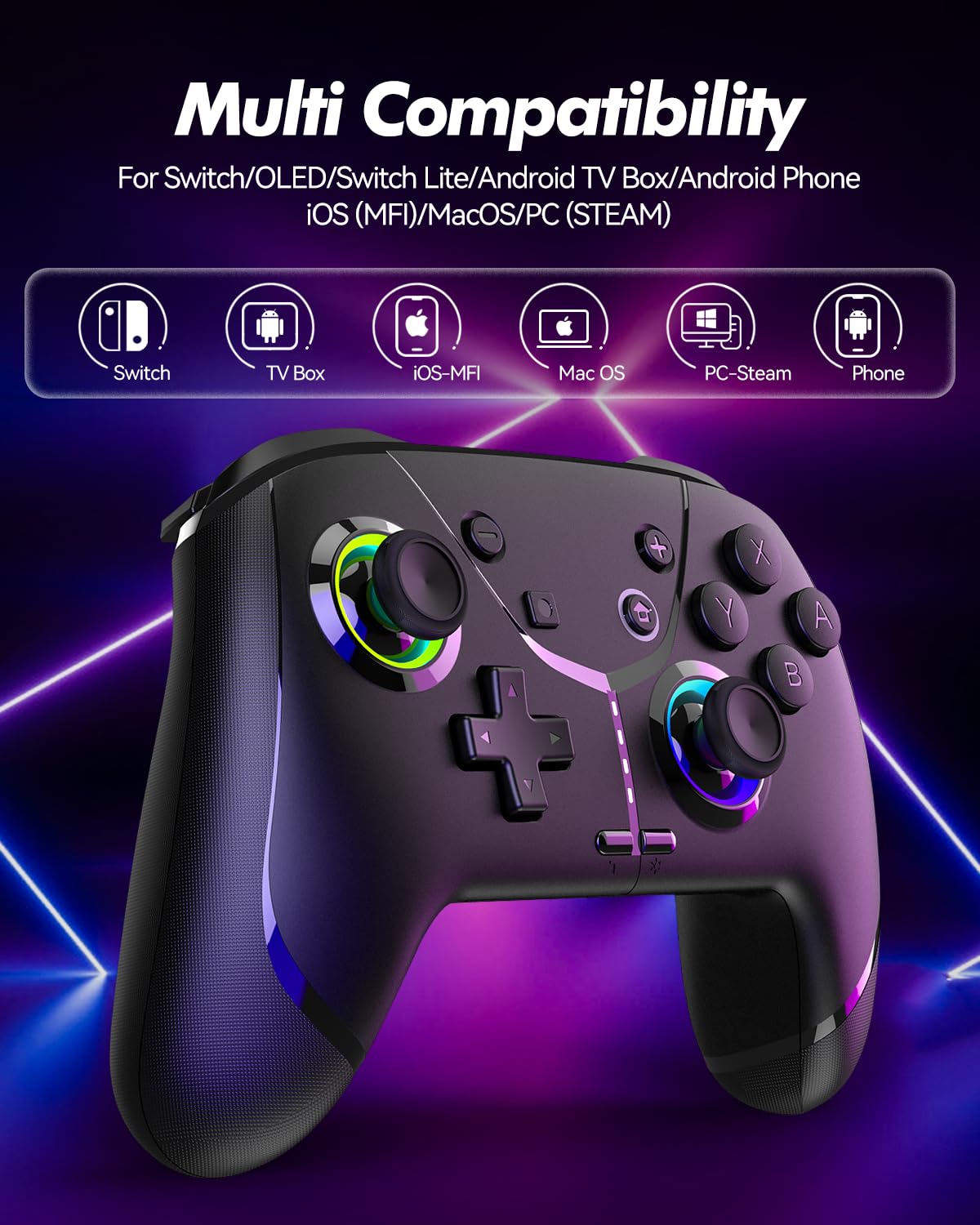
Image: Diagram illustrating the controller's compatibility with Nintendo Switch, TV Box, iOS-MFi, Mac OS, PC-Steam, and Phone devices.
3.2 Conexión Bluetooth
To pair the controller via Bluetooth:
- Asegúrese de que el controlador esté suficientemente cargado.
- Encienda el controlador presionando el botón Inicio.
- Activate Bluetooth pairing mode on the controller (refer to specific device pairing instructions below).
- On your device (Switch, phone, PC), go to Bluetooth settings and search for new devices.
- Select "Pro Controller" or similar from the list to connect.
- Una vez conectado, las luces indicadoras del controlador se estabilizarán.
3.3 conexiones cableadas
For PC or other compatible devices, you can connect the controller directly using the provided USB cable. This will typically allow for plug-and-play functionality without requiring Bluetooth pairing.
4. Instrucciones de funcionamiento
4.1 Programmable Buttons (AR/AL)
The controller features two programmable buttons (AR and AL) on the back. These can be mapped to single buttons or record a sequence of up to 30 seconds of gaming operations.
- Mapping Single Buttons: Press the Program button, then the button you wish to map (e.g., A, B, X, Y, L, R, ZL, ZR, Left Joystick, Right Joystick, D-pad, +,-), then press AR or AL.
- Grabación de macros: Press the Program button, then perform the sequence of actions you wish to record. Press AR or AL again to save the macro.

Imagen: Primer plano view of the controller's underside, highlighting the AR and AL programmable buttons and their mapping capabilities.
4.2 Motion Controls (6-Axis Gyro Sensor)
The built-in 6-axis gyro sensor allows for precise motion control in compatible games on Switch, mobile phones, PC, and TV. This feature enables intuitive aiming and movement based on the controller's orientation.

Image: Illustration of the 6-axis gyro sensor functionality, showing a user holding the controller with motion lines indicating active control in a racing game.
4.3 Vibración ajustable
The asymmetric dual motors provide four adjustable vibration intensities (100%, 70%, 50%, 0%) for an immersive gaming experience. Adjust the vibration level to your preference through the controller's settings or specific button combinations (refer to the quick start guide for details).

Image: Visual representation of the dual vibration feature with intensity levels (None, Weak, Medium, Strong) and the auto/manual turbo function.
4.4 Turbo Modes
The controller offers both auto and manual turbo modes with three adjustable speeds (5, 10, or 15 shots per second). This feature allows for rapid, continuous input of a button press, useful in fast-paced games.
- Turbomanuales: Press the Turbo button and the desired action button simultaneously.
- Turbo automático: Press the Turbo button and the action button twice.
- Ajuste de velocidad: While in Turbo mode, press the Turbo button and move the right joystick up or down to cycle through speeds.
4.5 ABXY Function Switching
Easily switch between Nintendo Switch (A/B/X/Y) and Xbox (Y/X/B/A) button layouts without physically removing buttons. This ensures compatibility and comfort across different gaming platforms.

Image: Depiction of the ABXY button layout switching feature, showing the buttons rotating to indicate the change between Nintendo and Xbox configurations.
4.6 Wake-Up Function and RGB Light
The controller supports a wake-up function for connected devices (e.g., Nintendo Switch). It also features cool RGB lighting around the joysticks, which can be customized or turned off to suit your preference.

Image: The controller with illuminated RGB lights around the joysticks, indicating the "Wake Up & Cool LED Light" feature.
4.7 Función de captura de pantalla
A dedicated screenshot button allows you to capture in-game moments instantly on compatible platforms.
5. Carga y duración de la batería
The controller is equipped with a built-in 800 mAh rechargeable battery, providing approximately 15-20 hours of gameplay on a full charge. Charging time is typically around 3 hours.
- Connect the controller to a USB power source (e.g., console, PC, USB wall adapter) using the provided USB charging cable.
- Las luces indicadoras mostrarán el estado de carga y se apagarán o cambiarán de color cuando estén completamente cargadas.

Image: Illustration highlighting the controller's ergonomic design and battery specifications: 800mAh Lithium Battery, 3H Charging Time, and 15-20H Playing Time.
6. Mantenimiento
To ensure the longevity and optimal performance of your GMBACK Wireless Switch 2 Pro Controller:
- Mantenga el mando limpio frotándolo con un paño suave y seco. Evite el uso de productos químicos agresivos o materiales abrasivos.
- Guarde el controlador en un lugar fresco y seco, alejado de la luz solar directa y de temperaturas extremas.
- Evite dejar caer el controlador o someterlo a impactos fuertes.
- No intente desmontar ni modificar el controlador, ya que esto anulará la garantía.
- Cargue el controlador periódicamente, incluso si no lo usa con frecuencia, para mantener la salud de la batería.
7. Solución de problemas
| Problema | Posible causa | Solución |
|---|---|---|
| El controlador no se enciende. | Batería baja. | Cargue el controlador durante al menos 3 horas. |
| No se puede emparejar mediante Bluetooth. | El controlador no está en modo de emparejamiento; interferencia de Bluetooth; dispositivo Bluetooth apagado. | Ensure controller is in pairing mode. Turn off and on device Bluetooth. Move closer to the device. Try wired connection. |
| Retraso de entrada o desconexión. | Batería baja; demasiado lejos del dispositivo; interferencia inalámbrica. | Charge controller. Move closer to device. Reduce other wireless device interference. |
| Los botones/joysticks no responden. | Fallo de software; daño físico. | Reinicie el controlador y el dispositivo conectado. Si el problema persiste, contacte con atención al cliente. |
| La vibración no funciona. | Intensidad de vibración establecida al 0%; el juego no admite vibración. | Adjust vibration intensity. Check game settings. |
8. Especificaciones
- Modelo: Sensor giroscópico de 6 ejes
- Conectividad: Bluetooth
- Compatibilidad: Nintendo Switch 2/Switch/Lite/OLED, Apple (iPhone, iPad, Mac, TV, MFi Games), Android (phone, tablet, TV), PC (Windows 7/8/9/10/11), Steam
- Batería: Batería de litio de 800 mAh
- Tiempo de carga: Aproximadamente 3 horas
- Tiempo de juego: 15-20 horas
- Características: Programmable Buttons, 6-Axis Gyro, Adjustable Vibration, Turbo Modes, ABXY Function Switching, Wake-up, RGB Light, Screenshot
- Peso del artículo: 11.3 onzas
- Dimensiones del paquete: 6.61 x 5.2 x 2.76 pulgadas
- Fabricante: GMBACK
9. Garantía y soporte
GMBACK is committed to providing high-quality products and excellent customer service. For any issues or inquiries regarding your controller, please refer to the following:
- Información de garantía: Please retain your proof of purchase for warranty claims. Specific warranty terms may vary; refer to the product packaging or contact GMBACK customer support for details.
- Atención al cliente: For technical assistance, troubleshooting, or warranty service, please contact GMBACK customer support through the retailer where you purchased the product or visit the official GMBACK store on Amazon: GMBACK Store.
- Manual de usuario en línea: Es posible que esté disponible para descargar una versión PDF del manual del usuario en https://manuals.plus/m/56f01544f3b9d5425429644adc4053f7681b5d3717aa40f944cdb0f9bfccf36b.