
1. Introducción
Thank you for choosing the XTUGA D900 Dual UHF Wireless Microphone System. This system is designed to provide high-quality audio transmission for various applications, including karaoke, DJ events, weddings, church services, business meetings, classroom activities, and live performances. This manual will guide you through the setup, operation, and maintenance of your new wireless microphone system.
The XTUGA D900 features dual handheld microphones with adjustable echo, treble, and bass controls, paired with a versatile mini receiver that offers both 3.5mm and 6.35mm output options for broad compatibility with audio devices.

Image: The XTUGA D900 system is suitable for performances, family entertainment, classroom speeches, and program hosting.
2. Contenido del paquete
Por favor revise el paquete para asegurarse de que todos los artículos estén presentes:
- 2 x XTUGA D900 Handheld Wireless Microphones
- 1 x Mini Wireless Receiver (with 3.5mm jack)
- 1 x 6.35mm Adapter (for receiver)
- 1 x USB Charging Cable (for receiver)
- 2 x Anti-roll Rings (for microphones)
- Manual de usuario
3. Características del producto
- Sonido de alta calidad: Clear voice transmission without feedback or distortion.
- Dual UHF Wireless System: Two microphones operating on independent UHF channels (ChA and ChB), each with 50 adjustable frequencies (573-599 MHz range) to prevent interference.
- On-Microphone Controls: Each handheld microphone features direct controls for volume, 7 levels of echo adjustment, and 5 levels of treble/bass adjustment.
- Versatile Receiver: Mini wireless receiver with a 3.5mm output, convertible to 6.35mm for wide compatibility with various audio equipment.
- Largo alcance inalámbrico: Transmisión de señal estable hasta 20 metros (65 pies).
- Receptor recargable: Built-in battery provides up to 8 hours of use on a 4-hour charge.
- Reproducción Bluetooth: The receiver supports Bluetooth connectivity for playing background music from a smartphone or other devices.

Image: Close-up of the XTUGA D900 microphone displaying its multifunctional adjustment capabilities for echo, volume, treble, and bass.
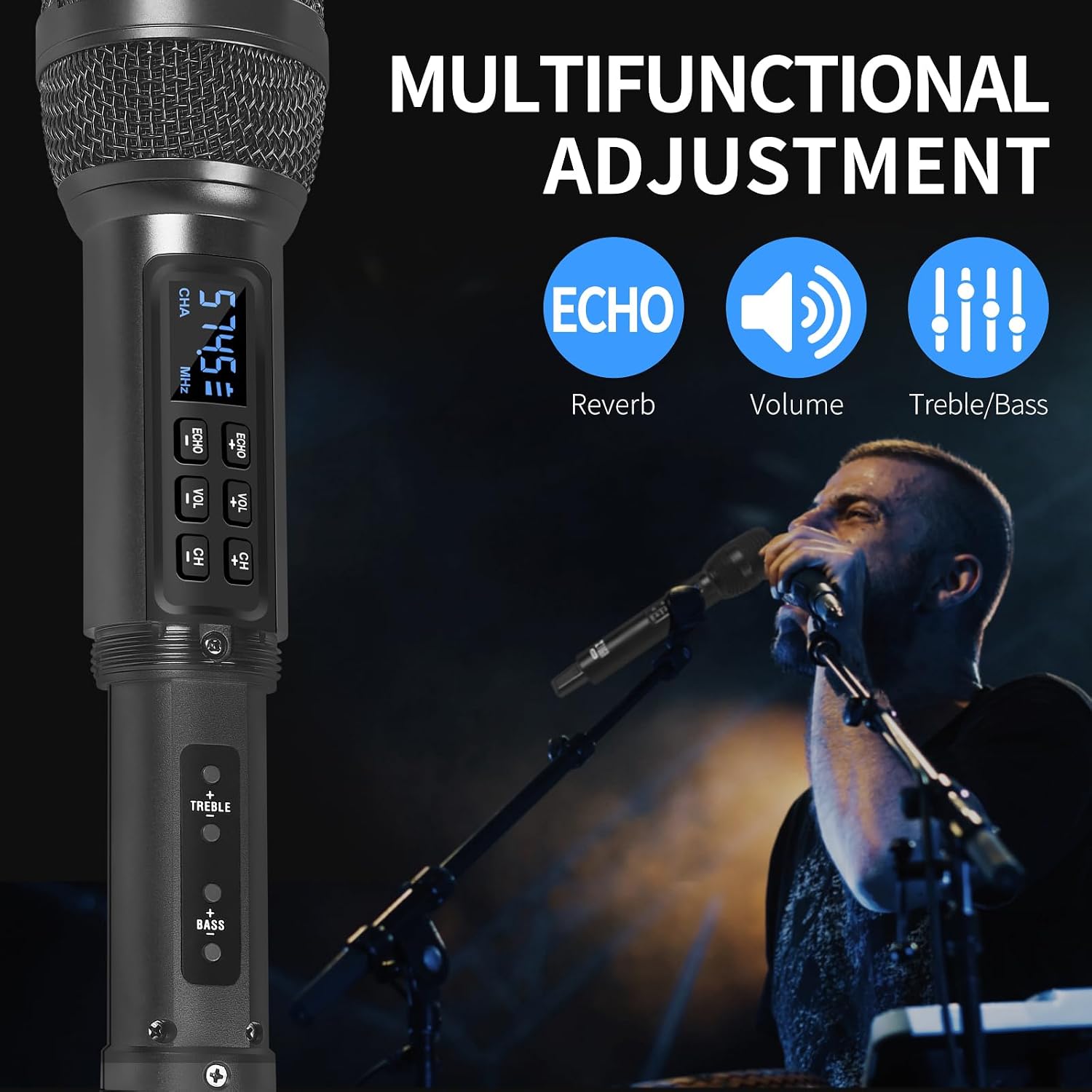
Image: The XTUGA D900 handheld microphone featuring a digital display for frequency and channel information.
4. Guía de configuración
4.1. Conexión del receptor
- Identify Output: Determine if your audio device (e.g., amplifier, mixer, speaker, soundbar, PC) requires a 3.5mm or 6.35mm input.
- Conectar el receptor:
- For 3.5mm input: Directly plug the mini wireless receiver's 3.5mm jack into your device's audio input port.
- For 6.35mm input: Attach the provided 6.35mm adapter to the receiver's 3.5mm jack, then plug it into your device's 6.35mm audio input port.
- Encendido del receptor: Press and hold the POWER button on the receiver until the indicator lights illuminate.
4.2. Configuración del micrófono
- Inserte las baterías: Open the battery compartment of each microphone and insert two AA batteries (not included), ensuring correct polarity.
- Encender los micrófonos: Press and hold the power button on each microphone. The display will light up, showing the channel and frequency.
- Emparejamiento automático: The microphones and receiver should automatically pair. The RF indicator lights (A.RF, B.RF) on the receiver will turn solid blue when a microphone is successfully connected.

Image: Connectivity diagram illustrating how to connect the XTUGA D900 microphone and receiver to different audio systems using 3.5mm or 6.35mm inputs. Note: Not recommended for small speakers under 15 watts.

Image: The XTUGA D900 system, showing two microphones and the receiver, highlighting a stable 20-meter wireless signal range.
5. Instrucciones de funcionamiento
5.1. Controles del micrófono
- Encendido/apagado: Press and hold the power button on the microphone for 2-3 seconds.
- Ajuste de volumen: Press the 'VOL +' or 'VOL -' buttons on the microphone to adjust the microphone's output volume.
- Ajuste de eco: Press the 'ECHO +' or 'ECHO -' buttons to cycle through 7 levels of echo effect.
- Ajuste de agudos/graves: Press the 'TREBLE +' or 'TREBLE -' buttons to adjust the treble. Press the 'BASS +' or 'BASS -' buttons to adjust the bass. There are 5 levels for each.
- Ajuste de frecuencia: Press the 'CH +' or 'CH -' buttons to change the operating frequency. Each microphone (ChA and ChB) has 50 selectable frequencies to avoid interference.

Image: Two XTUGA D900 microphones illustrating the frequency adjustment buttons (CH+/-) and their digital displays.
5.2. Receiver Bluetooth Playback
The receiver supports Bluetooth connectivity for playing background music from a compatible device.
- Activar Bluetooth: Asegúrese de que el receptor esté encendido.
- Emparejamiento: On your smartphone or Bluetooth-enabled device, search for Bluetooth devices and select "X168" to connect.
- Tocar música: Once connected, you can play music from your device, and the audio will be transmitted through the receiver to your connected sound system.

Image: The XTUGA D900 receiver demonstrating Bluetooth playback functionality, connected to a smartphone.
6. Información de la batería
6.1. Receiver Battery
- The receiver has a built-in rechargeable battery.
- To charge, connect the receiver to a USB power source using the provided USB charging cable.
- Una carga completa normalmente demora aproximadamente 4 horas y proporciona hasta 8 horas de uso continuo.
- The POWER indicator light on the receiver will show charging status.
6.2. Microphone Batteries
- Cada micrófono requiere dos pilas AA (no incluidas).
- Replace batteries when the microphone display indicates low power or when audio quality degrades.
- Utilice siempre baterías nuevas y de alta calidad para un rendimiento óptimo.

Image: The XTUGA D900 receiver highlighting its strong battery life, offering up to 8 hours of operation after a 4-hour charge.
7. Mantenimiento
- Limpieza: Wipe the microphones and receiver with a soft, dry cloth. Do not use liquid cleaners or solvents.
- Almacenamiento: Guarde el sistema en un lugar fresco y seco, alejado de la luz solar directa y de temperaturas extremas.
- Cuidado de la batería: Remove AA batteries from microphones if not used for an extended period to prevent leakage. Charge the receiver's battery periodically if stored for long durations to maintain battery health.
- Manejo: Avoid dropping the microphones or receiver, as this can damage internal components.
8. Solución de problemas
| Problema | Posible causa | Solución |
|---|---|---|
| No hay sonido del micrófono |
|
|
| Sound distortion or interference |
|
|
| Receiver Bluetooth not connecting |
|
|
9. Especificaciones
| Característica | Detalle |
|---|---|
| Marca | XTUGA |
| Nombre del modelo | XTUGA D900 |
| Tecnología de conectividad | UHF Wireless, Auxiliary, Bluetooth (Receiver) |
| Tipo de conector | Jack de 3.5 mm, Jack de 6.35 mm (con adaptador) |
| Factor de forma del micrófono | Portátil |
| Rango de frecuencia | 573 MHz - 599 MHz (30 adjustable frequencies per channel) |
| Número de frecuencias | 50 frequencies per channel (ChA and ChB) |
| alcance inalámbrico | Hasta 20 metros (65 pies) |
| Duración de la batería del receptor | Hasta 8 horas (después de 4 horas de carga) |
| Fuente de alimentación del micrófono | 2 x AA Batteries (per microphone, not included) |
| Dispositivos compatibles | PC, Smartphone, TV, Tablets, Laptops, Power Amplifiers, Mixers, Speakers, Soundbars, Bus Audio |
| Características especiales | Volume Control, 7-level Echo Adjustment, 5-level Treble Adjustment, 5-level Bass Adjustment |
| Componentes incluidos | 2 Microphones, 1 Mini Wireless Receiver, 1 6.35mm Adapter, 1 USB Charging Cable |
| País natal | Porcelana |
10. Información de seguridad
- No exponga el dispositivo a la lluvia ni a la humedad.
- No desmonte la unidad. Deje cualquier mantenimiento a personal cualificado.
- Mantener alejado de fuentes de calor y llamas abiertas.
- Deseche las baterías de forma responsable de acuerdo con las regulaciones locales.
- Avoid using the system near strong electromagnetic fields, which may cause interference.
11. Garantía y soporte
XTUGA products are designed for reliability and performance. For warranty information or technical support, please refer to the warranty card included with your purchase or contact XTUGA customer service through the retailer where you purchased the product.
Conserve su comprobante de compra para cualquier reclamo de garantía.