
1. Introducción
Thank you for choosing the SPLITSKY NZFS Kids Alarm Clock. This device combines an alarm clock, white noise sleep aid, and an 8-mode RGB night light, designed to assist with sleep and wake-up routines for children and adults. Please read this manual thoroughly to understand its features and ensure proper operation.
Información de seguridad:
- Mantenga el dispositivo alejado del agua y de entornos con alta humedad.
- No intente desmontar ni reparar el dispositivo usted mismo.
- Use only the provided USB-C power cable or a certified equivalent.
- Asegúrese de que haya una ventilación adecuada alrededor del dispositivo.
2. Contenido del paquete
Verifique que todos los artículos estén presentes en su paquete:
- SPLITSKY NZFS Kids Alarm Clock
- 1.2M (4.7 inch) USB-C Power Cable
- Manual de usuario (este documento)
- 1 x CR2032 Lithium Ion Battery (pre-installed for memory backup)
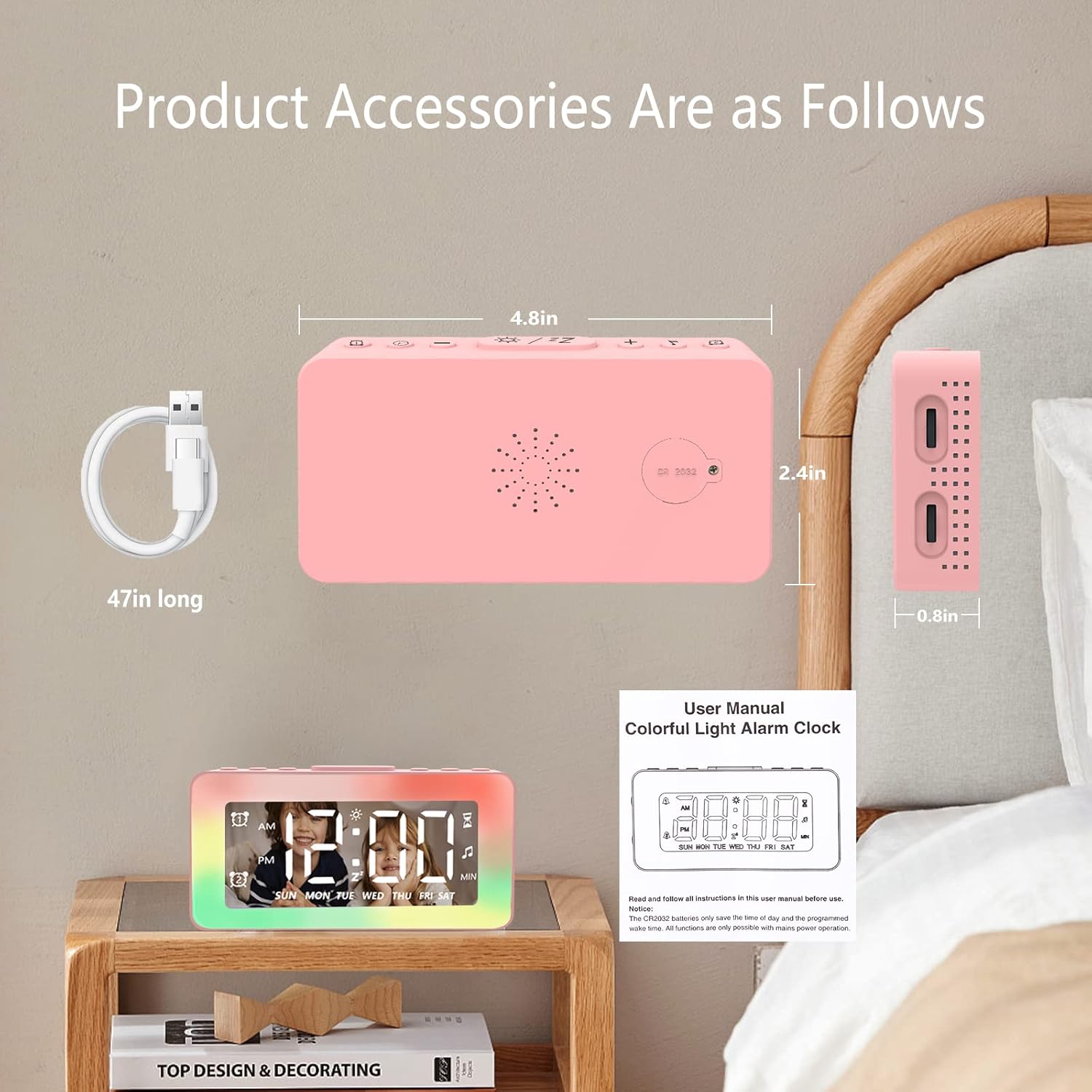
Image: The SPLITSKY NZFS Kids Alarm Clock, a USB-C power cable, and the user manual are included in the package.
3. Producto terminadoview
Familiarícese con los botones y puertos de su reloj despertador:

Imagen: Detallada view of the alarm clock's top buttons and side ports, including Alarm 1, Time Setting, Light Minus/Settings, Snooze/Light Mode Switch, Light Plus/Setup, Music Switch, Alarm 2, Volume Setting, Time Brightness Setting, USB Output Charging Port, and Type-C Input Interface.
- Botón de alarma 1: Set and activate Alarm 1.
- Botón de configuración de tiempo: Ajusta la hora actual.
- Light Minus / Settings Button: Decrease light brightness or navigate settings.
- Snooze / Light Mode Switch Button: Activate snooze, or cycle through light modes.
- Light Plus / Setup Button: Increase light brightness or confirm settings.
- Music Switch Button: Cycle through white noise sounds.
- Botón de alarma 2: Set and activate Alarm 2.
- Volume Setting Wheel (Side): Adjust alarm and white noise volume.
- Time Brightness Setting Wheel (Side): Ajustar el brillo de la pantalla.
- USB Output Charging Port (Side): Charge external devices.
- Type-C Input Interface (Side): Connect power cable to the alarm clock.
4. Configuración
4.1 Conexión de alimentación
- Connect the provided USB-C power cable to the Type-C Input Interface on the side of the alarm clock.
- Conecte el otro extremo del cable USB-C a un adaptador de corriente USB compatible (no incluido) o a un puerto USB.
- La pantalla se iluminará, indicando que el reloj está encendido.

Image: The SPLITSKY NZFS Kids Alarm Clock is shown powered on and connected via its USB-C port, also demonstrating its capability to charge a smartphone.
4.2 Instalación de la batería (copia de seguridad de la memoria)
The alarm clock includes a pre-installed CR2032 battery. This battery serves as a memory backup to retain time and alarm settings during a power outage or when the main power is disconnected. It does not power the clock for regular operation.
- If the battery needs replacement, locate the battery compartment on the back of the unit.
- Utilice un destornillador pequeño para abrir el compartimento.
- Reemplace con una nueva batería CR2032, asegurándose de la polaridad correcta.
- Cierre el compartimento de forma segura.
5. Instrucciones de funcionamiento
5.1 Setting the Time (12H/24H Format)
- Mantenga pulsado el Botón de ajuste de hora hasta que los dígitos de la hora comiencen a parpadear.
- Utilice el Light Minus / Settings Button (abajo) o Light Plus / Setup Button (up) to adjust the hour.
- Presione el Botón de ajuste de hora again to move to minute adjustment. Adjust minutes using the Light Minus/Plus buttons.
- Presione el Botón de ajuste de hora a third time to select 12-hour or 24-hour format. Adjust using the Light Minus/Plus buttons.
- Presione el Botón de ajuste de hora una vez más para confirmar y salir del modo de configuración de la hora.
5.2 Setting Alarms (Dual Alarm, Daily/Weekday/Weekend Mode)
El reloj admite dos alarmas independientes (Alarma 1 y Alarma 2).
- Mantenga pulsado el Botón de alarma 1 (para Alarma 1) o Botón de alarma 2 (para la alarma 2) hasta que los dígitos de la hora de la alarma parpadeen.
- Utilice el Light Minus / Settings Button or Light Plus / Setup Button para ajustar la hora.
- Press the respective Alarm Button again to move to minute adjustment. Adjust minutes using the Light Minus/Plus buttons.
- Press the respective Alarm Button again to select the alarm mode:
- Modo diario: La alarma suena todos los días.
- Modo de día laborable: La alarma suena de lunes a viernes.
- Modo fin de semana: La alarma suena el sábado y el domingo.
- Press the respective Alarm Button once more to confirm and exit alarm setting mode.
- Para habilitar o deshabilitar una alarma, presione brevemente el botón Botón de alarma 1 or Botón de alarma 2. Un icono de alarma aparecerá/desaparecerá en la pantalla.
5.3 Función de repetición
Cuando suene una alarma, toque el Snooze / Light Mode Switch Button on top to activate snooze. The alarm will pause for 9 minutes and then sound again. This can be repeated multiple times.
5.4 Night Light (8 Modes RGB, 10-level dimming)
The alarm clock features 6 solid color lights and 2 ambient colorful lights.
- Presione brevemente el Snooze / Light Mode Switch Button to turn on the night light and cycle through the 8 color modes.
- To adjust the brightness (10 levels), use the Light Minus / Settings Button or Light Plus / Setup Button while the night light is active.
- To turn off the night light, continue pressing the Snooze / Light Mode Switch Button hasta que la luz se apague.

Image: Multiple SPLITSKY NZFS Kids Alarm Clocks are shown, each displaying a different color from the 8 available RGB night light modes.
5.5 White Noise Sleep Aid (8 Sounds)
The clock offers 8 soothing sounds to aid sleep.
- Presione brevemente el Botón de cambio de música to turn on the white noise and cycle through the available sounds.
- To adjust the volume (16 levels), use the Volume Setting Wheel on the side of the clock.
- To turn off the white noise, continue pressing the Botón de cambio de música until the sound stops.

Image: The SPLITSKY NZFS Kids Alarm Clock is displayed on a bedside table, with icons illustrating the various white noise options such as rain, cicadas, piano, bonfire, waves, birdsong, and church bells.
5.6 Sleep Timer (10-120 minutes)
The sleep timer allows you to set a duration for the white noise and/or night light to play before automatically turning off.
- While white noise or night light is active, press and hold the Botón de cambio de música (for white noise timer) or Snooze / Light Mode Switch Button (for light timer).
- Utilice el Light Minus / Settings Button or Light Plus / Setup Button to select the desired timer duration (10, 20, 30, 60, 90, 120 minutes).
- Press the respective button again to confirm the timer setting. The timer icon will appear on the display.
5.7 Ajuste del brillo de la pantalla
Ajuste el brillo de la pantalla LED de tiempo usando el Time Brightness Setting Wheel on the side of the clock.
5.8 puertos de carga USB
The USB output charging port on the side of the alarm clock can be used to charge other small electronic devices, such as smartphones. Connect your device's charging cable to this port.
6. Mantenimiento
6.1 Limpieza
- Asegúrese de que el dispositivo esté desenchufado antes de limpiarlo.
- Limpie la superficie con un paño suave y seco.
- No utilice limpiadores abrasivos, disolventes ni aerosoles químicos.
6.2 Almacenamiento
Cuando no utilice el despertador durante períodos prolongados, guárdelo en un lugar fresco y seco, alejado de la luz solar directa y de temperaturas extremas.
7. Solución de problemas
If you encounter issues with your SPLITSKY NZFS Kids Alarm Clock, refer to the table below for common problems and solutions.
| Problema | Posible causa | Solución |
|---|---|---|
| La pantalla del reloj está apagada o tenue. | Not connected to power; Time brightness set too low. | Ensure USB-C cable is securely connected to a power source. Adjust the Time Brightness Setting Wheel. |
| La alarma no suena. | Alarma no activada; Volumen de alarma demasiado bajo. | Check if the alarm icon is displayed. If not, short press the respective Alarm Button to activate. Adjust the Volume Setting Wheel. |
| Time/settings reset after power disconnection. | La batería de respaldo CR2032 está agotada o falta. | Replace the CR2032 battery in the battery compartment. |
| Night light or white noise not working. | Function not activated; Sleep timer active. | Presione brevemente el Snooze / Light Mode Switch Button or Botón de cambio de música to activate. Check if a sleep timer is set. |
8. Especificaciones
| Característica | Detalle |
|---|---|
| Marca | SPLITSKY |
| Número de modelo | NZFS |
| Tipo de pantalla | LED digitales |
| Dimensiones del producto | 3.17"W x 3.17"H (approximately 8.05 cm W x 8.05 cm H) |
| Peso del artículo | 8.1 onzas (aproximadamente 230 gramos) |
| Fuente de poder | Corded Electric (USB-C), Battery Powered (CR2032 for memory) |
| Modos de luz nocturna | 8 (6 solid colors, 2 ambient colorful) with 10-level dimming |
| Sonidos de ruido blanco | 8 sonidos relajantes |
| Tonos de alarma | 7 wake-up alarm tones with 16-level volume control |
| Funciones de alarma | Dual Alarm, Daily/Weekday/Weekend modes, 9-minute Snooze |
| Función de temporizador | 10-120 minute sleep timer for sounds and lights |
| Conectividad | USB-C Input, USB-A Output (for charging external devices) |
| Material | Acrilonitrilo butadieno estireno |
9. Garantía y soporte
9.1 Información de garantía
Please refer to the warranty information provided at the time of purchase or contact your retailer for details regarding the product warranty. Keep your proof of purchase for any warranty claims.
9.2 Atención al cliente
For technical assistance, troubleshooting beyond this manual, or general inquiries, please contact the seller through the platform where you purchased the product. Provide your order number and a detailed description of the issue for prompt support.