
1. Introducción
This manual provides instructions for the proper use and care of your Docooler Portable USB Cassette Player. This device allows you to play audio cassettes and convert their content into digital MP3 files via a USB connection to a computer. Please read this manual thoroughly before operating the device to ensure optimal performance and longevity.
2. Producto terminadoview
The Docooler Portable USB Cassette Player is a compact, handheld device designed for playing and digitizing audio cassettes. It features a transparent casing, allowing visibility of the internal mechanism.
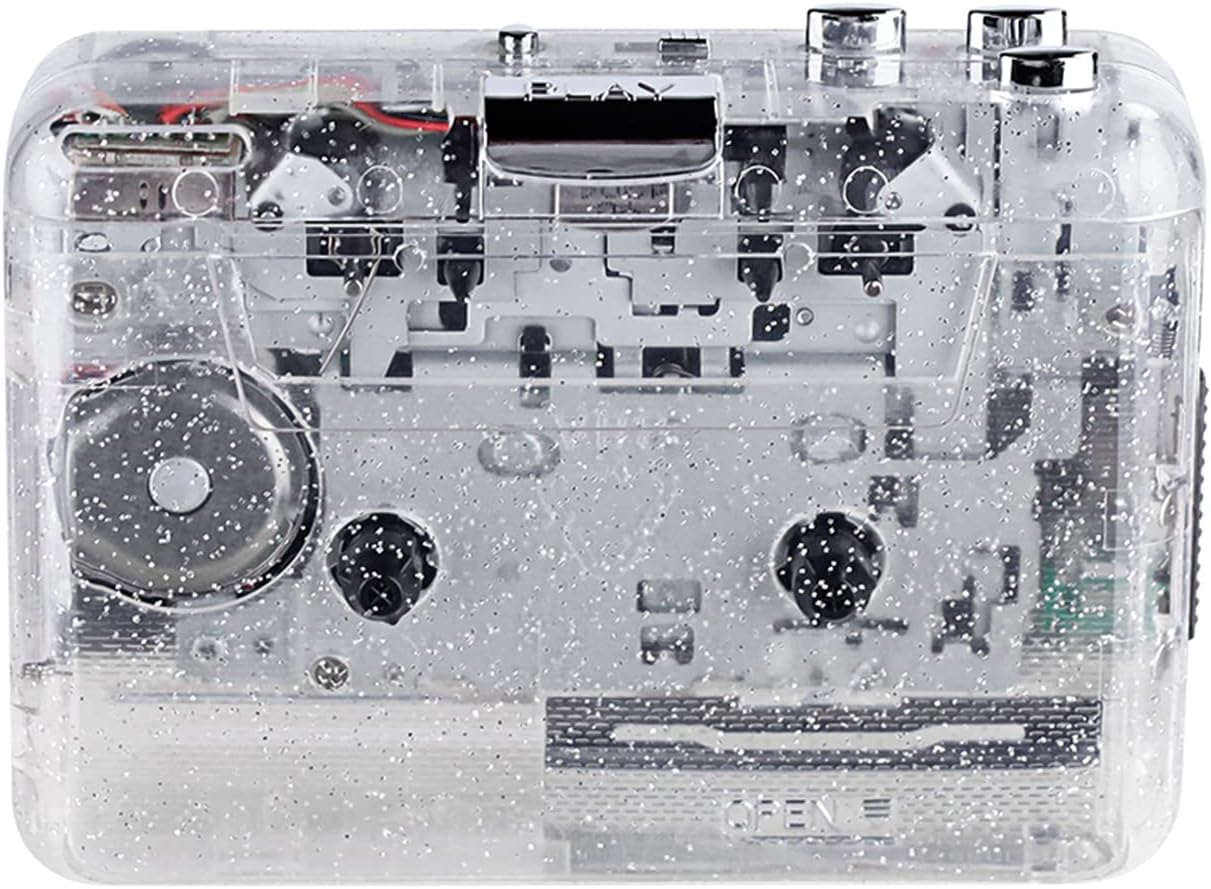
Figura 1: Frente view of the Docooler Portable USB Cassette Player, showcasing su diseño transparente.

Figure 2: Various angles of the cassette player, including top, side, and open views.
Contenido del paquete:
- Docooler Portable USB Cassette Player
- Cable USB
- Manual de usuario (este documento)
- Auriculares (pueden variar según el paquete)
3. Configuración
3.1 Fuente de alimentación
The cassette player can be powered by either batteries or a USB connection.
Instalación de la batería:
- Localice el compartimento de la batería en el dispositivo.
- Abra la tapa del compartimiento de la batería.
- Inserte 2 pilas AA (no incluidas), asegurándose de la polaridad correcta (+/-).
- Cierre bien la tapa del compartimento de la batería.
Energía del USB:
Connect the provided USB cable to the player's USB port and the other end to a powered USB port on your computer or a USB wall adapter. The device will draw power from the USB connection.
4. Instrucciones de funcionamiento
4.1 Reproducción de una cinta de casete
- Abra la tapa del compartimento del casete.
- Insert an audio cassette tape with the open edge facing upwards.
- Cierre firmemente la tapa del compartimento del casete.
- Conecte auriculares o altavoces externos al conector de salida de audio de 3.5 mm.
- Presione el JUGAR para comenzar la reproducción.
- Utilice el DETENER Botón para detener la reproducción.
- Utilice el FF (Avance rápido) y REW (Rebobinar) Botones para navegar a través de la cinta.
- Ajuste el volumen utilizando el dial de control de volumen.
- The "DIR" button allows you to quickly flip the tape direction. The "play mode" button can be used to reverse playback once or an unlimited number of times.

Figure 3: The cassette player in use, demonstrating tape insertion and playback setup.

Figure 4: Users listening to audio through headphones connected to the cassette player.
4.2 Conversión de cintas a MP3 Files
The Docooler Portable USB Cassette Player can convert your analog cassette audio into digital MP3 files. This process requires a computer and compatible audio recording software (not included).
- Ensure the cassette player is powered (via batteries or USB).
- Connect the cassette player to your computer using the provided USB cable.
- Install and open your preferred audio recording software on your computer. Software such as Audacity (free and open-source) is commonly used for this purpose.
- Configure your recording software to recognize the cassette player as an audio input device.
- Inserte la cinta de casete que desea convertir en el reproductor.
- Start recording in your software, then press the JUGAR botón en el reproductor de casetes.
- Monitor the recording process. Once the tape has finished playing, stop the recording in your software.
- Guardar el audio grabado como MP3 file en tu computadora.

Figure 5: Illustration of the process to convert cassette audio to MP3 files using the player and a computer.
5. Mantenimiento
5.1 Limpieza del dispositivo
- Limpie el exterior del reproductor con un paño suave y seco.
- Do not use liquid cleaners or abrasive materials, as they may damage the surface.
- Limpie periódicamente los cabezales de la cinta y los rodillos de presión utilizando un hisopo de algodón ligeramente húmedo.amptratado con alcohol isopropílico para garantizar una calidad de sonido óptima y evitar daños en la cinta.
5.2 Almacenamiento
- Cuando no se utilice durante períodos prolongados, retire las pilas para evitar fugas.
- Guarde el reproductor en un lugar fresco y seco, alejado de la luz solar directa y de temperaturas extremas.
6. Solución de problemas
| Problema | Posible causa | Solución |
|---|---|---|
| Sin poder | Dead batteries; USB cable not connected properly. | Reemplace las baterías; asegúrese de que el cable USB esté conectado de forma segura. |
| Sin sonido | Headphones/speakers not connected; volume too low; dirty tape heads. | Connect audio output device; increase volume; clean tape heads. |
| Poor sound quality (hissing, muffled) | Dirty tape heads; worn-out tape; low battery. | Limpie los cabezales de la cinta; pruebe con una cinta diferente; reemplace las baterías. |
| La cinta no se reproduce o no se mueve | Tape jammed; mechanism issue; low battery. | Check tape for damage; replace batteries. |
| Cannot convert to MP3 | USB connection issue; software not configured correctly; no recording software. | Ensure USB is connected; check software settings; install compatible recording software. |
7. Especificaciones
- Modelo: B0C69FDZF6
- Fuente de alimentación: 2 pilas AA o USB 5 V CC
- Interfaz: USB 2.0
- Salida de audio: Jack estéreo de 3.5 mm
- Dimensiones: 7.2 x 5.91 x 1.54 pulgadas (aprox.)
- Peso: 9.6 onzas (aprox.)
- Fabricante: Enfriador de bebidas
8. Información de seguridad
- No exponga el dispositivo al agua ni a la humedad excesiva.
- Evite dejar caer o someter el dispositivo a impactos fuertes.
- No intente desmontar ni reparar el dispositivo usted mismo. Consulte a personal de servicio técnico cualificado.
- Mantener fuera del alcance de los niños.
- Deshazte de las baterías de acuerdo a las regulaciones locales.
9. Garantía y soporte
For warranty information or technical support, please refer to the documentation included with your purchase or contact Docooler customer service through their official website or the retailer where the product was purchased. Please have your model number (B0C69FDZF6) and purchase date available when contacting support.