
Introducción
This manual provides detailed instructions for the setup, operation, and maintenance of your TONOR TW630 UHF Dual Wireless Microphone System. Please read this manual thoroughly before using the product to ensure proper function and longevity.
¿Qué hay en la caja?
Verifique que todos los artículos enumerados a continuación estén incluidos en su paquete:
- 2 micrófonos de mano
- 1 x Receptor con conector de 6.35 mm
- 2 x Anillos antideslizantes
- 2 x Mic Covers (Foam Windscreens)
- 1 x cable de carga USB
- 1 x Manual de usuario

Image: All components included in the TONOR TW630 package.
Producto terminadoview
The TONOR TW630 system features two durable metal handheld microphones and a compact plug-in receiver, designed for clear audio transmission over a UHF frequency band.

Imagen: Detallada view of the microphone, showing its display, power button, and channel switch button.
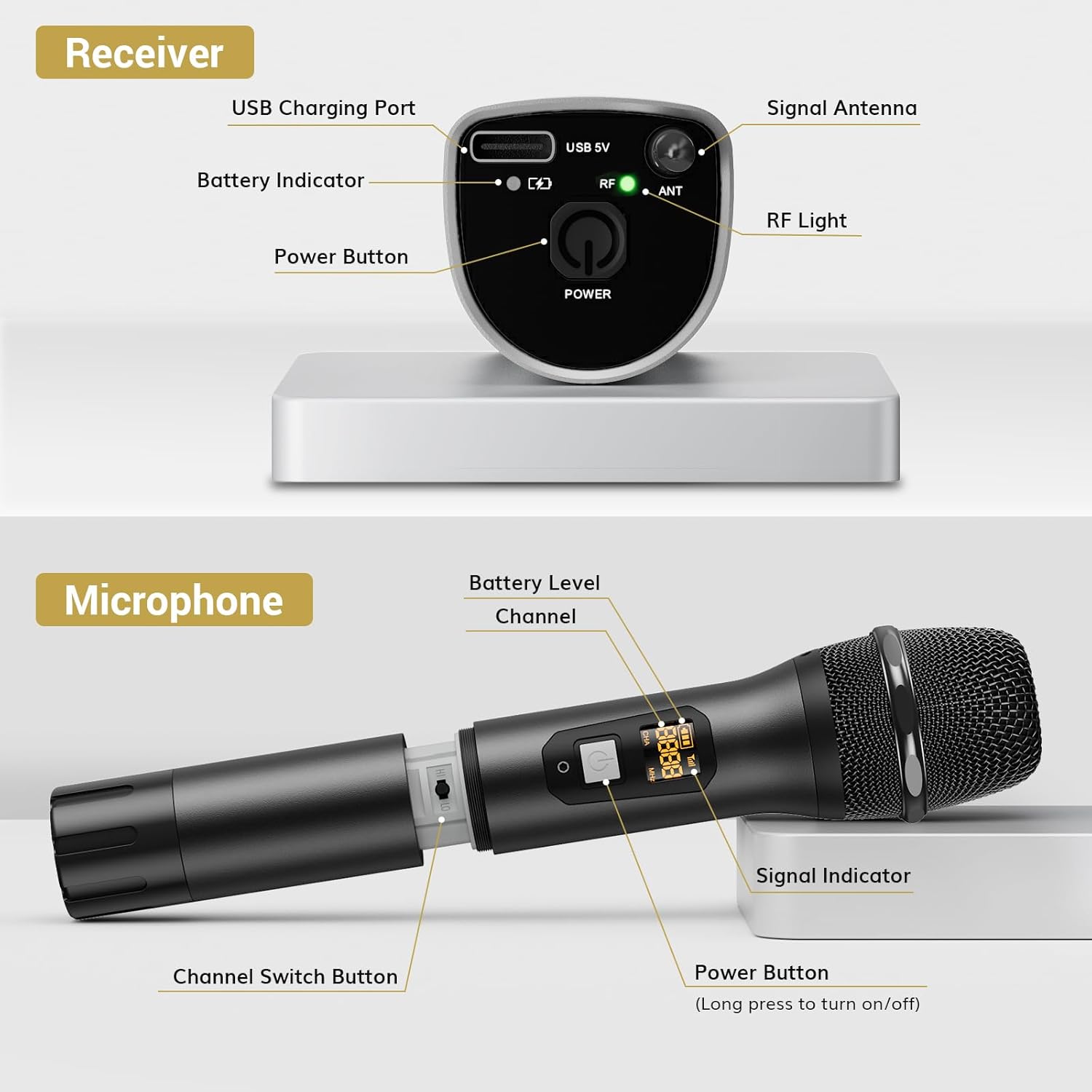
Imagen: Detallada view of the receiver, highlighting its charging port, antenna, and indicator lights.
Características principales:
- Libertad inalámbrica: Up to 200ft (60m) operating range (line of sight).
- Señal estable: 15 adjustable channels to minimize interference.
- Construcción duradera: Microphones and receiver are made of rugged metal.
- Mayor duración de la batería: Receiver provides up to 6 hours of use on a 2-3 hour charge.
Guía de configuración
1. Fuente de alimentación
- Micrófonos: Each microphone requires 2 x AA batteries (not included). Open the battery compartment at the bottom of the microphone and insert the batteries, observing polarity.
- Receptor: The receiver has a built-in rechargeable battery. Charge it using the provided USB cable and a 5V adapter (not included). A full charge takes approximately 2-3 hours and provides up to 6 hours of operation.

Image: Instructions for powering the microphone with AA batteries and charging the receiver via USB.
2. Pairing the Microphones and Receiver
El sistema está diseñado para el emparejamiento automático:
- Encienda tanto el micrófono como el receptor.
- The receiver will automatically sync its frequency with the microphone(s). The RF light on the receiver will illuminate when a stable connection is established.
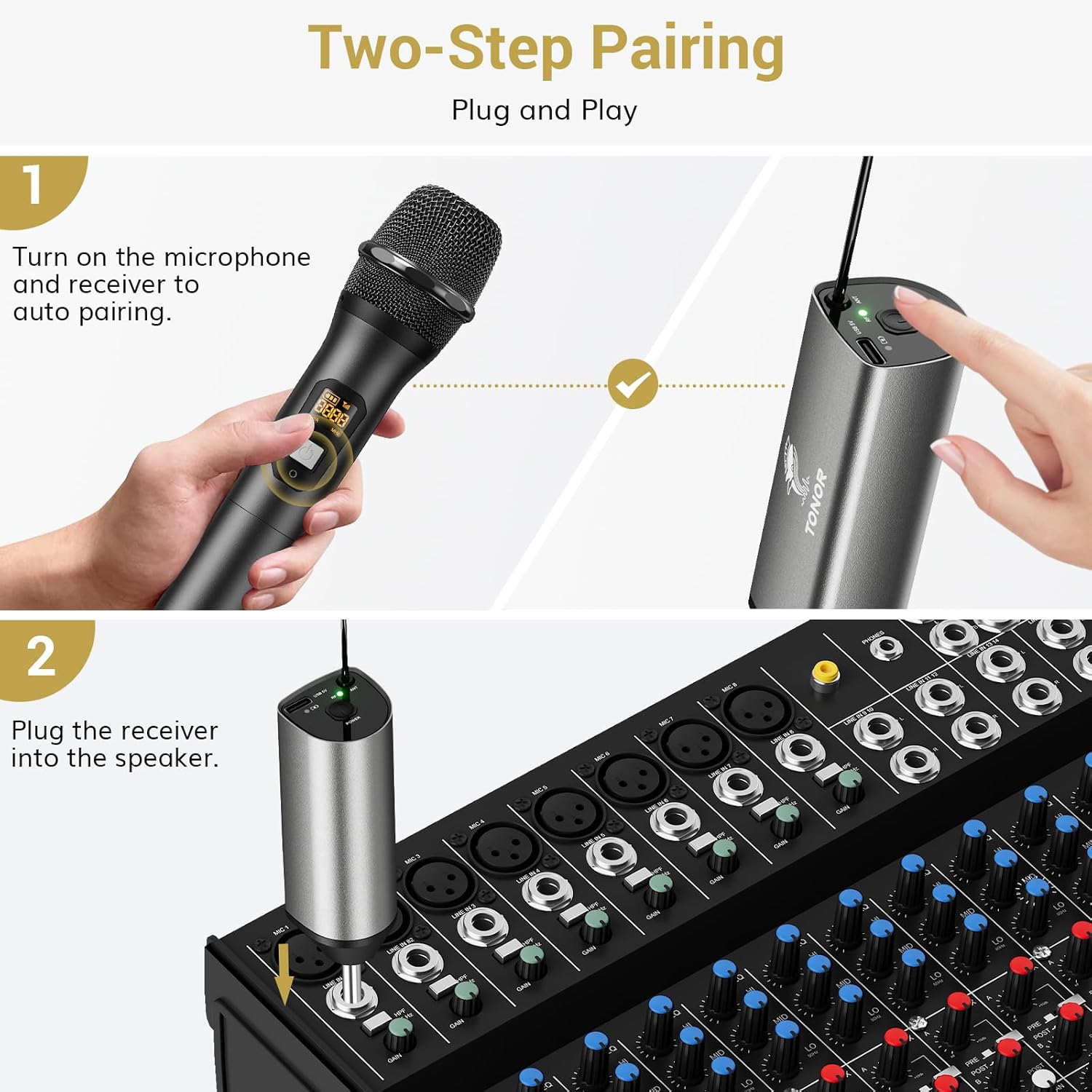
Image: Visual guide for the two-step pairing process and connecting the receiver.
3. Conexión a dispositivos de audio
Plug the 6.35mm receiver directly into the "MIC IN" input of compatible audio equipment.
- Dispositivos compatibles: Powered speakers, karaoke machines, amplifiers, mixers, and audio interfaces.
- Dispositivos incompatibles: This system is not compatible with phones, computers, or tablets directly. An additional 3.5mm (1/8") adapter is required for these devices (not included).

Imagen: Examples of compatible audio devices and correct input connection.
Instrucciones de funcionamiento
Cambio de canal
The TW630 system offers 15 adjustable channels to avoid interference. If you experience signal issues or are using multiple sets simultaneously, you can change the microphone's channel:
- To switch channels, briefly press the "Channel Switch Button" located inside the microphone's battery compartment (after unscrewing the bottom part).
- The display on the microphone will show the current channel (CHA) and frequency (MHz).
- The receiver will automatically adjust to the new channel.

Image: Guide to changing microphone channels.
Using Multiple Microphone Sets
Up to 15 sets of TONOR TW630 systems can be used simultaneously without interference. Ensure each set operates on a different channel to prevent signal conflicts.
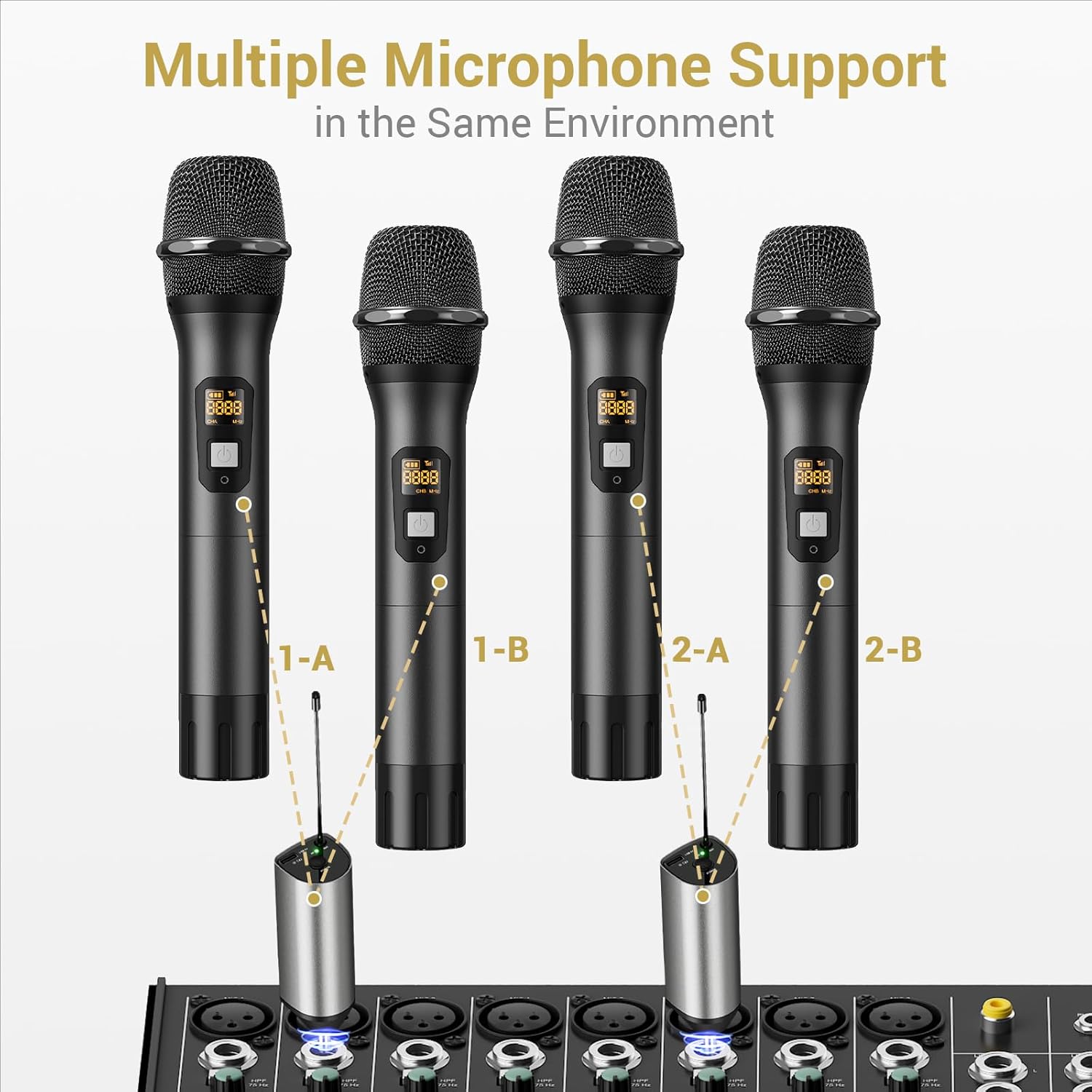
Image: Setup for using multiple microphone systems in the same environment.
Mantenimiento
- Limpieza: Wipe the microphones and receiver with a soft, dry cloth. Do not use liquid cleaners or solvents.
- Cuidado de la batería: Remove AA batteries from microphones if not in use for extended periods to prevent leakage. Recharge the receiver regularly to maintain battery health.
- Almacenamiento: Guarde el sistema en un lugar fresco y seco, alejado de la luz solar directa y de temperaturas extremas.
- Cubiertas de micrófono: Use the provided foam mic covers to protect against wind noise and moisture.
Solución de problemas
| Problema | Posible causa | Solución |
|---|---|---|
| No hay sonido del micrófono |
|
|
| Interferencia o mala calidad de sonido |
|
|
| El receptor no se carga |
|
|
Presupuesto
| Característica | Detalle |
|---|---|
| Marca | TONIFICACIÓN |
| Nombre del modelo | TW630 |
| Número de modelo del artículo | TN120106 |
| Tecnología de conectividad | Ultra alta frecuencia |
| Tipo de conector | 6.35 mm Jack |
| Factor de forma del micrófono | Portátil |
| Material | Metal |
| Número de canales | 15 |
| Sensibilidad de audio | 52 decibelios |
| Relación señal a ruido | 70 dB |
| Patrón polar | Unidireccional |
| Fuente de poder | Battery Powered (Microphones: 2x AA each; Receiver: Rechargeable Lithium Ion) |
| Tiempo de carga del receptor | 2-3 horas |
| Tiempo de trabajo del receptor | Hasta 6 horas |
| Rango de operación | 200 pies / 60 m (línea de visión) |
| Peso del artículo | 1.32 libras (600 gramos) |
| Dimensiones del paquete | 11.18 x 6.42 x 2.99 pulgadas |
Información de seguridad
- No exponga el producto al agua ni a la humedad excesiva.
- Evite dejar caer o someter el producto a fuertes impactos.
- Use only a 5V adapter for charging the receiver to prevent damage.
- Mantener fuera del alcance de los niños.
- No intente desmontar ni reparar la unidad usted mismo. Contacte con personal de servicio técnico cualificado.
Garantía y soporte
For warranty information and technical support, please refer to the official TONOR website or contact TONOR customer service directly. Keep your purchase receipt for warranty claims.
You can visit the TONOR store on Amazon for more information: TONOR Store