
SCHWAIGER SOEM0100
SCHWAIGER SOEM0100 Energy Cost Meter Instruction Manual
Marca: Schwaiger | Modelo: SOEM0100
1. Introducción
The SCHWAIGER SOEM0100 Energy Cost Meter is designed to help you monitor and manage the electricity consumption and associated costs of your household appliances. With its large, rotatable display and multiple viewing modes, it provides clear and accurate data, enabling informed decisions about energy usage. This manual will guide you through the setup, operation, and maintenance of your device.
Official Product Summary Video for SCHWAIGER SOEM0100. This video provides a brief overview of the energy cost meter's features and design.
2. Información de seguridad
- Lea atentamente todas las instrucciones antes de usar.
- Do not exceed the maximum load of 16A / 3600W. Overloading can cause damage to the device and connected appliances, and poses a fire hazard.
- This device is intended for indoor use only. Do not expose to moisture or extreme temperatures.
- No desmonte ni intente reparar el dispositivo. Encargue cualquier servicio técnico a personal cualificado.
- Mantener fuera del alcance de los niños.
- Ensure the device is securely plugged into a wall socket and that the appliance is securely plugged into the meter.
3. Contenido del paquete
- 1x SCHWAIGER SOEM0100 Energy Cost Meter
- 1x Manual de instrucciones (este documento)
4. Producto terminadoview
The SCHWAIGER SOEM0100 features a compact design with an integrated display and intuitive controls for easy operation.
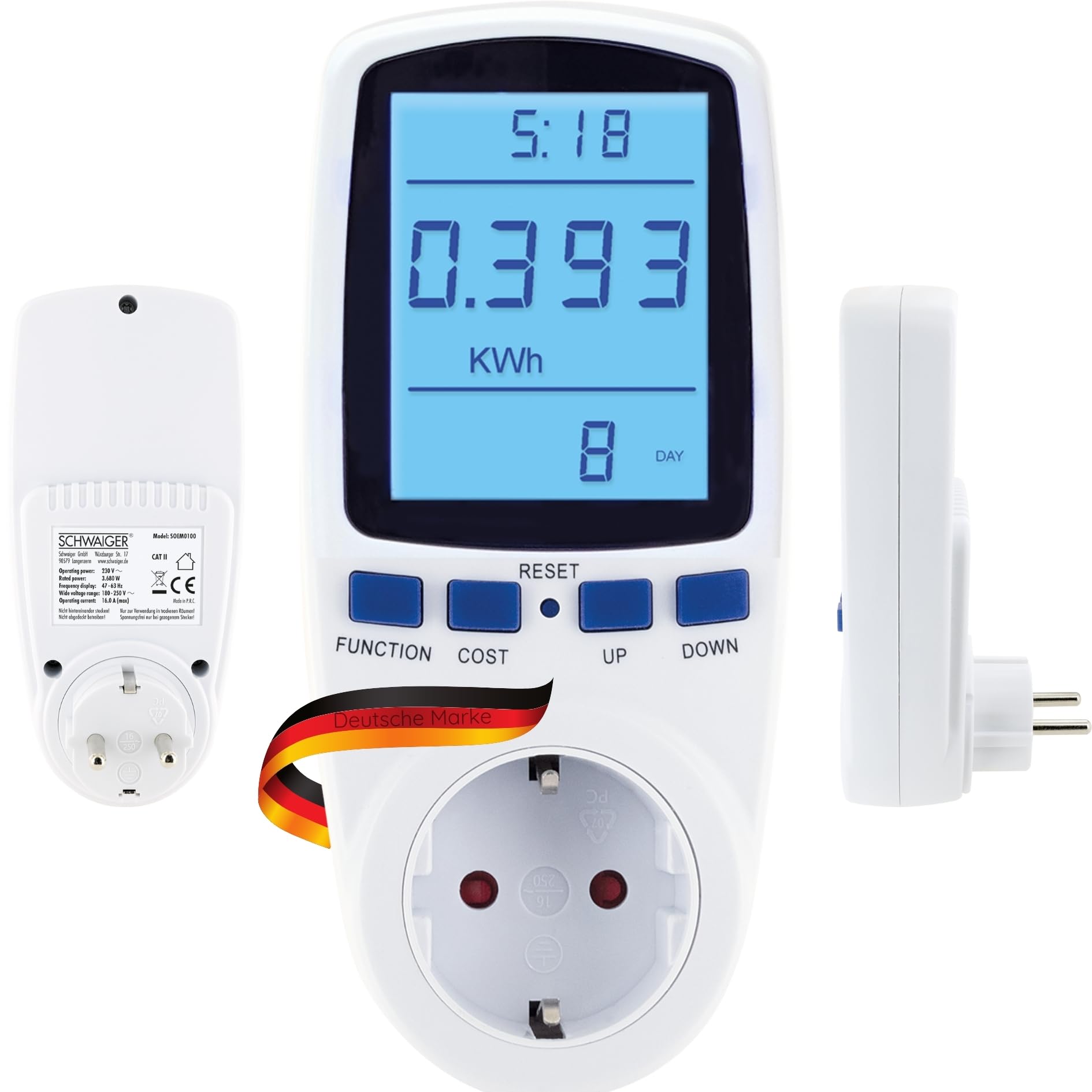


Controles y pantalla:
- Mostrar: Large, 180° rotatable, backlit LCD for clear visibility of measurement data.
- Botón FUNCIÓN: Cycles through the 7 different display modes (e.g., KWh, Watt, Voltage, Frequency, Cost, Total Time).
- Botón COSTO: Used to set the electricity cost per KWh.
- Botón de reinicio: Restablece los datos acumulados.
- Botones ARRIBA/ABAJO: Used for adjusting values during settings.
5. Configuración
- Conecte el medidor: Insert the SCHWAIGER SOEM0100 into a standard wall socket.
- Encendido inicial: The display will light up, and the device will be ready for use.
- Set Current Time (Optional): If the device has a clock function, use the appropriate buttons (refer to specific button combinations if available, otherwise assume 'FUNCTION' or 'SET' to access time settings and 'UP/DOWN' to adjust).
- Set Electricity Cost:
- Presione el COSTO button. The cost setting will appear on the display.
- Utilice el UP y ABAJO buttons to adjust the cost per KWh according to your local electricity tariff.
- Prensa COSTO nuevamente para confirmar y guardar la configuración.
- Conecte el aparato: Conecte el aparato que desea supervisar en la toma situada en la parte frontal del medidor de coste de energía.

6. Instrucciones de funcionamiento
ViewDatos de medición de ing:
Presione el FUNCIÓN button repeatedly to cycle through the 7 different display modes. These modes typically include:
- Current Power (Watt): Shows the real-time power consumption of the connected appliance.
- Accumulated Energy (KWh): Displays the total energy consumed since the last reset.
- Volumentagmi(V): Muestra el volumen de línea actualtage.
- Corriente (A): Muestra la corriente consumida por el aparato.
- Frecuencia (Hz): Shows the mains frequency.
- Costo de electricidad: Calculates the total cost based on accumulated energy and your set tariff.
- Total Operating Time: Shows the duration the appliance has been connected and powered on.
Almacenamiento de datos:
The SCHWAIGER SOEM0100 features internal memory to store accumulated data (KWh, cost, total operating time) even during a power outage or when unplugged. This ensures continuous tracking of your energy usage.
Restablecer datos:
To clear all accumulated data (KWh, cost, total operating time) and start a new measurement cycle, press and hold the REINICIAR button for approximately 3-5 seconds until the display clears or resets to zero.
7. Mantenimiento
- Limpieza: Limpie el dispositivo con un paño suave y seco. No utilice limpiadores abrasivos ni disolventes.
- Almacenamiento: When not in use for extended periods, unplug the device and store it in a cool, dry place away from direct sunlight.
- Inspección: Periodically check the device and its connections for any signs of damage. Do not use if damaged.
8. Solución de problemas
| Problema | Posible causa | Solución |
|---|---|---|
| La pantalla está en blanco o no se ilumina. | No power to the socket or device is faulty. | Check if the wall socket is live. Try plugging another device into the socket. If the problem persists, the meter may be faulty. |
| Incorrect readings or no readings. | Aparato no conectado correctamente o mal funcionamiento del medidor. | Ensure the appliance is fully plugged into the meter. Try resetting the meter by holding the RESET button. |
| Cost calculation is incorrect. | Electricity cost per KWh is set incorrectly. | Re-enter the correct electricity cost per KWh using the COST and UP/DOWN buttons. |
| Device feels warm. | Normal operation for some loads, or device is overloaded. | Ensure the connected appliance does not exceed the maximum load of 16A / 3600W. If it continues to feel excessively hot, discontinue use. |
9. Especificaciones
| Marca | Schwaiger |
| Modelo | SOEM0100 |
| Potencia de funcionamiento | 230 V ~ 50 Hz |
| Carga máx. | 16A / 3600W |
| Volumentage Rango | 180-250 V |
| Pantalla de frecuencia | 47-63 Hz |
| Peso | 210 gramos |
| Componentes incluidos | Medidor de costo de energía |
Nota: Las especificaciones del producto están sujetas a cambios sin previo aviso.

10. Garantía y soporte
Garantía:
The SCHWAIGER SOEM0100 Energy Cost Meter comes with a 2 año de garantía from the date of purchase. This warranty covers manufacturing defects and material faults under normal use. It does not cover damage caused by misuse, accidents, unauthorized modifications, or natural disasters.
Atención al cliente:
For technical assistance, troubleshooting, or warranty claims, please contact SCHWAIGER customer support. You can find contact information on the official SCHWAIGER websitio o a través de su minorista.
Visit the official SCHWAIGER websitio para obtener más información: SCHWAIGER Official Websitio
Ask a question about this manual
Ask about setup, troubleshooting, compatibility, parts, safety, or missing instructions. Manuals+ will review the question and use this page’s manual context to help answer it.