
Enlace de velocidad SL-680016-BK
TAUROX Gaming Mouse User Manual
Modelo: SL-680016-BK | Marca: Speedlink
1. Introducción
The TAUROX gaming mouse is designed to provide precise and responsive control for an enhanced gaming experience. With an impressive sensor resolution of up to 7,200 DPI and customizable features, it adapts to various gaming styles.
Características principales
- High-precision sensor with up to 7,200 DPI for accurate tracking.
- Two integrated DPI switches for on-the-fly sensitivity adjustment.
- 5 configurable buttons for personalized control and macros.
- Lightweight design (135 grams with cable) for comfortable extended use.
- Customizable RGB lighting to personalize your gaming setup.
- Durable fabric-covered cable with 1.8-meter length for flexibility.
- USB-A connection for easy and universal compatibility.

Image: The TAUROX Gaming Mouse showcasing its multi-coloured LED lighting and ergonomic design.
2. Contenido del paquete
Asegúrese de que todos los artículos estén presentes en el paquete:
- TAUROX Gaming Mouse
- Configuration Software (downloadable or included)

Imagen: Frente view of the TAUROX Gaming Mouse retail packaging, highlighting key features.
3. Guía de configuración
3.1 Conexión del ratón
Connect the USB-A connector of the TAUROX Gaming Mouse to an available USB port on your computer. The mouse is plug-and-play for basic functionality.
3.2 Instalación del software
For full utilization of all functions, including macro programming and advanced customization, the installation of the dedicated configuration software is necessary. This software is typically provided via a download link or included on a small disc. Refer to the product packaging or Speedlink's official website for the download location.
Image: Side of the product box indicating the need for configuration software.
4. Operating Your TAUROX Gaming Mouse
4.1 Ajuste de ppp
The TAUROX Gaming Mouse features two integrated DPI switches located behind the scroll wheel. Use these buttons to cycle through different sensitivity levels (up to 7,200 DPI) to match your gaming style or task requirements. The current DPI setting may be indicated by the mouse's LED lighting color, depending on software configuration.

Image: Screenshot of the Speedlink software's 'Performance' tab, showing DPI control settings.
4.2 botones programables
The mouse is equipped with 5 configurable buttons. These buttons can be assigned various functions, including keyboard macros, multimedia controls, or specific in-game actions, using the configuration software. Launch the software and navigate to the 'Button' or 'Macro' section to customize these settings.
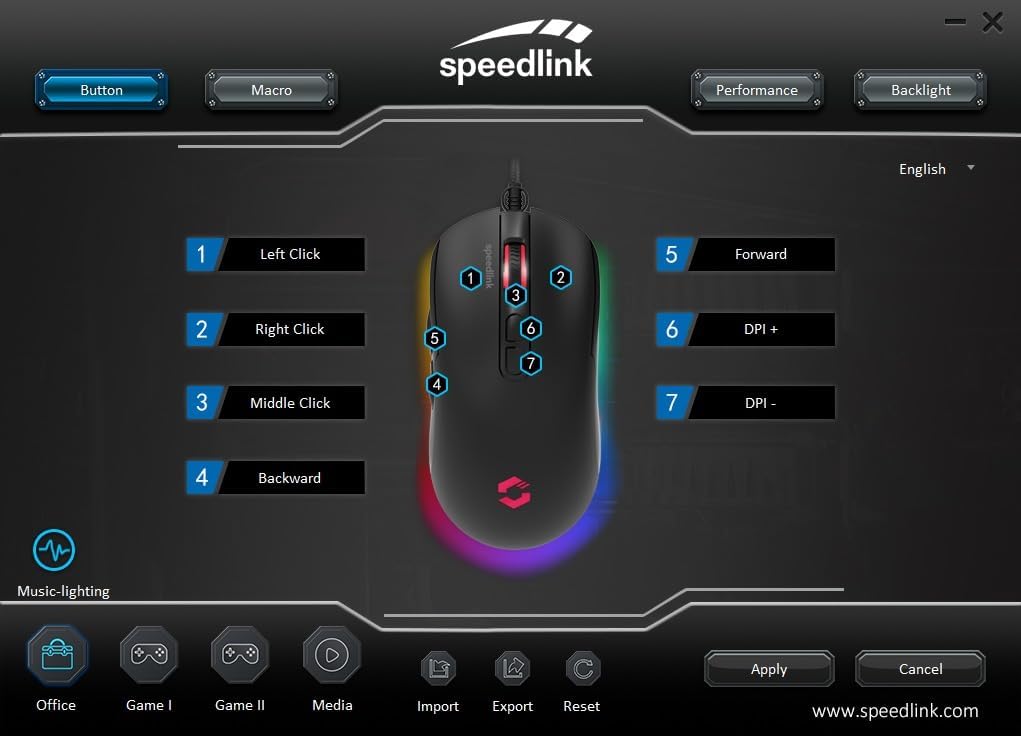
Image: Screenshot of the Speedlink software's 'Button' tab, illustrating the mapping of the mouse's 7 buttons.
4.3 Iluminación RGB
The TAUROX Gaming Mouse features multi-coloured RGB lighting that can be customized through the configuration software. You can select from various lighting effects, colors, and brightness levels to match your personal preference or gaming setup. Access the 'Backlight' section in the software to adjust these settings.

Image: Screenshot of the Speedlink software's 'Backlight' tab, showing options for customizing the mouse's RGB lighting effects.
5. Mantenimiento
To ensure the longevity and optimal performance of your TAUROX Gaming Mouse, follow these maintenance guidelines:
- Limpieza: Utilice un paño suave y seco para limpiar la superficie del ratón. Para la suciedad difícil, utilice un paño ligeramente seco.amp cloth can be used, but ensure no liquid enters the mouse. Avoid abrasive cleaners.
- Cuidado de cables: Avoid sharp bends, kinks, or excessive pulling on the cable. Store the cable neatly when not in use to prevent damage.
- Mantenimiento de sensores: Mantenga el sensor óptico en la parte inferior del mouse limpio y libre de polvo o residuos para garantizar un seguimiento preciso.
6. Solución de problemas
If you encounter issues with your TAUROX Gaming Mouse, consider the following:
- El ratón no responde: Asegúrese de que el cable USB esté bien conectado a su computadora. Pruebe a conectar el mouse a otro puerto USB.
- Seguimiento inexacto: Limpie el sensor óptico de la parte inferior del ratón. Asegúrese de utilizarlo sobre una superficie adecuada (por ejemplo, una alfombrilla).
- Problemas de software: If the configuration software is not functioning correctly, try reinstalling it. Ensure your operating system is up to date.
- Botones que no funcionan: Check the button assignments in the configuration software to ensure they are correctly configured.
- La iluminación no funciona: Verify the RGB lighting settings in the configuration software.
For persistent issues, refer to the support section on the Speedlink websitio.
7. Especificaciones técnicas
| Característica | Especificación |
|---|---|
| Dimensiones del producto | 4.92 x 2.48 x 0.04 inches (125x63x40 mm LxWxH) |
| Peso del artículo | 5.7 ounces (135 grams with cable) |
| Número de modelo | SL-680016-BK |
| Marca | Enlace de velocidad |
| Color | Negro |
| Tecnología de conectividad | USB-A (con cable) |
| Características especiales | Programmable Buttons, Multi-coloured LED Lighting |
| Tecnología de detección de movimiento | Óptico |
| Resolución DPI | Hasta 7,200 DPI (ajustable) |
| Longitud del cable | 1.8 metros |
| Fabricante | Enlace de velocidad |
8. Safety Instructions and Compliance
8.1 Instrucciones de seguridad importantes
Please note that the failure to observe these instructions can cause product damage, explosion, fire and/or electric shock!
- Utilice los dispositivos únicamente como se indica en la guía del usuario. No los abra ni los repare.
- No exponga los dispositivos a líquidos, calor o frío.
- No utilice los dispositivos en anunciosamp Medio ambiente. Limpie el dispositivo con un paño seco.
- Mantenga los dispositivos y todas las piezas sueltas fuera del alcance de niños, mascotas y personas no autorizadas.
- Only use the devices with the appropriate provided accessories.
- Disconnect cables from the devices if they will not be used for a long time. When disconnecting by cables, don't pull on the cord but on the plug.
- Don't use the cables in any way other than mentioned in the user guide. Don't bend, cut, extend, knot or step on them.
- Don't insert any foreign objects into the openings of the device.
- Si los dispositivos están dañados de alguna manera o se calientan demasiado, deje de usarlos inmediatamente.
- Take caution when using devices that emit radio signals if you have a pacemaker or are dependent on other sensitive electronic aids.
Instrucciones de seguridad en otros idiomas: www.speedlink.com
8.2 Warning Symbols and Markings
Extended use of input devices may cause health problems such as discomfort or pain. As such, take regular breaks and consult a doctor if problems persist.
8.3 Declaración de la FCC
Este equipo ha sido probado y se ha determinado que cumple con los límites establecidos para dispositivos digitales de Clase B, de conformidad con la parte 15 de las Normas de la FCC. Estos límites están diseñados para proporcionar una protección razonable contra interferencias perjudiciales en una instalación residencial. Este equipo genera, utiliza y puede irradiar energía de radiofrecuencia y, si no se instala y utiliza de acuerdo con las instrucciones, puede causar interferencias perjudiciales en las comunicaciones por radio. Sin embargo, no existe garantía de que no se produzcan interferencias en una instalación en particular. Si este equipo causa interferencias perjudiciales en la recepción de radio o televisión, lo que se puede determinar encendiendo y apagando el equipo, se recomienda al usuario que intente corregir la interferencia mediante una o más de las siguientes medidas:
- Reorientar o reubicar la antena receptora.
- Aumente la separación entre el equipo y el receptor.
- Conecte el equipo a una toma de corriente de un circuito diferente a aquel al que está conectado el receptor.
- Consulte al distribuidor o a un técnico de radio/TV experimentado para obtener ayuda.
Este dispositivo cumple con la parte 15 de las normas de la FCC. Su funcionamiento está sujeto a las dos condiciones siguientes: (1) Este dispositivo no puede causar interferencias perjudiciales y (2) este dispositivo debe aceptar cualquier interferencia que reciba, incluidas las interferencias que puedan causar un funcionamiento no deseado.
Nota: Modifications to this product will void the user's authority to operate this equipment.
8.4 Conformity Notice
IMPORTADOR/FABRICANTE: Zocherl Media GmbH, Im Dorf 5, 29303 Hemslingen, GERMANY
Teléfono: +49 4267 9341 0
DETALLES DEL PRODUCTO:
Número de tipo: SL-680016-BK
Descripción del Producto: Ratón para juegos TAUROX, negro
EL PRODUCTO CUMPLE CON LAS SIGUIENTES DIRECTIVAS:
CEM: 2014/30/UE
RoHS: 2011/65/UE
For a full declaration of conformity, the latest user guide, FAQ or further information, please visit: www.speedlink.com
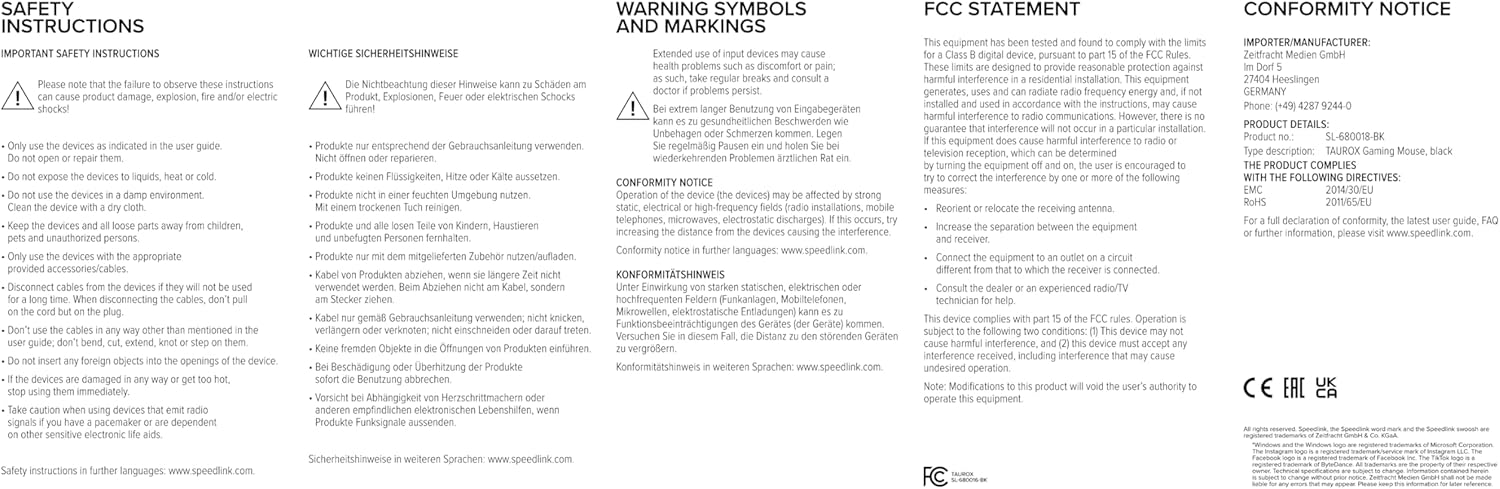
Image: Product packaging displaying various certifications and multilingual product names.
9. Garantía y soporte
For warranty information, technical support, frequently asked questions (FAQs), and the latest user guides, please visit the official Speedlink websitio:
Ask a question about this manual
Ask about setup, troubleshooting, compatibility, parts, safety, or missing instructions. Manuals+ will review the question and use this page’s manual context to help answer it.