
Introducción
Thank you for choosing the GOBOULT Z60 Wireless Earbuds. This manual provides detailed instructions to help you set up, operate, and maintain your earbuds for an optimal audio experience. Please read this manual thoroughly before use and retain it for future reference.

Image: GOBOULT Z60 Earbuds, illustrating the brand transition from BOULT to GOBOULT, highlighting the new logo and packaging while assuring consistent product performance.
¿Qué hay en la caja?
Asegúrese de que todos los artículos estén presentes en el paquete:
- GOBOULT Z60 Wireless Earbuds (Left and Right)
- Estuche de carga
- Cable de carga USB-C
- Puntas para los oídos (varios tamaños)
- Manual de usuario
- Tarjeta de garantía

Image: The GOBOULT Z60 Wireless Earbuds and their charging case, showcasing the product's design and included accessories.
Producto terminadoview
The GOBOULT Z60 earbuds are designed for comfort and high-quality audio. Each earbud features a 13mm bass driver and multiple microphones for clear calls. The charging case provides extended battery life.
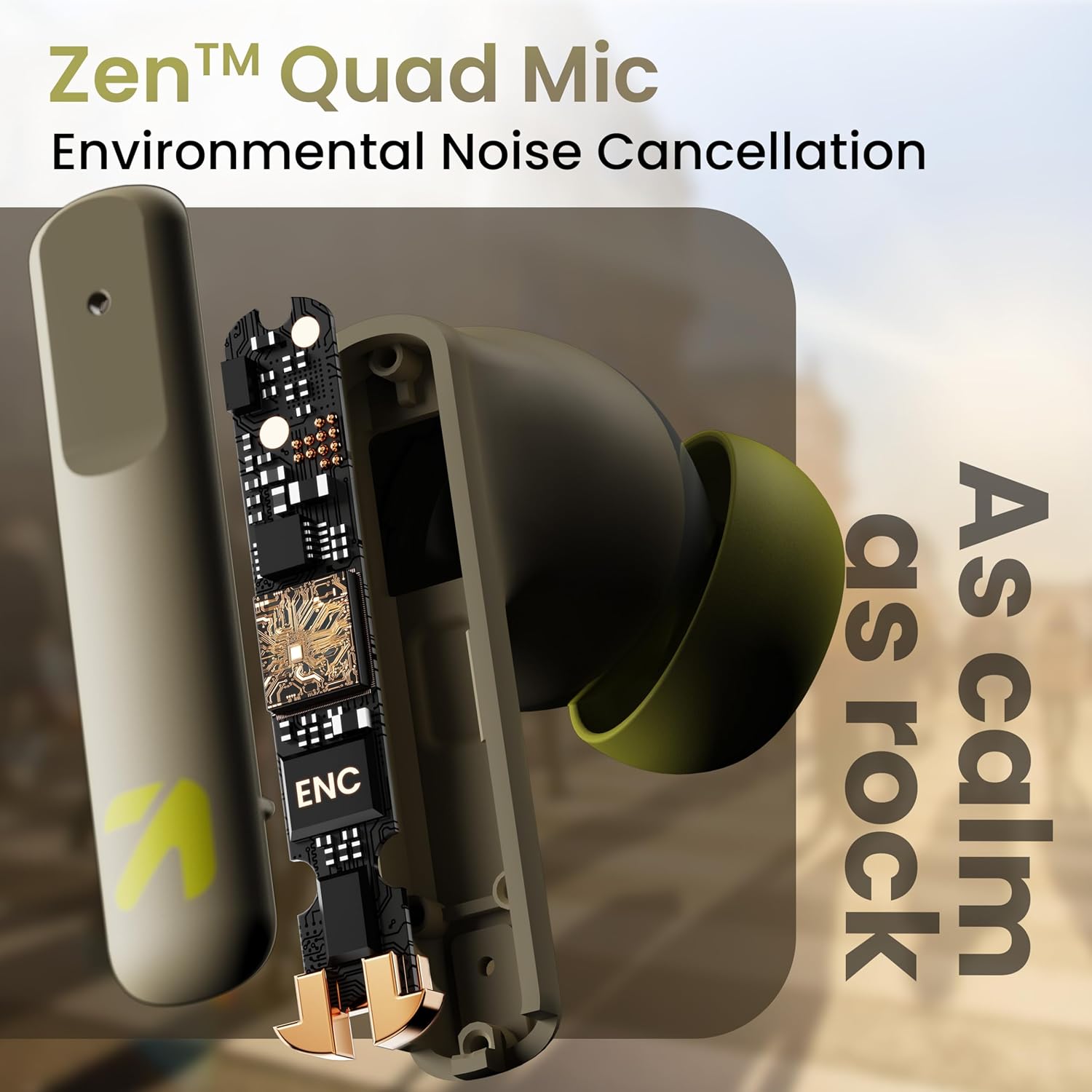
Imagen: Un interno view of a GOBOULT Z60 earbud, highlighting the Zen Quad Mic Environmental Noise Cancellation (ENC) technology for clear audio.

Image: A close-up of a GOBOULT Z60 earbud, emphasizing the 13mm BoomX Drivers responsible for rich bass and superior sound quality.
Cargando
To charge your GOBOULT Z60 earbuds and charging case:
- Coloque los auriculares en el estuche de carga. Asegúrese de que estén correctamente colocados.
- Conecte el cable de carga USB tipo C al puerto de carga del estuche y a una fuente de alimentación.
- El indicador LED en el estuche mostrará el estado de carga.
A full charge provides up to 60 hours of total playtime with the charging case. A quick 10-minute charge can provide up to 150 minutes of playtime.

Image: The GOBOULT Z60 charging case connected via a Type-C cable, illustrating the fast charging capability with indicators for 10 minutes charge yielding 150 minutes playtime.

Image: GOBOULT Z60 earbuds in their charging case, highlighting the impressive 60 hours of total playtime and 8 hours of playtime on a single earbud charge.
Setup: Pairing with Your Device
The GOBOULT Z60 earbuds utilize Bluetooth 5.3 for stable and efficient wireless connectivity.
- Emparejamiento inicial:
- Abre el estuche de carga. Los auriculares entrarán automáticamente en modo de emparejamiento.
- En su dispositivo (teléfono inteligente, tableta, computadora portátil), habilite Bluetooth.
- Buscar "GOBOULT Z60" in the list of available Bluetooth devices and select it to connect.
- Once connected, you will hear an audio prompt, and the LED indicator on the case will change.
- Reemparejamiento: Los auriculares se conectarán automáticamente al último dispositivo emparejado cuando se saquen del estuche, si Bluetooth está habilitado en el dispositivo.

Image: GOBOULT Z60 earbuds and their open charging case next to a smartphone, illustrating the Bluetooth 5.3 "Blink & Pair" feature for quick and stable connection.
Operación de sus auriculares
Controles táctiles
The GOBOULT Z60 earbuds feature intuitive touch controls. The specific functions are:
- Reproducción de música:
- Un solo toque: Reproducir/Pausar
- Doble toque (auricular derecho): Siguiente pista
- Double tap (Left earbud): Previous track
- Triple tap (Right earbud): Volume Up
- Triple tap (Left earbud): Volume Down
- Gestión de llamadas:
- Single tap: Answer/End call
- Long press: Reject call
- Asistente de voz: Long press (either earbud) to activate Google Assistant or Siri.
- Modo de juego: Tap 4 times on either earbud to activate/deactivate Combat Gaming Mode (50ms low latency).

Image: A visual guide to the GOBOULT Z60's touch controls, detailing actions for music playback (play/pause, next/back, volume), call management, activating voice assistance, and toggling game/music mode.
Modo de juego
Activate the 50ms low latency Combat Gaming Mode for a synchronized audio-visual experience during gaming. Tap 4 times on either earbud to switch between gaming and normal modes.

Image: GOBOULT Z60 earbuds in use with a smartphone displaying a racing game, emphasizing the "Combat Gaming Mode" with 50ms ultra-low latency, activated by tapping the earbud 4 times.
Asistente de voz
Access your device's voice assistant (Google Assistant or Siri) by long-pressing either earbud. This allows for hands-free control of your device.

Image: GOBOULT Z60 earbuds and their charging case, illustrating how to activate voice assistance (Ok Google, Hey Siri) with a long press on an earbud.
Mantenimiento
To ensure the longevity and optimal performance of your GOBOULT Z60 earbuds:
- Limpieza: Limpie regularmente los auriculares y el estuche de carga con un paño suave y seco. Evite el uso de productos químicos agresivos o materiales abrasivos.
- Consejos para los oídos: Remove and clean the eartips periodically. Ensure they are dry before reattaching.
- Resistencia al agua: The earbuds are IPX5 water-resistant, meaning they can withstand sweat and light rain. Do not submerge them in water or expose them to heavy downpours. Ensure the charging port is dry before charging.
- Almacenamiento: Cuando no los utilice, guarde los auriculares en su estuche de carga para protegerlos y mantenerlos cargados.

Image: A GOBOULT Z60 earbud with water droplets on its surface, illustrating its IPX5 water resistance, suitable for protection against sweat, rain, and splashes.
Solución de problemas
If you encounter issues with your GOBOULT Z60 earbuds, refer to the following common solutions:
| Problema | Posible solución |
|---|---|
| Los auriculares no se emparejan |
|
| Sin sonido de un auricular |
|
| Los auriculares no cargan |
|
| Volumen bajo o mala calidad de sonido |
|
Presupuesto
| Característica | Detalle |
|---|---|
| Nombre del modelo | AirBass (Z60) |
| Tecnología de conectividad | Inalámbrico (Bluetooth) |
| Versión de Bluetooth | 5.3 |
| Alcance de Bluetooth | 10 metros |
| Tamaño del controlador de audio | 13 milímetros |
| Tipo de controlador de audio | Controlador dinámico |
| Duración de la batería (total) | Hasta 60 horas (con estuche de carga) |
| Tiempo de carga | Aproximadamente 90 minutos |
| Carga rápida | 10 minutos de carga = 150 minutos de tiempo de reproducción |
| Puerto de carga | Tipo C |
| Micrófonos | 4 ENC Mics for Clear Calling |
| Latencia de audio | 50 milisegundos (modo de juego) |
| Resistencia al agua | IPX5 (resistente al sudor, a la lluvia y a las salpicaduras) |
| Método de control | Toque, Voz |
| Peso del artículo | 41.5 gramos |
| País natal | India |
Garantía y soporte
Your GOBOULT Z60 Wireless Earbuds come with a 1 año de garantía del fabricante a partir de la fecha de compra.
For any support, warranty claims, or technical assistance, please refer to the contact information provided on your warranty card or visit the official GOBOULT support websitio.