
Firecore F94T-XG
Firecore F94T-XG 3 X 360 Laser Level and FT1500D Tripod User Manual
Model: F94T-XG Laser Level & FT1500D Tripod
1. Introducción
Thank you for choosing the Firecore F94T-XG 3 X 360 Laser Level and FT1500D Tripod. This comprehensive system provides an all-in-one leveling and alignment solution for various applications. The F94T-XG laser level projects three 360° green laser planes, offering superior visibility and precision for tasks such as aligning, leveling, plumbing, and squaring. Paired with the adjustable FT1500D aluminum alloy tripod, this kit ensures stable and accurate measurements for both interior and exterior projects. Please read this manual thoroughly before operation to ensure safe and effective use of your new tool.
2. Información de seguridad
WARNING: Read and understand all safety warnings and instructions before operating this laser level. Failure to follow the warnings and instructions may result in serious injury.
2.1 Seguridad del láser
This product is a Class II laser product, with a power output of less than 1mW and a wavelength of 505-520nm. Direct eye exposure to the laser beam should be avoided.
- No mire directamente al rayo láser.
- No dirija intencionalmente el rayo láser hacia otras personas o superficies reflectantes.
- No opere el nivel láser en atmósferas explosivas, como en presencia de líquidos, gases o polvo inflamables.
- Mantenga el nivel láser fuera del alcance de los niños.
- Utilice únicamente las baterías y los métodos de carga especificados.
2.2 Seguridad general
- Always ensure the work area is clear and well-lit.
- Do not modify the laser level or tripod.
- Protect the device from extreme temperatures, water, and impact.
- Clean the laser level with a soft, dry cloth. Do not use solvents.
3. Contenido del paquete
The Firecore F94T-XG Laser Level and FT1500D Tripod kit includes the following items:

- Firecore F94T-XG 3 X 360 Laser Level
- Firecore FT1500D 60-inch Aluminum Alloy Laser Tripod
- 2 x 7.4V / 2600mAh Rechargeable Li-ion Batteries
- Type-C Charging Cable and Power Adapter
- Base pivotante magnética
- Green Target Plate
- Manual de usuario
- Carrying Case for Laser Level
- Shoulder Strap Bag for Tripod
4. Producto terminadoview
4.1 Firecore F94T-XG Laser Level
The F94T-XG is a robust and precise laser level designed for demanding job sites. It features an over-molded housing and IP65 water/dust resistance for durability.
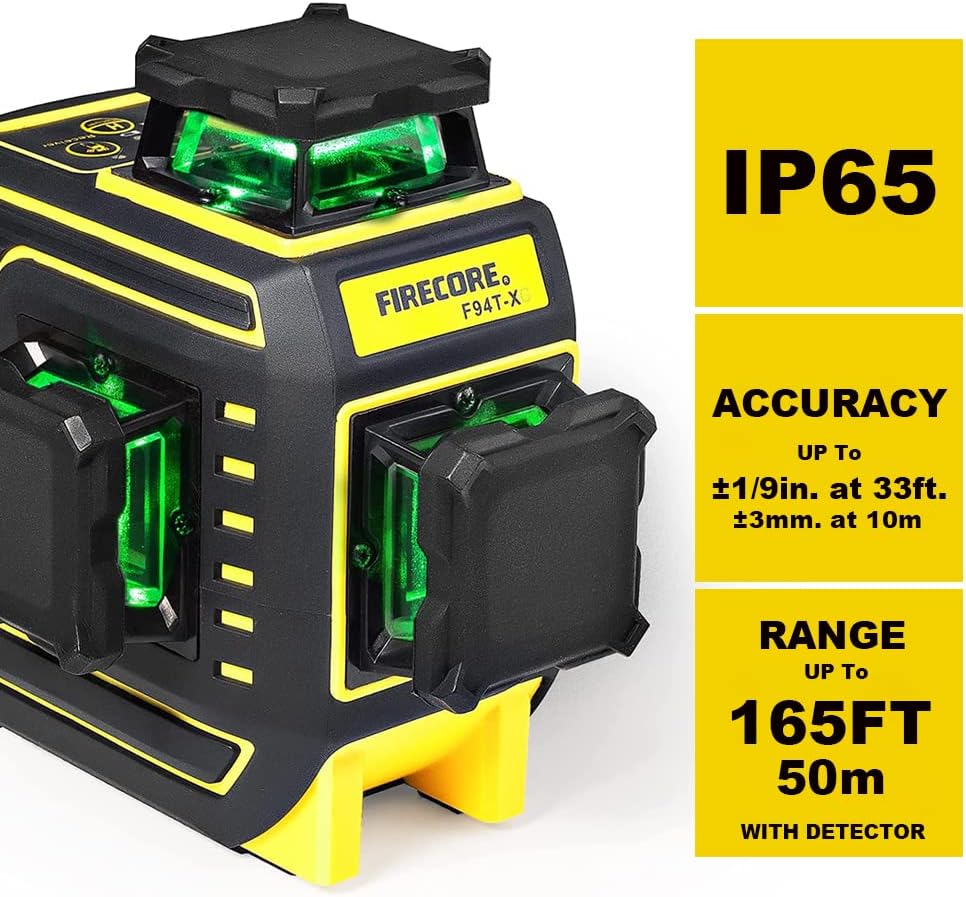
- 3 x 360° Green Laser Lines: One horizontal and two vertical planes for full room coverage.
- Alta visibilidad: Green beams are up to 4X brighter than standard red beams.
- Smart Pendulum System: Self-levels within ±4° in 3 seconds and indicates out-of-level conditions.
- Modo de pulso: Extends working range up to 197 ft (60m) with a Firecore FD30 laser detector.
- Soporte magnético integrado: Features 1/4 in. and 5/8 in. threads for versatile mounting.
- Disturbance Monitor: High-precision electronic motion sensor alerts if the tool position changes, ensuring consistent accuracy.
4.2 Firecore FT1500D Laser Tripod
The FT1500D tripod provides a stable and adjustable platform for your laser level, suitable for various applications.

- Altura ajustable: Expands from 20 inches to 60 inches (50 cm to 150 cm).
- Material: Crafted from quality aluminum for durability and lightweight portability.
- Diseño de la cabeza: Flat head with 1/4-inch x 20 threaded studs, compatible with the F94T-XG.
- Cl de liberación rápidaamps: For easy and secure leg adjustments.
5. Configuración
5.1 Instalación y carga de la batería
The F94T-XG uses two 7.4V / 2600mAh rechargeable Li-ion batteries.
- Abra la tapa del compartimiento de la batería en la parte posterior del nivel láser.
- Insert the rechargeable Li-ion battery packs, ensuring correct polarity.
- Cierre bien la tapa del compartimento de la batería.
- To charge, connect the Type-C charging cable to the battery pack (if charging separately) or directly to the laser level. Connect the power adapter to a suitable power outlet. The charging indicator will show charging status.
5.2 Attaching Laser Level to Tripod
The FT1500D tripod features both 1/4-inch and 5/8-inch mounting threads for compatibility.

- Extend the tripod legs and central column to your desired height. Use the quick-release clamps para asegurarlos.
- Place the F94T-XG laser level onto the tripod head. The laser level's base has a 1/4-inch thread.
- Secure the laser level by rotating the mounting screw on the tripod head until it is firmly attached.
6. Instrucciones de funcionamiento
6.1 Encendido y modo de autonivelación
The F94T-XG features a Smart Pendulum System for automatic leveling.

- Unlock the pendulum by sliding the pendulum lock switch to the unlocked position.
- Press the power button to turn on the laser level. The laser lines will activate.
- Place the laser level on a stable surface or tripod. The Smart Pendulum System will automatically self-level within ±4°.
- If the device is out of its self-leveling range, the laser lines will flash rapidly to indicate an out-of-level condition. Adjust the position of the laser level until the lines stop flashing and become steady.
6.2 Manual Mode (Locking Lines)
For applications requiring lines at an angle, you can lock the pendulum.
- With the pendulum lock switch in the locked position, press and hold the power button for a few seconds to activate Manual Mode.
- The laser lines will turn on and remain steady, allowing you to project lines at any desired angle. The out-of-level alarm will be deactivated in this mode.
6.3 Pulse Mode (Detector Use)
Pulse mode extends the working range of the laser level, especially in bright lighting or outdoor conditions, when used with a compatible laser detector (e.g., Firecore FD30).

- In self-leveling mode, press the dedicated Pulse Mode button (if available, or cycle through modes) to activate Pulse Mode. The laser lines may appear dimmer to the naked eye but will be detectable by the receiver.
- Follow the instructions for your specific laser detector to locate the laser line at extended distances.
6.4 Aplicaciones
The Firecore F94T-XG is versatile for various professional and DIY applications.

- Room layout and partitioning
- Alignment of conduit, lighting, and fixtures
- Flooring and tiling installation
- Drywall and window framing
- Cabinet and shelf installation
7. Mantenimiento
7.1 Limpieza
- Regularly clean the laser level and tripod with a soft, dry cloth.
- Do not use abrasive cleaners, solvents, or harsh chemicals, as these can damage the housing or optical components.
- Keep the laser apertures clean to ensure clear and accurate laser lines.
7.2 Almacenamiento

- Always lock the pendulum before storing or transporting the laser level to prevent damage to the internal mechanism.
- Store the laser level and tripod in their respective carrying cases when not in use.
- Conservar en un lugar fresco y seco, alejado de la luz solar directa y de temperaturas extremas.
- If storing for extended periods, remove the batteries from the laser level.
7.3 Cuidado de la batería
- Cargue las baterías completamente antes del primer uso.
- Do not expose batteries to excessive heat or direct flame.
- Deshazte de las baterías de acuerdo a las regulaciones locales.
8. Solución de problemas
If you encounter issues with your Firecore F94T-XG laser level, refer to the table below for common problems and solutions.
| Problema | Posible causa | Solución |
|---|---|---|
| Las líneas láser parpadean rápidamente. | El nivel láser está fuera de su rango de autonivelación (±4°). | Place the laser level on a more level surface or adjust the tripod until the lines become steady. |
| Las líneas láser son tenues o no son visibles en exteriores. | Bright ambient light; not in Pulse Mode. | Activate Pulse Mode and use a compatible laser detector (e.g., Firecore FD30). Use the green target plate to enhance visibility over short distances. |
| Laser level does not turn on. | Low battery; pendulum locked; power button not pressed correctly. | Charge or replace batteries. Ensure pendulum lock switch is in the unlocked position. Press the power button firmly. |
| Medidas inexactas. | Device not calibrated; pendulum not fully settled; disturbance during operation. | Ensure the device is on a stable surface and has fully self-leveled. Avoid disturbing the device during use. If persistent, contact customer support for calibration. |
| La duración de la batería es más corta de lo esperado. | Batteries not fully charged; old batteries; operating in extreme temperatures. | Ensure batteries are fully charged. Replace old batteries if capacity has significantly degraded. Operate within recommended temperature ranges. |
9. Especificaciones
| Característica | Especificación |
|---|---|
| Clase de láser | Class II (IEC/EN60825-1/2014) |
| Longitud de onda del láser | 505-520 nm (láser verde) |
| Precisión de nivelación | ±1/9 inch at 33 ft (±3mm at 10m) |
| Rango de autonivelación | ±4° |
| Tiempo de autonivelación | 3 segundos |
| Rango visible | Hasta 82 pies (25 m) |
| Working Range with Detector | Up to 197 ft (60m) with Firecore FD30 |
| Clasificación IP | IP65 (resistencia al agua y al polvo) |
| Fuente de poder | 2 x 7.4V / 2600mAh Li-ion Batteries |
| Tiempo de funcionamiento | Approx. 10 hours per battery (continuous use) |
| Rosca de montaje | 1/4 pulg. y 5/8 pulg. |
| Material del trípode | Aleación de aluminio |
| Rango de altura del trípode | 20 pulgadas a 60 pulgadas (50 cm a 150 cm) |
| Temperatura de funcionamiento | Not specified, generally 14°F to 122°F (-10°C to 50°C) for laser levels. |
| Temperatura de almacenamiento | Not specified, generally -4°F to 158°F (-20°C to 70°C). |
10. Garantía y soporte
Firecore products are manufactured to high-quality standards. For information regarding warranty coverage, please refer to the warranty card included with your product or visit the official Firecore website. If you have any questions, require technical assistance, or need to report an issue, please contact Firecore customer support through the following channels:
- Oficial Websitio: www.firecoretools.com (Example, actual link not provided in data)
- Soporte por correo electrónico: Consulte el embalaje de su producto o la información oficial. webSitio para correo electrónico de contacto.
- Tienda de Amazon: Visita el Firecore Store on Amazon para obtener información del producto y opciones de soporte.
Please have your model number (F94T-XG) and purchase date ready when contacting support.
Ask a question about this manual
Ask about setup, troubleshooting, compatibility, parts, safety, or missing instructions. Manuals+ will review the question and use this page’s manual context to help answer it.