
docooler V8 Finder 2
Manual del usuario del medidor de señal de TV docooler V8 Finder 2
Modelo: V8 Finder 2
1. Introducción
The docooler V8 Finder 2 is a professional digital satellite signal finder meter designed for efficient and accurate installation and adjustment of satellite dishes. It features a high-definition LCD display, supports various DVB standards, and includes advanced functions like spectrum analysis and automatic angle calculation. This manual provides comprehensive instructions for operating and maintaining your device.
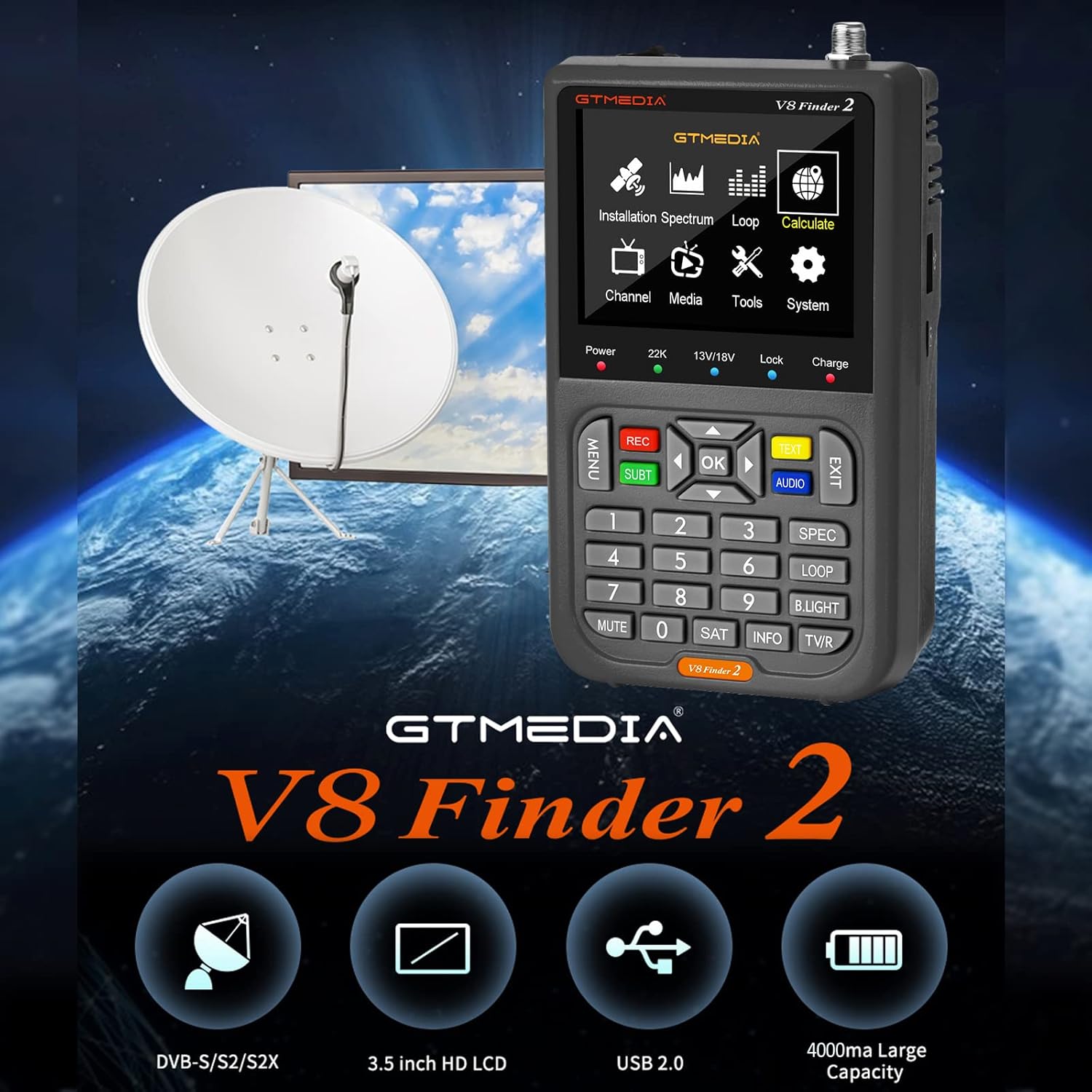
Figure 1: docooler V8 Finder 2 in use with a satellite dish, highlighting its core function.
2. Información de seguridad
Lea atentamente todas las advertencias e instrucciones de seguridad antes de utilizar este producto para garantizar un funcionamiento seguro y evitar daños.
- No exponga el dispositivo a la lluvia ni a la humedad.
- Avoid extreme temperatures. Operate the device within recommended environmental conditions.
- No desmonte ni intente reparar el dispositivo usted mismo. Encargue cualquier servicio técnico a personal cualificado.
- Utilice únicamente los accesorios de carga proporcionados o recomendados.
- Asegúrese de que haya una ventilación adecuada al utilizar el dispositivo.
- Mantenga el dispositivo alejado de campos magnéticos fuertes.
3. Producto terminadoview
The V8 Finder 2 is a compact and powerful tool for satellite signal detection. Familiarize yourself with its components and features.
3.1 Disposición del dispositivo

Figura 2: Frente view of the V8 Finder 2, showing the LCD display and control panel.
The front panel features a 3.5-inch high-definition LCD screen for displaying signal information, menus, and media. Below the screen are navigation buttons, numeric keypad, and function keys for various operations.
3.2 Puertos y conexiones
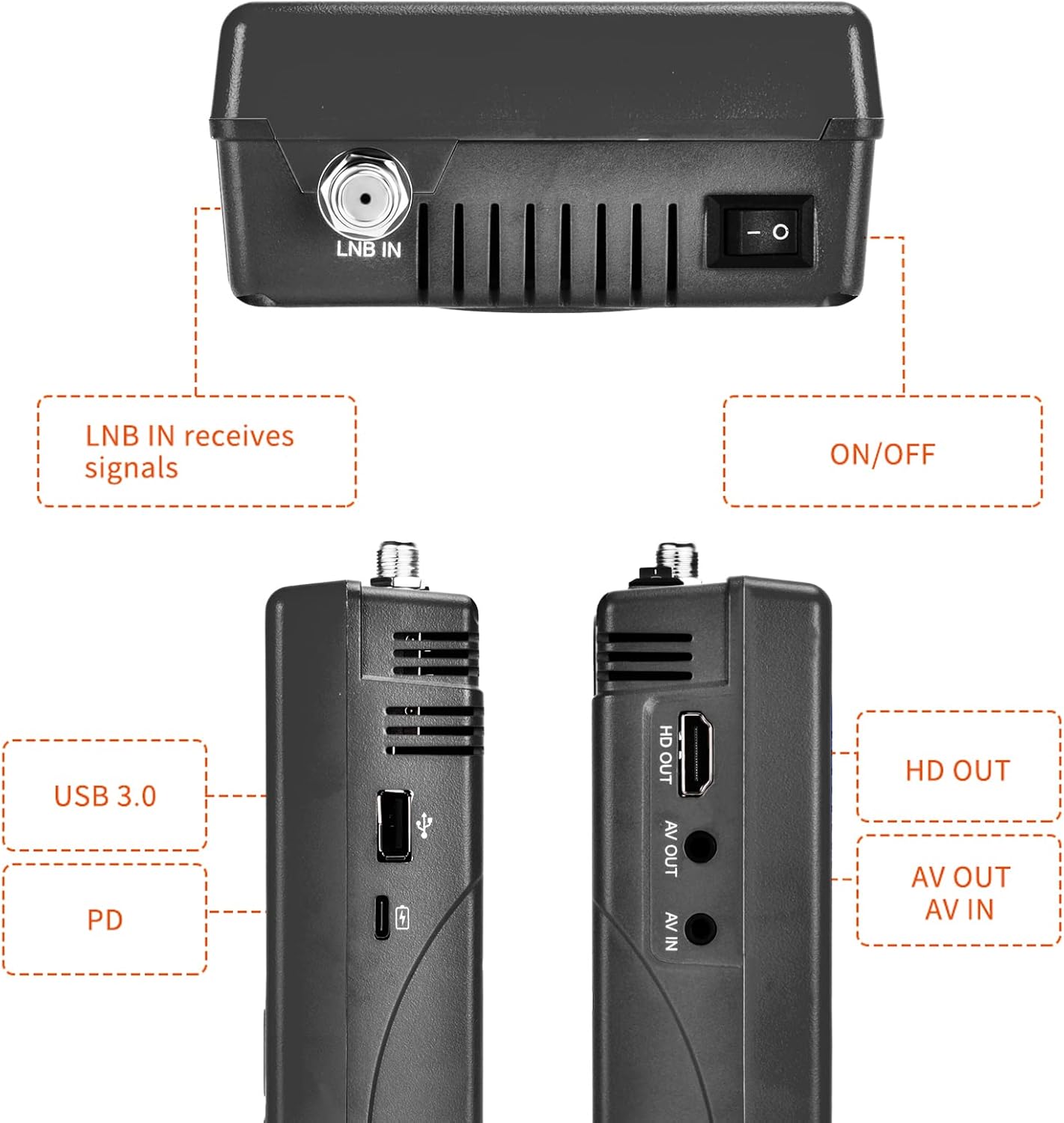
Figura 3: Lateral y superior views illustrating the various input and output ports.
- ENTRADA LNB: Connects to the LNB of your satellite dish for signal reception.
- Interruptor encendido / apagado: Enciende o apaga el dispositivo.
- Puerto USB (USB 3.0): For software updates and connecting a 2.4G USB Wi-Fi dongle for YouTube functionality.
- PD (Power Delivery) / Type-C Charging Port: For charging the device and supports reverse charging.
- SALIDA HD: Salida de interfaz multimedia de alta definición para conectar a una pantalla externa.
- SALIDA AV: Analog Video output for connecting to older displays.
- ENTRADA AV: Analog Video input for connecting external video sources.
3.3 Características principales
- 3.5-inch High-Definition LCD Display.
- Full compatibility with DVB-S2X/S2/S, MPEG-2/MPEG-4.
- H.264 (8-bit) hardware decoding support.
- Digital measurement for signal strength and quality.
- Spectrum Analyzer and Loop Search functions.
- Supports Auto, Blind, Manual, or NIT scanning.
- Audible tone for signal lock.
- Automatic calculation of AZ, EL angles.
- DISEQC 1.0/1.1/1.2, Unicable, 0/22kHz tone support.
- Altavoz incorporado.
- 7.4V/4000mAh Li-ion battery with Type-C fast charging and reverse charging.
- Actualización de software a través del puerto USB.

Figure 4: Visual representation of the V8 Finder 2's main features.
4. Configuración
Before first use, ensure the device is fully charged and familiarize yourself with the package contents.
4.1 Contenido del paquete

Figure 5: Items included in the V8 Finder 2 product package.
Verifique que todos los elementos estén presentes:
- docooler V8 Finder 2 Device
- Manual de usuario
- Cable USB (Tipo-C)
- Power Adapter (if included, not explicitly listed in JSON but implied by charging)
- F-connector adapter (if included)
4.2 Carga del dispositivo
The device is equipped with a 7.4V/4000mAh Li-ion battery. For optimal performance, fully charge the device before first use.
- Connect the provided USB Type-C cable to the PD/Type-C charging port on the device.
- Connect the other end of the USB cable to a compatible USB power adapter (not explicitly listed as included, but standard for Type-C charging) or a powered USB port.
- The charging indicator on the device will illuminate. Charging is complete when the indicator changes color or turns off (refer to device screen for battery status).
The device supports multi-protocol fast charging and Type-C reverse charging, allowing it to act as a power bank for other devices.
5. Instrucciones de funcionamiento
This section details the steps for using the V8 Finder 2 to locate and optimize satellite signals.
5.1 Encendido / Apagado
- To power on, slide the ON/OFF switch located on the top of the device to the 'ON' position.
- Para apagar, deslice el interruptor de ENCENDIDO/APAGADO a la posición 'APAGADO'.
5.2 Connecting to a Satellite Dish
- Ensure the V8 Finder 2 is powered off.
- Connect the coaxial cable from your satellite dish's LNB (Low Noise Block) to the LNB EN port on the V8 Finder 2.
- If connecting to a receiver or TV, use the HD OUT or AV OUT puertos.
5.3 Signal Finding and Optimization
The V8 Finder 2 provides various modes for signal acquisition and analysis.
- Seleccionar Satélite: From the main menu, navigate to the "Installation" or "Satellite Setup" section. Select the desired satellite from the pre-programmed list or add a new one.
- Ajustar el plato: Slowly adjust the azimuth (horizontal) and elevation (vertical) of your satellite dish. Observe the signal strength and quality indicators on the V8 Finder 2's display. The device will emit an audible tone when a signal is locked.
- Analizador de espectro: Use the "Spectrum" function to visualize the signal spectrum, which can help identify interference or weak signals.
- Cálculo del ángulo: The device can automatically calculate the AZ (Azimuth) and EL (Elevation) angles for your location, assisting in precise dish alignment.
- Escaneo de canales: Once a strong signal is acquired, perform an "Auto Scan," "Blind Scan," "Manual Scan," or "NIT Scan" to find available channels.

Figure 6: The V8 Finder 2 display showing signal decoding capabilities.
5.4 Reproducción de medios y otras funciones
- Medios de comunicación: The device supports media playback. Connect a USB drive to the USB port to access compatible audio or video files.
- YouTube (via Wi-Fi): Connect a 2.4G USB Wi-Fi dongle to the USB port to enable YouTube functionality.
- AV IN/OUT: Use the AV IN port to display video from an external source on the V8 Finder 2 screen. Use AV OUT or HD OUT to display the V8 Finder 2's screen on an external monitor or TV.

Figure 7: Illustration of AV IN and AV OUT functionality, connecting the device to a television.
6. Mantenimiento
Proper maintenance ensures the longevity and optimal performance of your V8 Finder 2.
- Limpieza: Utilice un paño suave y seco para limpiar el dispositivo. No utilice limpiadores líquidos ni aerosoles.
- Almacenamiento: Guarde el dispositivo en un lugar fresco y seco, alejado de la luz solar directa y de temperaturas extremas.
- Cuidado de la batería: To preserve battery life, avoid fully discharging the battery frequently. If storing for extended periods, charge the battery to about 50% every few months.
- Actualizaciones de software: Periodically check for software updates on the manufacturer's website. Updates can improve performance and add new features. Use the USB port for software upgrades.
7. Solución de problemas
If you encounter issues with your V8 Finder 2, refer to the following common problems and solutions.
| Problema | Posible causa | Solución |
|---|---|---|
| El dispositivo no se enciende. | Batería baja; interruptor de encendido apagado. | Cargue el dispositivo por completo. Asegúrese de que el interruptor de encendido/apagado esté en la posición "ON". |
| Ninguna señal detectada. | Incorrect LNB connection; Dish misalignment; Incorrect satellite selected. | Check LNB cable connection. Re-align the satellite dish. Verify the correct satellite is selected in the device settings. |
| Señal débil o inestable. | Fine-tuning needed; Obstruction; LNB issue. | Make small adjustments to the dish. Check for any physical obstructions. Inspect LNB for damage. |
| No se puede conectar al wifi. | No 2.4G USB Wi-Fi dongle connected; Incorrect Wi-Fi settings. | Ensure a compatible 2.4G USB Wi-Fi dongle is inserted. Verify Wi-Fi network settings and password. |
| Display issues. | Software glitch; Hardware fault. | Restart the device. If the problem persists, consider a software update or contact support. |
8. Especificaciones
Technical specifications for the docooler V8 Finder 2.
- Mostrar: LCD de alta definición de 3.5 pulgadas
- Compatibilidad: DVB-S2X/S2/S, MPEG-2/MPEG-4
- Descodificación de video: H.264 (8 bits)
- Batería: Iones de litio de 7.4 V / 4000 mAh
- Puerto de carga: Type-C (supports fast charging, reverse charging)
- Conectividad: USB (for software update, 2.4G Wi-Fi dongle), HD OUT, AV OUT, AV IN
- Dimensiones: Aproximadamente 155 mm x 95 mm x 45 mm
- Peso: 530 gramos
- Soporte DISEQC: 1.0/1.1/1.2, Unicable
- Tone Support: 0/22 kHz
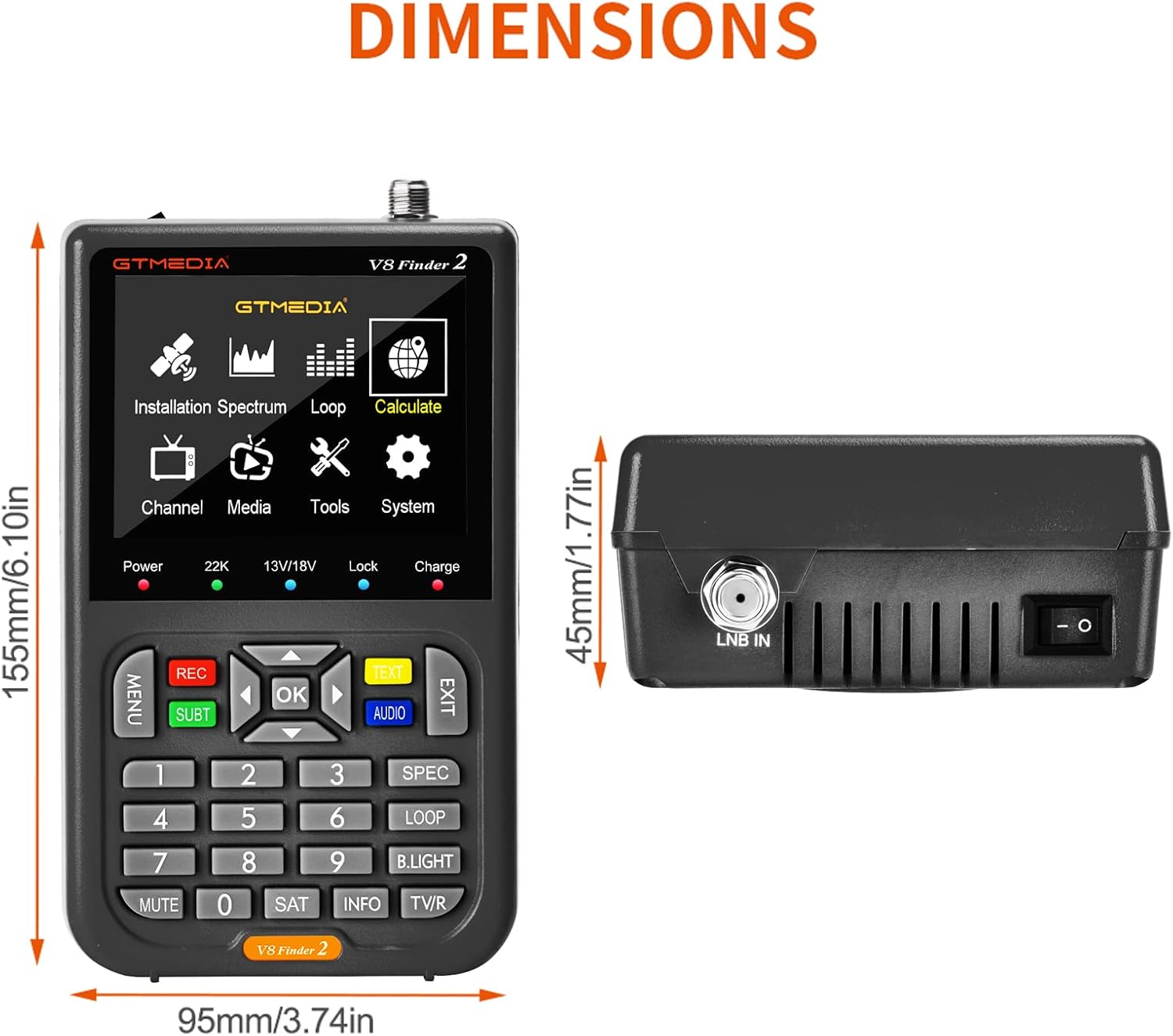
Figure 8: Physical dimensions of the V8 Finder 2.
9. Garantía y soporte
For warranty information and technical support, please refer to the product warranty card included in your package or visit the official docooler webSitio. Conserve su recibo de compra como comprobante para reclamaciones de garantía.
Fabricante: Enfriador de bebidas
Marca: enfriador de do
For further assistance, please contact docooler customer service.
Ask a question about this manual
Ask about setup, troubleshooting, compatibility, parts, safety, or missing instructions. Manuals+ will review the question and use this page’s manual context to help answer it.