
1. Introducción
The MXR M222 Talk Box is a unique effects pedal designed to allow musicians to shape the sound of their instrument (guitar, keyboard, etc.) using their mouth, creating vocal-like effects. This self-contained unit includes its own amplifier and speaker driver, eliminating the need for additional external equipment. It offers Volume, Tone, and Gain controls to fine-tune the effect to your preference.

Figura 1: Arriba view of the MXR M222 Talk Box Effects Pedal, showing the control knobs and voice tube input.
2. Características del producto
- Self-Contained Unit: Cuenta con un incorporado amplifier and speaker driver, removing the need for an external ampmás duradero.
- Controles versátiles: Equipped with Volume, Tone, and Gain knobs for precise sound shaping.
- Amplia compatibilidad: Suitable for use with guitars, keyboards, and other instruments.
- Diseño compacto: Durable and compact housing for both practice and live performance settings.
3. Controles y conexiones
Familiarize yourself with the various controls and connection points on your MXR M222 Talk Box.
3.1 Controles del panel frontal
- Perilla de VOLUMEN: Controla el nivel de salida general del efecto.
- Perilla de TONO: Adjusts the tonal character of the distorted signal, from darker to brighter.
- Perilla de GANANCIA: Controls the amount of distortion applied to the signal.
- VOICE TUBE Input: Connects the included voice tube.
- INTERRUPTOR DE PIE: Toggles the effect on/bypass. A blue LED indicates when the effect is active.
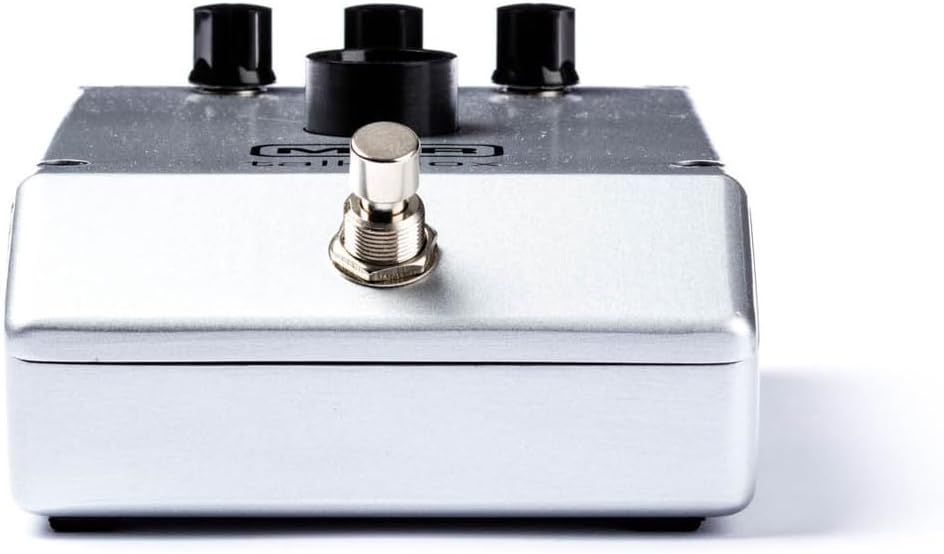
Figura 2: Frente view of the MXR M222 Talk Box, highlighting the footswitch.
3.2 Conexiones del panel posterior
- Toma de entrada: Connect your instrument (guitar, keyboard) here.
- Entrada de alimentación de 18 V CC: Connect the 18V 1000mA Dunlop ECB009 power supply here.
- SALIDA Jack: Conecta esto a tu ampamplificador o interfaz de audio.

Figura 3: Posterior view of the MXR M222 Talk Box, showing the input, power, and output connections.
4. Configuración
Follow these steps to set up your MXR M222 Talk Box:
- Conexión de energía: Connect the 18V 1000mA Dunlop ECB009 power supply to the 18V DC input jack on the rear of the pedal.
- Conexión del instrumento: Run a cable from your instrument (guitar, keyboard, etc.) to the Talk Box's INPUT jack.
- AmpConexión del elevador: Run another cable from the Talk Box's OUTPUT jack to your ampamplificador o interfaz de audio.
- Voice Tube Placement: Attach one end of the clear voice tube to the VOICE TUBE Input on the pedal. Secure the other end of the tube to your microphone stand using the included clip, ensuring the end of the tube is close to your mouth for optimal vocal shaping.
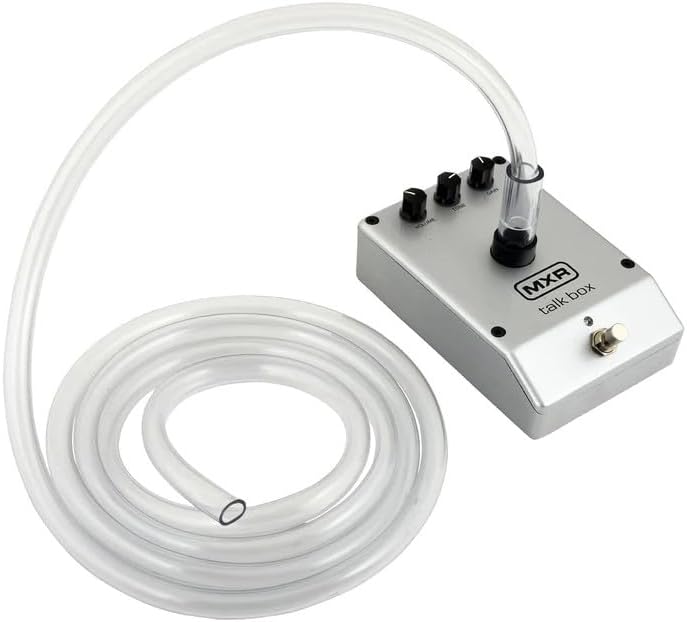
Figure 4: The MXR M222 Talk Box with the voice tube attached and ready for use.
5. Instrucciones de funcionamiento
Once set up, you can begin using your Talk Box to create expressive vocal effects:
- Ajustes iniciales: Start with the VOLUME and TONE knobs fully counter-clockwise and the GAIN knob at 12 o'clock.
- Engage Effect: Turn the effect on by depressing the footswitch. The blue LED will illuminate.
- Ajustar el volumen: Slowly rotate the VOLUME knob clockwise until the desired volume is achieved.
- Ajustar tono: Rotate the TONE knob clockwise for a brighter sound and counter-clockwise for a darker sound.
- Ajustar ganancia: Rotate the GAIN knob clockwise to increase the amount of distortion and counter-clockwise to decrease it.
- Shaping Sound: After setting up your microphone and tube, place the open end of the tube in the corner of your mouth between your back teeth. Without making any sound with your voice, practice mouthing vowel sounds (A, E, I, O, U) while simultaneously playing your instrument. Exaggerate the shape of your mouth for best results.
- Advanced Vocalization: To create more complex sounds, practice mouthing words with consonants such as B, D, G, J, K, P, Q, or T. It takes practice to distinguish them from V, G, B, and D. Exaggerating with consonants is just as important with vowels.
- Ajuste de fase: Try placing a Phase 90 or other effect in front of the MXR Talk Box for interesting results.
Vídeo 1: Un finalview of the MXR M222 Talk Box Pedal, demonstrating its features and basic operation. This video is provided by a seller and is 1 minute and 2 seconds in length.
6. Mantenimiento
Proper maintenance ensures the longevity and optimal performance of your Talk Box.
- Limpieza: Wipe the pedal's exterior with a soft, dry cloth. Avoid abrasive cleaners or solvents.
- Voice Tube Care: The voice tube should be cleaned regularly for hygiene. It can be washed with mild soap and water. Ensure it is completely dry before re-attaching.
- Almacenamiento: Guarde el pedal en un lugar fresco y seco, alejado de la luz solar directa y de temperaturas extremas cuando no esté en uso.
7. Solución de problemas
If you encounter issues with your MXR M222 Talk Box, refer to the following common problems and solutions:
- No Sound/Weak Effect:
- Asegúrese de que la fuente de alimentación esté conectada correctamente y funcione.
- Check all instrument and amplifier cables for secure connections.
- Verify the footswitch LED is illuminated, indicating the effect is active.
- Adjust the VOLUME, TONE, and GAIN knobs to appropriate levels.
- Confirm the voice tube is properly inserted into the pedal and positioned correctly in your mouth.
- Ruido/zumbido no deseado:
- Ensure you are using the correct 18V 1000mA power supply.
- Compruebe si hay cables o conexiones defectuosas.
- Try moving the pedal away from other electronic devices that might cause interference.
- Pedal Not Sitting Flat:
- Some units may exhibit slight unevenness on the bottom surface. The included rubber feet can be applied to the corners to provide stability on flat surfaces. For pedalboard mounting, consider using a mounting solution that accommodates slight variations in the pedal's base.
8. Especificaciones
| Especificación | Valor |
|---|---|
| Peso del artículo | 2.77 kilogramos (6.1 libras) |
| Dimensiones del paquete | 10.35 x 9.57 x 5 pulgadas |
| Número de modelo del artículo | M222-TBB-3 |
| Interfaz de hardware | Audio de 1/4 de pulgada |
| Formato de señal | Cosa análoga |
| Fuente de poder | Eléctrico con cable |
| Volumentage | 18 voltios |
| Color | Plata |
| Primero disponible | 19 de julio de 2023 |
9. Información de seguridad
Tenga en cuenta las siguientes pautas de seguridad:
- Use only the specified 18V 1000mA power supply to prevent damage to the unit and voiding the warranty.
- Do not expose the pedal to water or excessive moisture.
- Avoid operating the pedal in extremely high or low temperatures.
- No intente abrir ni reparar la unidad usted mismo. Encargue cualquier reparación a personal cualificado.
- Keep the voice tube clean and replace it if it becomes damaged or discolored.
10. Garantía y soporte
Para obtener información sobre la garantía, asistencia técnica o consultas de servicio, póngase en contacto con el fabricante o con su distribuidor autorizado. Conserve el recibo de compra como comprobante para reclamaciones de garantía.