
1. Producto terminadoview
The Tenda SG105 is an unmanaged 5-port Gigabit Ethernet switch designed to expand your network connectivity. It provides five 10/100/1000Mbps auto-negotiating RJ45 ports, supporting wire-speed forwarding for high-speed data transfer. Its compact, fanless design ensures quiet operation, making it suitable for home and small office environments. The device supports both desktop placement and wall-mounting for flexible installation.
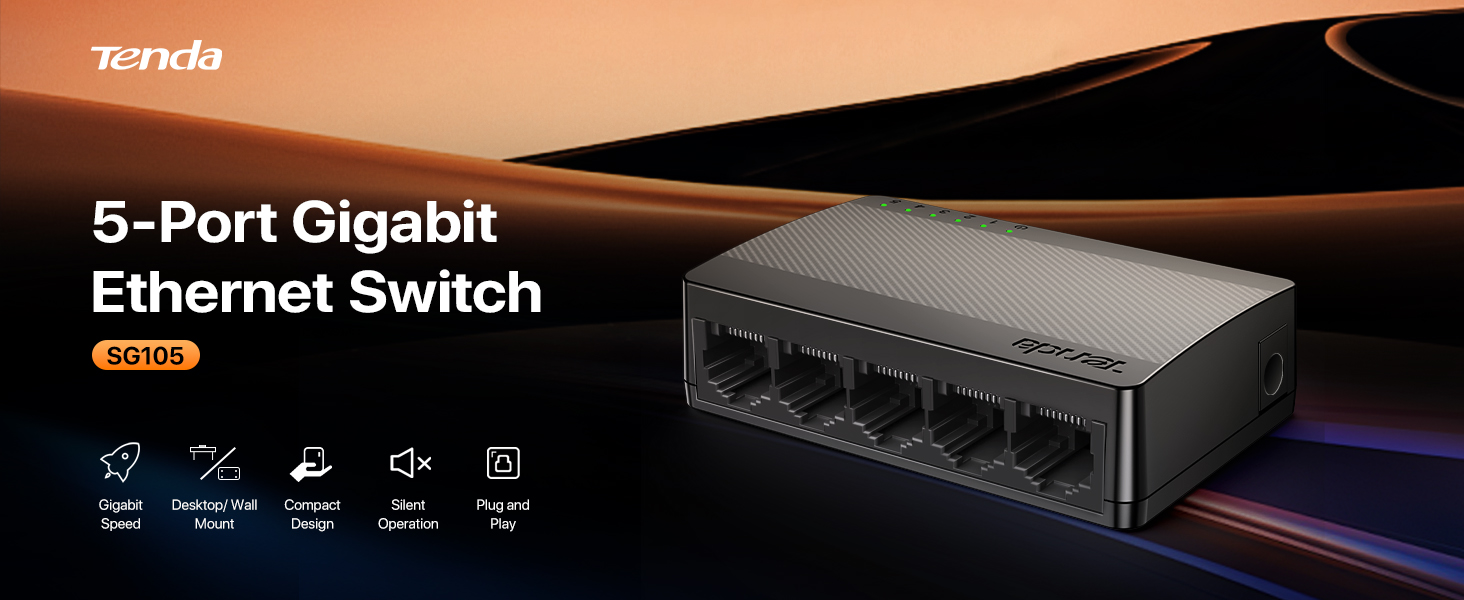
Image: Tenda SG105 overview highlighting its features.
2. Características
- 5 puertos Gigabit: Provides 5 10/100/1000Mbps auto-negotiating MDIX RJ45 Ethernet ports for high-speed connections.
- Conectar y usar: Requires no configuration; simply connect your devices.
- Diseño compacto: Mini size for minimal space occupation, suitable for various environments.
- Funcionamiento sin ventilador: Ensures silent performance, ideal for quiet settings.
- Colocación flexible: Supports both desktop and wall-mounting options.
- Reconocimiento inteligente: Automatically identifies parallel and intersecting lines.
- Eficiencia energética: Ultra-low power consumption (only 1.7W).
3. Contenido del paquete
Verifique que su paquete contenga los siguientes elementos:
- Tenda SG105 5-Port Gigabit Ethernet Switch
- Adaptador de corriente
- Manual de usuario (este documento)

Image: Contents of the Tenda SG105 package.
4. Instrucciones de configuración
4.1 Conexión del conmutador
- Conecte el adaptador de corriente: Plug the power adapter into the DC IN port of the SG105 switch and then into a power outlet. The power indicator LED on the switch will light up.
- Conéctese a su red: Use an Ethernet cable to connect one of the SG105's RJ45 ports to your router, modem, or existing network.
- Conecte sus dispositivos: Connect your wired devices (e.g., computer, gaming console, printer, Smart TV, IP camera) to the remaining RJ45 ports on the SG105 switch using Ethernet cables.

Image: Connection diagram for the Tenda SG105 switch, illustrating how to connect it to a router and various devices.
4.2 Montaje en pared (opcional)
The Tenda SG105 switch features two mounting holes on its underside, allowing for wall-mounting to save desk space.
- Marcar posiciones de montaje: Hold the switch against the wall at the desired location and mark the positions for the two mounting holes.
- Instalar tornillos: Insert two screws (not included) into the marked positions, leaving a small gap between the screw head and the wall.
- Monte el interruptor: Align the mounting holes on the switch with the screws and slide the switch down to secure it.

Image: Underside of the Tenda SG105 switch with wall-mounting slots.
4.3 Guía de video
Video: Official Tenda instruction video demonstrating the setup and features of the SG105 5-Port Gigabit Ethernet Switch.
5. Funcionamiento del interruptor
The Tenda SG105 is an unmanaged switch, meaning it operates automatically without requiring any software configuration. Once connected, it functions as a network extender, providing additional wired ports for your devices.
5.1 Indicadores LED
The front panel of the switch features LED indicators for each port and for power. These LEDs provide visual feedback on the switch's status:
- LED de encendido: Indicates if the switch is powered on.
- LED de puerto (1-5): Each port has an LED that indicates link status and activity. A solid light typically means a stable connection, while a blinking light indicates data transmission.

Imagen: Frente view of the Tenda SG105 switch with LED indicators.
5.2 Funcionamiento silencioso
The fanless design of the SG105 ensures completely silent operation, making it suitable for placement in living rooms, bedrooms, or quiet office spaces without causing any noise disturbance.

Image: Tenda SG105 operating silently in an office environment.
6. Mantenimiento
To ensure optimal performance and longevity of your Tenda SG105 switch, consider the following maintenance tips:
- Mantenga el dispositivo en un área bien ventilada para evitar el sobrecalentamiento.
- Avoid exposing the switch to direct sunlight, high temperatures, or excessive humidity.
- Clean the exterior of the device with a soft, dry cloth. Do not use liquid or aerosol cleaners.
- Asegúrese de que todas las conexiones de cables estén seguras y libres de daños.
- Periodically check for firmware updates on the official Tenda website, although unmanaged switches rarely require updates.
7. Solución de problemas
Si tiene problemas con su conmutador Tenda SG105, consulte los siguientes problemas y soluciones comunes:
- Sin energía:
- Ensure the power adapter is securely connected to the switch and a working power outlet.
- Verify that the power outlet is functional by plugging in another device. - LED sin enlace/actividad:
- Check that the Ethernet cable is securely plugged into both the switch port and the connected device.
- Try a different Ethernet cable to rule out cable damage.
- Ensure the connected device is powered on and functioning correctly. - Velocidad de red lenta:
- Confirm that all connected devices and cables support Gigabit Ethernet (Cat5e or higher cables are recommended for Gigabit speeds).
- Check for network congestion or issues with your router/modem.
- Ensure the switch is placed away from sources of electromagnetic interference. - Conexión intermitente:
- Compruebe que todas las conexiones de cables no estén flojas ni dañadas.
- Restart the switch by unplugging and replugging the power adapter.
- Ensure the switch is not overheating; move it to a cooler, well-ventilated location if necessary.
8. Especificaciones
| Característica | Descripción |
|---|---|
| Modelo | SG105 |
| Número de puertos | 5 |
| Tipo de interfaz | RJ45 |
| Velocidad de transferencia de datos | 10/100/1000 Mbps (Gigabit) |
| Capacidad de conmutación | 10 Gbps |
| Consumo de energía | 3 Watts (Maximum), 1.7 Watts (Ultra-Low Power) |
| Entrada de potencia | 5V / 600mA DC |
| Dimensiones (L x An x Al) | 3.34" x 2.04" x 0.86" (84.8 mm x 52 mm x 22 mm) |
| Peso del artículo | 1.9 onzas (aprox. 54 g) |
| Material de la caja | Plástico |
| Temperatura de funcionamiento | 0 °C a 45 °C (32 °F a 113 °F) |
| Temperatura de almacenamiento | -40 °C a 70 °C (-40 °F a 158 °F) |
| Humedad de funcionamiento | 10% a 90% sin condensación |
| Humedad de almacenamiento | 5% a 90% sin condensación |
9. Información de garantía
Los productos Tenda suelen incluir una garantía del fabricante. Consulte la tarjeta de garantía incluida en el embalaje del producto o visite el sitio web oficial de Tenda. website for detailed warranty terms and conditions specific to your region. Keep your purchase receipt for warranty claims.
10. Atención al cliente
For technical support, product inquiries, or warranty service, please contact Tenda customer support through the following channels:
- Websitio: www.tendacn.com/nosotros
- Correo electrónico: support.us@tenda.cn
- Soporte gratuito: +1 (800) 570-5892 (Mon-Sun: 9AM-6PM PST)
Please have your product model (SG105) and serial number ready when contacting support.