
symcode USA-6709DA-Green
Symcode Wireless Bluetooth Barcode Scanner User Manual
Model: USA-6709DA-Green
1. Introducción
This user manual provides comprehensive instructions for the Symcode Wireless Bluetooth Barcode Scanner, Model USA-6709DA-Green. This device is designed for accurate and efficient data capture, supporting various 1D and 2D barcode types. It offers versatile connectivity options including Bluetooth, 2.4G wireless, and USB wired connections, making it suitable for a wide range of business applications.

Image 1: Symcode Wireless Bluetooth Barcode Scanner and accessories.
2. Contenido del paquete
Por favor verifique que todos los artículos estén presentes en su paquete:
- Symcode Barcode Scanner (Model: USA-6706DA-Green)
- Cable de carga USB
- Dongle USB 2.4G
- Manual de usuario

Image 2: Components included with the Symcode Barcode Scanner.
3. Características del producto
- Tecnología de escaneo avanzada: CMOS optical imaging for quick and precise scanning of 1D and 2D barcodes (QR, DataMatrix, PDF417, Aztec, Hanxin, etc.) even on damaged or poorly printed labels.
- Modos de conectividad triple: Supports Bluetooth, 2.4G wireless, and USB wired connections for maximum flexibility.
- Alcance inalámbrico extendido: Up to 200m in open environments and 30m indoors with the 2.4G USB dongle.
- Batería de larga duración: 2000mAh battery provides up to 30 hours of continuous scanning, with a full recharge in approximately 2 hours.
- Configuración versátil: Features include hands-free intelligent sensor mode, trigger scan mode, vibration/buzzer settings, data storage/instant upload modes, multiple keyboard languages, and customizable prefix/suffix options.
- Durabilidad superior: Constructed with strong ABS material, designed to withstand drops of up to 2.4 meters (8 ft) and features an integrated dustproof housing (IP67 rated).
4. Configuración y conexión
El escáner ofrece tres métodos de conexión principales:
4.1. Conexión inalámbrica 2.4G
- Conecte el adaptador USB 2.4G a un puerto USB disponible en su computadora.
- Turn on the scanner. It will automatically pair with the dongle.
- A successful connection is indicated by a specific beep sound and LED indicator.
4.2. Conexión Bluetooth
- Asegúrese de que su dispositivo (teléfono inteligente, tableta, computadora) tenga Bluetooth habilitado.
- Scan the Bluetooth pairing barcode (usually found in the user manual or on a setup card).
- On your device, search for Bluetooth devices and select "Symcode Scanner" (or similar name).
- Confirmar emparejamiento.
4.3. Conexión por cable USB
- Conecte el escáner a su computadora usando el cable USB provisto.
- El escáner funcionará como un dispositivo con cable y también se cargará simultáneamente.

Image 3: Connectivity options for the Symcode Barcode Scanner.

Imagen 4: Compatibilidad del sistema operativo.
5. Instrucciones de funcionamiento
5.1. Operación básica de escaneo
To scan a barcode, point the scanner's window at the barcode and press the trigger button. A successful scan will be indicated by a beep and/or vibration, and the data will be transmitted to your connected device.
5.2. Modos de carga de datos
El escáner admite dos modos de carga de datos:
- Modo de carga instantánea: Data is transmitted to the connected device immediately after each scan. This is the default mode.
- Modo de almacenamiento sin conexión: Scanned data is stored in the scanner's internal memory (up to 10,000 codes). To upload stored data, scan the specific setup code for 'Upload Data' found in your detailed user manual.

Image 5: Instant Upload Mode vs. Offline Storage Mode.
5.3. Capacidades de decodificación
The scanner can decode a wide array of barcode types, including:
- Códigos de barras 1D: UPC/EAN, Code 39, Code 128, Codabar, Interleaved 2 of 5, Code 93, MSI, Code 11, RSS variants, etc.
- Códigos de barras 2D: QR Code, Data Matrix, PDF417, Aztec, Hanxin.
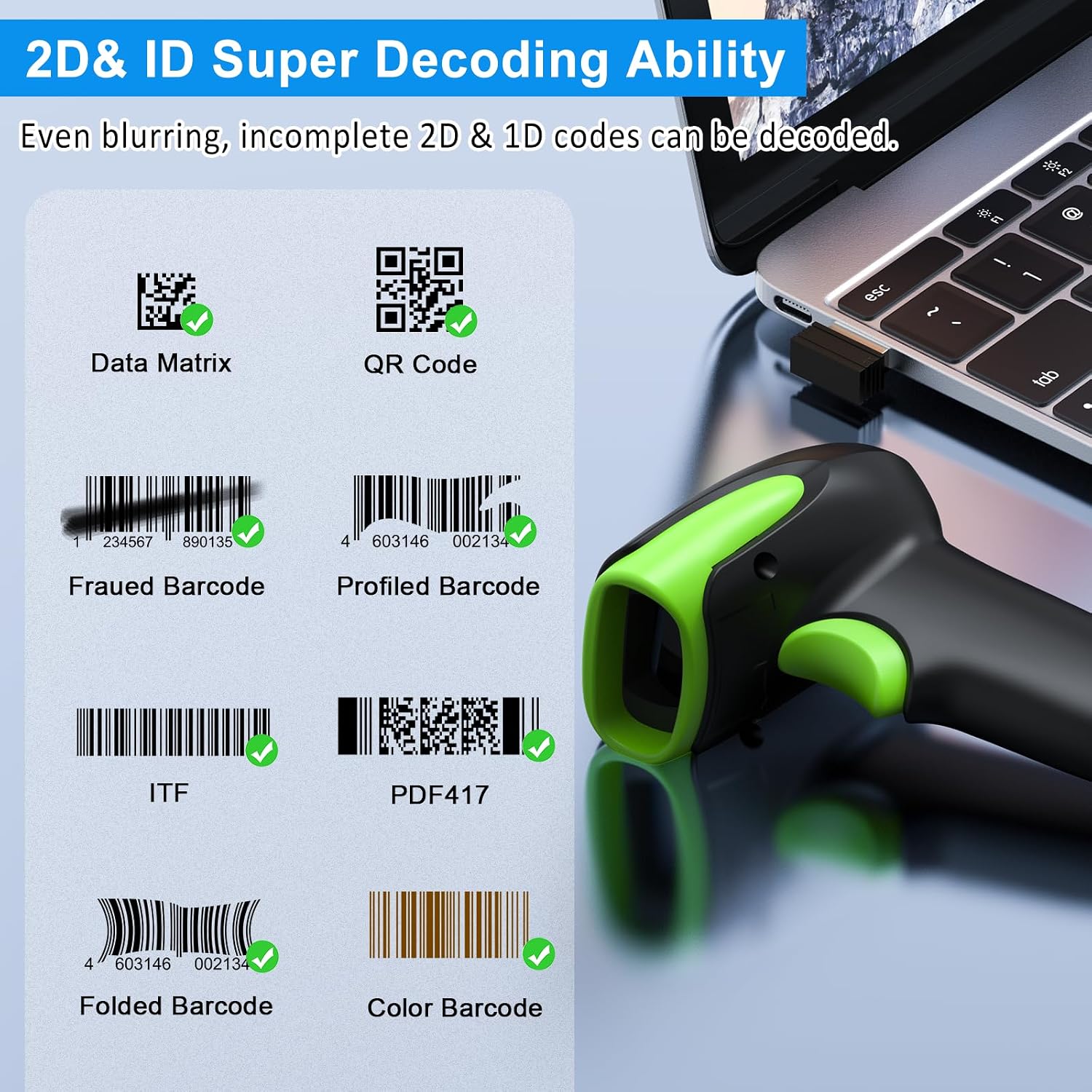
Imagen 6: Examples of decodable 1D and 2D barcodes.
6. Mantenimiento
Para garantizar un rendimiento óptimo y la longevidad de su escáner:
- Limpieza: Utilice un paño suave y seco para limpiar el exterior del escáner. Para la ventana de escaneo, utilice un paño de limpieza de lentes para evitar rayones. No utilice limpiadores abrasivos ni disolventes.
- Cargando: Recharge the battery using the provided USB cable. Avoid overcharging or completely draining the battery for extended periods.
- Almacenamiento: Guarde el escáner en un lugar fresco y seco, alejado de la luz solar directa y de temperaturas extremas.
- Durabilidad: While rugged, avoid intentional drops or impacts. The scanner is designed to withstand accidental drops up to 2.4 meters.

Image 7: The scanner's rugged design and drop resistance.
7. Solución de problemas
Si tiene problemas con su escáner, consulte los siguientes problemas y soluciones comunes:
- El escáner no se conecta:
- Asegúrese de que el escáner esté cargado.
- Verify the correct connection mode (Bluetooth, 2.4G, USB) is selected and properly set up.
- For 2.4G, ensure the dongle is securely plugged in. For Bluetooth, ensure your device's Bluetooth is on and the scanner is paired.
- Intente reiniciar tanto el escáner como el dispositivo host.
- El escáner no lee códigos de barras:
- Asegúrese de que el código de barras no esté excesivamente dañado, manchado o mal impreso.
- Verifique la distancia y el ángulo del escáner con respecto al código de barras.
- Verifique que el tipo de código de barras sea compatible con el escáner.
- Limpie la ventana de escaneo si está sucia.
- Datos no transmitidos:
- Confirme que el escáner esté conectado correctamente a su dispositivo.
- Check if the scanner is in 'Offline Storage Mode' and needs to be manually uploaded.
- Ensure the application on your device is ready to receive input.
For further assistance, please refer to the comprehensive troubleshooting section in the full user manual or contact Symcode customer support.
8. Especificaciones
| Característica | Especificación |
|---|---|
| Número de modelo | USA-6709DA-Green |
| Vol de entradatage | CC 5 V ± 0.25 V |
| Current (Work/Instantaneous) | 25 mA / 95 mA |
| Velocidad de decodificación | 100 veces / seg |
| Alcance inalámbrico (2.4 G) | Up to 200m (open air), 30m (indoors) |
| Tiempo de carga | Aproximadamente 2.5 horas |
| Duración de la batería | Up to 30 Hours (continuous scanning) |
| Tipo de batería | 1 batería de polímero de litio (incluida) |
| Conectividad | Bluetooth 6.1, Wireless 2.4G, USB Cable |
| Dispositivos compatibles | Desktop, Laptop, Smartphone, POS systems |
| Sistemas operativos | Windows 11/10/8/7/XP, Mac OS, iOS, Android, Linux |
| Peso del artículo | 10.2 onzas |
| Dimensiones del paquete | 6.89 x 4.49 x 3.31 pulgadas |

Image 8: Wireless transmission range.
9. Garantía y soporte
This Symcode product is manufactured by USA Scanner. For any product inquiries, technical support, or warranty claims, please contact USA Scanner directly. Refer to the contact information provided in your product packaging or visit the official Symcode brand store on Amazon for support resources.
Visita el Tienda de Symcode Para más información.