
1. Introducción
This manual provides detailed instructions for the installation, operation, and maintenance of your Tiandy TC-C32QN 2MP Fixed IP Bullet Camera. Please read this manual thoroughly before using the product to ensure proper setup and functionality.
1.1 ¿Qué hay en la caja?
- Tiandy TC-C32QN 2MP Fixed IP Bullet Camera
- Adaptador de corriente
2. Información de seguridad
Tenga en cuenta las siguientes precauciones de seguridad para evitar dañar el producto o provocar lesiones a usted o a otras personas:
- Fuente de alimentación: Ensure the camera is connected to a stable Corded Electric power source using the provided adapter. The camera operates at 5 Watts.
- Instalación: Install the camera in a stable location, suitable for outdoor use. The mounting type is protruding.
- Condiciones ambientales: Do not expose the camera to extreme temperatures, humidity, or corrosive environments. While rated IP65 for protection against dust and water jets, avoid submerging the camera in water.
- Limpieza: Desconecte la alimentación antes de limpiar. Utilice un paño suave y seco. No utilice limpiadores líquidos ni en aerosol.
- Servicio: No intente reparar este producto usted mismo. Deje todo servicio a personal cualificado.
3. Producto terminadoview
The Tiandy TC-C32QN is a 2MP Fixed IP Bullet Camera designed for outdoor surveillance applications. It features a durable Metal+Plastic Housing and delivers high-resolution video capture for effective monitoring.
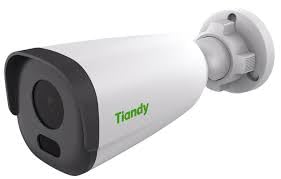
An image showing the Tiandy TC-C32QN 2MP Fixed IP Bullet Camera, typically a cylindrical camera with a mounting bracket.
3.1 Características principales
- 2MP Photo Sensor Resolution (Up to 1920x1080@25fps)
- S+265/H.265/H.264 Video Compression
- Smart IR Night Vision with 30m Range and Night Color capability
- Built-in Microphone for audio capture
- Designed for Outdoor Usage with IP65 Waterproof Rating
- Supports Wireless and Ethernet Connectivity
- Zoom óptico de 3x
- Tipo de alerta de solo movimiento
4. Configuración
4.1 Montaje
The camera is designed for protruding mounting, suitable for secure installation on walls or ceilings. Ensure the mounting surface can support the camera's weight (500 Grams) and is free from vibrations. Use appropriate screws and anchors for installation.
4.2 Conexión de alimentación
Connect the provided power adapter to the camera's power input port and then plug the adapter into a standard electrical outlet. Verify that the power indicator light on the camera (if present) illuminates, indicating power is supplied.
4.3 Conectividad de red
The camera supports both wired (Ethernet) and wireless network connections.
- Conexión Ethernet: Connect an Ethernet cable from the camera's network port to your network router or NVR.
- Conexión inalámbrica: For wireless setup, refer to the specific instructions provided with your NVR or the camera's dedicated Android controller application for pairing and network configuration.
5. Instrucciones de funcionamiento
5.1 Configuración inicial
After physical installation and power connection, use an Android device as the controller to access and configure the camera. Follow the instructions provided with your Network Video Recorder (NVR) or the camera's dedicated mobile application for initial network setup, device pairing, and password creation.
5.2 Visión nocturna
The camera is equipped with Smart IR Night Vision, providing clear surveillance up to 30 meters in low-light conditions. It also supports Night Color technology for enhanced visibility. Night vision mode typically activates automatically in dim lighting, but settings can be adjusted via the camera's interface.
5.3 Detección de movimiento
The camera features a motion-only alert type. To utilize this feature, configure motion detection zones and sensitivity settings through the camera's web interface or the connected NVR/application. This allows the camera to trigger alerts or recordings only when movement is detected within specified areas.
5.4 Grabación de vídeo
The camera captures video at 25 frames per second with a maximum resolution of 1920x1080. It utilizes S+265/H.265/H.264 video compression for efficient storage and supports MP4 video capture format. Recording settings, including continuous recording, scheduled recording, or event-triggered recording, can be configured via your NVR or management software.
6. Mantenimiento
6.1 Limpieza
To maintain optimal image quality, regularly clean the camera lens and housing. Gently wipe surfaces with a soft, dry, lint-free cloth. Do not use harsh chemicals, abrasive cleaners, or solvents, as these can damage the camera's finish or lens coating. Ensure the camera is powered off before cleaning.
6.2 Consideraciones ambientales
The Tiandy TC-C32QN camera is designed for outdoor use with an IP65 waterproof rating, providing protection against dust ingress and low-pressure water jets. While robust, avoid exposing the camera to extreme weather conditions beyond its operating specifications. Ensure proper ventilation if installed in an enclosed space to prevent overheating.
7. Solución de problemas
- Sin energía: Check all power connections. Ensure the power adapter is securely plugged into both the camera and a working electrical outlet. Verify the outlet is supplying power.
- Sin transmisión de video: Confirm that the camera is properly connected to the network (Ethernet or Wireless). Check your NVR or mobile application for correct camera registration and status. Ensure network cables are not damaged.
- Mala calidad de imagen: Clean the camera lens to remove any dust or smudges. Adjust the camera's position to avoid direct glare or strong backlighting. If using wireless, check Wi-Fi signal strength.
- Problemas de visión nocturna: Ensure there are no obstructions blocking the camera's infrared (IR) illuminators. Verify night vision settings in the camera's configuration interface.
- La detección de movimiento no funciona: Review the motion detection zone settings and sensitivity levels in the camera's software. Ensure the feature is enabled and configured correctly.
- Cannot Connect to App/NVR: Verify network settings on both the camera and the controlling device. Ensure the camera's firmware is up to date. Consult your NVR or app manual for specific connection procedures.
8. Especificaciones
| Característica | Especificación |
|---|---|
| Marca | Tiandi |
| Número de modelo | TC-C32QN |
| Resolución del sensor fotográfico | 2 MP |
| Resolución de captura de video | Up to 1920x1080@25fps |
| Compresión de vídeo | S+265/H.265/H.264 |
| Tecnología de conectividad | Inalámbrico, Ethernet |
| Fuente de poder | Eléctrico con cable |
| Quétage | 5 vatios |
| Uso en interiores y exteriores | Exterior |
| Clasificación de impermeabilidad | IP65 |
| Rango de visión nocturna | 30 metros |
| Tipo de visión nocturna | Smart IR, Night Color |
| Medios integrados | Adaptador |
| Funciones integradas | Micrófono |
| Zoom óptico | 3 x |
| Tipo de controlador | Androide |
| Tipo de montaje | Saliente |
| Material del recinto | Metal+Plastic Housing |
| Dimensiones del artículo | 12 x 10 x 5 centímetros |
| Peso del artículo | 500 gramos |
| Tipo de alerta | Solo movimiento |
9. Garantía y soporte
9.1 Información de garantía
This product may be eligible for a 1 Year Extended Warranty by Onsitego. Please refer to your purchase documentation or contact your retailer for specific warranty terms, conditions, and registration procedures.
Información de contacto de 9.2
Para soporte técnico o consultas, por favor póngase en contacto con:
- Fabricante: TIANDY, TIANDY TECHNOLOGIES CO LTD
- Importador: HOTSPOT ELECTRONICS