
XO F39
Manual de usuario del altavoz Bluetooth portátil XO F39
Modelo: F39
Introducción
Gracias por la compraasing the XO F39 Portable Bluetooth Speaker. This manual provides essential information for setting up, operating, and maintaining your speaker. Please read it carefully to ensure proper use and to maximize your listening experience.

Image: The XO F39 Portable Bluetooth Speaker, showcasing its compact design, integrated handle, and vibrant RGB lighting.
Información de seguridad
Para garantizar un funcionamiento seguro y evitar daños, tenga en cuenta las siguientes precauciones:
- No exponga el altavoz a temperaturas extremas, luz solar directa o humedad alta.
- Evite dejar caer o someter el altavoz a impactos fuertes.
- Do not disassemble, repair, or modify the unit yourself. Contact qualified service personnel for assistance.
- Mantenga el altavoz alejado del agua u otros líquidos.
- Utilice únicamente el volumen de carga especificadotage and current (DC5V/0.5-1A).
Producto terminadoview
Contenido del paquete
- XO F39 Portable Bluetooth Speaker
- Cable de carga USB (Tipo C)
- Cable de audio auxiliar
- Manual de usuario
Controles y Puertos
Familiarícese con los controles del altavoz y los puertos de conexión:

Image: Top panel of the XO F39 speaker, displaying the control buttons including power, volume, mode, and light controls.
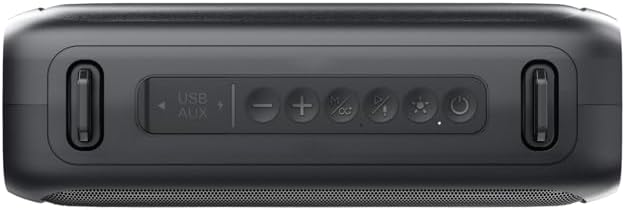
Imagen: Un detalle view of the control panel on the XO F39 speaker, highlighting the USB and AUX input labels, and individual buttons.
- Puerto USB/AUX: For USB drive playback and auxiliary audio input.
- Bajar volumen / Pista anterior: Pulsación corta para la pista anterior, pulsación larga para bajar el volumen.
- Play/Pause / TWS Pairing: Presione brevemente para reproducir/pausar, presione prolongadamente para iniciar el emparejamiento TWS.
- Subir volumen / Siguiente pista: Presione brevemente para pasar a la siguiente pista, presione prolongadamente para subir el volumen.
- Botón de modo: Presione para cambiar entre los modos Bluetooth, radio FM, USB y AUX.
- Control de luz RGB: Press to change or turn off the RGB light effects.
- Botón de encendido: Long press to power on/off. Short press to check battery status (if applicable).

Imagen: Trasera view of the XO F39 speaker, showing the charging port and regulatory information labels.
Configuración
Carga del altavoz
Before first use, fully charge the speaker. Connect the provided USB charging cable to the speaker's charging port and the other end to a USB power adapter (DC5V/0.5-1A, not included) or a computer's USB port.
- El tiempo de carga es de aproximadamente 3 horas.
- A charging indicator light will typically show charging status (e.g., red for charging, off/blue for full).

Image: The XO F39 speaker on a table, with overlaid text indicating FM, USB, Bluetooth modes, a charging time of about 3 hours, and playback times of 7 hours (50% volume) or 3 hours (100% volume).
Encendido/apagado
Mantenga pulsado el Botón de encendido (labeled with a power symbol) for approximately 3 seconds to turn the speaker on or off.
Emparejamiento Bluetooth
- Encienda el altavoz. Entrará automáticamente en modo de emparejamiento Bluetooth, lo que se indicará mediante una luz LED parpadeante.
- Habilite Bluetooth en su dispositivo (teléfono inteligente, tableta, etc.).
- Buscar available Bluetooth devices and select "XO-F39" from the list.
- Una vez emparejado, el altavoz emitirá un sonido de confirmación y la luz LED dejará de parpadear.
Verdadero emparejamiento estéreo inalámbrico (TWS)
To pair two XO F39 speakers for a stereo sound experience:
- Ensure both XO F39 speakers are powered on and not connected to any other Bluetooth device.
- En uno de los altavoces (este será el altavoz principal), mantenga presionado el botón Botón de reproducción/pausa hasta que escuche un tono de emparejamiento.
- Los dos altavoces se conectarán automáticamente. Un sonido de confirmación indicará que el emparejamiento TWS se ha realizado correctamente.
- Ahora, conecte su dispositivo al altavoz principal a través de Bluetooth como se describe en la sección "Emparejamiento Bluetooth".
Reproducción USB
Inserte una unidad flash USB que contenga audio MP3 files en el USB/AUX Port. The speaker will automatically switch to USB mode and begin playing music.
Entrada auxiliar
Connect one end of the 3.5mm auxiliary audio cable to the USB/AUX Port on the speaker and the other end to the audio output of your device. The speaker will automatically switch to AUX mode.
Funcionamiento de la radio FM
- Presione el Botón de modo para cambiar al modo de radio FM.
- Mantenga pulsado el Botón de reproducción/pausa para escanear y guardar automáticamente las estaciones de FM disponibles.
- Utilice el Subir volumen / Pista siguiente y Bajar volumen / Pista anterior Botones para navegar entre estaciones guardadas.
Control de luz RGB
Presione el Botón de control de luz RGB (labeled with a light bulb symbol) to cycle through different light modes or to turn the lights off.

Imagen: Dos views of the XO F39 speaker, one with the RGB lights off and another with the multi-color RGB lights illuminated.
Operar el altavoz
- Reproducir/Pausa: Presione brevemente el Botón de reproducción/pausa.
- Ajuste de volumen: Mantenga pulsado el Botón de subir volumen / siguiente pista to increase volume, and long press the Botón para bajar el volumen / pista anterior para bajar el volumen.
- Navegación de pista: Presione brevemente el Botón de subir volumen / siguiente pista for the next track, and short press the Botón para bajar el volumen / pista anterior para la pista anterior.
- Cambio de modo: Presione el Botón de modo to cycle through Bluetooth, FM Radio, USB, and AUX modes.
Mantenimiento
- Limpieza: Utilice un paño suave y seco para limpiar la superficie del altavoz. No utilice limpiadores abrasivos ni disolventes.
- Almacenamiento: Cuando no utilice el altavoz durante períodos prolongados, guárdelo en un lugar fresco y seco, alejado de la luz solar directa.
- Cuidado de la batería: Para prolongar la vida útil de la batería, evite descargarla por completo con frecuencia. Cargue el altavoz regularmente, incluso si no lo usa.
Solución de problemas
| Problema | Solución |
|---|---|
| El altavoz no se enciende. | Asegúrate de que el altavoz esté cargado. Conéctalo a una fuente de alimentación y vuelve a intentarlo. |
| No se puede emparejar a través de Bluetooth. |
|
| No hay sonido o volumen bajo. |
|
| La recepción de radio FM es mala. |
|
Presupuesto

Image: A table detailing the product parameters of the XO F39 speaker, including model, Bluetooth version, battery capacity, play time, charging time, and dimensions.
| Característica | Detalle |
|---|---|
| Modelo | XO-F39 |
| Nombre del producto | Altavoz inalámbrico |
| Versión de Bluetooth | Bluetooth V5.1 |
| Alcance de Bluetooth | ≤10 m |
| Capacidad de la batería | 1500 mAh |
| Estándar de entrada de carga | USB-C, DC5V/0.5-1A |
| Tiempo de carga | Aproximadamente 3 horas |
| Tiempo de juego | About 7 hours (50% volume), 3 hours (100% volume) |
| Potencia máxima de salida | 8W*2 (Total 16W Stereo Sound) |
| Material del producto | Malla de plástico y hierro |
| Color | Negro |
| LED Lamp Efecto | Supported (RGB) |
| Support Play Mode | MP3, FM, AUX |
| Protocolo de soporte | A2DP, AVRCP, HFP, HSP |
| Dimensiones del producto (L x An x Al) | 255 x 87 x 110 mm (25.5 x 8.7 x 11 cm) |
| Peso | 721 g (aprox. 880 g con embalaje) |
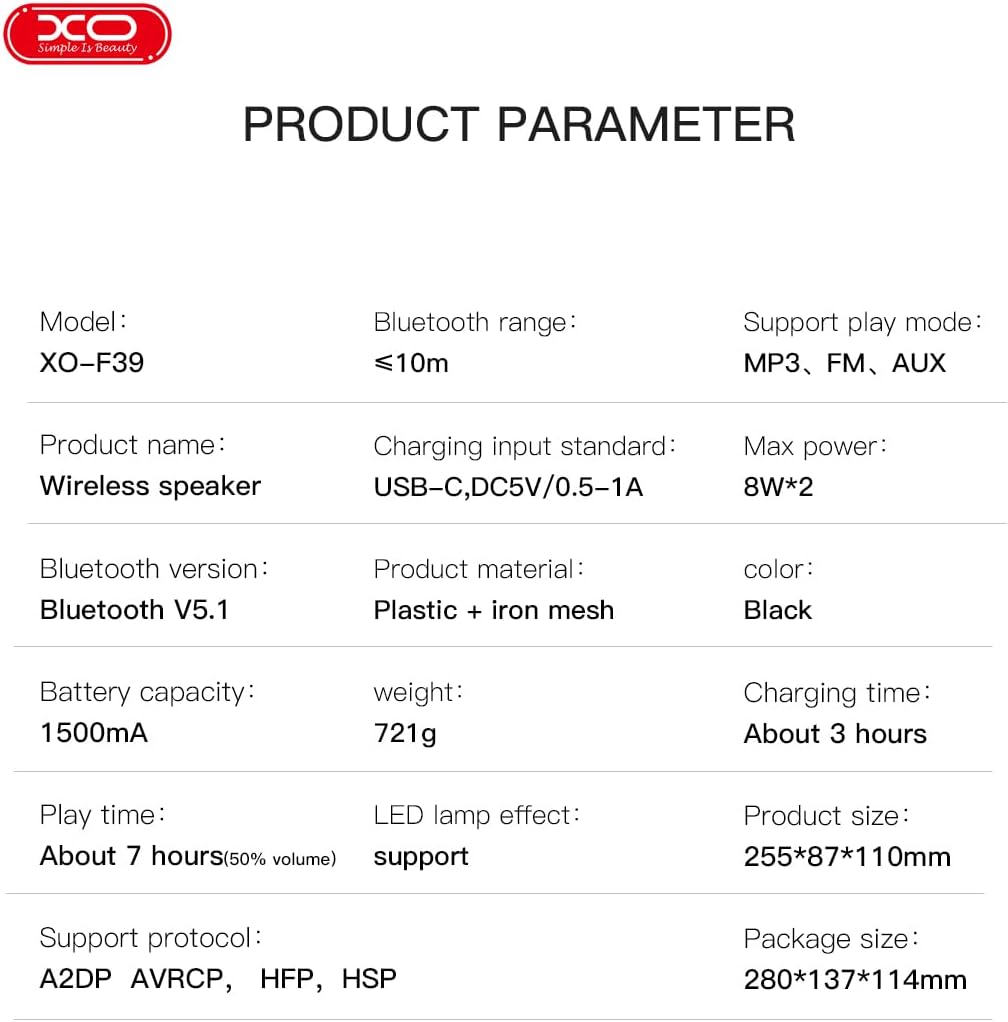
Image: The XO F39 speaker with its length (25.5cm), width (8.71cm), and height (11cm) clearly labeled.
Garantía y soporte
The XO F39 Portable Bluetooth Speaker comes with a standard manufacturer's warranty. Please refer to the warranty card included in your package for specific terms and conditions.
For technical support, troubleshooting assistance, or warranty claims, please contact your retailer or the official XO customer service. Contact information can typically be found on the product packaging or the brand's official websitio.
Ask a question about this manual
Ask about setup, troubleshooting, compatibility, parts, safety, or missing instructions. Manuals+ will review the question and use this page’s manual context to help answer it.