
Amgico GH0717
Amgico Digital Alarm Clock (Model: GH0717) Instruction Manual
Su guía completa de configuración, operación y mantenimiento.
Introducción
Thank you for choosing the Amgico Digital Alarm Clock, Model GH0717. This device features an 11.5-inch large LED display, showing time, date, calendar, and indoor temperature. Designed for versatility, it can be used as a desk or wall clock. This manual provides detailed instructions to help you set up and operate your new clock effectively.
Contenido del paquete
Por favor verifique que todos los artículos estén presentes en su paquete:
- 1 x Amgico Digital Wall Clock (Model: GH0717)
- 1 x 5V DC Power Cord
- 1 adaptador de corriente de 5 V 1 A
- 1 x control remoto inalámbrico
- 2 x CR2032 Batteries (for backup)
- 1 x Manual del producto
- Mounting accessories (e.g., stands, hooks, screws)
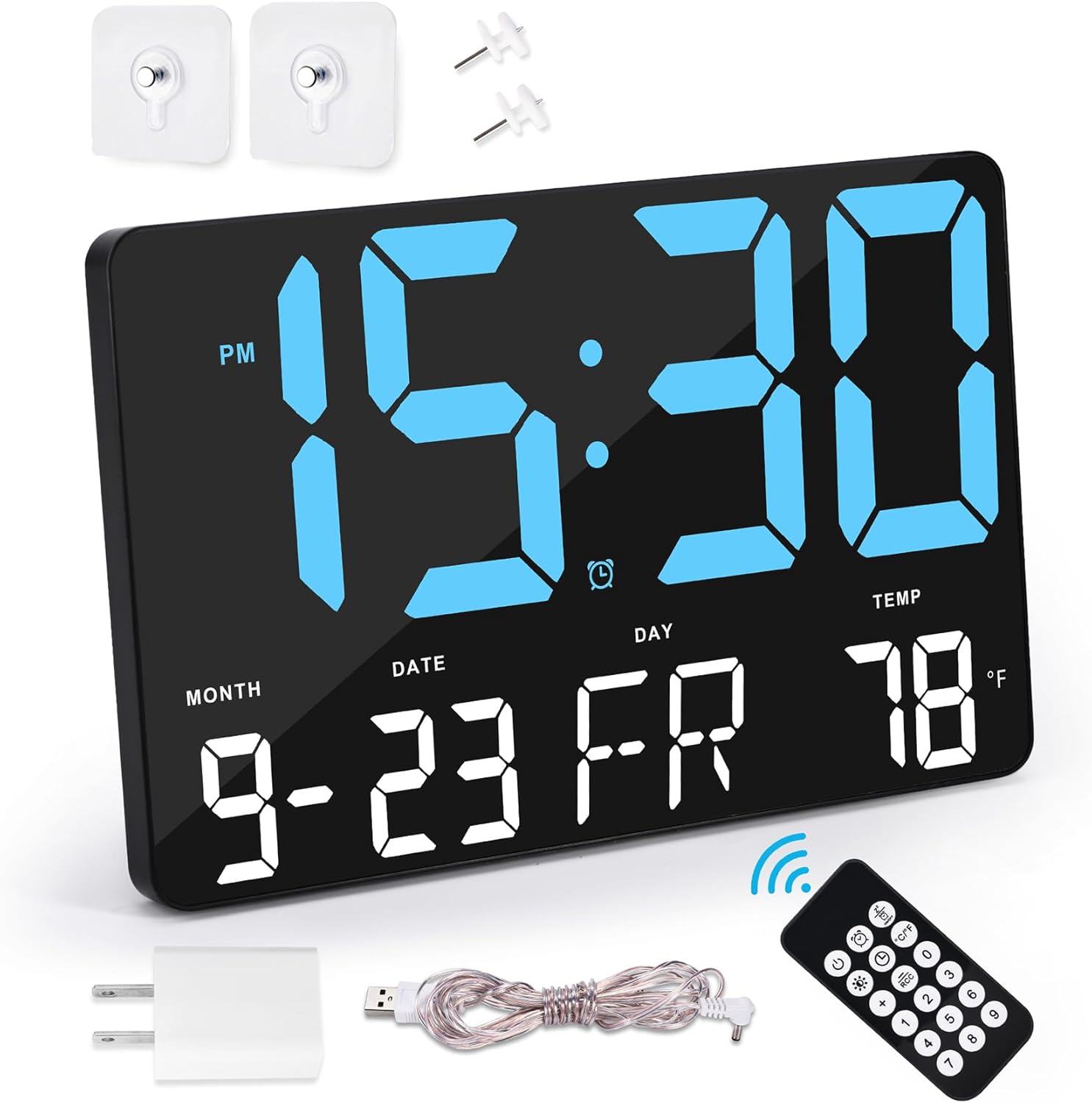
Configuración
Conexión de energía
- Insert the 5V DC power cord into the designated input port on the back of the clock.
- Conecte el adaptador de corriente al cable de alimentación.
- Plug the power adapter into a standard electrical outlet. The clock is designed for external power and is not battery-powered for primary operation.
- Install the included CR2032 backup battery into the battery compartment on the back of the clock. This battery retains time and settings during a power outage pero no enciende la pantalla.

Opciones de montaje
The clock can be placed on a desk or mounted on a wall:
- Colocación del escritorio: Attach the two sturdy stands to the bottom of the clock for stable placement on any flat surface.
- Montaje en pared: Use the integrated hanging holes on the back of the clock. Securely fasten the clock to a wall using appropriate screws or hooks (included).

Instrucciones de funcionamiento
Uso del control remoto
The wireless remote control allows for convenient adjustment of settings from up to 30 feet away.

Configuración de hora y fecha
- Press the "SET" button on the remote control or the corresponding button on the back of the clock.
- Use the "+" and "-" buttons to adjust the hour, then press "OK" or "SET" to confirm and move to minutes.
- Repita el proceso para los minutos, el año, el mes y el día.
- Select 12-hour or 24-hour format using the "12/24H" button.
- Choose between Fahrenheit (°F) or Celsius (°C) for temperature display using the "°C/°F" button.

Configuración de alarma
The clock features a loud alarm suitable for heavy sleepers and a snooze function.
- Press the "ALARM" button on the remote or the back of the clock to enter alarm setting mode.
- Utilice los botones "+" y "-" para configurar la hora de alarma deseada.
- Press "OK" or "SET" to confirm.
- To activate the snooze function, press the "SNOOZE" button on top of the clock or the remote when the alarm sounds.
- To turn off the alarm, press the "ALARM OFF" button on the remote.

Ajuste de brillo
The clock offers 4 levels of brightness and an auto-dimming feature to suit various lighting conditions and preferences.
- Press the "LIGHT" button on the remote control or the corresponding button on the back of the clock to cycle through the 4 brightness levels.
- The auto-dimming feature adjusts the display brightness automatically based on ambient light, ensuring optimal visibility without disturbing sleep.

Selección de idioma
The clock supports 7 languages for the day of the week display: English, German, French, Spanish, Italian, Dutch, and DR.
- Refer to the detailed product manual for specific instructions on how to change the display language.
Mantenimiento
- Clean the clock's display and body with a soft, dry cloth. Avoid using abrasive cleaners or solvents.
- Ensure the clock is always connected to its external power supply for continuous operation. The CR2032 battery is for backup only.
- Replace the CR2032 backup battery annually or as needed to ensure settings are retained during power interruptions.
Solución de problemas
| Problema | Posible causa | Solución |
|---|---|---|
| La pantalla del reloj está apagada. | No hay suministro de energía. | Ensure the power cord and adapter are securely connected to the clock and a working electrical outlet. |
| Las configuraciones se pierden después de un corte de energíatage. | La batería de respaldo está muerta o falta. | Reemplace la batería de respaldo CR2032. |
| El control remoto no funciona. | Remote battery is dead or obstruction. | Ensure there are no obstructions between the remote and the clock. Replace the remote control batteries. |
| La alarma no es lo suficientemente fuerte. | El ajuste del volumen es bajo. | Adjust the alarm volume using the controls on the back of the clock or the remote. |
Presupuesto
| Característica | Detalle |
|---|---|
| Marca | Amigo |
| Número de modelo | GH0717 |
| Tipo de pantalla | LED digitales |
| Tamaño de pantalla | 11.5 pulgadas |
| Dimensiones del producto | 9.8" de ancho x 6.3" de alto |
| Fuente de poder | Corded Electric (5V 1A adapter) |
| Batería de respaldo | 1 x CR2032 (incluido) |
| Características especiales | Adjustable Brightness, Calendar Display, Large Display, Loud Alarm, Snooze, Indoor Temperature, 7 Languages |
| Tipo de montaje | Desk Stand / Wall Mount |
| Material | Policarbonato (PC) |
| Peso del artículo | 1.28 libras |
Vídeos oficiales de productos
Amgico Digital Wall Clock Features
Video: This video demonstrates the various features of the Amgico Digital Wall Clock, including its RGB color modes, pure color modes, and the requirement for external power. It highlights the different display options and how to freeze a favorite color.
Garantía y soporte
The Amgico Digital Alarm Clock comes with a 12-month warranty.
For any questions or support regarding your product, please contact Amgico customer service. Refer to the product packaging or the official Amgico websitio para detalles de contacto.