
Introducción
This manual provides detailed instructions for the installation, operation, and maintenance of your Cooler Master MasterLiquid Atmos 360 Black CPU Liquid Cooler. This all-in-one (AIO) water cooling system is designed to deliver efficient thermal performance for your CPU, featuring a dual-chamber pump, pre-installed SickleFlow 120 Edge fans, and Addressable Gen 2 RGB lighting.
The MasterLiquid Atmos 360 is compatible with a wide range of Intel LGA (1700/1200/1151/1150/1155/1156) and AMD (AM5/AM4) sockets.

Image: The Cooler Master MasterLiquid Atmos 360 Black CPU Liquid Cooler, showcasing its radiator, three RGB fans, and illuminated pump head.
Contenido del paquete
Antes de comenzar la instalación, verifique que todos los componentes estén presentes en el paquete:
- 360mm Radiator with pre-installed SickleFlow 120 Edge Fans
- CPU Water Block/Pump Unit
- Mounting Hardware for Intel LGA 1700/1200/115x sockets
- Mounting Hardware for AMD AM5/AM4 sockets
- Pasta térmica
- ARGB Gen 2 Controller (if included)
- Various Cables (PWM fan cables, ARGB cables)
- Manual de usuario

Imagen: Una imagen completa view of all included components for the MasterLiquid Atmos 360, including the radiator, fans, pump, mounting brackets, and accessories.
Configuración e instalación
Follow these steps carefully to install your liquid cooler. Refer to your motherboard and PC case manuals for specific guidance on component placement and cable routing.
1. Preparar el zócalo de la CPU
- Identifique el tipo de zócalo de su CPU (Intel LGA o AMD AM).
- Install the appropriate backplate (for Intel) or retention clips (for AMD) as per the included hardware guide.
- Limpie la superficie de la CPU con alcohol isopropílico para eliminar cualquier residuo.
2. Aplicar pasta térmica
- Apply a small, pea-sized amount of the included thermal paste to the center of your CPU's integrated heat spreader (IHS).
- Do not spread the paste manually; the pressure from the cold plate will distribute it evenly.
3. Instalar el radiador y los ventiladores
- Determine la ubicación de montaje óptima para el radiador de 360 mm en la carcasa de su PC (normalmente en la parte superior o frontal).
- Secure the radiator to the case using the provided screws. The SickleFlow Edge fans are pre-installed on the radiator for convenience.
4. Mount the Pump/Cold Plate
- Attach the correct mounting brackets to the pump unit for your CPU socket.
- Carefully place the pump/cold plate assembly onto the CPU, aligning the mounting holes.
- Secure the pump unit with the appropriate screws, tightening them in a diagonal pattern until snug. Do not overtighten.
5. Conecte los cables
- Connect the pump's 3-pin power cable to an available CPU_FAN or AIO_PUMP header on your motherboard.
- Connect the PWM fan cables from the SickleFlow Edge fans to the CPU_FAN or other available fan headers on your motherboard. It is recommended to connect them to a single header using a splitter if necessary, to ensure synchronized fan speed control.
- Connect the ARGB cables from the pump and fans to an Addressable Gen 2 RGB header on your motherboard (5V-D-G) or to the included ARGB controller.

Image: The assembled MasterLiquid Atmos 360, showing the radiator, fans, and pump unit connected by tubing.
Instrucciones de funcionamiento
Encendido inicial
After installation, power on your system. The pump and fans should begin operating. Monitor your CPU temperatures using system monitoring software to ensure proper function.
Control de iluminación RGB
The MasterLiquid Atmos 360 features Addressable Gen 2 RGB lighting on both the pump and fans. You can control the lighting effects through several methods:
- Sincronización de placa base: If connected to a compatible ARGB motherboard header, use your motherboard's RGB software (e.g., ASUS Aura Sync, MSI Mystic Light, Gigabyte RGB Fusion, ASRock Polychrome Sync) to customize lighting.
- Controlador ARGB incluido: If an ARGB controller is included, use its physical buttons to cycle through pre-set lighting modes and colors.
- Cooler Master MasterCTRL/MasterPlus Software: Download and install Cooler Master's MasterCTRL or MasterPlus software for advanced customization of lighting effects and device performance.
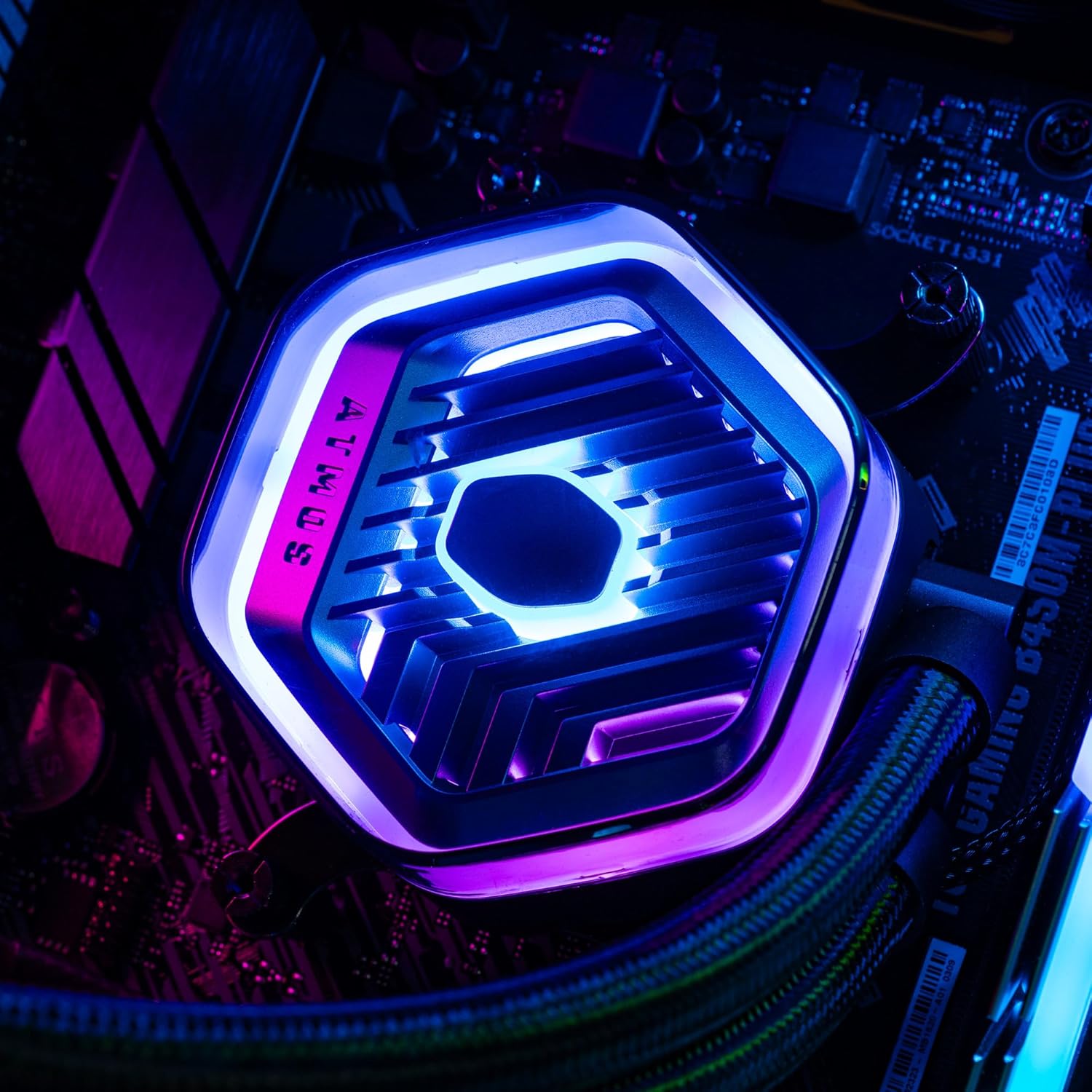
Imagen: Un detalle view of the MasterLiquid Atmos pump head, showcasing its unique design and customizable RGB illumination.
Control de velocidad del ventilador
The SickleFlow Edge fans are PWM (Pulse Width Modulation) controlled. Their speed can be managed via your motherboard's BIOS/UEFI settings or through motherboard-specific software. Adjust fan curves to balance cooling performance and noise levels according to your preferences.
Mantenimiento
El mantenimiento regular ayuda a garantizar un rendimiento óptimo y la longevidad de su enfriador líquido.
- Limpieza de polvo: Limpie periódicamente el polvo de las aletas del radiador y las aspas del ventilador con aire comprimido o un cepillo suave. Asegúrese de que el sistema esté apagado antes de limpiarlo.
- Inspección visual: Inspeccione ocasionalmente los tubos y las conexiones para detectar fugas o daños. Si bien los enfriadores AIO son sistemas sellados, una rápida revisión visual puede prevenir posibles problemas.
- Actualizaciones de software: Keep your Cooler Master MasterCTRL/MasterPlus software and motherboard BIOS/UEFI updated to ensure compatibility and access to the latest features and performance optimizations.
Solución de problemas
Si tiene problemas con su MasterLiquid Atmos 360, consulte los siguientes pasos comunes de solución de problemas:
Altas temperaturas de la CPU
- Compruebe la conexión de la bomba: Ensure the pump's power cable is securely connected to the correct motherboard header (CPU_FAN or AIO_PUMP) and receiving power.
- Verifique el funcionamiento del ventilador: Confirm that all radiator fans are spinning. Check their connections to the motherboard or fan controller.
- Pasta térmica: Ensure thermal paste was applied correctly and the cold plate has good contact with the CPU. Re-apply if necessary.
- Flujo de aire: Check your PC case's overall airflow. Ensure radiator fans are oriented correctly for intake or exhaust as desired.
La iluminación RGB no funciona
- Conexión ARGB: Verify that the ARGB cables are correctly connected to a 5V-D-G header on your motherboard or the ARGB controller. Ensure it is not connected to a 12V RGB header, which can damage the LEDs.
- Software: Check your motherboard's RGB software or Cooler Master's MasterCTRL/MasterPlus software for lighting settings. Ensure the lighting is enabled and configured.
- Potencia del controlador: If using an external ARGB controller, ensure it is receiving power (usually via SATA power connector).
Ruido inusual de la bomba
- Burbujas de aire: New AIOs may have some air bubbles that can cause gurgling noises initially. These usually dissipate within a few hours of operation. Gently tilt your PC case to help move air bubbles to the radiator.
- Montaje: Asegúrese de que la bomba esté montada de forma segura y no vibre contra otros componentes.
If problems persist, please contact Cooler Master customer support.
Presupuesto
| Característica | Especificación |
|---|---|
| Número de modelo | MLX-D36M-A25PZ-R1 |
| Dimensiones del producto (L x An x Al) | 15.51" x 4.71" x 1.07" (394 x 119.6 x 27.2 mm) |
| Método de enfriamiento | Líquido (todo en uno) |
| Dispositivos compatibles | Escritorio, servidor |
| Enchufes compatibles | Intel LGA 1700/1200/1151/1150/1155/1156, AMD AM5/AM4 |
| Nivel de ruido | 27.2 decibelios (ventilador) |
| Maximum Rotational Speed (Fan) | 2500 RPM |
| Air Flow Capacity (Fan) | 70.7 pies cúbicos por minuto |
| Material | Aluminio (Radiador) |
| Tipo de conector de alimentación | 3 pines (bomba), PWM de 4 pines (ventiladores) |
| Volumentage | 12 voltios |
| Quétage | 3.6 vatios |
| Peso del artículo | 1.42 kilogramos |
Información de garantía
The Cooler Master MasterLiquid Atmos 360 Black CPU Liquid Cooler comes with a Garantía de 5 años a partir de la fecha de compra. Esta garantía cubre defectos de materiales y mano de obra en condiciones normales de uso.
For warranty claims or detailed terms and conditions, please retain your proof of purchase and visit the official Cooler Master websitio o comuníquese con su servicio de atención al cliente.
Apoyo
For further assistance, technical support, or to download the latest software and drivers, please visit the official Cooler Master websitio:
You may also find helpful resources, FAQs, and community forums on their support pages.