
1. Introducción
This manual provides essential instructions for setting up, operating, maintaining, and troubleshooting your VIBOX VI-63 PC Gamer. Please read this guide thoroughly before using your new computer to ensure optimal performance and longevity.
2. Información de seguridad
- Ensure the PC is placed on a stable, flat surface with adequate ventilation.
- Do not block any ventilation openings on the PC case.
- Keep the PC away from direct sunlight, heat sources, and liquids.
- Use only the power adapter supplied with your PC.
- Desconecte el cable de alimentación antes de limpiar o realizar cualquier mantenimiento.
- Avoid opening the PC case unless instructed by VIBOX support, as this may void your warranty.
3. Contenido del paquete
Verifique que todos los artículos enumerados a continuación estén incluidos en su paquete:
- VIBOX VI-63 PC Gamer Tower
- Monitor de 22 pulgadas
- Teclado RGB para juegos
- Ratón RGB para juegos
- Black Mouse Pad
- Auriculares para juegos con micrófono
- Wireless WiFi Network Adapter (600 Mbps)
- Cables de poder)
- Display Cable (HDMI or VGA, depending on monitor)
- Documentación (este manual)
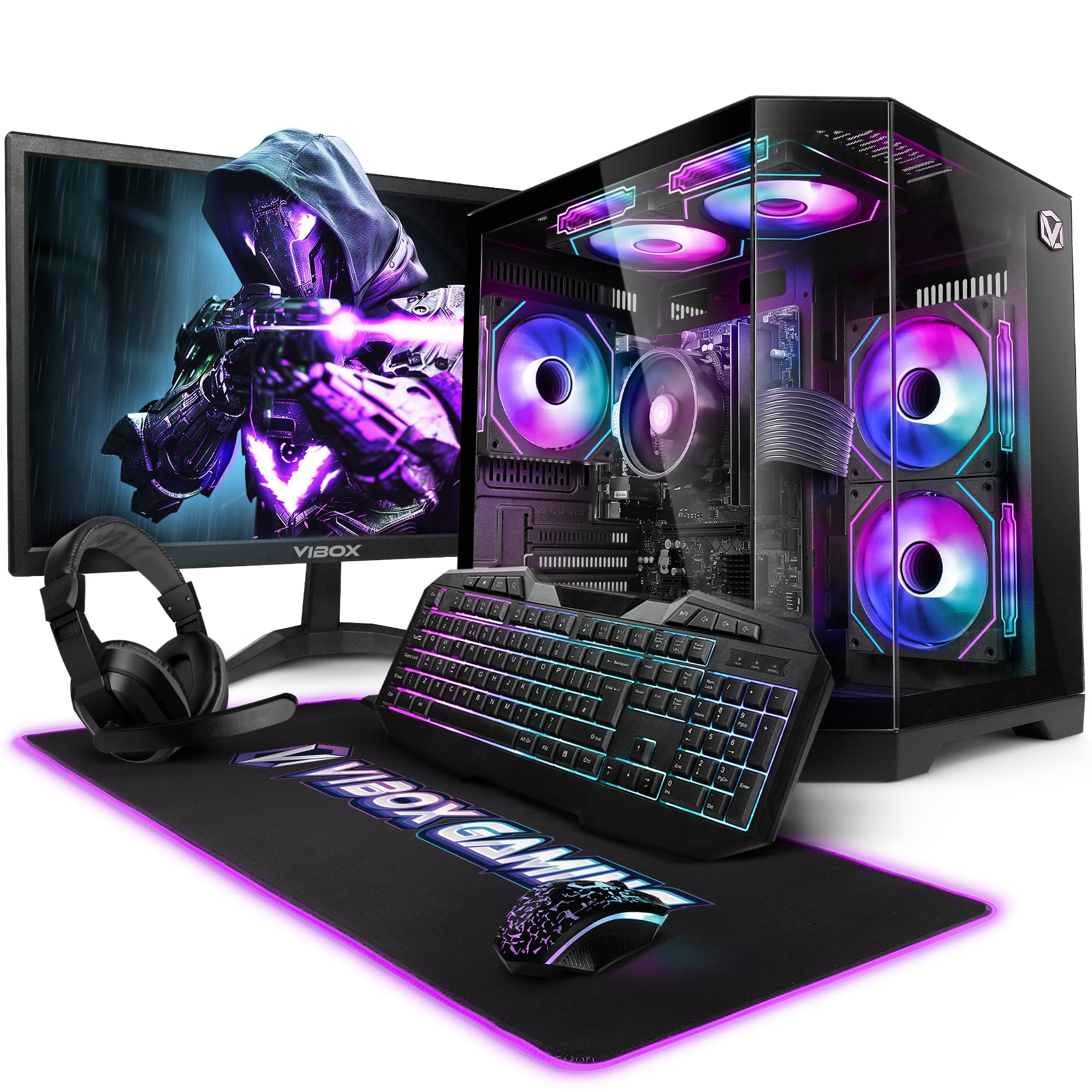
Image 3.1: VIBOX VI-63 PC Gamer Tower with internal RGB lighting.
4. Instrucciones de configuración
4.1. Desembalaje y colocación
- Retire con cuidado todos los componentes de su embalaje.
- Place the PC tower on a flat, stable surface. Ensure there is sufficient space around the tower for proper airflow.
- Place the monitor on a stable surface at a comfortable viewaltura de vuelo.
4.2. Conexión de periféricos
- Monitor: Connect one end of the display cable (HDMI or VGA) to the corresponding port on the back of the PC and the other end to the monitor.
- Teclado y ratón: Connect the USB cables of the keyboard and mouse to any available USB ports on the PC.
- Auriculares: Connect the headset to the audio jacks (headphone and microphone) on the front or rear of the PC.
- Adaptador WiFi: Insert the wireless WiFi network adapter into an available USB port.
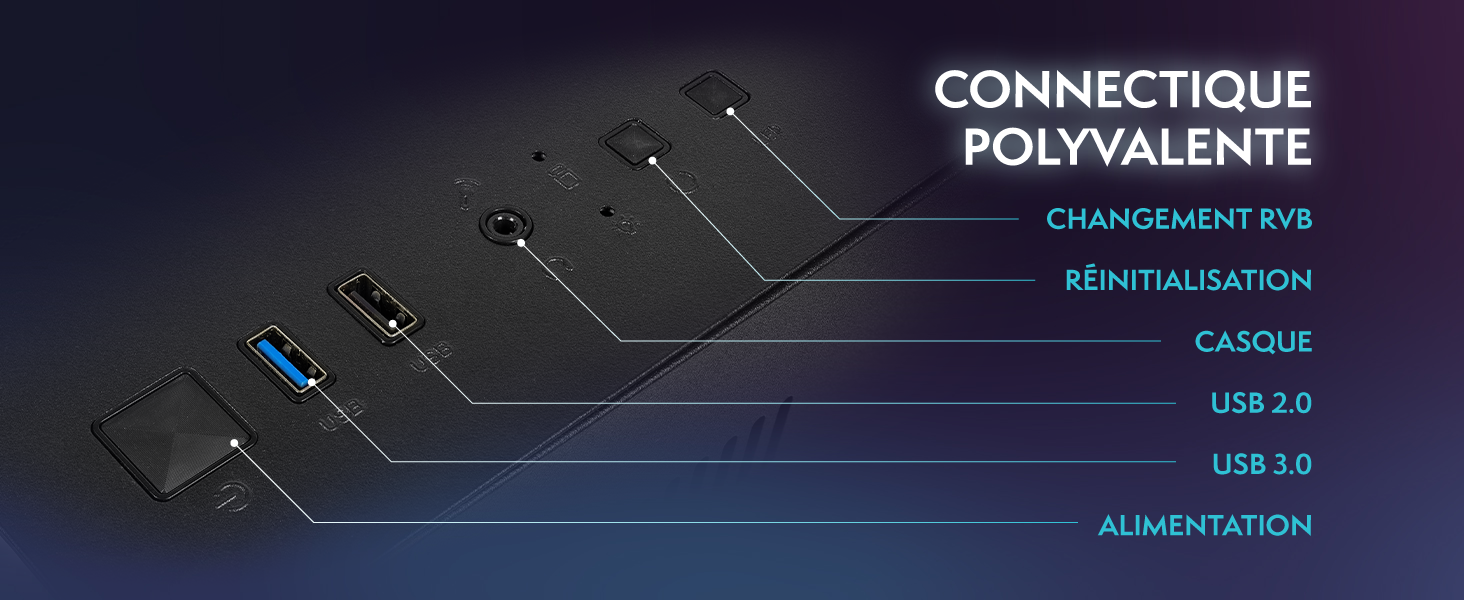
Image 4.1: Front panel connections including USB 2.0, USB 3.0, headset jack, reset button, and RGB change button.
4.3. Conexión de alimentación
- Connect the power cable to the power supply unit (PSU) at the back of the PC.
- Connect the other end of the power cable to a wall outlet.
- Connect the monitor's power cable to a wall outlet.
4.4. Arranque inicial y configuración de Windows 11
- Press the power button on the front of the PC tower.
- Encienda el monitor.
- Follow the on-screen instructions to complete the Windows 11 Home setup. This typically involves selecting your region, language, creating a user account, and connecting to a Wi-Fi network.
5. Instrucciones de funcionamiento
5.1. Funcionamiento básico
- Encendido/apagado: Presione el botón de encendido para encender la PC. Para apagarla, haga clic en el botón Inicio en Windows y luego en Inicio/Apagado > Apagar.
- Reanudar: Desde el menú Inicio, seleccione Energía > Reiniciar.
- Modo de sueño: Desde el menú Inicio, seleccione Energía > Suspender.
5.2. Características de Windows 11
Your VIBOX VI-63 PC Gamer comes with Windows 11 Home pre-installed, offering features designed to enhance your computing and gaming experience:
- DirectStorage: Enables faster loading times for compatible games.
- AutoHDR: Automatically enhances visuals for a wider range of games.
- Xbox Game Pass Integration: Seamless access to a library of games (subscription may be required).
- Optimized CPU Performance: Windows 11 is designed to optimize CPU usage for gaming and multitasking.
5.3. Rendimiento en juegos
The VIBOX VI-63 is equipped with an AMD Ryzen 3 3200GE processor and integrated Radeon Vega 8 graphics, providing solid performance for everyday computing and gaming at 720p to 1080p resolutions.

Imagen 5.1: Másview of internal components including CPU, GPU, RAM, and storage.
5.4. Control de iluminación RGB
Your PC features RGB lighting. Use the dedicated RGB change button on the front panel (refer to Image 4.1) to cycle through different lighting modes and colors.
6. Mantenimiento
6.1. Limpieza del PC
- Exterior: Utilice un paño suave y seco.amp cloth to wipe down the exterior of the PC case and monitor. Avoid abrasive cleaners.
- Polvo: Periodically use compressed air to clear dust from the ventilation openings and fan grilles. Ensure the PC is powered off and unplugged before doing so.
- Periféricos: Limpie el teclado y el mouse periódicamente para evitar la acumulación de polvo y residuos.
6.2. Actualizaciones de software
- Busque e instale periódicamente las actualizaciones de Windows para garantizar la estabilidad y la seguridad del sistema. Vaya a Configuración > Windows Update.
- Keep your graphics drivers updated for optimal gaming performance. You can usually download the latest drivers from the AMD websitio.
6.3. Cuidado del sistema
- Avoid installing unnecessary software to keep your system lean and fast.
- Run regular antivirus scans to protect against malware. Windows Defender is pre-installed.
- Ensure proper airflow around the PC to prevent overheating. The inverted airflow design helps with cooling.
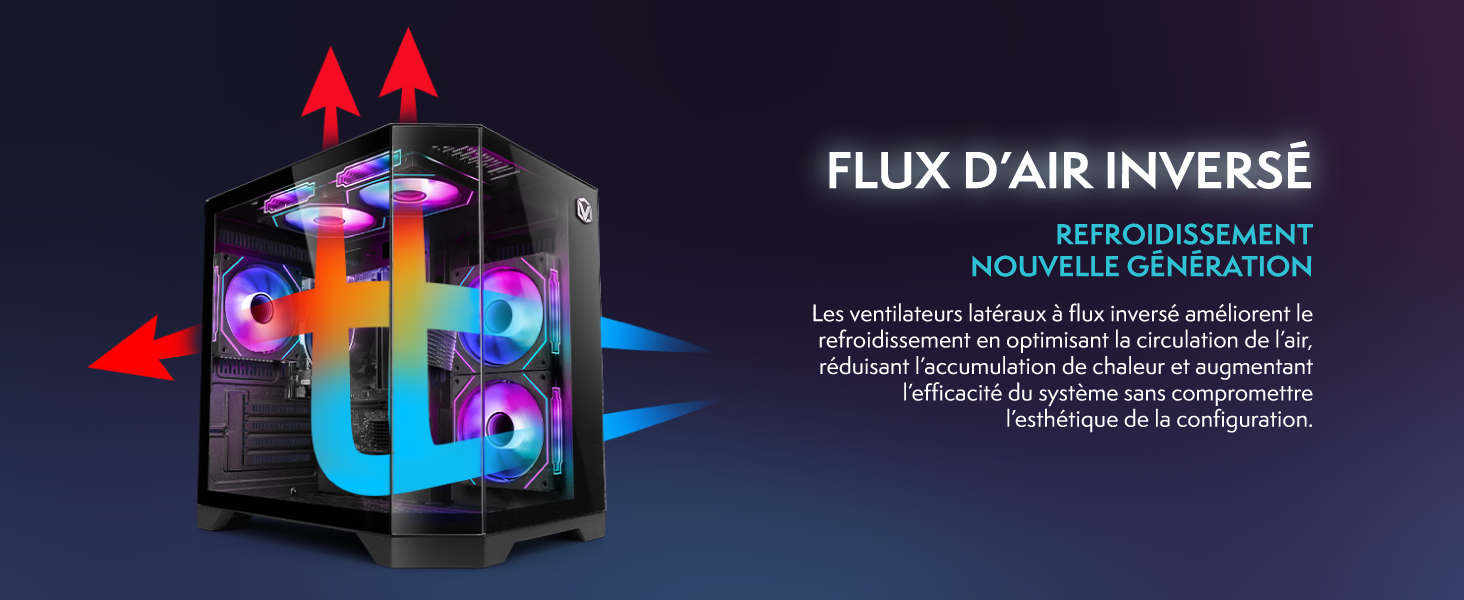
Image 6.1: Inverted airflow design for efficient cooling.
7. Solución de problemas
- Sin energía: Check all power cable connections. Ensure the wall outlet is functional.
- Sin pantalla: Ensure the monitor is powered on and the display cable is securely connected to both the PC and the monitor. Try a different display cable or port if available.
- Sin conexión a Internet: Verify the WiFi adapter is properly installed. Check your router and internet service. In Windows, go to Settings > Network & internet to troubleshoot.
- PC Freezes/Crashes: Restart the PC. Ensure all drivers are updated. Check for overheating (ensure good airflow).
- Periféricos que no funcionan: Try connecting the keyboard, mouse, or headset to different USB/audio ports. Ensure drivers are installed if required.
8. Especificaciones
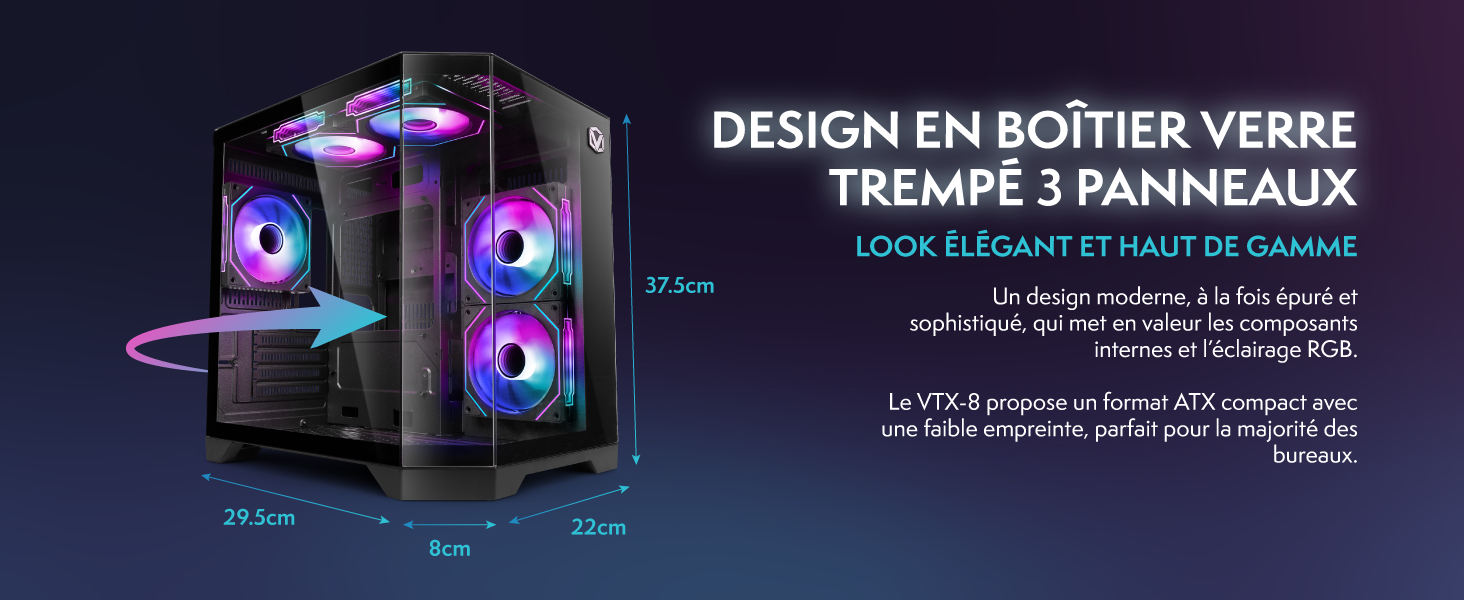
Image 8.1: VIBOX VI-63 PC Gamer case dimensions.
| Característica | Especificación |
|---|---|
| Marca | VIBOX |
| Nombre del modelo | Vibox VI-63 Gaming PC |
| Sistema operativo | Inicio de Windows 11 |
| Modelo de CPU | Procesador AMD Ryzen 3 3200G |
| Velocidad de la CPU | 3.6 GHz (4 GHz Turbo) |
| Núcleos de CPU | 4 |
| Coprocesador gráfico | Radeon Vega 8 (Integrated) |
| RAM de gráficos | 2 GB (compartido) |
| RAM instalada | 16 GB DDR4 |
| RAM Speed | 2666 MHz |
| Capacidad de almacenamiento | SSD de 1TB |
| Tecnología de disco duro | Unidad de estado sólido |
| Tamaño del monitor | 22 pulgadas |
| Resolución máxima de pantalla | 1920x1080 píxeles |
| Interfaz de salida de vídeo | HDMI, VGA |
| Tecnología de conectividad | AMD Radeon Vega 8, Ethernet, HDMI, USB, Wi-Fi |
| Dimensiones (L x An x Al) | 32.6 x 19.5 x 42 cm |
| Color | VTX-1 Black |
9. Garantía y soporte
9.1. Información de garantía
Your VIBOX VI-63 PC Gamer comes with a 2 año de garantía on spare parts. This warranty covers manufacturing defects and component failures under normal use. Please retain your proof of purchase for warranty claims.
9.2. Atención al cliente
For technical assistance, troubleshooting, or warranty inquiries, please contact VIBOX customer support. Refer to the contact information provided with your purchase documentation or visit the official VIBOX websitio para detalles de soporte.
Recursos en línea: For additional support and FAQs, please visit the VIBOX official websitio.