
Introducción
Thank you for choosing the Philco PAS26P Robotic Vacuum Cleaner. This device is designed to provide efficient and convenient cleaning for your home. Please read this manual thoroughly before operating the appliance to ensure safe and optimal performance. Keep this manual for future reference.
Instrucciones de seguridad importantes
Al utilizar un aparato eléctrico, siempre se deben seguir precauciones básicas, incluyendo las siguientes:
- Lea todas las instrucciones antes de utilizar el aparato.
- No utilice la aspiradora en condiciones de humedad o sobre superficies mojadas.
- No permita que los niños operen la aspiradora. Supervise a los niños y a las mascotas cuando el aparato esté en uso.
- No recoja objetos grandes o afilados, líquidos ni materiales en llamas o humeantes.
- Asegúrese de que la base de carga esté colocada contra una pared sobre una superficie nivelada y libre de obstáculos.
- Desenchufe el aparato de la toma de corriente antes de limpiarlo o realizarle mantenimiento.
- Utilice únicamente los accesorios y aditamentos recomendados por el fabricante.
- Do not use the appliance if it is damaged or malfunctioning. Contact customer support.
- This appliance contains a lithium-ion battery. Dispose of batteries according to local regulations.
Contenido del paquete
Verifique que todos los componentes estén presentes y en buen estado:
- Philco PAS26P Robotic Vacuum Cleaner
- Base de carga
- Adaptador de corriente
- Mando a distancia
- Cepillos laterales (2 pares)
- Paño de fregona
- Cubo de basura con filtro HEPA
- Water Tank (integrated with mop function)
- Manual de usuario (este documento)
Producto terminadoview
Familiarize yourself with the main components of your robotic vacuum cleaner.
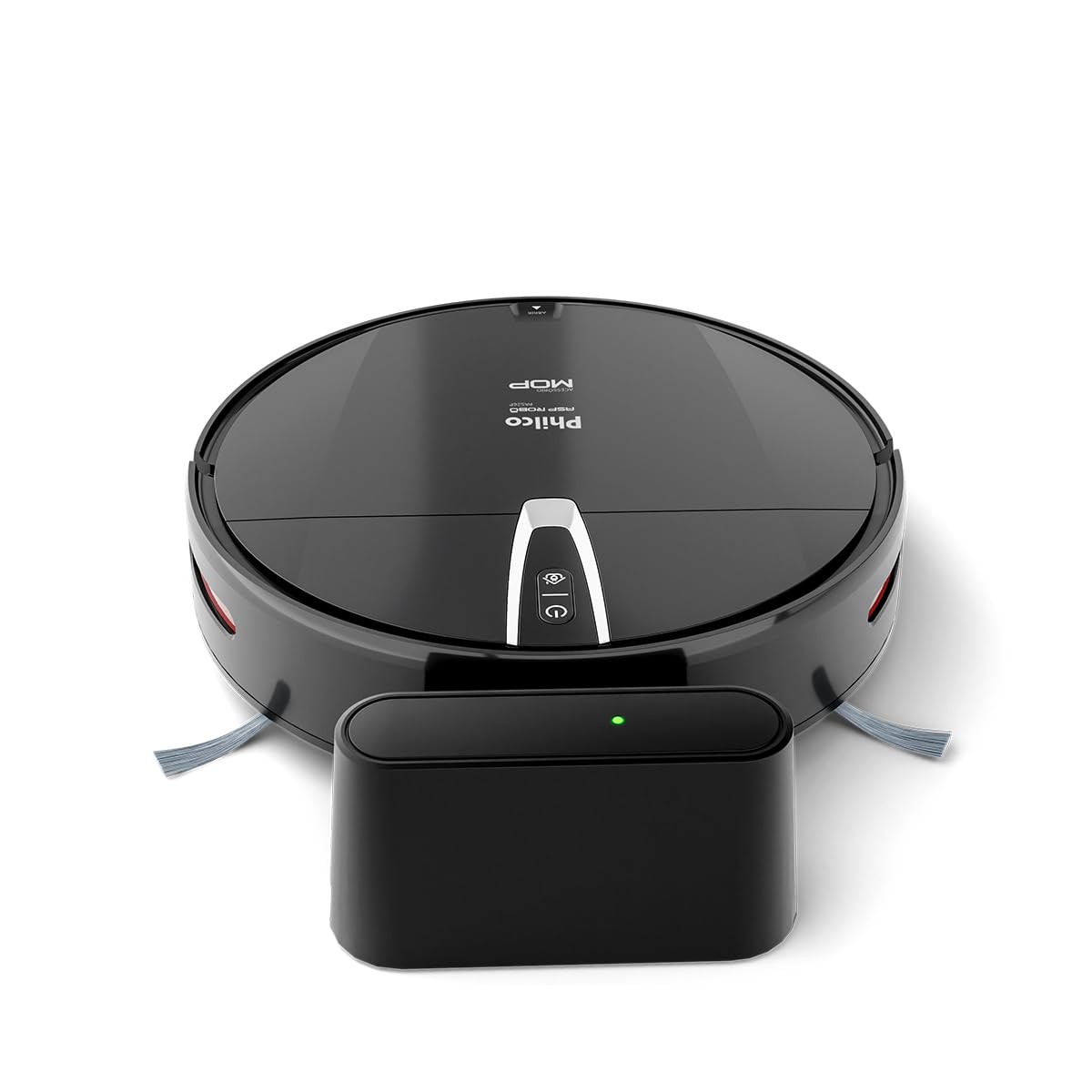
Figura 1: Arriba view of the Philco PAS26P Robotic Vacuum Cleaner with its charging base. The robot is black and round, featuring control buttons on its top surface and a side brush visible. The charging base is a compact black unit with an indicator light.

Figura 2: The Philco PAS26P Robotic Vacuum Cleaner with its top cover lifted, revealing the dustbin compartment. The dustbin is easily accessible for emptying and filter maintenance.

Figura 3: Abajo view of the Philco PAS26P Robotic Vacuum Cleaner, showing the two side brushes, main wheels, and the attached blue mop cloth for wet cleaning.
Configuración
- Desembalaje del robot: Carefully remove the robotic vacuum cleaner and all accessories from the packaging.
- Instalar cepillos laterales: Attach the two side brushes to their respective posts on the bottom of the robot. Press firmly until they click into place.
- Coloque la base de carga: Position the charging base against a wall in an open area, ensuring there are no obstacles within 1 meter (3 feet) to the front and 0.5 meters (1.5 feet) to the sides. Plug the power adapter into the charging base and a wall outlet.
- Carga inicial: Place the robot onto the charging base. Ensure the charging contacts on the robot align with those on the base. The indicator light on the robot will show charging status. For first use, charge the robot for at least 4-6 hours until fully charged.
- Prepárese para trapear (opcional): If using the mop function, fill the water tank with clean water and attach the mop cloth. Insert the water tank assembly into the designated slot on the robot's underside.

Figura 4: The Philco PAS26P Robotic Vacuum Cleaner docked on its charging base. The robot automatically returns to this base when its battery is low or after completing a cleaning cycle.
Instrucciones de funcionamiento
Antes de limpiar
- Clear the area of loose cables, small objects, and fragile items.
- For optimal mopping, ensure the water tank is filled and the mop cloth is attached.
- Open doors to rooms you wish to clean and close doors to areas you want the robot to avoid.
Iniciar un ciclo de limpieza
You can start the robot using the power button on the robot or the remote control.
- En el robot: Press the power button once to start a cleaning cycle. The robot will begin cleaning in automatic mode.
- Usando el control remoto: Use the "Start/Pause" button on the remote control to begin or pause cleaning. The remote control also allows you to select different cleaning modes (e.g., Auto, Spot, Edge) and direct the robot manually.

Figura 5: The Philco PAS26P Robotic Vacuum Cleaner actively cleaning a hard floor surface. Its compact design allows it to navigate under furniture and around obstacles.
Modos de limpieza
- Modo automático: The robot cleans automatically, adjusting its path based on obstacles and room layout.
- Limpieza de manchas: The robot focuses on a specific area, cleaning in a spiral pattern. Useful for concentrated dirt.
- Limpieza de bordes: El robot limpia a lo largo de las paredes y los bordes de los muebles.
Regresando a la base de carga
The robot will automatically return to its charging base when the battery is low or when a cleaning cycle is complete. You can also manually send it back using the "Home" button on the remote control.
Mantenimiento
El mantenimiento regular garantiza un rendimiento óptimo y prolonga la vida útil de su aspiradora robótica.
Vaciar el cubo de basura
- Press the "Open" button on the top cover to access the dustbin.
- Remove the dustbin and empty its contents into a trash can.
- Clean the HEPA filter and primary filter with the provided cleaning brush or by tapping them gently to remove dust. Do not wash the HEPA filter with water.
- Reinsert the filters and dustbin into the robot.
Limpieza de cepillos laterales
- Periodically remove the side brushes by pulling them upwards.
- Retire cualquier cabello o residuo enredado alrededor de los cepillos.
- Reattach the brushes, ensuring they are securely in place.
Cleaning the Mop Cloth and Water Tank
- Remove the mop cloth from the water tank. Wash it by hand or machine and allow it to air dry completely before reattaching.
- Empty any remaining water from the water tank after each use to prevent mildew and odors.
Limpieza de sensores y contactos de carga
- Wipe the anti-fall sensors (located on the bottom of the robot) and obstacle sensors (on the front bumper) with a clean, dry cloth.
- Limpie los contactos de carga tanto del robot como de la base de carga con un paño seco para garantizar una buena conexión.
Solución de problemas
Consulte esta sección para conocer problemas comunes y sus soluciones.
| Problema | Posible causa | Solución |
|---|---|---|
| El robot no enciende. | Batería baja; interruptor de encendido apagado. | Charge the robot; Ensure the main power switch (if present) is ON. |
| El robot no carga. | Contactos de carga sucios; adaptador de corriente no conectado. | Limpie los contactos de carga del robot y la base; asegúrese de que el adaptador de corriente esté bien enchufado. |
| El robot se atasca con frecuencia. | Obstáculos (cables, alfombras); Sensores sucios. | Retire los obstáculos del camino de limpieza; limpie todos los sensores. |
| Bajo rendimiento de limpieza. | Cubo de basura lleno; filtros obstruidos; cepillos enredados. | Empty dustbin; Clean/replace filters; Clean side brushes. |
| Mop function not effective. | Water tank empty; Mop cloth dry or dirty. | Refill water tank; Wet and clean mop cloth. |
| El robot no regresa a la base. | Base de carga obstruida; Robot demasiado lejos de la base. | Asegúrese de que el camino hacia la base esté despejado; coloque manualmente el robot más cerca de la base. |
Presupuesto
| Número de modelo | PAS26P |
| Marca | FILCO |
| Color | Negro |
| Dimensiones del producto | 8 x 31.6 x 34.9 cm (Height x Diameter) |
| Peso del producto | 2.4 kilogramos |
| Capacidad del cubo de basura | 0.61 litros |
| Capacidad del tanque de agua | 0.2 litros |
| Características especiales | Anti-fall sensors, Automatic cleaning, Mop function, HEPA filter |
| Tipo de batería | Iones de litio (1 incluida) |
| Componentes incluidos | Robotic Vacuum Cleaner, Charging Base, Remote Control |
| Recomendación de superficie | Vinyl and similar hard floor surfaces |
Garantía y soporte
For warranty information or technical support, please refer to the warranty card included in your product packaging or visit the official Philco webSitio. Conserve su recibo de compra como comprobante de compra.
Official Philco Store: Visit the Philco Store on Amazon